
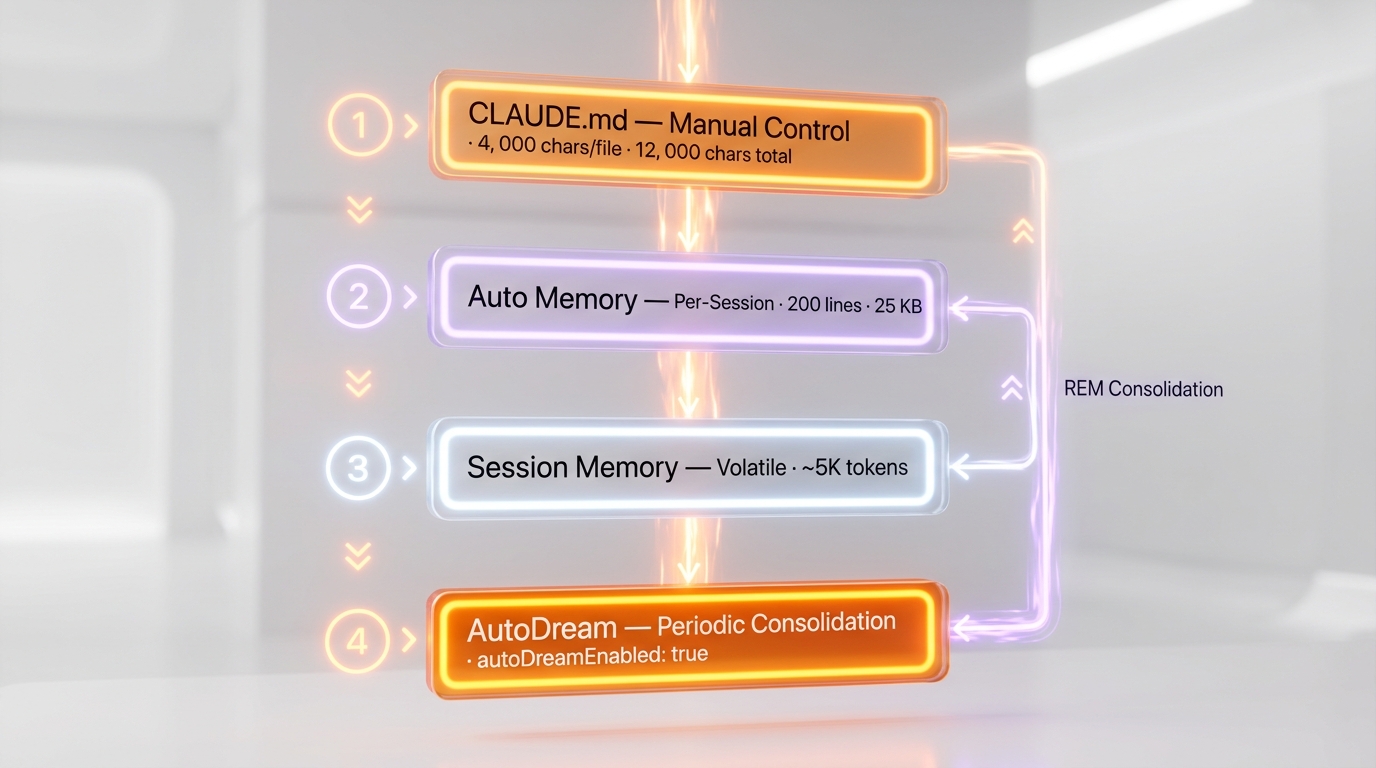
Claude Code memory optimization operates across 4 layers — CLAUDE.md (4,000 chars/file, 12,000 total), Auto Memory (200-line MEMORY.md index), Session Memory (volatile per-conversation), and AutoDream (periodic consolidation activated via autoDreamEnabled: true) — combined with compaction tuning through CLAUDE_AUTOCOMPACT_PCT_OVERRIDE and a 1M token context window enabled by CLAUDE_CODE_MAX_CONTEXT_TOKENS=1000000.
Most Claude Code users hit the same wall: the AI forgets project context between sessions, compaction destroys important details mid-conversation, and CLAUDE.md files grow bloated with instructions Claude already infers from code. The result is repetitive prompting, lost context, and wasted tokens.
This guide dissects every layer of Claude Code's memory system — from the discovery order of CLAUDE.md files to the internal AutoDream consolidation mechanism — and provides copy-paste configurations for each. Every variable, threshold, and file path is documented with its exact effect on Claude's behavior.
1. The 4-Layer Memory Architecture
Claude Code has four distinct memory layers, each with a specific role, persistence model, and hard limit:
| Layer | Who Writes | Purpose | Persistence | Hard Limit |
|---|---|---|---|---|
| CLAUDE.md | You (manual) | Instructions, rules, architecture | Manual control | 4,000 chars/file, 12,000 chars total |
| Auto Memory | Claude (per session) | Patterns, debug solutions, preferences | Auto-captured | 200 lines / 25 KB for MEMORY.md |
| Session Memory | Claude (auto) | Conversation continuity | ~5K token window | Volatile (lost on session end) |
| AutoDream | Claude (periodic) | Memory consolidation and cleanup | Between sessions | Server-gated feature flag |
MEMORY ARCHITECTURE FLOW:

  ┌─────────────┐     ┌──────────────┐     ┌────────────────┐
  │  CLAUDE.md  │     │  Auto Memory │     │ Session Memory │
  │  (Manual)   │     │  (Per-sess.) │     │  (Volatile)    │
  │  12K chars  │     │  200 lines   │     │  ~5K tokens    │
  └──────┬──────┘     └──────┬───────┘     └───────┬────────┘
         │                   │                      │
         └───────────┬───────┘                      │
                     │                              │
              ┌──────▼───────┐                      │
              │  AutoDream   │◄─────────────────────┘
              │ (Periodic    │   Consolidates all layers
              │  consolid.)  │   into durable memories
              └──────────────┘
The critical insight: these layers don't simply stack. AutoDream actively consolidates information from session transcripts and Auto Memory into organized, deduplicated files. Think of it as REM sleep for your AI — replaying, reinforcing, and pruning.
2. CLAUDE.md — Best Practices & Hard Limits
Discovery Order
Claude Code walks up from your working directory and loads every CLAUDE.md it finds. Understanding this order is critical for multi-project setups:
Loading Order (first to last):
1. /etc/claude-code/            ← Admin policy (enterprise)
2. ~/.claude/CLAUDE.md          ← Personal global instructions
3. ~/.claude/rules/*.md         ← Global modular rules
4. CLAUDE.md in each ancestor   ← From filesystem root to cwd
5. .claude/CLAUDE.md            ← Project main instructions
6. .claude/rules/*.md           ← Project modular rules
7. CLAUDE.local.md              ← Local preferences (gitignored)
Hard-Coded Limits
MAX_INSTRUCTION_FILE_CHARS = 4,000    # Per CLAUDE.md file
MAX_TOTAL_INSTRUCTION_CHARS = 12,000  # Budget across ALL files combined
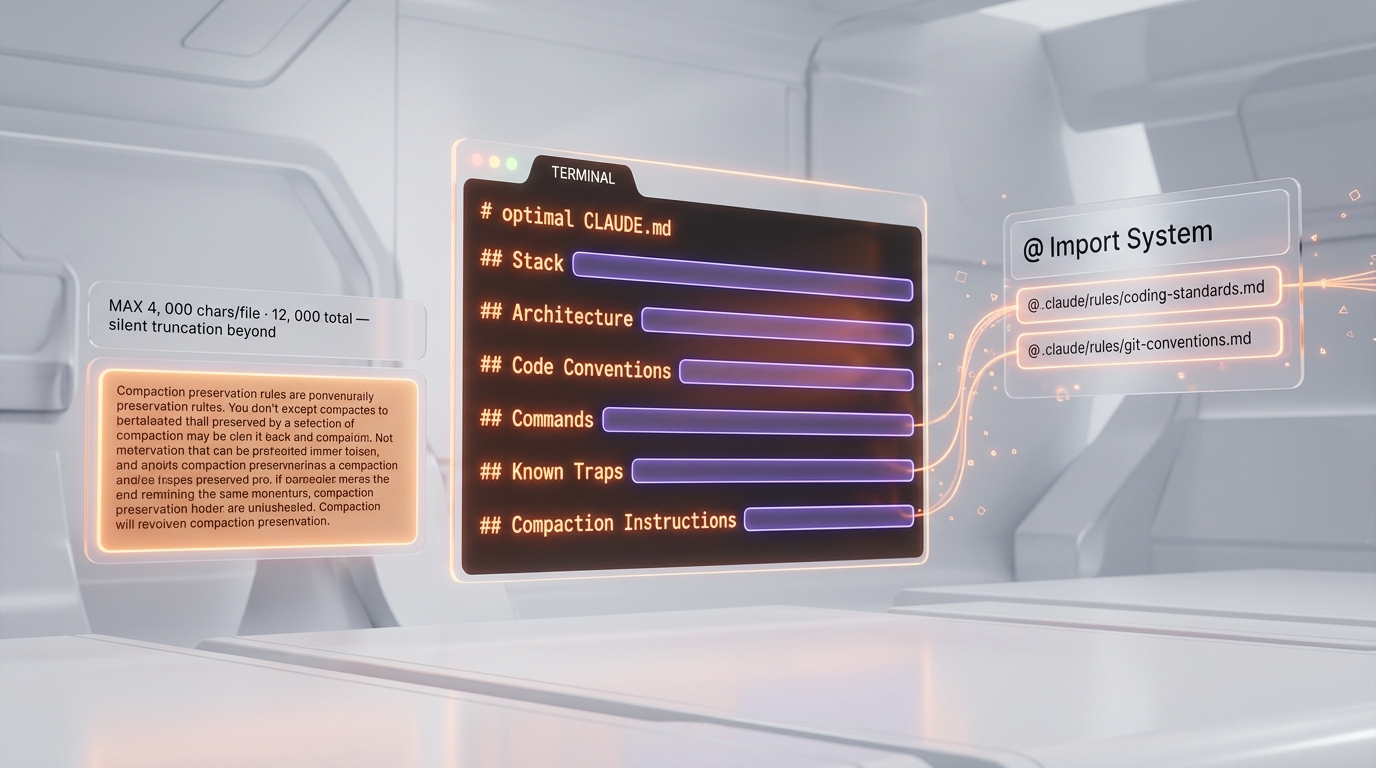
These limits are enforced in the runtime. If your CLAUDE.md exceeds 4,000 characters, it gets truncated silently. If your combined instruction files exceed 12,000 characters, later files in the discovery order are dropped. Every character counts.
Optimal CLAUDE.md Structure
# Project Name

## Stack
- Next.js 16 App Router, TypeScript strict, Tailwind 4
- Supabase (PostgreSQL + Auth + Storage)
- pnpm (NOT npm/yarn)

## Architecture
- Server Components by default, 'use client' only when needed
- Queries in src/lib/queries/ — never Supabase direct in components
- revalidate = 3600 on all dynamic pages

## Code Conventions
- kebab-case files, PascalCase components, camelCase functions
- generateStaticParams() on all [slug] routes
- Tests with Vitest, not Jest

## Commands
- `pnpm dev` — dev server
- `pnpm build` — production build
- `pnpm test` — run tests

## Known Traps
- DO NOT use fetch() in Supabase Server Components (use the client)
- next.config middleware has a rewrite bug — use API routes instead

## Compaction Instructions
When you compact, ALWAYS preserve:
- The complete list of files modified in this session
- All relevant test and build commands
- Current work-in-progress state
- Architecture decisions made this session
The @ Import System
CLAUDE.md supports importing external files with the @ syntax:
# Main CLAUDE.md
@.claude/rules/coding-standards.md
@.claude/rules/git-conventions.md
@.claude/rules/testing-rules.md
@~/.claude/my-global-preferences.md
Each imported file is processed recursively and inserted BEFORE the file that references it. This transforms your memory from a single file into a composable network.
The .claude/rules/ Directory
A modular alternative to a monolithic CLAUDE.md. Every .md file found recursively in .claude/rules/ is loaded automatically:
.claude/
  rules/
    coding-standards.md     # Code standards
    git-conventions.md      # Git conventions
    testing-rules.md        # Testing rules
    api-patterns.md         # API patterns
    component-rules.md      # Component rules (with frontmatter filter)
Rules files support frontmatter to target specific file patterns:
---
globs:
  - "src/components/**/*.tsx"
  - "src/ui/**/*.tsx"
---
# React Component Rules
- Use forwardRef for all UI components
- Type props with interface, not type
Golden Rules for CLAUDE.md
| Rule | Why |
|---|---|
| Short and actionable | Every token in CLAUDE.md is a token less for your conversation |
| No documentation | Only document what Claude cannot infer from the code itself |
| Delete if unnecessary | If Claude already does something correctly without the instruction, remove it |
| Specific over generic | "Use pnpm test -- --watch" beats "Run tests in watch mode" |
| Include compaction instructions | Always tell Claude what must survive compaction |
| Use /init to start | Run /init on an existing project to generate a starter CLAUDE.md |
3. Auto Memory — Optimization Strategies
What Claude Memorizes Automatically
Claude records these categories of information between sessions:
- Build commands and testing conventions
- Code style preferences and recurring patterns
- Debug solutions (what worked, what didn't)
- Architecture decisions and key file relationships
- Communication patterns and tool preferences
- Explicit corrections ("no, do it like this")
The 200-Line Limit — The Fundamental Constraint
Only the first 200 lines of MEMORY.md (or the first 25 KB, whichever comes first) are loaded at the start of each conversation. This is the single most important constraint in the entire memory system.
~/.claude/projects/<project-hash>/memory/
  MEMORY.md           # INDEX ONLY — max 200 lines / 25KB
  architecture.md     # Architecture details
  debug-solutions.md  # Known debug solutions
  preferences.md      # User preferences
  stack-decisions.md  # Technical decisions
Critical rule: MEMORY.md must be an index, not a dump. Each entry should be a single line of ~150 characters maximum, pointing to a thematic file:
# Memory Index

## Project
- [Architecture](architecture.md) — Next.js 16 App Router + Supabase
- [Stack Decisions](stack-decisions.md) — Chose pnpm, Tailwind 4, Vitest

## Debug
- [Known Solutions](debug-solutions.md) — Supabase errors, ISR, middleware

## Preferences
- [Code Style](preferences.md) — kebab-case, Server Components default
Configuration
// ~/.claude/settings.json — Enable (default)
{
  "autoMemoryEnabled": true
}

// Disable via environment variable
// export CLAUDE_CODE_DISABLE_AUTO_MEMORY=1

// Disable per-project in .claude/settings.json
// { "autoMemoryEnabled": false }
Memory Commands
| Command | Action |
|---|---|
/memory | Open memory editor (toggle auto memory, edit MEMORY.md) |
/remember <info> | Memorize a specific piece of information for this session |
claude /memory | Open memory editor directly from terminal |
5 Optimization Strategies
- Pre-structure proactively — Create thematic files yourself in
~/.claude/projects/<project>/memory/before Claude writes anarchically - Keep MEMORY.md lean — Regularly verify the index stays under 100-150 lines (safety margin below 200)
- Use absolute dates — Replace "yesterday" or "last week" with ISO dates (YYYY-MM-DD)
- Resolve contradictions — If two memory files contradict each other, correct the wrong one
- Delete the obsolete — Information about a merged branch? Delete it immediately
Internal Architecture (8 Modules)
| Module | Role |
|---|---|
memdir.ts | Memory directory orchestration |
findRelevantMemories.ts | Semantic search and relevance scoring |
memoryScan.ts | Directory scanning and inventory |
memoryAge.ts | Age calculation, obsolescence detection |
memoryTypes.ts | Memory types (project, global, team) |
paths.ts | Path resolution (~/.claude/projects/<project>/memory/) |
teamMemPaths.ts | Team memory paths |
teamMemPrompts.ts | Team memory prompts |
Key insight: findRelevantMemories.ts uses semantic search — Claude doesn't blindly concatenate all memory files. It scores relevance against the current context and loads only what matters.
4. AutoDream — Activation & Configuration
What Is AutoDream?
AutoDream is Claude Code's memory consolidation mechanism, deliberately named after the concept of dreaming. The internal system prompt says:
"You are performing a dream — a reflective pass over your memory files. Synthesize what you've learned recently into durable, well-organized memories so that future sessions can orient quickly."
It's the equivalent of REM sleep for AI: replaying, reinforcing, discarding, and organizing information from recent sessions into structured, long-term memory.
How to Activate AutoDream
Method 1 — settings.json (recommended):
// ~/.claude/settings.json (global, all projects)
{
  "autoDreamEnabled": true
}

// .claude/settings.json (per-project)
{
  "autoDreamEnabled": true
}
Method 2 — Via /memory command:
Type /memory in Claude Code and toggle AutoDream ON.
Method 3 — Manual trigger:
/dreamLaunches the consolidation cycle immediately without waiting for automatic thresholds.
Note: The /dream command is in progressive rollout. If it returns "Unknown skill", the server feature flag tengu_onyx_plover is not yet active for your account. The autoDreamEnabled setting should still work for automatic triggering.
The 3-Gate Trigger System
All three conditions must be met SIMULTANEOUSLY before automatic activation:
| Gate | Condition | Default |
|---|---|---|
| Time gate | Hours since last dream | minHours: 24 |
| Session gate | Sessions accumulated since consolidation | minSessions: 5 |
| Lock gate | Exclusive consolidation lock acquired | Lock file (PID-based) |
In practice: AutoDream triggers only after 24 hours AND 5 sessions minimum, and only one instance can run at a time (lock file prevents concurrent dreams).
The 4 Dream Phases
Phase 1 — Orient: List the memory directory, read MEMORY.md, survey existing thematic files.
Phase 2 — Gather Signal: Sources by priority: (1) daily logs, (2) memories that have drifted from current codebase, (3) targeted grep on session transcripts (JSONL) — never exhaustive reads.
Phase 3 — Consolidate: Merge new signal into existing files (no duplicates). Convert relative dates to absolute. Delete contradicted facts.
Phase 4 — Prune & Index: Keep MEMORY.md under 200 lines and ~25 KB. Each entry is a single line under ~150 chars pointing to a file. Remove obsolete pointers. Resolve contradictions.
Operational Constraints
- The dream sub-agent has read-only bash access — inspection only
- Writing is limited exclusively to memory files
- Source code, config, and tests are never touched
- Performance: approximately 8-10 minutes for 900+ sessions consolidated
3 Scheduling Levels
| Level | Type | Persistence |
|---|---|---|
In-session (/loop) | Local | Dies with the session |
| Desktop scheduled | Local | Survives restarts |
| Cloud scheduled | Anthropic infra | Survives machine shutdown |
5. Compaction — Context Compression Tuning
How Compaction Works
When context approaches the limit, Claude Code automatically compresses earlier messages into a summary. The process:
- Check if the session exceeds the threshold (configurable)
- Keep the N most recent messages verbatim (default: 4)
- Summarize older messages into a system message
- The summary includes: scope, tools used, recent requests, work in progress, key files, timeline
CLAUDE_AUTOCOMPACT_PCT_OVERRIDE — The Most Important Variable
# Compaction threshold as % of context window
# Default: approximately 80% (167K / 200K)
# Recommended: 75 for standard development
export CLAUDE_AUTOCOMPACT_PCT_OVERRIDE=75
How it works:
- Value from 1 to 100 (percentage)
- On a 1M token window,
75= compaction at ~750K tokens - Important: The internal code uses a
Math.min()clamp — you can only move compaction earlier, not later. The variable works in one direction only: earlier compaction, not delayed compaction.
All Compaction Variables
# Auto-compaction window (tokens)
export CLAUDE_CODE_AUTO_COMPACT_WINDOW=20000

# Disable auto-compaction entirely
export DISABLE_AUTO_COMPACT=1

# Disable manual /compact
export DISABLE_COMPACT=1

# Disable Session Memory compaction
export DISABLE_CLAUDE_CODE_SM_COMPACT=1

# Enable Session Memory compaction
export ENABLE_CLAUDE_CODE_SM_COMPACT=1

# Disable pre-compaction skip
export CLAUDE_CODE_DISABLE_PRECOMPACT_SKIP=1
Manual Compaction with /compact
/compact                    # Compact now
/compact [instructions]     # Compact with specific instructions
/clear caches              # Clear context caches
/clear conversation        # Full conversation reset
Compaction tips:
/compacttypically achieves 60-80% reduction — 150K tokens become 30-50K- Use
/compactproactively — don't wait for auto-compaction - Add compaction instructions to your CLAUDE.md telling Claude what to preserve
The Post-Compaction Continuation Message
After compaction, this message is injected into the context:
This session is being continued from a previous conversation that ran
out of context. The summary below covers the earlier portion of the
conversation.

[Formatted summary]

Recent messages are preserved verbatim.
Continue the conversation from where it left off without asking the
user any further questions.
Feature Flags (Internal)
| Flag | Gate | Description |
|---|---|---|
REACTIVE_COMPACT | Compile-time | Dynamic reactive compaction (not shipped) |
CONTEXT_COLLAPSE | Compile-time | Window inspection and restructuring (not shipped) |
HISTORY_SNIP | Compile-time | Aggressive history trimming (not shipped) |
CACHED_MICROCOMPACT | Compile-time | Cached micro-compactions (not shipped) |
tengu_cobalt_raccoon | GrowthBook | Auto-compact runtime control |
6. Context Management Variables
CLAUDE_CODE_MAX_CONTEXT_TOKENS — The Maximum Window
# Override the maximum context window
# Default: depends on model (200K for Sonnet, up to 1M for Opus 4.6)
export CLAUDE_CODE_MAX_CONTEXT_TOKENS=1000000
Since early 2026, the 1M window is generally available for Opus 4.6 and Sonnet 4.6 without price surcharge. This flag forces maximum window usage.
MAX_THINKING_TOKENS — Thinking Budget
# Increase thinking budget (default: model-dependent)
# Recommended: 32000 for complex code, 64000 for architecture
export MAX_THINKING_TOKENS=32000
Warning: This budget is TAKEN from the context window. More thinking = less space for conversation.
CLAUDE_CODE_MAX_OUTPUT_TOKENS — Output Limit
# Increase maximum output length
# Useful for long code generation
export CLAUDE_CODE_MAX_OUTPUT_TOKENS=64000
This controls the maximum length of a single Claude response, NOT the context window size.
Effort Level
# Force effort level
export CLAUDE_CODE_EFFORT_LEVEL=high
# Options: low | medium | high | max

# Or in-session:
/effort high
/effort max
Thinking Controls
# Disable adaptive thinking (force constant level)
export CLAUDE_CODE_DISABLE_ADAPTIVE_THINKING=1

# Disable thinking completely (not recommended)
export CLAUDE_CODE_DISABLE_THINKING=1

# Disable interleaved thinking (reduces quality on complex tasks)
export DISABLE_INTERLEAVED_THINKING=1
Model Overrides
# Force Opus 4.6 (1M context)
export ANTHROPIC_MODEL=claude-opus-4-6

# Model for sub-agents/workers
export CLAUDE_CODE_SUBAGENT_MODEL=claude-sonnet-4-6

# Small/fast model for lightweight tasks
export ANTHROPIC_SMALL_FAST_MODEL=claude-haiku-4-5

# Universal fallback model
export FALLBACK_FOR_ALL_PRIMARY_MODELS=claude-sonnet-4-6
Always Think Setting
// ~/.claude/settings.json
{
  "alwaysThinkingEnabled": true
}
Context Variable Summary Table
| Variable | Default | Recommended | Effect |
|---|---|---|---|
CLAUDE_CODE_MAX_CONTEXT_TOKENS | Model-dependent | 1000000 | Maximum context window |
MAX_THINKING_TOKENS | Auto | 32000 | Thinking budget |
CLAUDE_CODE_MAX_OUTPUT_TOKENS | Auto | 64000 | Max single response length |
CLAUDE_CODE_EFFORT_LEVEL | Auto | high | Thinking depth |
CLAUDE_AUTOCOMPACT_PCT_OVERRIDE | ~80 | 75 | Compaction threshold |
CLAUDE_CODE_AUTO_COMPACT_WINDOW | Auto | 20000 | Auto-compact window |
7. Session Management — Resume & Persistence
Resuming Sessions
# Resume the last session
claude --continue
claude -c

# Resume a specific session by ID
claude --resume abc123
claude -r abc123

# Open the session picker
claude --resume
claude -r
Session Transcript Storage
Sessions are stored as JSONL (JSON Lines) files:
~/.claude/projects/<project-path-hash>/
  sessions/
    <session-id>.jsonl    # One JSON per line, one event per line
Each line represents a message or event. The format is grep-friendly without requiring full file parsing. AutoDream uses these transcripts as source material for consolidation.
Persistence Configuration
# Enable session persistence (experimental)
export ENABLE_SESSION_PERSISTENCE=1

# Auto-resume an interrupted turn
export CLAUDE_CODE_RESUME_INTERRUPTED_TURN=1
Session Commands
| Command | Action |
|---|---|
/session | Manage sessions |
/rename <name> | Rename current session |
/resume | Resume a previous session |
/rewind | Go back (conversation AND code) |
/export | Export the conversation |
/clear | Clear the conversation |
/clear caches | Clear caches |
/clear conversation | Full reset |
/cost | Display session costs |
/tag v1-before-refactor | Tag a conversation snapshot |
Background Sessions and Worktrees
# Launch Claude in an isolated git worktree (separate branch)
claude -w
claude --worktree

# Background session
claude --bg "Refactor the auth module using the new pattern"

# List background sessions
claude ps

# View logs
claude logs

# Attach to a session
claude attach <session-id>
8. Team Memory for Shared Projects
3 Memory Types
The memory subsystem supports three scopes:
- Project — Memory local to the project (default)
- Global — User memory across all projects
- Team — Shared memory between team members
Team Memory Configuration
# Enable experimental agent teams
export CLAUDE_CODE_EXPERIMENTAL_AGENT_TEAMS=1

# Team memory sync URL
export TEAM_MEMORY_SYNC_URL=https://...

# Override cowork memory path
export CLAUDE_COWORK_MEMORY_PATH_OVERRIDE=/custom/path

# Extra guidelines for cowork memory
export CLAUDE_COWORK_MEMORY_EXTRA_GUIDELINES="Always document architecture decisions"
Shared Memory via Git (Simple Method)
The simplest approach for team memory sharing:
- Commit CLAUDE.md to the repo (shared conventions)
- Gitignore CLAUDE.local.md (personal preferences)
- Each member keeps personal preferences in
~/.claude/CLAUDE.md(global)
# .gitignore
CLAUDE.local.md
.claude/settings.local.json
Coordinator Mode
# Activate multi-agent coordinator mode
export CLAUDE_CODE_COORDINATOR_MODE=1

# Number of agents in Plan V2 mode
# Max/Team: 3 agents, Free: 1 agent
export CLAUDE_CODE_PLAN_V2_AGENT_COUNT=3
9. Optimal Config — Copy-Paste Ready
~/.claude/settings.json — Global Optimal Config
{
  "autoMemoryEnabled": true,
  "autoDreamEnabled": true,
  "alwaysThinkingEnabled": true
}
Environment Variables — Optimal Profile
Add to your ~/.bashrc, ~/.zshrc, or shell profile:
# === CLAUDE CODE — OPTIMAL CONFIG ===

# Context & Performance
export CLAUDE_CODE_MAX_CONTEXT_TOKENS=1000000
export MAX_THINKING_TOKENS=32000
export CLAUDE_CODE_MAX_OUTPUT_TOKENS=64000
export CLAUDE_CODE_EFFORT_LEVEL=high

# Compaction
export CLAUDE_AUTOCOMPACT_PCT_OVERRIDE=75

# Models
export ANTHROPIC_MODEL=claude-opus-4-6
export CLAUDE_CODE_SUBAGENT_MODEL=claude-sonnet-4-6
export ANTHROPIC_SMALL_FAST_MODEL=claude-haiku-4-5

# Anti-noise
export DISABLE_TELEMETRY=1
export DISABLE_COST_WARNINGS=1
export CLAUDE_CODE_DISABLE_FEEDBACK_SURVEY=1

# Tool performance
export CLAUDE_CODE_MAX_TOOL_USE_CONCURRENCY=5
export BASH_MAX_OUTPUT_LENGTH=50000

# Idle threshold (default 75min, increased to 120min)
export IDLE_THRESHOLD_MINUTES=120

# Session persistence
export ENABLE_SESSION_PERSISTENCE=1
export CLAUDE_CODE_RESUME_INTERRUPTED_TURN=1
.claude/settings.json — Project Config Template
{
  "autoMemoryEnabled": true,
  "autoDreamEnabled": true,
  "permissions": {
    "allow": [
      "Bash(pnpm:*)",
      "Bash(git:*)",
      "Read", "Write", "Edit",
      "Glob", "Grep"
    ]
  }
}
Optimal Memory Directory Structure
~/.claude/
  CLAUDE.md                          # Global instructions (all machines)
  settings.json                      # Global config
  keybindings.json                   # Shortcuts
  agents/                            # Custom agents
    seo-writer.md
    code-reviewer.md
  projects/
    <project-hash>/
      memory/
        MEMORY.md                    # INDEX ONLY (< 200 lines)
        architecture.md              # Architecture details
        debug-solutions.md           # Known debug solutions
        stack-decisions.md           # Dated technical decisions
        patterns.md                  # Project code patterns
        logs/                        # Daily logs (AutoDream source)
          2026/
            04/
              2026-04-01.md

<project>/
  CLAUDE.md                          # Shared instructions (committed)
  CLAUDE.local.md                    # Local preferences (gitignored)
  .claude/
    settings.json                    # Project config
    settings.local.json              # Local config (gitignored)
    rules/                           # Modular rules
      coding-standards.md
      git-conventions.md
      testing-rules.md
CLAUDE.md Optimized Template
# [Project Name]

## Stack
- [Framework] + [Language] + [CSS] + [DB]
- Package manager: [pnpm/npm/yarn]

## Commands
- `pnpm dev` — dev server
- `pnpm build` — production build
- `pnpm test` — run tests
- `pnpm lint` — linter

## Architecture
- [Main pattern] (e.g., Server Components by default)
- [Where queries live] (e.g., src/lib/queries/)
- [Naming convention] (e.g., kebab-case files, PascalCase components)

## Key Rules
- [Rule 1 — specific and actionable]
- [Rule 2 — specific and actionable]
- [Known trap to avoid]

## Current Focus
- [What we're working on now — update regularly]

## Compaction Instructions
When you compact, ALWAYS preserve:
- The complete list of files modified
- Relevant test commands
- Current work-in-progress state
- Decisions made this session
Debugging Memory Issues
# Debug mode to see what's happening
CLAUDE_DEBUG=1 claude

# Detailed debug logs
CLAUDE_CODE_DEBUG_LOG_LEVEL=debug claude

# Write logs to a directory
export CLAUDE_CODE_DEBUG_LOGS_DIR=/tmp/claude-logs

# Profile startup
CLAUDE_CODE_PROFILE_STARTUP=1 claude

# View current context
/context

# View loaded files
/files

# View costs
/cost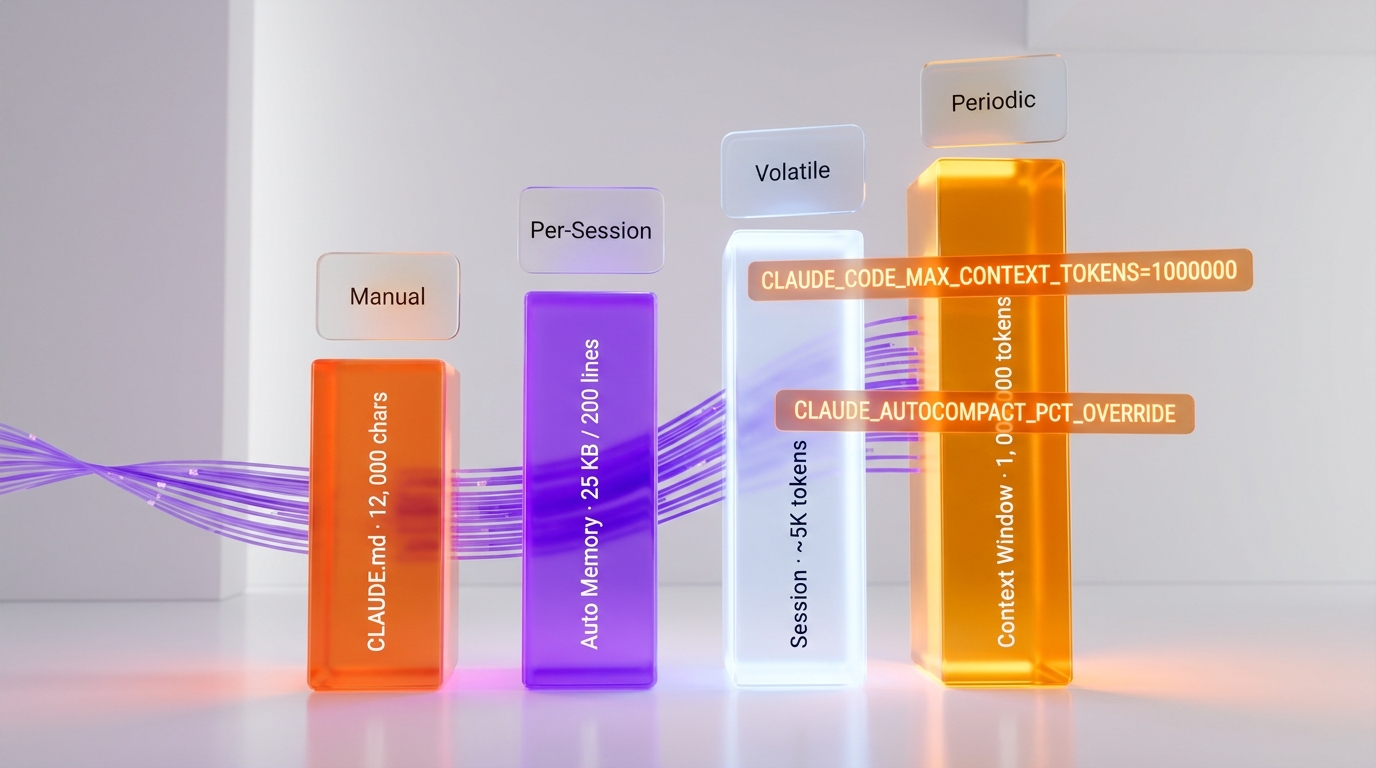
Frequently Asked Questions
Why does Claude Code forget my project context between sessions?
Claude Code uses a 4-layer memory system. Session Memory is volatile and lost when a session ends. To persist context, use CLAUDE.md for instructions (loaded every session), Auto Memory for patterns Claude captures automatically, and AutoDream for periodic consolidation. Enable all three: create a CLAUDE.md under 4,000 characters, set autoMemoryEnabled: true and autoDreamEnabled: true in ~/.claude/settings.json, and structure your MEMORY.md as an index under 200 lines.
What is the maximum size for CLAUDE.md files?
Each individual CLAUDE.md file has a hard limit of 4,000 characters. The total budget across ALL instruction files (global CLAUDE.md, project CLAUDE.md, .claude/rules/*.md files, imports) is 12,000 characters. Exceeding these limits causes silent truncation — the file is cut off without warning. Use the .claude/rules/ directory with frontmatter glob targeting to stay within limits while maintaining comprehensive instructions.
How do I activate AutoDream and how often does it run?
Add "autoDreamEnabled": true to your ~/.claude/settings.json. AutoDream triggers automatically when three conditions are met simultaneously: at least 24 hours since the last dream, at least 5 sessions accumulated, and the exclusive lock file is available. You can also trigger it manually with the /dream command (if available on your account). The process takes approximately 8-10 minutes and only modifies memory files — never source code.
What does CLAUDE_AUTOCOMPACT_PCT_OVERRIDE actually do?
CLAUDE_AUTOCOMPACT_PCT_OVERRIDE controls when automatic context compaction triggers, as a percentage of your context window. The default is approximately 80%. Setting it to 75 means compaction starts at 75% of window capacity (750K tokens on a 1M window). Important limitation: due to an internal Math.min() clamp, this variable can only move compaction earlier, never later. Setting it to 90 will not delay compaction beyond the built-in maximum. Recommended value: 75 for standard development work.
How should I structure MEMORY.md for optimal performance?
MEMORY.md must be an index, not a data dump. Only the first 200 lines (or 25 KB) are loaded per session. Each entry should be a single line of approximately 150 characters maximum, linking to a thematic file (e.g., [Architecture](architecture.md) — Next.js 16 + Supabase). Create separate files for architecture, debug solutions, stack decisions, and code patterns in the same memory directory. Keep the index under 100-150 lines as a safety margin. Use absolute dates (YYYY-MM-DD) instead of relative ones, and delete entries for completed or merged work.