If you've been building software for more than a few years, you've watched the tooling landscape shift beneath your feet multiple times. First it was version control going from SVN to Git. Then containers. Then CI/CD pipelines. Each shift felt seismic at the time, but in retrospect, they were incremental improvements to the same fundamental workflow: a human writes code, a machine runs it.
What's happening in 2026 is different. AI agents aren't improving the workflow — they're replacing parts of it entirely. And if you're not paying attention, you're going to wake up one morning wondering why the junior developer next to you is shipping features at 10x your pace while you're still manually writing boilerplate.
This isn't hype. We use AI agents every day to build and maintain ThePlanetTools.ai. This article is what we've learned — the honest version, not the marketing version.
What AI Agents Actually Are (And What They're Not)
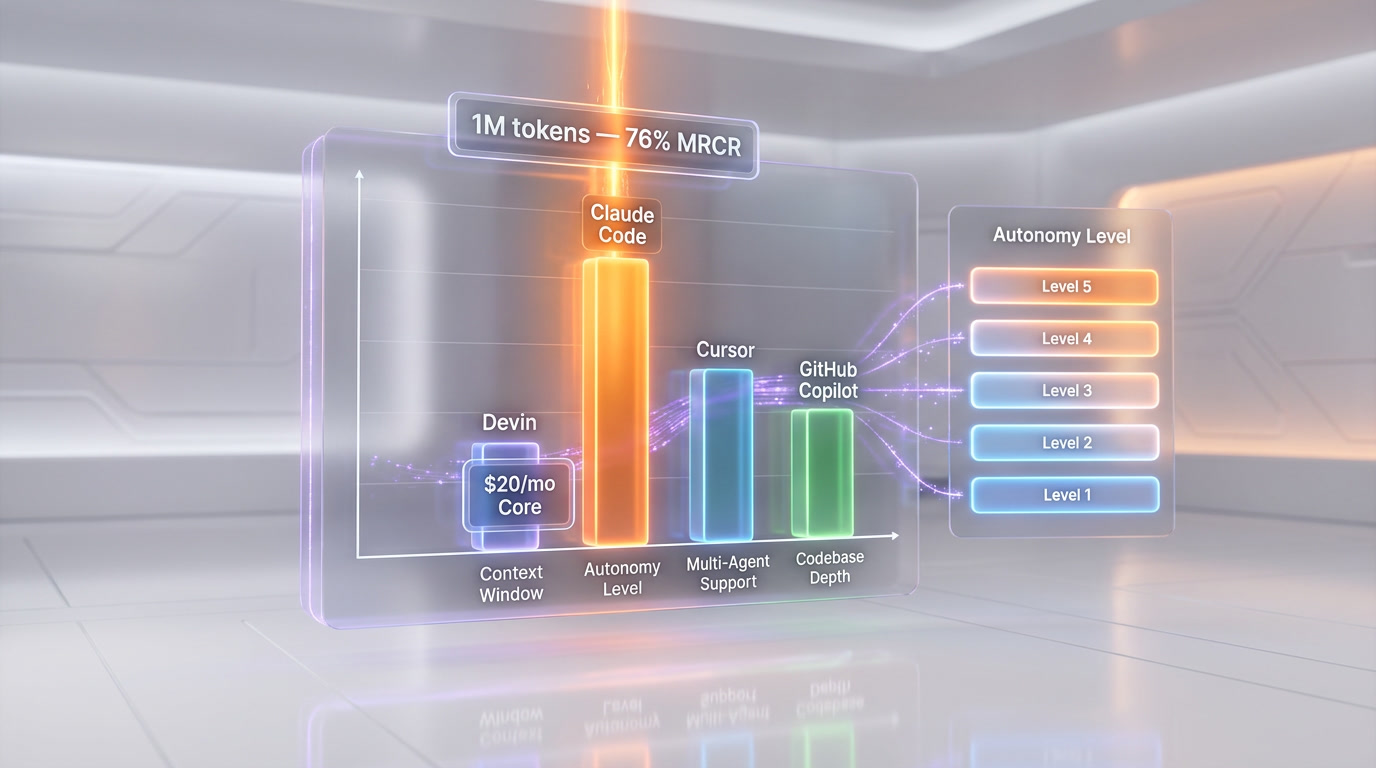
AI coding agents in 2026 span five autonomy levels from autocomplete to multi-agent teams. Claude Code uses Opus 4.6 with a 1M-token context and 76% needle-in-a-haystack accuracy, Devin costs $20 per month for autonomous PR generation, and Cursor reached $2 billion ARR. February 2026 saw every major player ship multi-agent parallel coding, letting one developer run frontend, backend, and test agents simultaneously.
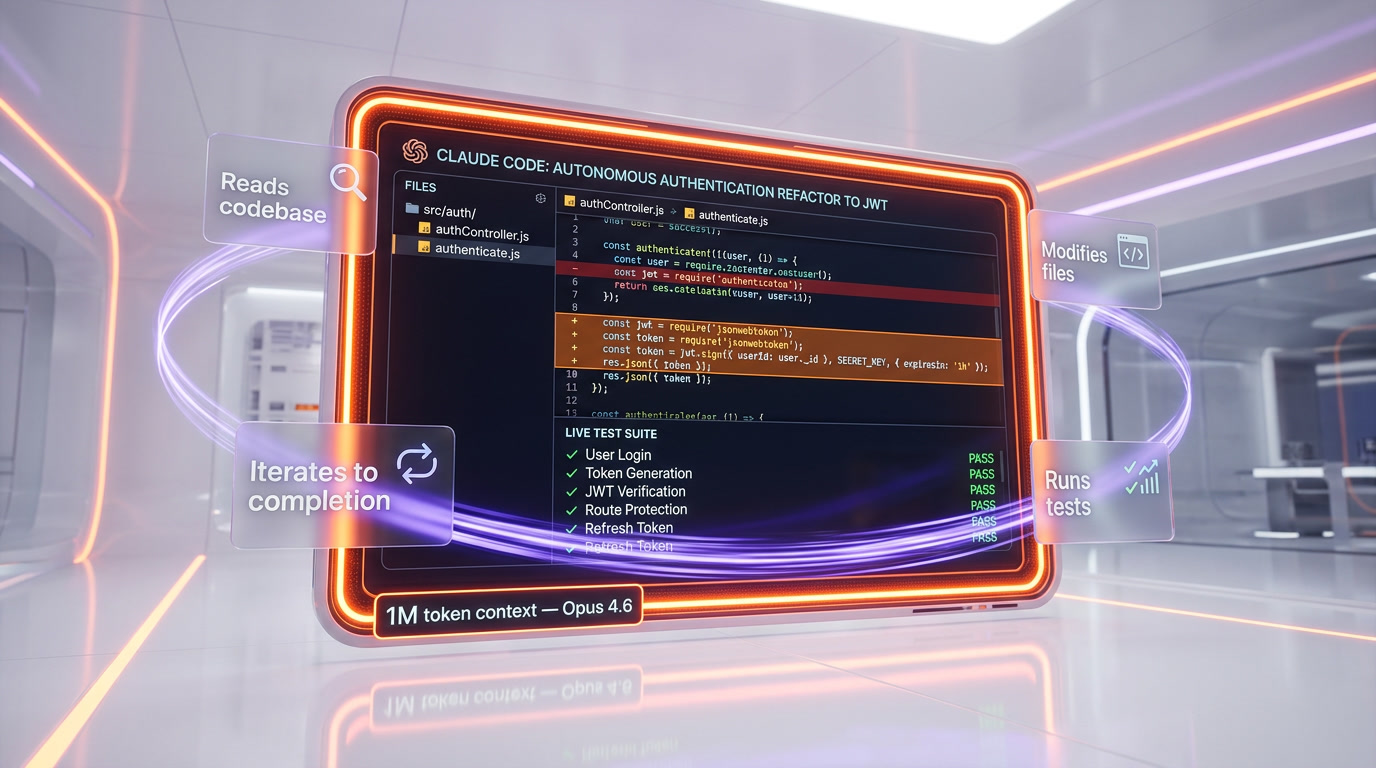
Here's the critical distinction: a chatbot answers questions. An agent completes tasks. When you tell Claude Code to "refactor this authentication module to use JWT tokens and update all the tests," it doesn't just suggest code. It reads your entire codebase, understands the dependency graph, modifies files across multiple directories, runs the test suite, sees what broke, fixes those issues, and keeps iterating until everything passes. That's agency.
The technical definition most researchers agree on involves three properties:
- Autonomy — the agent can operate without step-by-step human guidance
- Tool use — the agent can interact with external systems (file systems, terminals, APIs, browsers)
- Planning and reasoning — the agent can break complex goals into subtasks and adapt when things go wrong
If a system has all three, it's an agent. If it's missing any one of them, it's something less — useful, perhaps, but not an agent in the meaningful sense of the word.
The Spectrum: From Code Completion to Autonomous Engineering
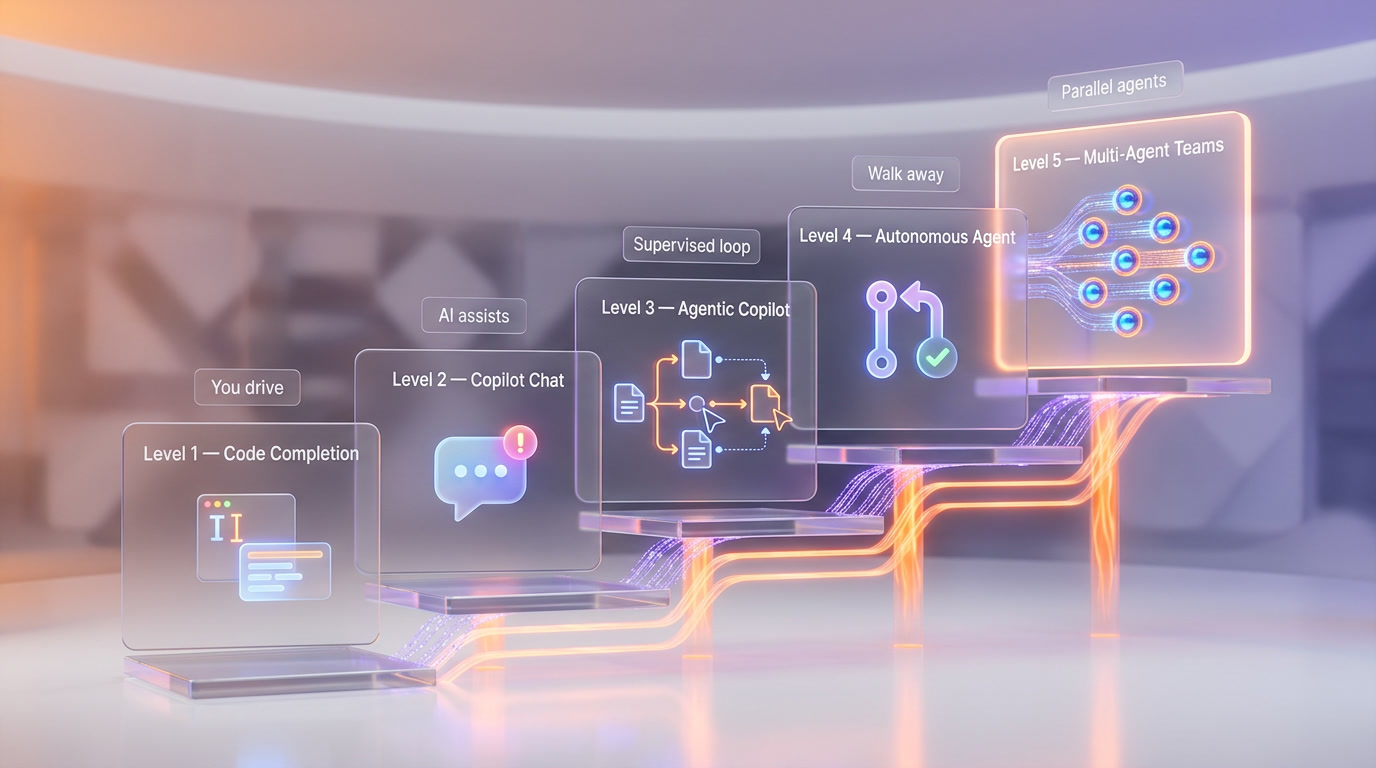
It helps to think of AI coding tools on a spectrum of autonomy:
Level 1: Code Completion
This is where it all started. GitHub Copilot's original inline suggestions, TabNine, Codeium — tools that predict the next few lines of code as you type. Useful, but you're still driving. The AI is essentially a very smart autocomplete. Think of it as cruise control: you set the direction, the AI handles the throttle for short bursts.
Level 2: Interactive Copilot
Chat-based coding assistants. You describe what you want in natural language, the AI generates a block of code, you review and paste it in. ChatGPT, Claude in the browser, early Cursor chat — these all live here. The AI is more capable, but the human is still the orchestrator. You're the pilot; the AI is the copilot who can handle some tasks when asked.
Level 3: Agentic Copilot
This is where things get interesting. The AI can edit files directly, run terminal commands, and iterate on errors — but within a human-supervised loop. Cursor's agent mode, GitHub Copilot agent mode, and Claude Code in its standard configuration operate here. The AI proposes changes, you approve or reject them. It's like having a skilled junior developer who works incredibly fast but checks in with you before merging anything.
Level 4: Autonomous Agent
The AI receives a task and works independently to completion. Devin, GitHub Copilot coding agent (which opens PRs autonomously), and Claude Code in headless mode operate at this level. You assign a ticket, walk away, and come back to a pull request. The agent handles planning, implementation, testing, and even self-review.
Level 5: Multi-Agent Teams
Multiple AI agents collaborating on different parts of a project simultaneously. In February 2026, this became reality when nearly every major player shipped multi-agent support in the same two-week window: Grok Build launched with 8 parallel agents (still in limited availability/waitlist as of March 2026), Windsurf introduced 5 parallel agents, Claude Code shipped Agent Teams, and Codex CLI integrated with OpenAI's Agents SDK. This is the current frontier.
The Key Players in 2026
Claude Code by Anthropic
Claude Code is Anthropic's agentic coding tool that lives in your terminal. Powered by Claude Opus 4.6, which was released on February 5, 2026, with a 1-million-token context window and 128k token output capability, it reads your entire codebase, edits files, runs commands, and manages git workflows through natural language.
What makes Claude Code stand out is its depth of codebase understanding. The 1M context window means it can hold massive codebases in working memory. On the MRCR v2 needle-in-a-haystack benchmark, Opus 4.6 scores 76% on the 8-needle 1M variant — meaning it can find and reason about multiple pieces of information scattered across enormous contexts. It also features adaptive thinking, where the model dynamically decides how much internal reasoning to apply to each task, and context compaction that automatically summarizes older context in long-running agentic sessions.
We use Claude Code daily at ThePlanetTools.ai. It handles everything from scaffolding new features to debugging complex state management issues in our Next.js application. The key advantage: it doesn't just generate code — it understands architectural patterns and maintains consistency across your project.
Devin by Cognition
Devin made headlines as "the first AI software engineer" and has matured significantly. The pricing dropped dramatically from $500 per month to a $20 per month Core plan plus $2.25 per Agent Compute Unit (ACU). One ACU equals roughly 15 minutes of active work, so the $20 entry gets you about 2.25 hours of agent time.
Devin excels at clearly defined, verifiable tasks: clearing bug backlogs, maintaining documentation, handling repetitive migrations. It operates in its own sandboxed environment with a full development setup — browser, terminal, code editor. You assign it a task via Slack or its web interface, and it works autonomously, opening PRs when done.
After Cognition acquired Windsurf's product, brand, and team (following the collapse of OpenAI's $3 billion acquisition attempt in July 2025 when Microsoft blocked the deal), Devin's capabilities expanded. The combination of Windsurf's IDE intelligence and Devin's autonomous agent architecture created a more complete offering.
Cursor
Cursor is the IDE story of 2026. Built as a fork of VS Code, it raised $2.3 billion at a $29.3 billion valuation in November 2025 and is now in talks for a $50 billion valuation with over $2 billion in annualized revenue. Large corporate buyers account for approximately 60% of that revenue — this isn't just indie developers; enterprises are going all-in.
Cursor's agent mode lets the AI edit multiple files, run terminal commands, and iterate on errors within the IDE. It's the most polished agentic experience inside an editor, with features like auto-applied edits, multi-file context awareness, and the ability to switch between different AI models (Claude, GPT, Gemini) depending on the task.
GitHub Copilot Agent Mode
GitHub's agent mode evolved substantially in early 2026. In agent mode, Copilot determines which files to change, offers code modifications and terminal commands, and iterates until the task is complete. The coding agent can now open pull requests autonomously, complete with self-review using Copilot code review before submitting.
The February and March 2026 updates brought custom agents (specialized versions of Copilot for different tasks), MCP server integration for connecting external tools, and skill-based customization for tailoring Copilot to specific workflows. Core agentic capabilities — including sub-agents and plan agents — are now generally available.
OpenAI Codex CLI
OpenAI's answer to Claude Code — a terminal-based agent powered by GPT-5.4, released March 5, 2026. GPT-5.4 is the first OpenAI model with native computer-use capabilities and a 1M token context window, which makes Codex CLI a serious contender. The integration with OpenAI's Agents SDK enables multi-agent orchestration.
Real-World Use Cases Right Now
Let's cut through the demos and talk about what actually works in production today:
Bug Triage and Fixes
This is the sweet spot. Hand an agent a bug report with reproduction steps, and it can trace the issue through your codebase, identify the root cause, implement a fix, write regression tests, and open a PR. We estimate this saves us 60-70% of the time we'd spend on routine bug fixes at ThePlanetTools.ai.
Code Reviews
AI agents as first-pass code reviewers catch issues that humans miss — not just style violations, but actual logic errors, race conditions, and security vulnerabilities. GitHub Copilot's self-review feature means the agent reviews its own code before submitting, catching obvious issues before a human even looks at it.
Documentation Generation and Maintenance
Keeping documentation in sync with code has always been a losing battle. Agents can read your codebase, understand the public API, and generate or update documentation that actually reflects the current state of the code. Devin is particularly good at this kind of ongoing maintenance task.
Migration Work
Upgrading from Next.js 15 to 16? Migrating from one authentication provider to another? These are repetitive, well-defined tasks that agents handle well. The key is that the success criteria are clear and verifiable — the tests either pass or they don't.
Scaffolding and Boilerplate
Need a new API endpoint with proper validation, error handling, types, and tests? An agent can scaffold the entire thing in minutes, following the patterns already established in your codebase. Claude Code's deep context understanding means it picks up on your project's conventions automatically.
Test Generation
Writing tests is one of the most tedious parts of development. Agents can analyze your code, generate comprehensive test suites covering edge cases you might not think of, and even run them to verify they pass. The adoption rate of AI tools among developers (over 75%, per the GitHub developer survey) is driven largely by productivity gains like these.
How We Use AI Agents in Our Workflow
At ThePlanetTools.ai, we've developed a workflow that combines multiple agents for different purposes:
- Planning phase: We use Claude (in conversation mode) to discuss architecture decisions, evaluate trade-offs, and plan feature implementations. The 1M context window lets us paste entire module structures for analysis.
- Implementation phase: Claude Code handles the actual coding. We describe what we want, it reads our codebase, and implements changes across multiple files. For our Next.js + Supabase + Tailwind stack, it understands the patterns and maintains consistency.
- Review phase: We review AI-generated code with the same rigor we'd apply to human code. Agents are fast but not infallible — they can introduce subtle bugs, especially in complex state management or concurrent operations.
- Automation phase: n8n workflows handle the repetitive operational tasks — deploying to Vercel, running scheduled jobs, syncing data. The agents built the automation; now the automation runs itself.
The result: a small team shipping at the velocity of a much larger one. But — and this is important — the human is still the architect, the decision-maker, and the quality gate.
What's Coming Next
The February 2026 multi-agent wave was just the beginning. Here's what the trajectory looks like:
- Specialized agent roles: Instead of one general-purpose agent, teams of specialized agents — one for frontend, one for backend, one for testing, one for DevOps — working in parallel on different parts of a feature.
- Persistent memory: Agents that remember your codebase across sessions, learn from your feedback over time, and develop an understanding of your project's patterns and preferences. Anthropic's memory features, rolled out to all Claude users in early March 2026, are an early step in this direction.
- CI/CD integration: Agents that don't just write code but deploy it, monitor production, and automatically respond to incidents. GitHub Copilot's coding agent already opens PRs; the next step is closing the loop from code to production.
- Cross-tool orchestration: Agents that work across your entire toolchain — reading Jira tickets, writing code in your IDE, updating documentation in Notion, posting updates in Slack. Notion's Custom Agents (launched February 24, 2026) and their MCP integrations with Slack, Linear, Figma, and HubSpot point toward this future.
The AWS-Cerebras collaboration announced on March 13, 2026, is also worth watching. By combining AWS Trainium for prefill and Cerebras CS-3 for decode, they're promising a 5x increase in inference speed through Amazon Bedrock. Faster inference means agents can iterate faster, which means more complex autonomous workflows become practical.
Should You Replace Developers with AI Agents?
Here's the honest answer: no, and anyone telling you otherwise is selling something.
AI agents are incredibly powerful tools, but they have clear limitations:
- They lack true understanding. Agents can pattern-match and follow instructions, but they don't understand why your business logic works the way it does. They can refactor authentication code, but they can't decide whether you should use JWT tokens or session-based auth for your specific use case.
- They struggle with novel problems. If the solution pattern exists in training data, agents are great. If you're doing something genuinely new — a novel algorithm, an unusual architecture, a creative solution to a unique constraint — they're less helpful.
- They need supervision. Even at Level 4 autonomy, you need to review agent output. They can introduce subtle bugs, make incorrect assumptions about business requirements, or choose approaches that are technically correct but architecturally wrong.
- They can't handle ambiguity well. Real-world software development is full of ambiguous requirements, political constraints, and trade-offs that require human judgment. "The stakeholder wants it fast but also wants it perfect" is a human problem, not an agent problem.
What you should do is augment every developer with AI agents. A senior developer with Claude Code and Cursor is significantly more productive than a senior developer without them. The over 75% adoption rate among developers (source: GitHub developer survey) isn't because agents replace people — it's because they multiply what people can do.
The developers who will thrive in 2026 and beyond are the ones who learn to work with agents effectively: knowing when to let the agent run autonomously, when to intervene, how to write clear prompts, and how to review AI-generated code critically. The skill isn't coding anymore — it's orchestrating AI to code well.
Frequently Asked Questions
What is an AI coding agent?
An AI coding agent is a software system that can autonomously write, edit, test, and debug code with minimal human intervention. Unlike chatbots that simply respond to prompts, agents can take actions in your development environment — reading files, running terminal commands, executing tests, and iterating on errors until a task is complete. Key players in 2026 include Claude Code, Devin, Cursor's agent mode, and GitHub Copilot's coding agent.
What is the difference between an AI copilot and an AI agent?
A copilot assists you while you remain in control — it suggests code, answers questions, and generates snippets when asked. An agent operates more independently: you give it a goal (like "fix this bug" or "add this feature"), and it plans the approach, implements changes across multiple files, runs tests, and iterates until the task is done. The key distinction is autonomy: copilots help you code, agents code for you (under supervision).
How much does Devin cost in 2026?
Devin offers a Core plan at $20 per month that includes a base allocation of Agent Compute Units (ACUs). Additional ACUs cost $2.25 each, with one ACU representing approximately 15 minutes of active agent work. The Team plan at $500 per month offers better per-ACU pricing at $2.00 each. This is a dramatic reduction from Devin's original $500 per month flat-rate pricing.
Is Claude Code free to use?
Claude Code is available through Anthropic's API with usage-based pricing. It's powered by Claude Opus 4.6, which costs $5 per million input tokens and $25 per million output tokens at standard rates. There's also a Max plan for Claude subscribers that includes Claude Code access. For professional use, the cost depends on how much you use it — expect to spend $50-200/month for active development work.
Can AI agents replace software developers?
No. AI agents in 2026 excel at well-defined, verifiable tasks like bug fixes, migrations, test generation, and boilerplate code. They struggle with ambiguous requirements, novel architecture decisions, business logic design, and tasks requiring deep domain knowledge. The most productive setup is a skilled developer working alongside AI agents — using agents for implementation speed while the human handles architecture, requirements, and quality assurance.
What is multi-agent coding?
Multi-agent coding involves running multiple AI agents simultaneously on different parts of a codebase. In February 2026, major tools shipped this capability almost simultaneously: Grok Build with 8 parallel agents, Claude Code with Agent Teams, and Codex CLI with Agents SDK integration. This allows parallel development — one agent handles frontend changes while another works on the API layer, dramatically increasing throughput for complex features.
Which AI coding agent is best for my project?
It depends on your workflow. Claude Code is best for deep codebase understanding and complex refactoring (thanks to its 1M context window). Cursor is best for developers who want agentic capabilities inside a polished IDE. Devin is best for clearly defined, verifiable tasks you want to run fully autonomously. GitHub Copilot agent mode is best if you're already deep in the GitHub ecosystem and want seamless integration with issues and PRs.
How do I get started with AI coding agents?
Start with an agentic copilot (Level 3) before jumping to full autonomy. Install Cursor or enable GitHub Copilot agent mode in VS Code. Practice giving clear, specific instructions. Review every output carefully. As you build trust and learn the tool's strengths and weaknesses, gradually give it more autonomy. The learning curve isn't in the tool — it's in learning to prompt effectively and review AI-generated code critically.
Are AI agents safe to use with proprietary code?
This depends on the tool and your configuration. Claude Code can be run locally and sends code to Anthropic's API for processing — Anthropic's terms state they don't train on API inputs. Cursor offers a privacy mode. Devin runs in sandboxed environments. GitHub Copilot offers enterprise plans with IP indemnity. For sensitive codebases, review each tool's data handling policies, consider enterprise plans with stronger privacy guarantees, and consult your legal team.
What will AI agents look like in 2027?
Based on current trajectories, expect persistent memory across sessions (agents that know your codebase intimately), deeper CI/CD integration (agents that deploy and monitor in production), cross-tool orchestration (agents that work across your entire toolchain from tickets to deployment), and specialized agent teams where different agents have different roles and expertise. The AWS-Cerebras partnership promising 5x faster inference will also enable more complex agentic workflows.