There are a thousand articles telling you what tech stack to use for your SaaS. Most of them are written by people who haven't shipped a product in years, recommending technology they've never used in production, and listing tools they get affiliate commissions for.
This isn't that article.
We built ThePlanetTools.ai — a fully functional SaaS platform with 100+ pages, 3D effects, server-side rendering, real-time database interactions, and AI-powered features. We did it with a small team, a modest budget, and a stack that we chose deliberately based on shipping speed, developer experience, and total cost of ownership.
This guide covers every layer of the stack we use, why we chose each piece, what it costs, and the mistakes we made along the way so you don't have to repeat them.
The Stack Overview
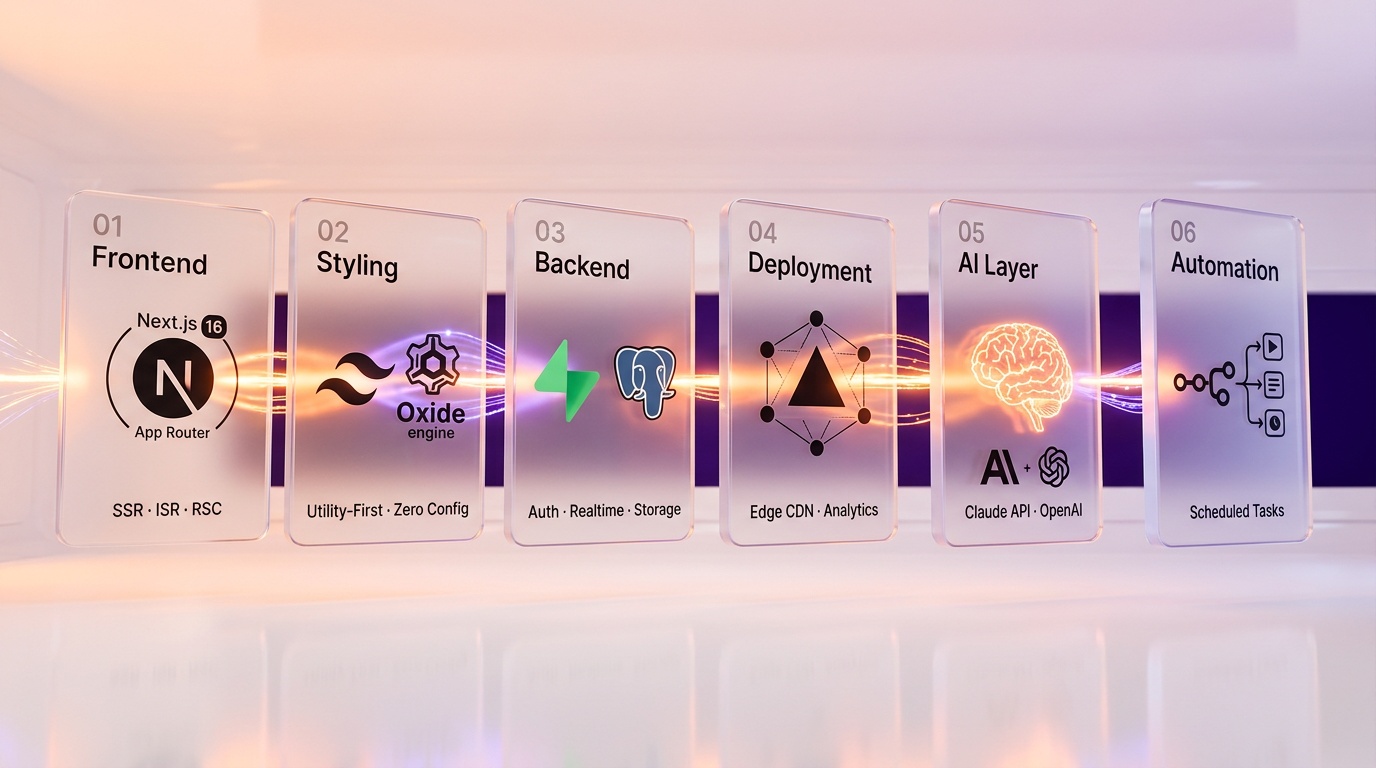
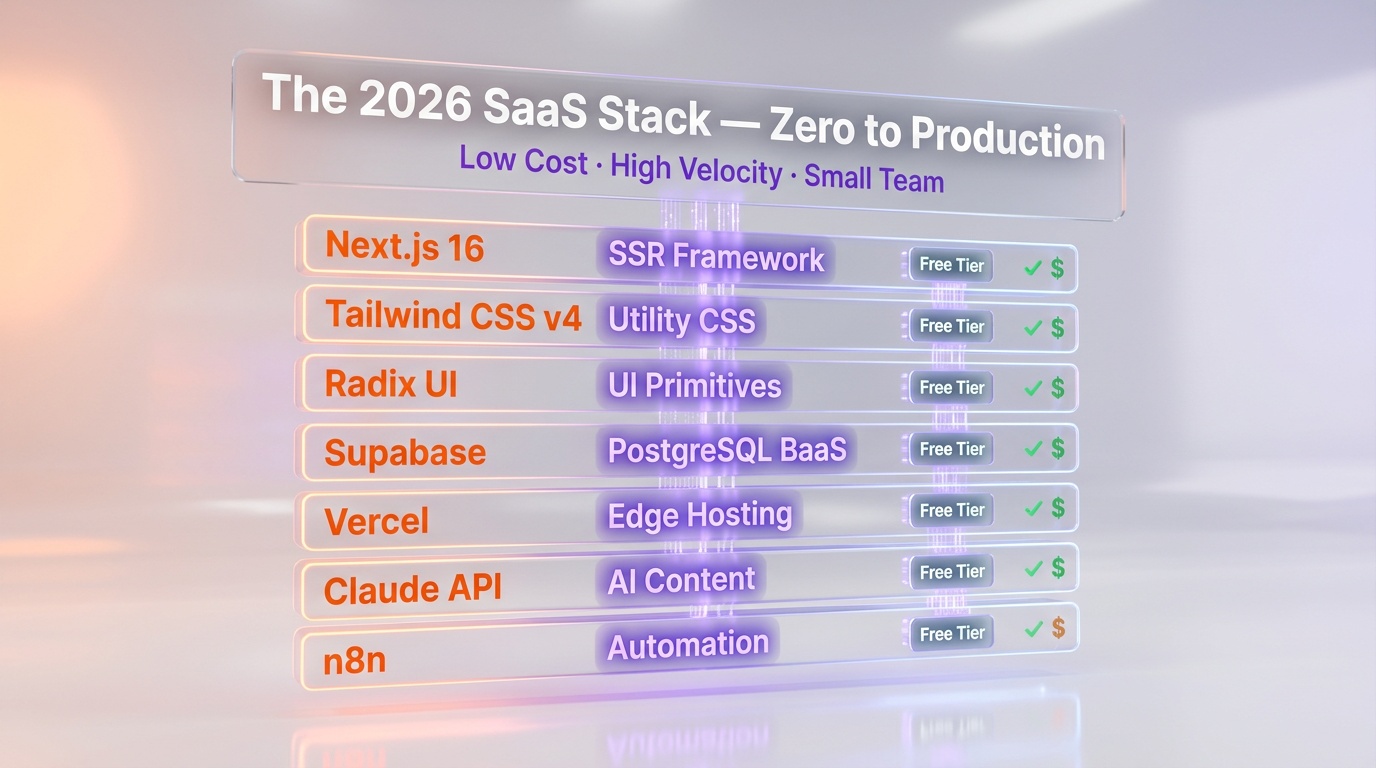
ThePlanetTools.ai runs on Next.js 16 App Router with 80% Server Components, Supabase for PostgreSQL and auth, Tailwind CSS v4 powered by the Rust-based Oxide engine, and Vercel for edge hosting with ISR. The full stack costs under $50 per month at early stage, using Claude API for AI features and n8n for workflow automation.
| Layer | Technology | Purpose |
|---|---|---|
| Frontend Framework | Next.js 16 | React framework with SSR, SSG, ISR |
| Styling | Tailwind CSS v4 | Utility-first CSS framework |
| UI Components | Radix UI + custom components | Accessible, unstyled primitives |
| Backend / Database | Supabase | Auth, PostgreSQL, Storage, Realtime |
| Deployment | Vercel | Edge hosting, CDN, analytics |
| AI Integration | Claude API + OpenAI API | Content generation, analysis |
| Automation | n8n | Workflow automation, scheduled tasks |
| Development Tools | Cursor + Claude Code | AI-assisted development |
| Version Control | GitHub | Code hosting, CI/CD |
| Domain / DNS | Cloudflare | DNS management, DDoS protection |
The philosophy behind these choices: minimize infrastructure management, maximize development velocity, and keep costs low until revenue justifies scaling. Every piece of this stack has a generous free tier or a low entry price, which means you can go from zero to production without spending thousands upfront.
Frontend: Next.js 16 with App Router
Why Next.js
Next.js has become the default choice for production React applications, and for good reason. It handles the problems that raw React leaves you to solve: server-side rendering for SEO, file-system routing, API routes, image optimization, code splitting, and incremental static regeneration. The alternative is assembling all of this yourself from a dozen different libraries — which is educational but not productive.
Next.js 16 (the current version) builds on the App Router introduced in version 13 and now fully stabilized. The major additions in v16 include Cache Components leveraging Partial Pre-Rendering (PPR) and use cache for instant navigation, full removal of synchronous request API access (which was deprecated in v15), and promotion of Turbopack configuration from experimental to stable.
Server Components: The Game Changer
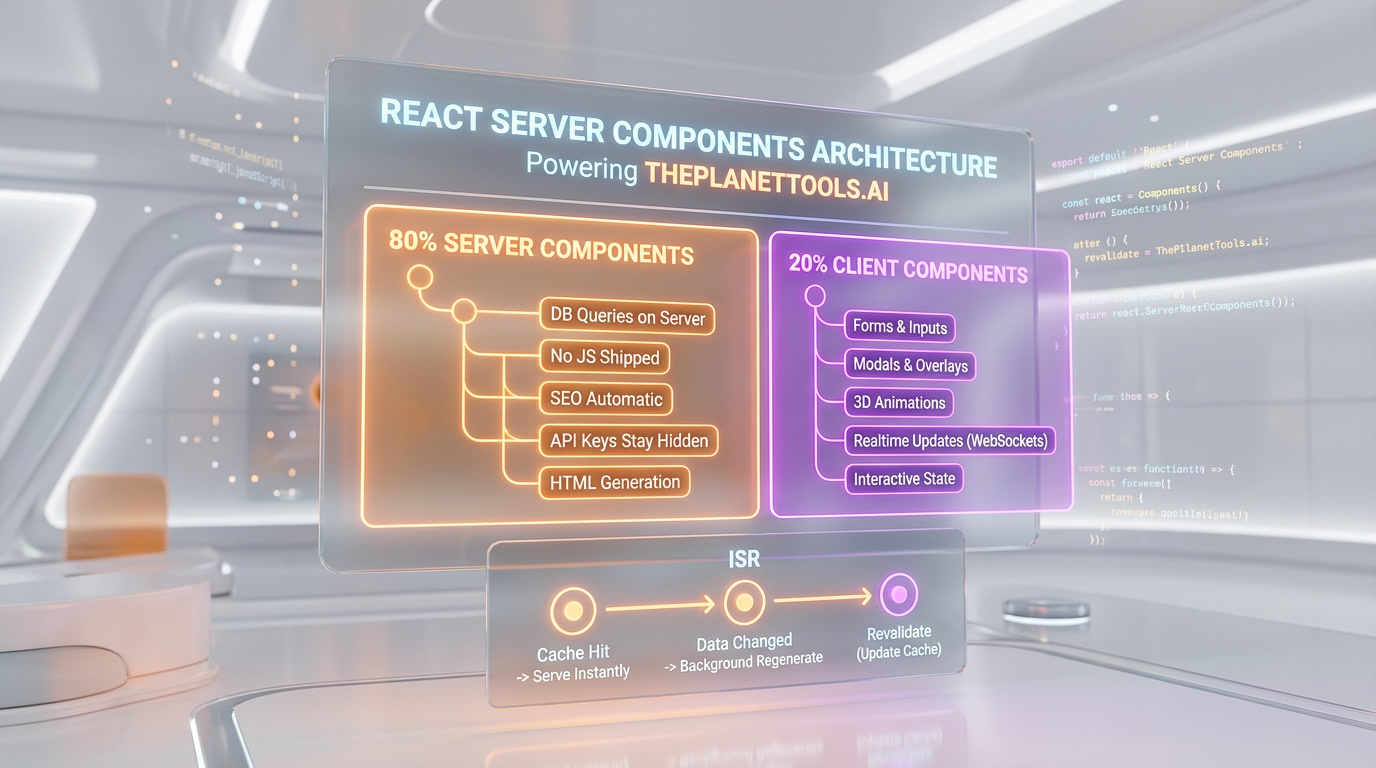
If you're still building React apps where everything renders on the client, you're leaving significant performance on the table. React Server Components (RSC) let you render components on the server, send the HTML to the client, and never ship the JavaScript for those components to the browser.
In practice, this means:
- Database queries happen on the server — no API layer needed for read operations
- Sensitive logic (API keys, database credentials) never reaches the client
- Initial page loads are faster because there's less JavaScript to download and parse
- SEO is automatically handled because content is rendered server-side
At ThePlanetTools.ai, roughly 80% of our components are Server Components. We only use Client Components when we need interactivity: forms, modals, 3D animations, and real-time features. This architecture keeps our JavaScript bundle small and our pages fast.
Incremental Static Regeneration (ISR)
ISR is the best of both worlds between static sites and dynamic rendering. You pre-render pages at build time for instant loads, but they automatically regenerate in the background when data changes. For our tool review pages, we use ISR with a revalidation period — the page is served from cache instantly, but if the data has changed (new reviews, updated pricing), the next visitor triggers a background regeneration.
Key Next.js Patterns We Use
- Parallel routes for complex layouts where different sections load independently
- Intercepting routes for modal overlays that maintain URL state
- Route handlers for API endpoints that run as serverless functions on Vercel
- Middleware for authentication checks and redirects at the edge
- Server Actions for form submissions and data mutations without building a separate API
Styling: Tailwind CSS v4
The Tailwind debate is over. You either love it or you haven't used it long enough. For building a SaaS quickly, utility-first CSS is objectively faster than writing custom CSS files, maintaining BEM naming conventions, or wrestling with CSS modules.
Tailwind v4 brought significant improvements: a new high-performance Oxide engine written in Rust, automatic content detection (no more configuring content paths), built-in CSS-first configuration, and zero-config usage with modern bundlers. The dev experience is noticeably snappier.
Our approach: Tailwind utilities for layout and spacing, custom CSS for complex animations (like our 3D metaball effects and volumetric nebula background), and Radix UI primitives for accessible interactive components (dropdowns, modals, tooltips). This gives us Awwwards-level visual quality with production-grade accessibility.
Backend: Supabase
Why Supabase Over Firebase, AWS, or Custom Backend
Supabase is an open-source Firebase alternative built on PostgreSQL. That last part is crucial — it's not a proprietary database. It's PostgreSQL with a beautiful dashboard, auto-generated APIs, built-in authentication, file storage, and real-time subscriptions.
Why we chose it over alternatives:
- vs. Firebase: PostgreSQL vs. NoSQL (Firestore). For a SaaS with relational data — users, subscriptions, reviews, categories — a relational database is the right tool. Firestore's document model creates headaches for complex queries and reporting. Plus, Supabase is open-source — no vendor lock-in.
- vs. AWS (RDS + Cognito + S3 + etc.): Supabase bundles all of this into one platform with a unified API and dashboard. AWS gives you infinite flexibility but requires significantly more DevOps knowledge and setup time. For a small team, Supabase's integrated experience wins.
- vs. Custom backend (Express/Fastify/Hono): Writing your own backend is educational but slow. Supabase's auto-generated REST and GraphQL APIs, built-in row-level security, and authentication system save weeks of development time.
What We Use Supabase For
Authentication: Email/password, OAuth (Google, GitHub), and magic links. Supabase Auth handles session management, token refresh, and user metadata. It integrates with Next.js middleware for route protection.
Database: PostgreSQL with row-level security (RLS) policies. RLS is a game-changer — you define access rules at the database level, so even if your application code has a bug, unauthorized data access is blocked by the database itself. Every table in our application has RLS policies.
Storage: File uploads (user avatars, product images, assets) go to Supabase Storage, which is S3-compatible under the hood. We use signed URLs for private files and public buckets for static assets.
Realtime: Supabase's realtime engine lets us push database changes to connected clients instantly. We use this for live-updating review counts and notification systems.
Edge Functions: Serverless functions running on Deno for custom backend logic that doesn't fit into a database query — webhook handlers, third-party API integrations, and scheduled jobs.
Supabase Pricing Reality
The free tier includes 2 projects, 500 MB database storage, 50,000 monthly active users, 1 GB file storage, unlimited API requests, and unlimited realtime connections. That's generous enough to build and launch an MVP.
The Pro plan at $25 per month per project unlocks 8 GB database storage, daily backups, no project pausing (free projects pause after 1 week of inactivity), and higher limits across all features. For a production SaaS, the Pro plan is the minimum.
Our actual monthly spend on Supabase: approximately $25-50/month depending on storage and egress usage. Extremely cost-effective for what we get.
Deployment: Vercel
Why Vercel
Vercel made Next.js, so their platform is the most optimized deployment target for it. The integration is seamless: push to GitHub, Vercel automatically builds and deploys. Preview deployments for every PR. Automatic HTTPS. Global Edge Network with CDN. Zero configuration.
What We Get from Vercel
- Edge Network: Our pages are served from edge locations closest to the user. For a global audience, this means sub-second page loads regardless of location.
- Serverless Functions: Our API routes automatically deploy as serverless functions. No server management, automatic scaling, pay-per-invocation.
- Analytics: Real User Monitoring (RUM) that shows actual Core Web Vitals performance from real visitors. This data is critical for SEO optimization.
- Preview Deployments: Every pull request gets its own URL for testing. This alone saves hours of "works on my machine" debugging.
- Instant Rollbacks: If a deployment breaks something, roll back to any previous deployment in seconds.
Vercel Pricing Reality
The Hobby tier (free) gives you 100 GB bandwidth, 1M function invocations, and 4 hours of active CPU per month — plenty for development and small projects.
The Pro plan at $20 per user/month includes $20 in monthly usage credits, 1 TB bandwidth, 10M edge requests, and team collaboration features. For most SaaS products in the early stages, the Pro plan is more than sufficient.
Our actual monthly spend: $20 per month on the Pro plan, occasionally with small overage charges during traffic spikes. Note: Vercel shifted to a credit-based pricing model in September 2025, where usage beyond the included credits is charged incrementally. Vercel's pricing is transparent and predictable, which matters when you're bootstrapping.
AI Integration: Claude API and OpenAI API
Why Both?
We use multiple AI providers because different models excel at different tasks. This isn't about brand loyalty — it's about using the right tool for each job.
Claude API (Anthropic): Our primary model for content-related tasks. Claude's strength is nuanced writing, detailed analysis, and long-context understanding. We use it for generating tool descriptions, analyzing user reviews, and powering our editorial workflow. The Opus 4.6 model with its 1M context window is particularly useful for tasks that require understanding large amounts of context.
OpenAI API: We use GPT models for structured data extraction, classification tasks, and quick completions where speed matters more than depth. GPT-5.4's native tool use capabilities make it excellent for structured output generation.
Cost Management
AI API costs can spiral quickly if you're not careful. Our strategies:
- Use the smallest model that works: Not every task needs Opus 4.6. Sonnet 4.6 handles most routine tasks at a fraction of the cost. Use Haiku for classification and simple extraction.
- Cache aggressively: If the same prompt generates the same result, cache it. We cache AI-generated metadata for 24 hours.
- Batch where possible: Instead of making individual API calls for each tool review, we batch process updates during off-peak hours.
- Set hard spending limits: Both Anthropic and OpenAI let you set monthly spending caps. Use them.
Our actual monthly AI API spend: $50-150/month depending on content generation volume. This replaces what would cost thousands in freelance writing.
Automation: n8n Workflows
Why n8n Over Zapier or Make
n8n is an open-source workflow automation platform with over 400 pre-configured integrations. The key advantages over Zapier or Make:
- Self-hostable: You can run n8n on your own infrastructure, which means no per-execution pricing and full control over your data. For workflows that run frequently, the cost savings are significant.
- Code when you need it: n8n lets you inject JavaScript or Python code at any step. When a no-code node doesn't do exactly what you need, you can add a code node without leaving the platform.
- AI-native: n8n has native nodes for OpenAI, Anthropic, and other AI platforms. You can build RAG workflows, run AI agents, and orchestrate LLM calls visually.
- MCP support: n8n supports the Model Context Protocol, enabling you to expose your workflows as tools for AI agents — and call MCP-enabled tools from within your workflows.
Workflows We Run
- Content freshness monitoring: Checks tool pricing pages weekly and flags changes for review
- SEO monitoring: Pulls Google Search Console data daily and alerts on significant ranking changes
- Social media automation: Distributes new content across platforms with platform-specific formatting
- Data enrichment: When a new tool is added to our database, automatically fetches metadata, visual assets, and categorization
- User notification workflows: Sends targeted emails based on user behavior and preferences
n8n cloud pricing starts at €24/month (EUR, approximately $24 per month) for 2,500 executions. Self-hosted is free (you only pay for server costs). We use cloud for simplicity — the time saved on infrastructure management is worth the monthly fee.
Development: Cursor + Claude Code
Our development environment is AI-augmented at every level:
Cursor ($20 per month Pro plan) is our primary IDE. It's a VS Code fork with deep AI integration. Agent mode lets us describe changes in natural language and have the AI implement them across multiple files. The ability to reference specific files, documentation, or code patterns in the context window makes it incredibly effective for codebase-wide changes.
Claude Code (API-based pricing) handles complex architectural tasks from the terminal. When we need to refactor a module, implement a new feature that touches many files, or debug a complex issue, Claude Code's deep codebase understanding and 1M context window make it the right tool. It reads the entire project, understands the relationships between files, and makes changes that are consistent with existing patterns.
The combination works like this: Cursor for day-to-day coding within files, Claude Code for cross-cutting changes and complex tasks, and standard VS Code extensions (ESLint, Prettier, GitLens) for code quality.
Real Cost Breakdown: What We Actually Pay Per Month
| Service | Plan | Monthly Cost |
|---|---|---|
| Vercel | Pro | $20 |
| Supabase | Pro | $25-50 |
| Cursor | Pro | $20 |
| Claude API | Usage-based | $50-100 |
| OpenAI API | Usage-based | $20-50 |
| n8n | Cloud Starter | €24 (~$24) |
| Cloudflare | Free | $0 |
| GitHub | Free (public) / Team | $0-4 |
| Domain | Annual (amortized) | ~$1 |
| Total | $160-270/month |
For a fully functional SaaS with AI features, real-time database, global CDN deployment, automated workflows, and AI-assisted development — under $300 per month. Compare this to the cost of a traditional stack (AWS EC2 + RDS + ElastiCache + CloudFront + custom auth + etc.) and the difference is stark.
This doesn't include labor, obviously. But the AI-assisted development workflow means a solo developer or tiny team can ship at the velocity of a much larger one. That's the real cost advantage — not just cheaper infrastructure, but dramatically higher output per person.
Mistakes to Avoid
1. Premature Optimization
Don't set up Kubernetes, microservices, or event-driven architecture before you have 100 users. The Supabase + Vercel stack scales to tens of thousands of users without architectural changes. Build for today's traffic, not imaginary future traffic.
2. Ignoring Row-Level Security
If you're using Supabase, enable RLS on every table from day one. It's harder to retrofit later. Write your policies early, test them thoroughly, and treat them as your last line of defense against data leaks.
3. Not Using Server Components
If you're building a Next.js app in 2026 and every component has "use client" at the top, you're doing it wrong. Default to Server Components. Only add "use client" when you actually need browser APIs or interactivity. Your bundle size and performance will thank you.
4. Skipping TypeScript
Just use TypeScript. The productivity cost of adding types is negligible compared to the debugging time you save. With AI coding assistants, TypeScript is even more valuable — the type information gives the AI better context for generating correct code.
5. Building Auth From Scratch
Use Supabase Auth, Clerk, NextAuth, or another established solution. Rolling your own authentication is a security risk and a time sink. The only exception is if auth is your core product.
6. Over-Relying on AI-Generated Code Without Review
AI coding agents are incredibly productive, but they can introduce subtle bugs, security vulnerabilities, and architectural inconsistencies. Review every AI-generated commit with the same rigor you'd apply to human code. Use TypeScript strict mode, ESLint with security rules, and automated testing to catch issues.
7. Not Setting Up Monitoring Early
Set up error tracking (Sentry), analytics (Vercel Analytics or Plausible), and uptime monitoring from day one. The worst time to set up monitoring is when something is already broken and you're flying blind.
8. Ignoring SEO From the Start
SEO is not something you bolt on after launch. It's baked into your architecture: server-side rendering, proper meta tags, structured data, fast page loads, semantic HTML. Next.js makes this easier than most frameworks, but you still need to be intentional about it. Read our SEO in the Age of AI guide for the complete strategy.
Frequently Asked Questions
What is the best tech stack for a SaaS in 2026?
The best general-purpose SaaS stack in 2026 is Next.js 16 (frontend framework with SSR/SSG), Supabase (PostgreSQL database, auth, storage, realtime), Vercel (deployment and CDN), and Tailwind CSS (styling). This combination offers the best balance of developer experience, performance, cost, and scalability for most SaaS products. Alternatives like Nuxt + Supabase or SvelteKit + Supabase are also excellent choices.
How much does it cost to build a SaaS in 2026?
Infrastructure costs for a modern SaaS using the Next.js + Supabase + Vercel stack range from $0 (using free tiers during development) to $160-270/month for a production application with AI features. The major variable cost is AI API usage (Claude, OpenAI), which scales with feature usage. Development costs depend on your team — with AI-assisted development tools like Cursor and Claude Code, a solo developer can ship a production SaaS that would have required a team of 3-5 people previously.
Is Supabase production-ready in 2026?
Yes. Supabase is used in production by thousands of companies. It's built on PostgreSQL (the most trusted open-source database), offers 99.9% uptime SLA on the Pro plan, daily backups, and point-in-time recovery on higher tiers. The free tier pauses projects after 1 week of inactivity, so use the Pro plan ($25 per month) for anything that needs to stay online 24/7.
Should I use the App Router or Pages Router in Next.js?
Use the App Router. The Pages Router is in maintenance mode, and all new Next.js features are built for the App Router. The App Router uses React Server Components by default, supports layouts, parallel routes, intercepting routes, and server actions. If you're starting a new project in 2026, there's no reason to use the Pages Router.
Do I need a separate backend for my SaaS?
For most SaaS products, no. Supabase provides your database, authentication, storage, and real-time capabilities. Next.js route handlers serve as your API layer and run as serverless functions on Vercel. Supabase Edge Functions handle custom backend logic. This "backendless" architecture covers 90% of SaaS use cases without maintaining separate backend infrastructure.
How do I add AI features to my SaaS?
Start with the Claude API or OpenAI API via server-side route handlers in Next.js. Never expose API keys to the client — make AI calls from Server Components or API routes. Use streaming (the Vercel AI SDK makes this easy) for real-time AI responses. Cache results aggressively. Start with the smallest model that works and scale up only when needed. Budget $50-150/month for AI API costs in a production application.
Is Vercel expensive at scale?
Vercel's pricing is transparent but can surprise you at scale. The Pro plan at $20 per user/month includes generous limits (1TB bandwidth, 10M edge requests). Beyond that, you pay per-usage. For high-traffic sites, monitor bandwidth and function invocation costs carefully. The Enterprise plan offers custom pricing, SLA guarantees, and dedicated support. For most SaaS products in the growth stage, the Pro plan is cost-effective.
What about using Hono.js instead of Next.js API routes?
Hono.js is an excellent ultra-fast backend framework optimized for edge environments. If your SaaS has complex backend logic that outgrows Next.js API routes — heavy computation, complex middleware chains, websocket handling — Hono.js is a strong choice. You can deploy it on Vercel, Cloudflare Workers, or AWS Lambda. For most SaaS products, Next.js route handlers are sufficient, but Hono.js is the best upgrade path when you need a dedicated backend.
How do I handle payments and subscriptions?
Stripe is the standard for SaaS billing. Use Stripe Checkout for payment pages, Stripe Billing for subscription management, and Stripe webhooks (handled by Next.js route handlers or Supabase Edge Functions) to sync subscription status with your database. Libraries like stripe-node and @stripe/stripe-js handle the integration. Budget 2.9% + 30 cents per transaction for Stripe fees.
Note on enterprise costs: If your SaaS serves enterprise customers using Microsoft 365, be aware that Microsoft 365 E5 pricing is increasing from $57 per user/month to $60 per user/month on July 1, 2026, which may affect your customers' budgets and procurement timelines.
What database should I use for a SaaS in 2026?
PostgreSQL, accessed through Supabase. PostgreSQL is the most versatile production database — it handles relational data, JSON documents, full-text search, vector embeddings (via pgvector), and geospatial data. Supabase adds auth, realtime, storage, and a management dashboard on top. Unless you have a specific need for a NoSQL database (like high-throughput event logging), PostgreSQL through Supabase is the right default choice.