
Privacy researcher Alexander Hanff published forensic evidence on April 29, 2026 that Google Chrome version 148 silently downloads a 4GB Gemini Nano AI model — weights.bin — into the OptGuideOnDeviceModel directory in 14 minutes 28 seconds, on a fresh user profile, with no consent prompt and no disclosure. The behavior affects more than 1 billion Chrome users worldwide and likely violates GDPR Article 5(1), GDPR Article 25, and ePrivacy Directive Article 5(3).
TL;DR — what every Chrome user should know
- What got installed. A 4GB on-device large language model called Gemini Nano (file:
weights.bin) insideOptGuideOnDeviceModel/2025.8.8.1141/in Chrome's user data directory. - How fast. 14 minutes 28 seconds on a clean macOS profile, monitored via the kernel-level
.fseventsdlog Chrome cannot tamper with. - Who saw it coming. Nobody. There is no consent UI, no install prompt, no opt-out screen before the download begins.
- Scope. 1B+ Chrome users globally; Hanff models a 60,000-tonne CO2 emissions footprint at full scale.
- Why it matters legally. EU privacy lawyers flag Article 5(3) of the ePrivacy Directive (terminal-storage consent), GDPR Article 5(1) (lawfulness, fairness, transparency), and GDPR Article 25 (data protection by design) as likely violated.
- How to find and remove it. Detection, disablement, and registry-level blocking are documented later in this piece. Deleting the file alone is not enough — Chrome reinstalls it.
What happened: a forensic investigation, not a thinkpiece
On April 29, 2026, independent privacy researcher Alexander Hanff published "Google Chrome silently installs a 4 GB AI model on your device without consent" on his blog That Privacy Guy. The post is not opinion — it is a four-source forensic chain that documents Chrome installing a multi-gigabyte AI model on machines whose users had not asked for it, and in many cases did not know existed.
Hanff's setup was deliberately conservative. He created a clean macOS user account, installed a fresh build of Chrome version 148, signed into a freshly created Google account, and then walked away. The machine was monitored at four independent levels: the macOS kernel filesystem event log (.fseventsd), Chrome's local_state JSON configuration file, Chrome's internal feature flags listing (including the OnDeviceModelBackgroundDownload flag), and the GoogleUpdater component logs.
14 minutes and 28 seconds after the browser first launched, the kernel filesystem log captured a 4GB write event into the path ~/Library/Application Support/Google/Chrome/OptGuideOnDeviceModel/2025.8.8.1141/weights.bin. The file is the unpacked weights of Gemini Nano, Google's on-device foundation model. No consent UI fired. No disclosure modal fired. No notification surfaced in Chrome's settings panel. Hanff repeated the experiment on multiple profiles — same result.
Why filesystem-level evidence matters
The macOS .fseventsd log is a kernel-level audit trail. Chrome, as a userspace application, cannot rewrite it, hide entries, or backdate writes. That makes Hanff's chain of custody essentially uncontestable — the model arrived, on this date, at this size, into this directory, and the consent surface required to lawfully place 4GB of data on a user's terminal in the EU was not present.
The same evidence chain is reproducible by any user with administrator access to a macOS or Linux machine. On Windows, Sysinternals Procmon traces produce the equivalent forensic record. As of May 2026, multiple secondary investigators — including security teams at Cybernews and the Windows enthusiast community at ElevenForum — have independently reproduced the install pattern.
How to detect Chrome's hidden AI install
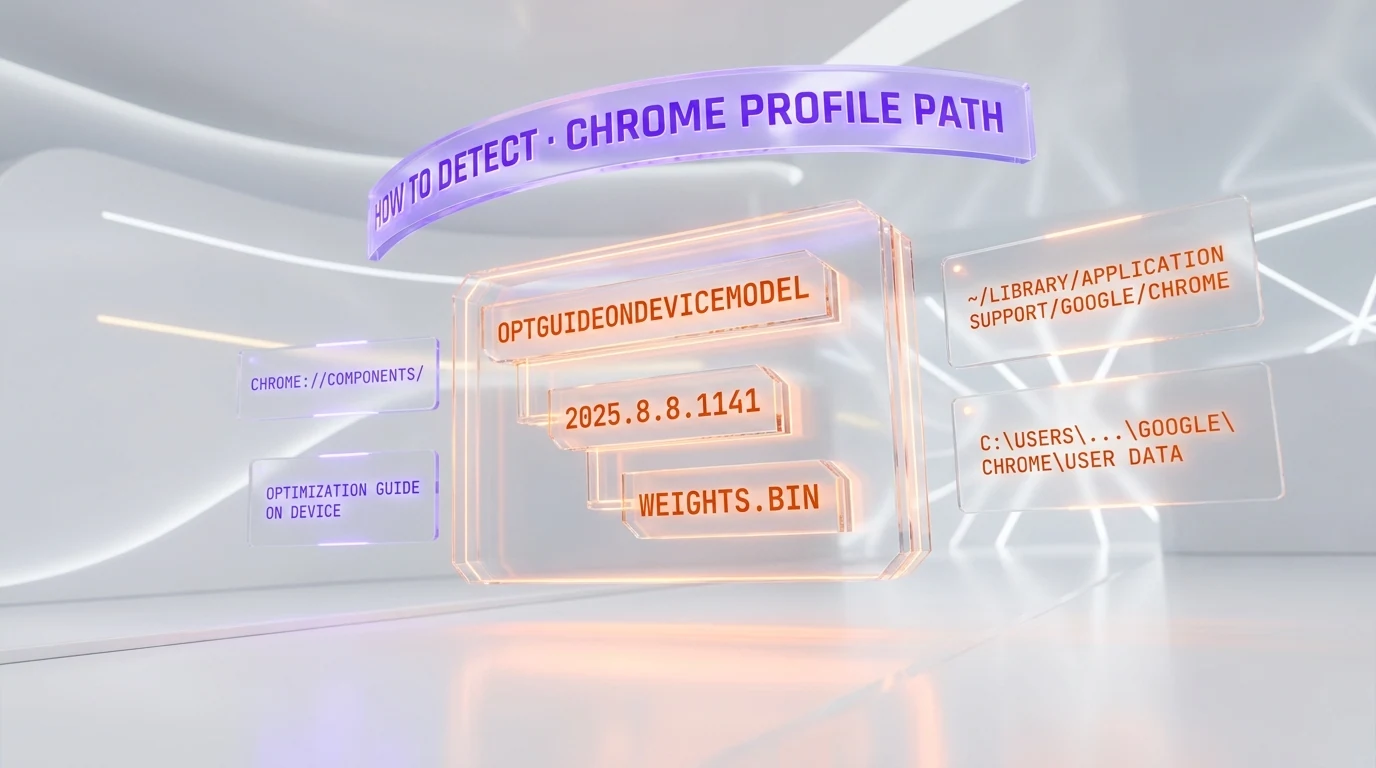
Detection takes under sixty seconds. The model's storage path is deterministic, and Chrome surfaces its component status in a built-in diagnostic page.
Method 1: filesystem path
The fastest signal is the existence of the directory OptGuideOnDeviceModel inside your Chrome user-data folder.
- Windows.
C:\Users\<you>\AppData\Local\Google\Chrome\User Data\OptGuideOnDeviceModel\— followed by a version subdirectory (for example2025.8.8.1141) and theweights.binfile. File size approximately 4GB. - macOS.
~/Library/Application Support/Google/Chrome/OptGuideOnDeviceModel/— same version subdirectory pattern. - Linux.
~/.config/google-chrome/OptGuideOnDeviceModel/— same pattern.
Method 2: chrome://components/
Open a new Chrome tab and paste chrome://components/. The list contains an entry titled "Optimization Guide On Device Model." If a version number is shown next to it (e.g. 2025.8.8.1141), the model is already on your machine. If the entry shows "0.0.0.0," it has not been downloaded — yet.
Method 3: about:flags audit
Visit chrome://flags/ and search for optimization-guide-on-device-model. The flag governs whether Chrome is allowed to background-download the model. Default state is "Default" (which resolves to enabled for most users). Setting it to "Disabled" prevents future installs but does not delete an existing copy.
How to disable Chrome's AI download — for real
The single most important detail: simply deleting weights.bin does not work. Chrome's OnDeviceModelBackgroundDownload service treats a missing model as a request for redownload, and the file reappears within hours. Persistent removal requires policy-level intervention.
Option A: Chrome enterprise policy (Windows registry)
For Windows users with administrator rights, the most permanent block is to set the GenAILocalFoundationalModelSettings Chrome enterprise policy to value 1 (model download disabled).
- Open
regeditand navigate toHKEY_LOCAL_MACHINE\SOFTWARE\Policies\Google\Chrome(create theGoogle\Chromekeys if absent). - Right-click → New → DWORD (32-bit) Value → name it
GenAILocalFoundationalModelSettings→ set value to1. - Restart Chrome. The model directory will not be repopulated.
Option B: Chrome flags (less permanent)
Visit chrome://flags/#optimization-guide-on-device-model, set to "Disabled," and relaunch Chrome. This blocks fresh installs on the current profile, but a future Chrome update may reset the flag to "Default."
Option C: macOS / Linux configuration profile
On macOS, deploy a configuration profile (com.google.Chrome.plist) with the key GenAILocalFoundationalModelSettings set to integer 1. On Linux, drop a JSON file into /etc/opt/chrome/policies/managed/ with the same key. Both methods enforce the policy at the OS level.
The GDPR and ePrivacy legal angle
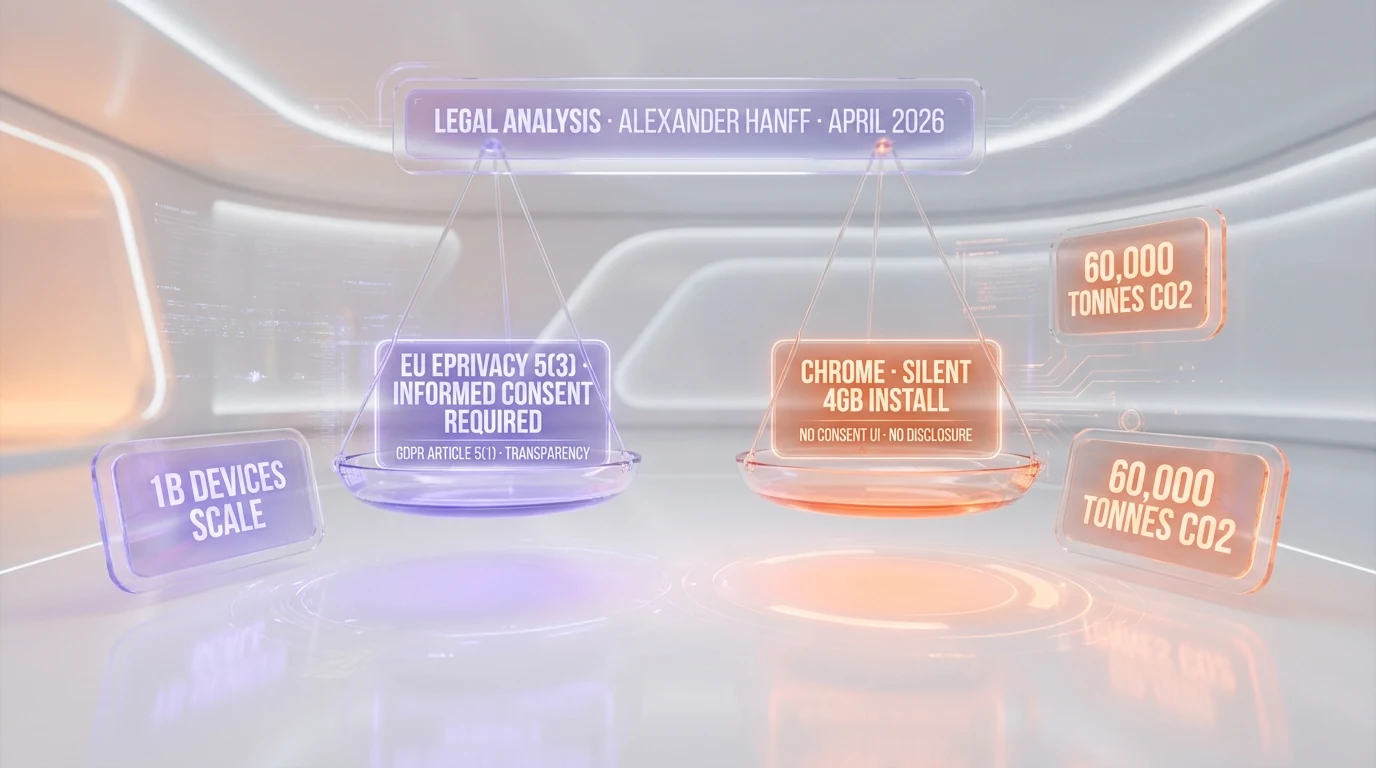
Three regulatory regimes are in play, and Hanff's reading — corroborated by independent privacy practitioners cited in EU enforcement-focused outlets — is that Chrome's silent install is hard to defend on any of them.
ePrivacy Directive Article 5(3) — terminal-storage consent
Article 5(3) of the EU ePrivacy Directive (recast 2009/136/EC) is the rule most non-EU readers know as "the cookie law." Its actual scope is broader: it requires prior, informed consent before storing any information on a user's terminal equipment, with a single narrow exception — storage strictly necessary to provide a service the user has explicitly requested. Chrome's silent install of a 4GB on-device LLM, which powers default-on features such as the Summarizer API, the Prompt API, and "Help me write" composition assistance, is not plausibly characterized as "strictly necessary" to render the web. The user did not request the model. The model was placed first, with the user-facing settings UI shipping later.
GDPR Article 5(1) — lawfulness, fairness, transparency
Even setting aside Article 5(3) of ePrivacy, GDPR Article 5(1) requires that any personal-data processing be lawful, fair, and transparent to the data subject. Local LLM inference on browsing data is processing. Doing so without notifying the user that the model has been deployed locally — and without a clear policy disclosure — pulls hard against the transparency limb. Hanff also cites GDPR Article 25, which mandates "data protection by design and by default": shipping the model before the consent surface is the textbook definition of failing that obligation.
California CCPA
The California Consumer Privacy Act and its successor CPRA are weaker on terminal storage than ePrivacy — California operates on opt-out for sale-of-data, not opt-in for storage — but the Attorney General has signaled in past enforcement that "dark patterns" around consent surface design are actionable. A 4GB silent install with no user-visible disclosure is a textbook dark pattern under California's 2023 enforcement guidance.
The deceptive design pattern hiding in plain sight
Hanff's most pointed finding is not the install itself — it is the disconnect between Chrome's user-facing AI affordances and what those affordances actually do. The visible "AI Mode" pill in Chrome's address bar, which lights up to suggest that AI processing is happening locally, in fact routes queries to Google's cloud servers. The local Gemini Nano model is used for entirely different surfaces, primarily the Summarizer/Prompt/Writer/Rewriter web APIs that any visited website can invoke against a user's machine. Users plausibly believe their on-device queries stay local; in reality, the visible interface ships data to Google, while the invisible local model executes silently against any website that asks.
The climate footprint Hanff modeled
Using a conservative energy-intensity baseline of 0.06 kWh per GB of data transferred and 0.25 kg CO2e per kWh of electricity, Hanff modeled the carbon cost of pushing 4GB to every Chrome user worldwide.
| Install scale | Estimated CO2 emissions | Equivalent |
|---|---|---|
| 100M devices | 6,000 tonnes | ~1,300 EU passenger cars driven for one year |
| 500M devices | 30,000 tonnes | ~6,500 EU passenger cars driven for one year |
| 1B devices | 60,000 tonnes | ~13,000 EU passenger cars driven for one year |
Independent climate-cost reviewers have flagged Hanff's per-GB intensity assumption as on the conservative side — real numbers may run higher once edge-CDN energy and storage refresh cycles are included. The point of the calculation is not the precise tonnage. It is the order of magnitude: a single autoupdate, multiplied by 1B devices, is in the same scale as municipal-fleet emissions of a mid-sized European city.
What Google's own policies say
Chrome's privacy whitepaper and AI documentation, as of May 2026, continue to characterize the on-device model as opt-in. Hanff's evidence shows the opposite: the model arrives before any user-facing opt-in surface fires. Google has not, at the time of this writing, published an official response to Hanff's specific forensic claims. Independent reporting from Cybernews and The Coders Blog notes that Chrome's stable channel release notes for version 148 mention "improved on-device features" without disclosing the install size or the consent gap.
Market context: who else is doing this?
Chrome is not alone in shipping local model weights — but it is alone in the scale-to-disclosure ratio. Apple's Apple Intelligence ships a similar-sized on-device foundation model on macOS Sequoia and iOS 18, but the install is gated behind an explicit opt-in modal during OS setup, and the user-facing description names the feature, the size, and the disabling path. Microsoft's Phi Silica on Copilot+ PCs ships pre-installed by hardware OEMs and is disclosed in the device's marketing materials. Mozilla Firefox has explicitly chosen not to ship local LLM weights by default, citing exactly the consent-surface concerns Hanff raises. Among major browsers, Chrome is the outlier in the gap between install scale and disclosure.
What to watch next
- EU enforcement. Watch CNIL (France), the Irish Data Protection Commission (Google's lead EU supervisory authority), and the German Bundesbeauftragte für den Datenschutz. Article 5(3) ePrivacy violations are enforceable at the national level, and historical enforcement timelines run 6 to 18 months from formal complaint to first fine.
- Civil discovery in the U.S. Class-action plaintiffs' bar is already prospecting for named plaintiffs — the unique disk-usage and bandwidth-billing harms make a CCPA private-right-of-action theory plausible.
- Google's response. The most likely outcome is a Chrome update that ships an explicit consent modal and ports the install behind it. Whether that retroactively cures the existing 1B-device install is a separate legal question.
- Rival browsers. Brave, Vivaldi, and DuckDuckGo's browser have all communicated on Hanff's findings — expect "we don't do this" marketing within weeks.
The Planet Tools take
This is not a new internet outrage cycle. It is an inflection point in how shipped browser weights interact with EU consent law. The technical fact pattern — kernel-logged install, no consent UI, default-on AI surfaces invocable by any website — is the cleanest test case yet for whether ePrivacy Article 5(3) extends to AI model storage on a user's terminal. If the EU enforcement answer is yes, every browser, every OS vendor, and every AI feature shipped silently to a user's device becomes a consent surface — and the entire on-device AI rollout has to be re-architected. The 4GB on a billion laptops is the plot device. The question is whether the law catches up.
Frequently asked questions
What is the OptGuideOnDeviceModel folder in Chrome?
It is the directory Chrome 148 uses to store the unpacked weights of Gemini Nano, Google's on-device large language model. The folder lives inside Chrome's user-data directory and contains a version subfolder (e.g. 2025.8.8.1141) and a single 4GB file named weights.bin. The model is invoked by Chrome's Summarizer API, Prompt API, Writer/Rewriter APIs, and the "Help me write" composition surface.
How long did Alexander Hanff's investigation say the install takes?
14 minutes and 28 seconds, measured on a clean macOS user profile with a fresh Chrome 148 install on April 24, 2026. The timing was captured by the macOS kernel-level .fseventsd filesystem event log, which is tamper-resistant from userspace applications.
Does deleting weights.bin actually remove Gemini Nano from my Chrome?
Only temporarily. Chrome's OnDeviceModelBackgroundDownload service treats a missing model file as a redownload trigger, and within hours the 4GB file reappears. Persistent removal requires setting an enterprise policy — GenAILocalFoundationalModelSettings = 1 on Windows registry, or the equivalent macOS configuration profile or Linux managed-policy JSON.
Does Chrome's silent install violate the EU GDPR?
The strongest legal exposure is under ePrivacy Directive Article 5(3), which requires prior, informed consent before any terminal storage that is not strictly necessary to deliver a user-requested service. Hanff and EU privacy practitioners argue that 4GB of LLM weights powering opt-in features the user never asked for fail the strictly-necessary test. GDPR Article 5(1) on transparency and Article 25 on data protection by design are also implicated. Final adjudication rests with national supervisory authorities — most likely the Irish DPC as Google's lead authority.
Why doesn't Chrome show a consent prompt before downloading the model?
Chrome currently treats Gemini Nano as a browser component, similar to how component updates for the codec subsystem are delivered. Component updates historically have not required user-facing consent because they are framed as security and stability fixes. The disagreement raised by Hanff and EU privacy lawyers is whether a 4GB AI model that powers website-invocable APIs can be classified the same way as a critical security patch. Most observers say no.
How can I verify whether Gemini Nano is already installed on my computer?
Open a new Chrome tab and visit chrome://components/. Look for the entry titled "Optimization Guide On Device Model." If the version field shows a non-zero version number (for example 2025.8.8.1141), the model is on your machine. If it shows 0.0.0.0, it has not been downloaded yet. You can also check directly for the OptGuideOnDeviceModel directory in your Chrome user-data path.
Does this affect Chromium-based browsers like Brave, Edge, and Opera?
It depends on how each fork handles the upstream Chromium component. Microsoft Edge does ship a similar on-device model integration but disables the default-on download for enterprise SKUs. Brave has explicitly disabled the Gemini Nano component download in its build. Vivaldi and Opera have communicated they will offer explicit user-facing toggles before any local model deployment. Always verify with your specific browser's documentation.
What is the climate cost of installing a 4GB model on 1 billion devices?
Hanff's conservative model — 0.06 kWh per GB of data transferred and 0.25 kg CO2e per kWh of electricity — yields approximately 60,000 tonnes of CO2 emissions for a full 1B-device rollout. That is comparable to roughly 13,000 European passenger cars driven for one year. Independent climate-impact reviewers have noted the figure is on the conservative side once CDN edge energy and storage refresh cycles are accounted for.
Has Google responded to Alexander Hanff's investigation?
As of publication, Google has not published an official, on-the-record response to Hanff's specific forensic claims. Chrome's stable-channel release notes for version 148 mention "improved on-device AI features" without disclosing the install size, the install path, or the consent-surface gap. Independent reporting from Cybernews, ConductAtlas, and That Privacy Guy has reproduced the install pattern and corroborated the forensic chain.
What should I do right now if I run Chrome 148 on a regulated device?
If your device is subject to enterprise compliance (HIPAA, PCI-DSS, GDPR processor obligations), block the model deployment via the GenAILocalFoundationalModelSettings enterprise policy now and document the action in your data-protection records. Then consult with your DPO or legal team on whether a notification under your data-protection authority is appropriate given that 4GB of third-party model weights have been written to a regulated endpoint without prior consent. Treat this as a P0 control until your organization has formally assessed the risk.