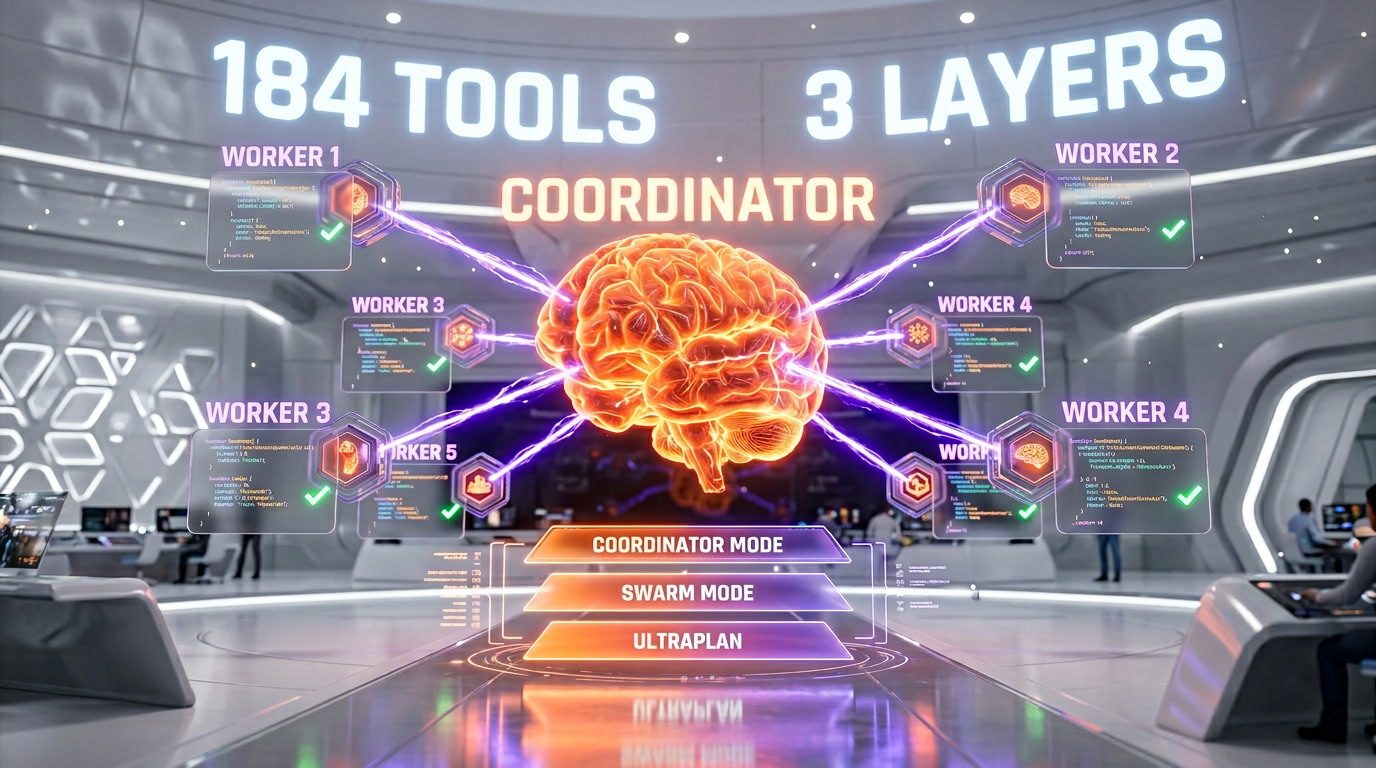
The Claude Code source leak of March 31, 2026 revealed a complete multi-agent orchestration system hidden behind feature flags. Three distinct layers power it: Coordinator Mode (one lead agent directing N parallel workers through 4 phases), Agent Teams/Swarm Mode (separate CLI processes coordinating via filesystem at ~/.claude/teams/), and ULTRAPLAN (30-minute cloud planning sessions on Opus 4.6). The architecture's defining insight: orchestration logic is a prompt, not code — the coordinator directs workers through natural language instructions like "Parallelism is your superpower" and "Do not rubber-stamp weak work." 184 tool modules, 6 built-in agents, and an XML-based task notification system connect it all.
The Architecture Overview: Three Layers of Multi-Agent Orchestration
When the Claude Code source map leaked on March 31, 2026, most attention focused on headline features like KAIROS (the always-on daemon) and Buddy (the Tamagotchi companion). But the most architecturally significant discovery was the multi-agent orchestration system — a production-grade framework for running multiple AI agents in parallel, coordinated through prompts rather than procedural code.
The system operates on three distinct layers, each designed for different scales of parallelism:
| Layer | Mode | Process Model | Communication | Use Case |
|---|---|---|---|---|
| 1 | Coordinator Mode | Single process, inline workers | XML task-notification | Complex tasks requiring research + implementation |
| 2 | Agent Teams / Swarm | Separate CLI processes per teammate | Filesystem + peer-to-peer messaging | Large projects needing independent context per agent |
| 3 | ULTRAPLAN | Remote cloud container (CCR) | WebSocket/SSE + sentinel teleportation | Deep planning requiring up to 30 min of Opus 4.6 compute |
Underneath all three layers sits the AgentTool module — the core engine that spawns, manages, and tracks sub-agents. With 20 modules (the largest tool group in the codebase), AgentTool handles agent lifecycle from creation through memory snapshot to completion.
The Core Engine: AgentTool and the Sub-Agent System
Every multi-agent operation in Claude Code ultimately flows through AgentTool, located in tools/AgentTool/. This module provides the building blocks that Coordinator Mode, Agent Teams, and ULTRAPLAN all depend on.
Agent Lifecycle: How a Sub-Agent Runs
When a sub-agent is spawned via runAgent.ts, five steps execute in sequence:
- A unique agent identifier is generated (
agentId.ts) - Execution context is isolated via
AsyncLocalStorage(agentContext.ts) - The agent receives a subset of tools from its parent
- The agent runs in its own LLM loop (a distinct QueryEngine instance)
- Results are pushed back to the parent via XML
<task-notification>
Agents are never polled. They push completion notifications to the coordinator when their work finishes. An idle agent sends an idle_notification automatically after each LLM turn. Sending a message to an idle agent wakes it at the next polling cycle, handled by resumeAgent.ts.
The 20-Module AgentTool Architecture
| Module | Role |
|---|---|
| AgentTool.tsx | Main React/Ink component for agent tool |
| runAgent.ts | Full agent lifecycle execution |
| resumeAgent.ts | Resume paused or idle agents |
| forkSubagent.ts | Unix fork()-like agent duplication |
| agentMemory.ts | Persistent memory between agents |
| agentMemorySnapshot.ts | Memory state capture for transfer |
| agentColorManager.ts | Visual color assignment for tmux panes |
| builtInAgents.ts | Registry of 6 pre-configured agents |
| loadAgentsDir.ts | Dynamic loading from ~/.claude/agents/ |
| prompt.ts | System prompts for agents |
Supporting modules in utils/ handle agent context management (agentContext.ts), ID generation (agentId.ts), swarm mode gating (agentSwarmsEnabled.ts), and session search (agenticSessionSearch.ts).
Six Built-in Agents
Claude Code ships with six pre-configured agents, each specialized for a phase of the multi-agent workflow:
- exploreAgent.ts — Codebase exploration. Uses Glob, Grep, and FileRead autonomously to map project structure during the Coordinator's Research phase
- planAgent.ts — Task decomposition and planning. Linked to the Plan Mode system and potentially ULTRAPLAN
- generalPurposeAgent.ts — Default worker when no specialization is needed. Inherits the full tool set
- verificationAgent.ts — Post-implementation verification. Runs tests, checks builds, validates specs in the Coordinator's final phase
- claudeCodeGuideAgent.ts — Self-help agent for Claude Code usage assistance
- statuslineSetup.ts — Multi-agent terminal status bar configuration
Beyond built-in agents, users can define custom agents in ~/.claude/agents/, loaded dynamically by loadAgentsDir.ts.
Coordinator Mode: Prompt-Based Orchestration
Coordinator Mode, gated behind the COORDINATOR_MODE feature flag and activatable via CLAUDE_CODE_COORDINATOR_MODE=1, is the most sophisticated of the three multi-agent layers. Its defining architectural decision: the orchestration algorithm is a prompt, not code.
Rather than managing workers through procedural logic (DAG scheduling, state machines, or message queues), the coordinator agent receives natural language instructions in its system prompt that define how to direct workers. This is a fundamentally different approach from traditional orchestration frameworks like Apache Airflow, Temporal, or Prefect.
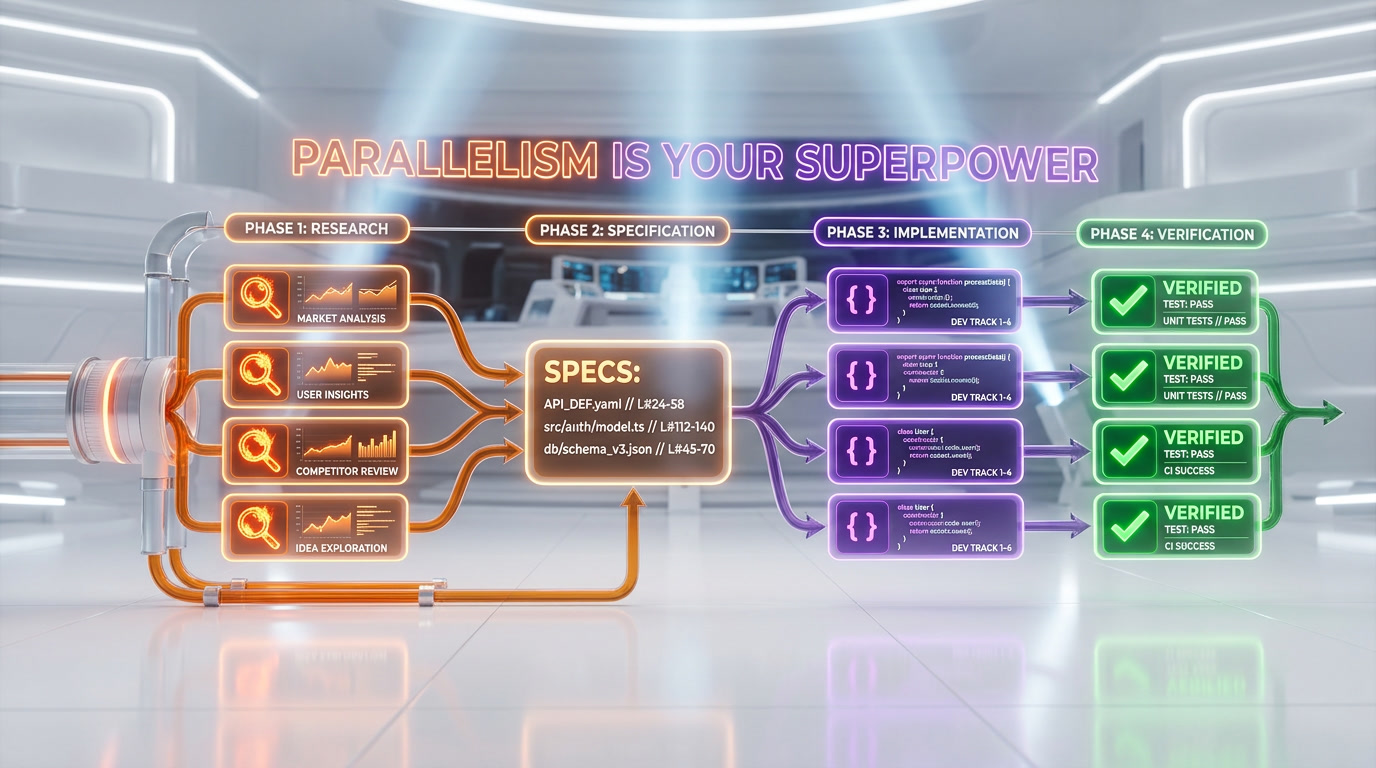
The Four Phases
Phase 1 — Research (parallel). Workers explore the codebase simultaneously, each analyzing a different aspect of the problem. They use Glob, Grep, FileRead, and other tools autonomously. Each worker reports findings via XML <task-notification> messages. The coordinator does not poll workers — they push notifications on completion.
Phase 2 — Specification (coordinator only). The coordinator reads all worker discoveries and synthesizes them into precise specs with file paths, line numbers, and exact changes required. The system prompt enforces: "You must understand findings before directing follow-up work. Never hand off understanding to another worker." This prevents the coordinator from becoming a mere message router.
Phase 3 — Implementation (parallel). Workers implement changes according to the specifications. Each worker commits its changes independently. The coordinator validates quality with a strict rule: "Do not rubber-stamp weak work."
Phase 4 — Verification (parallel). Workers verify that changes work correctly. The verificationAgent likely drives this phase, executing tests, checking builds, and validating coherence across all changes.
Key System Prompt Rules
The leaked coordinatorMode.ts reveals the natural language rules governing the coordinator:
- "Parallelism is your superpower." Workers are async. The coordinator must launch independent workers concurrently whenever possible rather than sequentially.
- "Do not rubber-stamp weak work." The coordinator must critically evaluate worker output and reject inadequate results.
- "You must understand findings before directing follow-up work." The coordinator cannot delegate understanding. It must comprehend research results before creating implementation specs.
- Specs must be precise: File paths, line numbers, exact changes required. No vague instructions.
Shared Scratchpad (tengu_scratch)
Workers share a durable scratchpad directory, gated behind the tengu_scratch feature flag. This shared workspace persists discoveries from the Research phase so that Implementation workers can reference them without re-exploring. The scratchpad serves as a knowledge base that survives across agent lifecycles within a single coordination session.
Permission Handling
The coordinator has its own permission handler (coordinatorHandler.ts) separate from the standard interactive handler. This is necessary because the coordinator must auto-approve certain tool operations for its workers — you cannot have a human confirm every file read across 5 parallel research agents. The swarm worker handler (swarmWorkerHandler.ts) applies more restrictive permissions to workers than the coordinator receives.
Agent Teams / Swarm Mode: Distributed CLI Coordination
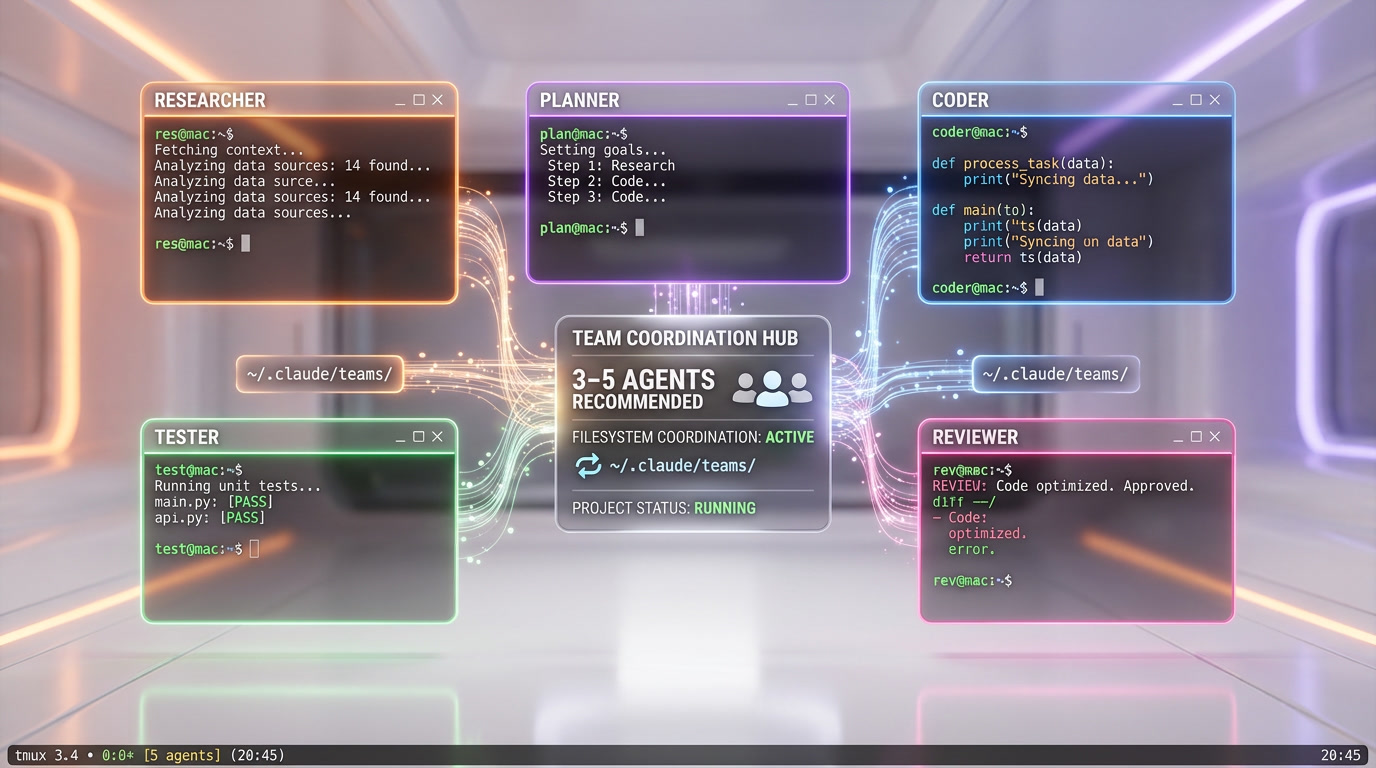
While Coordinator Mode runs everything in a single process, Agent Teams (also called Swarm Mode) takes a fundamentally different approach: each teammate is a separate Claude CLI process with its own context window, token budget, and terminal pane.
Subagents vs. Agent Teams: The Critical Distinction
| Aspect | Subagents (Coordinator) | Agent Teams (Swarm) |
|---|---|---|
| Process model | Same process, shared context | Separate CLI processes |
| Context isolation | Weak (AsyncLocalStorage) | Strong (independent context windows) |
| Communication | Direct return to caller | Peer-to-peer messaging via filesystem |
| Token cost | Shared token budget | Independent token budgets per teammate |
| Visibility | Invisible (inline execution) | Visible (tmux panes, color-coded) |
| Best for | Quick parallel tasks within one problem | Large projects needing deep independent exploration |
The 13 Operations in 4 Categories
The TeammateTool system exposes 13 operations organized into four categories, first discovered by kieranklaassen through reverse engineering of Claude Code v2.1.29:
1. Team Lifecycle. TeamCreateTool creates a team with a name and configuration. TeamDeleteTool stops all teammates and removes the team.
2. Membership. Adding teammates spawns new claude CLI processes. Each teammate can be configured with roles: lead, worker, or specialist.
3. Coordination. SendMessageTool enables peer-to-peer messaging between any two teammates. Task assignment uses the Task system with file-locked claiming to prevent race conditions when multiple agents grab the same task.
4. Shutdown. Graceful teammate shutdown with notification propagation via useTeammateShutdownNotification.ts.
Filesystem-Based Coordination Protocol
All team coordination runs through the filesystem, not network protocols. The directory structure under ~/.claude/ serves as both message bus and state store:
~/.claude/teams/{team-name}/config.json— Team configuration~/.claude/teams/{team-name}/{agent-name}/inbox/— Incoming messages per agent~/.claude/tasks/{team-name}/{task-id}.json— Task files with status tracking
This filesystem approach provides natural persistence (tasks survive process crashes), simple concurrency control (file locks), and zero dependency on external infrastructure (no Redis, no message queues, no database).
Three Deployment Modes
In-process mode (default without tmux): All teammates run in the same terminal. Users navigate between them with Shift+Down. Context isolation uses AsyncLocalStorage.
Split panes mode (tmux/iTerm2): Each teammate gets its own terminal pane, color-coded for visual distinction via agentColorManager.ts. Users can click directly on any pane to interact with that teammate. Auto-configured when running inside an existing tmux session.
Auto mode (default): Detects tmux availability. If present, uses split panes. Otherwise, falls back to in-process.
Competing Hypothesis Debugging
One of the most interesting features discovered in the Agent Teams system is Competing Hypothesis Debugging. When investigating a bug, multiple agents each propose a different hypothesis about the root cause and then debate each other. Each agent argues for its hypothesis based on evidence found through code exploration. This adversarial approach to debugging mirrors how experienced engineering teams naturally work — different engineers advocating for different theories until evidence converges on the actual cause.
Team Memory and Recommendations
Team memory is managed through teamMemPaths.ts and teamMemPrompts.ts, providing shared memory synchronized across all teammates. The recommended team size is 3-5 teammates. Beyond that, coordination overhead exceeds the parallelism gains. Token costs scale linearly since each teammate maintains its own context window.
ULTRAPLAN: 30 Minutes of Cloud-Powered Planning
ULTRAPLAN represents the most ambitious planning system found in the leak. It is an internal-only command (not in public builds) that offloads complex planning to a remote cloud container running Opus 4.6 for up to 30 minutes of continuous compute.
How ULTRAPLAN Works
Step 1 — Detection by keyword. ULTRAPLAN is not a slash command. The system detects the word "ultraplan" in user input, replaces it with "plan" to keep the forwarded prompt grammatical, and initiates the remote planning sequence. Detection is sophisticated enough to avoid false positives from casual mentions.
Step 2 — Remote CCR session. A Claude Code Remote (CCR) session is created on cloud infrastructure. The remote session is pre-configured in plan mode and runs Opus 4.6, the most powerful available model. The local CLI polls the remote session every 3 seconds for up to 30 minutes. The remote Claude explores the codebase, decomposes the task, and plans the implementation.
Step 3 — Teleportation. When the remote Claude finishes planning (by calling ExitPlanMode), the plan is "teleported" to the local terminal via a sentinel string: __ULTRAPLAN_TELEPORT_LOCAL__. The rejection feedback from the browser interface carries the sentinel, keeping the remote session in plan mode while extracting the plan text. The local CLI then executes the plan.
Infrastructure
ULTRAPLAN relies on several infrastructure components discovered in the leak:
cli/transports/ccrClient.ts— Client for communicating with Claude Code Remote containersremote/RemoteSessionManager.ts— Remote session lifecycle managementremote/SessionsWebSocket.ts— WebSocket communication with CCR- SSE (Server-Sent Events) as secondary transport
The ULTRAPLAN feature is gated behind the tengu_ultraplan_model flag and listed in INTERNAL_ONLY_COMMANDS. A browser interface allows Anthropic engineers to visualize the plan as it develops, approve or reject it, and modify it before local execution.
Supporting Systems: Fork, Spawn, Tasks, and Communication
Fork Subagent
The forkSubagent.ts module implements a Unix fork() analogy for AI agents. It creates an exact copy of the current agent — same conversation context, same memory, same available tools — that then evolves independently. The memory state is captured at fork time via agentMemorySnapshot.ts. Use cases include exploring alternative problem-solving approaches without losing the current context, and saving agent state before risky operations.
Spawn Multi-Agent
The spawnMultiAgent.ts primitive (in tools/shared/) launches multiple agents in parallel in a single operation. It underlies all three orchestration layers: Coordinator Mode spawns workers, Agent Teams spawns teammates, and ULTRAPLAN creates remote sessions through it. Each agent config specifies its prompt, tool subset, constraints (timeout, max cost), and execution mode (in-process, tmux pane, or remote CCR).
Task System
Six TaskTools manage the complete task lifecycle across all multi-agent modes:
| Tool | Function |
|---|---|
| TaskCreateTool | Create task with description, assignee, and metadata |
| TaskGetTool | Retrieve task details by ID |
| TaskListTool | List tasks with filtering by status, team, etc. |
| TaskOutputTool | Get output/result of a completed task |
| TaskStopTool | Stop a running task |
| TaskUpdateTool | Update task status or description |
Tasks follow a simple lifecycle: CREATED → ASSIGNED → RUNNING → COMPLETED (or FAILED/STOPPED).
SendMessageTool: Inter-Agent Communication
The SendMessageTool supports three addressing schemes, enabling communication across all contexts:
to: "researcher"— Address a teammate by nameto: "uds:/.../sock"— Address a local Unix Domain Socket for cross-session communicationto: "bridge:..."— Address a remote agent via Bridge mode
Discovery of available peers is handled by ListPeersTool, which reads the sessions directory at ~/.claude/sessions/.
What This Means for AI-Powered Development
The Claude Code multi-agent architecture revealed by the leak shows where AI-assisted development is heading. The key insights for the industry:
Prompt-based orchestration scales. Traditional workflow engines require explicit DAG definitions, state machine transitions, and error handling code. Claude Code's approach — encoding orchestration rules in natural language — allows the coordinator to adapt dynamically to unexpected situations. The tradeoff is less predictability, but the flexibility gains appear to outweigh this in practice for software engineering tasks.
Multiple parallelism models coexist. Coordinator Mode (shared process), Agent Teams (separate processes), and ULTRAPLAN (remote cloud) serve different scales. This mirrors how distributed systems in general require different coordination patterns at different scales.
Filesystem beats network for local coordination. Agent Teams' use of ~/.claude/teams/ and ~/.claude/tasks/ for all coordination is a pragmatic choice that avoids dependency on databases, message brokers, or custom IPC. Files provide persistence, lock files provide concurrency control, and directory watchers provide event notification.
Adversarial debugging is novel. Competing Hypothesis Debugging, where agents argue different root cause theories, introduces a mechanism for reducing confirmation bias in automated bug investigation. This pattern is worth watching as it could influence how other AI agent frameworks approach complex problem-solving.
The multi-agent system discovered in the Claude Code leak is not publicly available in its full form. Coordinator Mode and ULTRAPLAN remain behind feature flags. Agent Teams was officially announced in February 2026 but the full capabilities exposed in the leak (delegate mode, competing hypothesis debugging, team memory) go well beyond what has been documented. As these features gradually roll out, they will redefine what a "coding assistant" can do.
Frequently Asked Questions
What is Claude Code's Coordinator Mode?
Coordinator Mode is a multi-agent orchestration system hidden in Claude Code, gated behind the COORDINATOR_MODE feature flag. It transforms a single Claude Code instance into an orchestrator where one "lead" agent directs N worker agents in parallel. The workflow follows 4 phases: Research (parallel exploration), Specification (coordinator synthesizes findings), Implementation (parallel coding), and Verification (parallel testing). Its key innovation is that the orchestration logic is defined through natural language prompts rather than procedural code.
How do Agent Teams differ from Coordinator Mode?
Agent Teams (Swarm Mode) uses separate CLI processes for each teammate, while Coordinator Mode runs everything in a single process. This gives Agent Teams stronger context isolation (each teammate has its own context window and token budget) but higher communication overhead (filesystem-based messaging vs. direct return). Agent Teams supports tmux/iTerm2 split panes for visual multi-agent work, and includes unique features like Competing Hypothesis Debugging where agents argue different theories about bug root causes.
What is ULTRAPLAN in Claude Code?
ULTRAPLAN is an internal-only command that offloads complex planning to a remote cloud container (CCR) running Opus 4.6 for up to 30 minutes. It is triggered by detecting the keyword "ultraplan" in user input, not as a slash command. The remote Claude explores, plans, and when finished, the plan is "teleported" to the local terminal via a sentinel string. It includes a browser interface for plan visualization and approval. Reserved for Anthropic engineers.
How many agents can Claude Code run in parallel?
For Agent Teams, the recommended size is 3-5 teammates. Beyond that, coordination overhead exceeds parallelism gains. Token costs scale linearly since each teammate maintains its own context window. Coordinator Mode's inline workers share a token budget, making it more efficient for quick parallel tasks but less suitable for deep independent exploration. ULTRAPLAN uses a single remote Opus 4.6 instance with up to 30 minutes of dedicated compute.
Are these multi-agent features available to the public?
Partially. Agent Teams was officially announced in February 2026 and is being progressively rolled out via the feature gate tengu_amber_flint. However, full capabilities like delegate mode, competing hypothesis debugging, and team memory go beyond public documentation. Coordinator Mode remains behind a feature flag (COORDINATOR_MODE) and is not publicly available. ULTRAPLAN is explicitly listed in INTERNAL_ONLY_COMMANDS and is reserved for Anthropic engineers. The leak exposed a roadmap of features 6+ months ahead of public release.