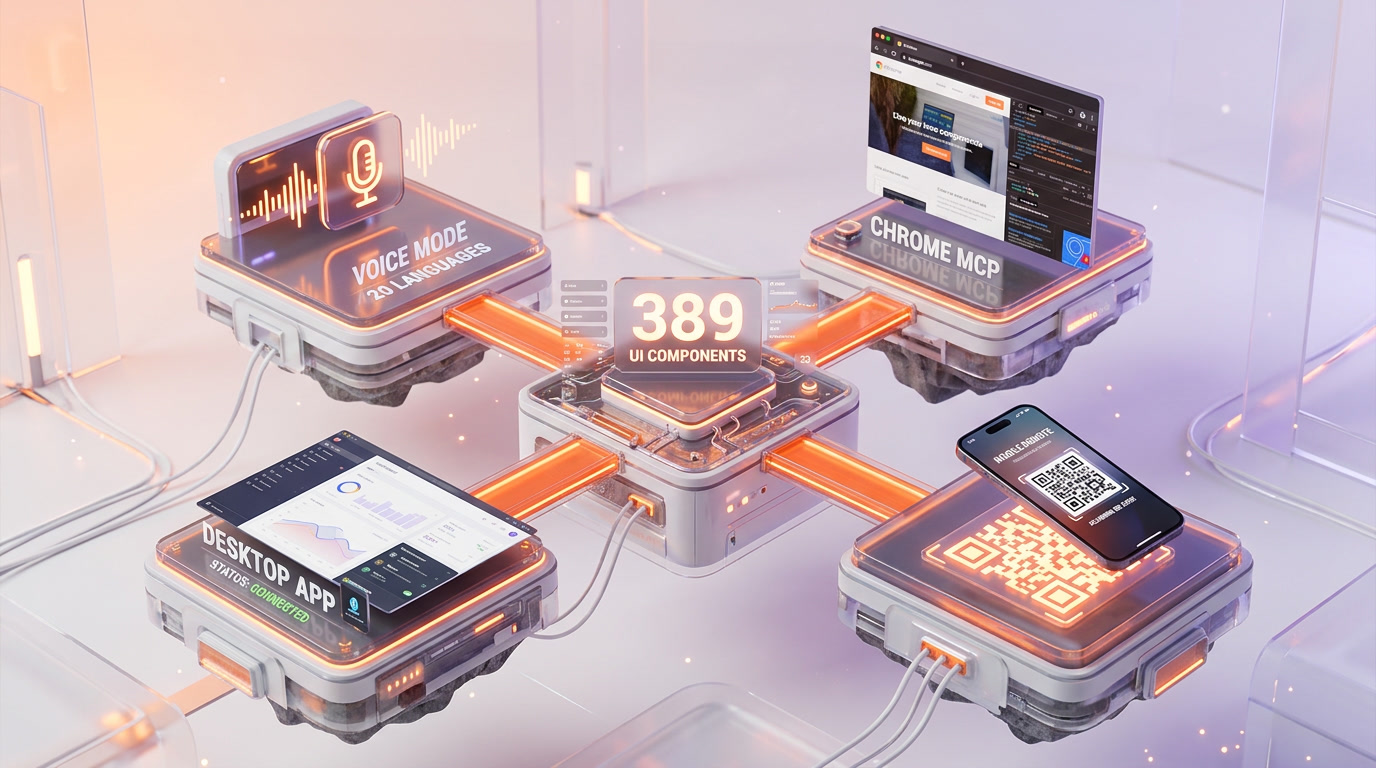
Claude Code is not staying in the terminal. The v2.1.88 source leak reveals a full voice dictation system with push-to-talk via WebSocket in 20 languages, a Chrome DevTools extension using MCP protocol, a desktop app with system tray and global hotkey, and a mobile remote control that generates QR codes over encrypted bridge channels. 389 UI components and 31 bridge modules paint a picture of an AI coding tool evolving into a multi-platform agentic harness.
Voice Mode: Push-to-Talk Dictation for the Terminal
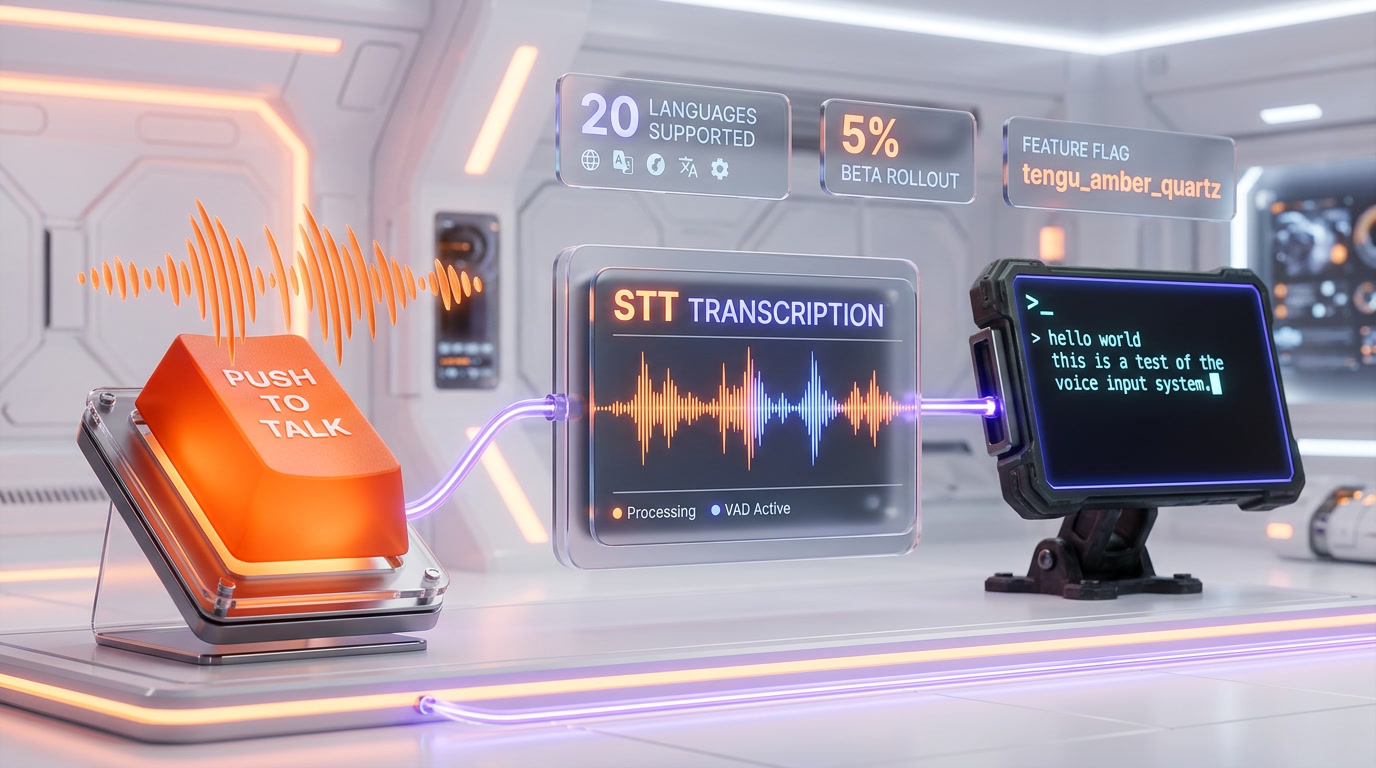
One of the most unexpected discoveries in the leaked source code is a fully implemented voice dictation system hidden behind feature flags. Claude Code — a CLI tool — has speech-to-text capabilities that let you talk to your AI coding assistant instead of typing. The system uses push-to-talk via the Space bar, meaning you hold Space to speak and release to stop — a deliberate design choice to prevent accidental voice input in a terminal environment.
The voice system is gated behind two layers of feature flags: a compile-time flag called VOICE_MODE and a server-side GrowthBook flag named tengu_amber_quartz. There is also an emergency killswitch (tengu_amber_quartz_disabled) that Anthropic can trigger remotely. According to GitHub Issue #33580, voice mode was deployed to approximately 5% of users in a limited beta, with a gradual rollout planned over several weeks. Anthropic has published documentation at code.claude.com/docs/en/voice-dictation, confirming the feature exists in production.
| Voice Mode Detail | Specification |
|---|---|
| Input method | Push-to-talk (Space bar) |
| Authentication | OAuth |
| Output | Text-only (no TTS response) |
| Feature flag (compile) | VOICE_MODE |
| Feature flag (server) | tengu_amber_quartz |
| Beta rollout | ~5% of users |
| Killswitch | tengu_amber_quartz_disabled |
The architecture is minimal but effective. A single module, voiceModeEnabled.ts, acts as a guard that checks four conditions: the compile-time VOICE_MODE flag, the server-side GrowthBook flag, that the killswitch is not active, and that a functioning microphone is present. The transcription converts speech to text that gets injected into the prompt — no voice synthesis in return. This is dictation, not a conversational voice assistant. For developers who spend hours typing prompts, the productivity implications are significant.
Chrome Integration: DevTools as an MCP Server
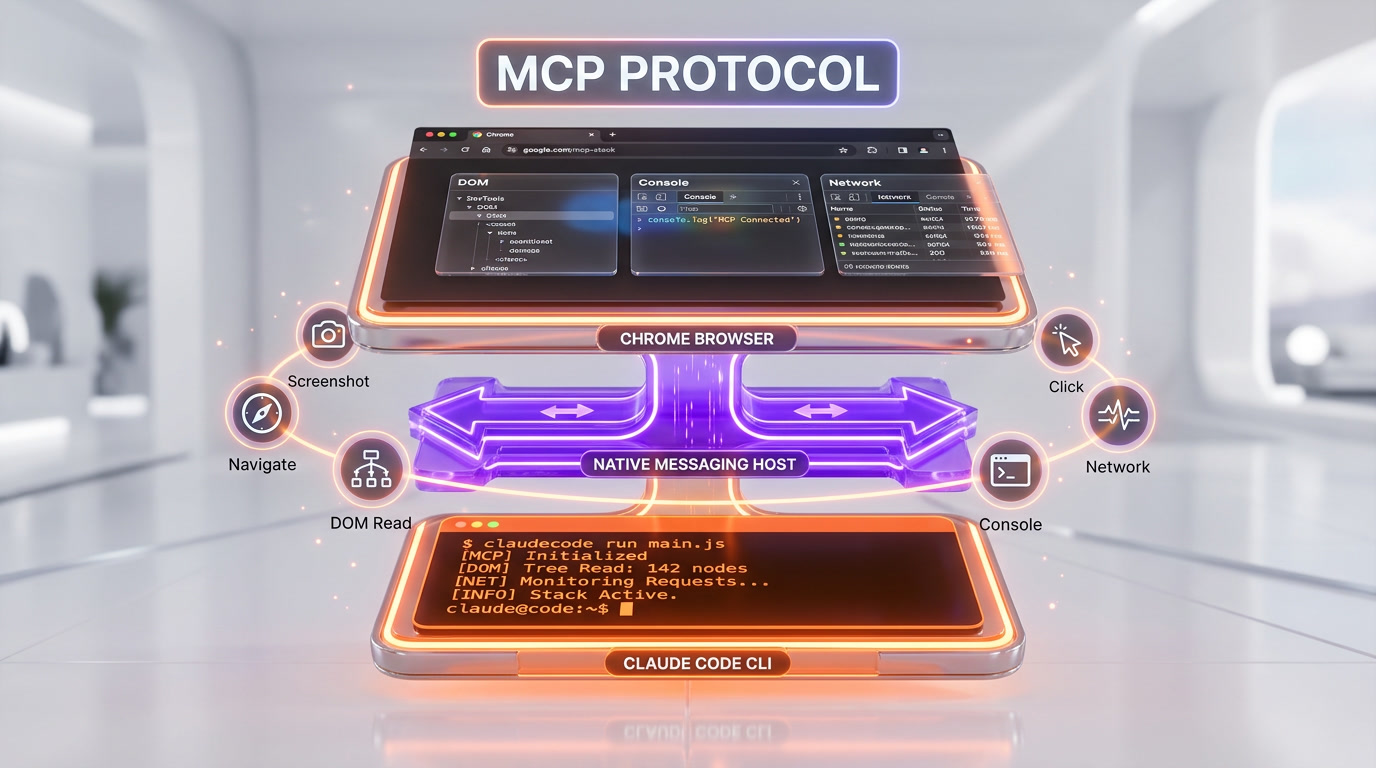
The leak reveals that Claude Code can see and interact with your browser through a Chrome extension that exposes DevTools functionality via the Model Context Protocol (MCP). This is arguably the most architecturally ambitious feature found in the leaked code. The system works through a three-layer architecture: a Chrome extension that installs in the browser, a Native Messaging Host binary that bridges the extension to Claude Code CLI, and the MCP protocol that exposes browser tools.
What Claude Code Can Do in Your Browser
Once connected via the /chrome command or the --claude-in-chrome-mcp CLI flag, Claude Code gains access to six categories of browser tools: page navigation, DOM content reading, page screenshots, element interaction (click, fill forms), console log access, and network request monitoring. The ClaudeInChromeOnboarding.tsx component provides a guided setup flow that walks users through extension installation, native host configuration, connection verification, and a first browser tool test.
There are known issues documented in the source. When both Claude Desktop and Claude Code CLI are installed, they both register a Native Messaging Host with the same Chrome Extension ID, causing conflicts (GitHub Issue #38533). A security bug (Issue #29814, flagged SECURITY) was reported where data from a Chrome MCP session on one machine appeared in a Claude.ai session on a different machine — a session isolation failure with serious privacy implications. WSL2 is not supported, and Flatpak Chrome installations are not auto-detected.
CLI Flags for Chrome
| Flag | Purpose |
|---|---|
--claude-in-chrome-mcp | Activate Chrome MCP integration |
--chrome-native-host | Configure the native messaging host |
--chrome | Shortcut to launch Chrome integration |
Desktop App: System Tray, Auto-Start, and Global Hotkey
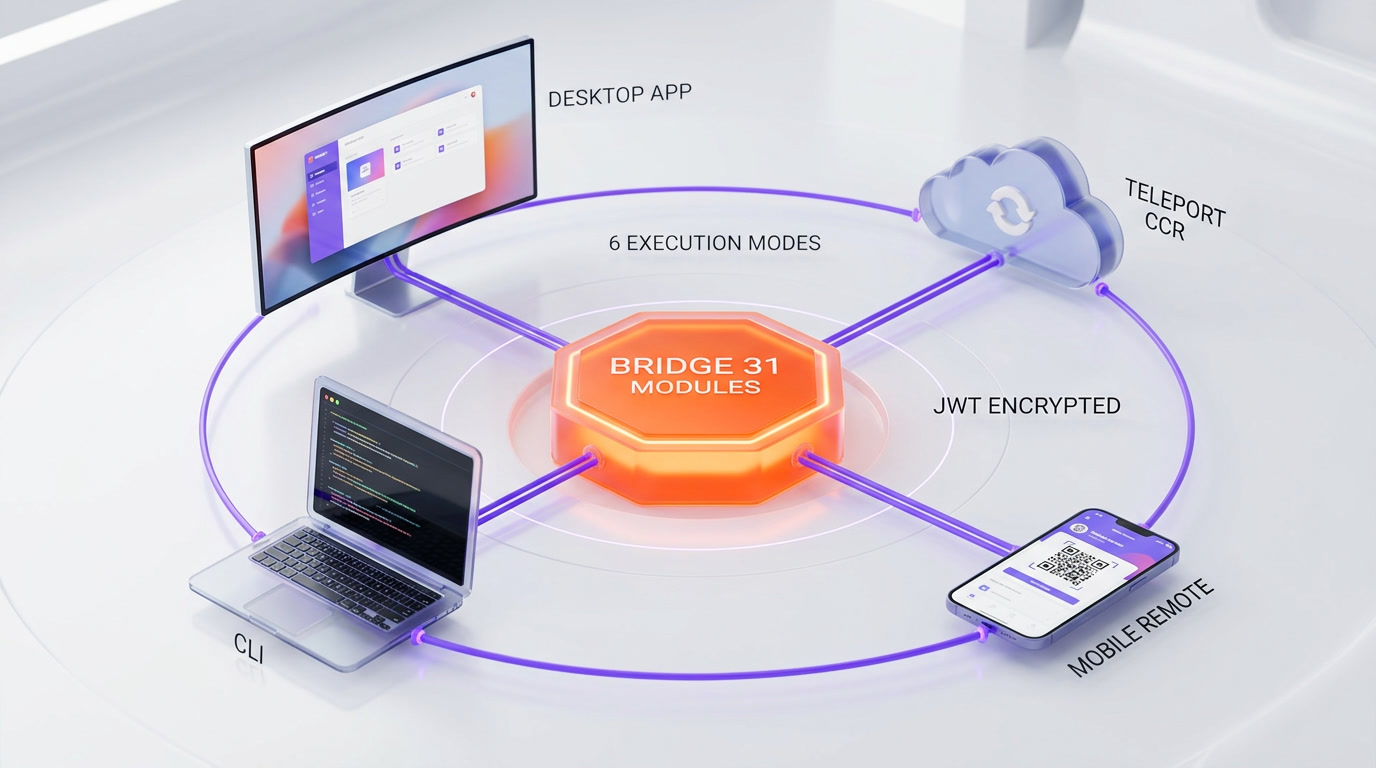
The /desktop command and its associated modules reveal integration with a desktop application — likely the Electron-based Claude.ai app. But the real story is the Bridge System: 31 TypeScript modules that form the communication backbone between every Claude Code interface. The Bridge is not a simple connector — it is a distributed messaging system with JWT authentication, WebSocket transport, bidirectional messaging, permission callbacks across sessions, and automatic reconnection after sleep or network loss.
Bridge Architecture: 31 Modules Deep
The Bridge modules fall into four categories. Core modules (bridgeMain.ts, bridgeApi.ts, bridgeConfig.ts, bridgeMessaging.ts) handle the main communication pipeline. Session modules (codeSessionApi.ts, createSession.ts, remoteBridgeCore.ts) manage session lifecycle. Communication modules (inboundMessages.ts, inboundAttachments.ts, capacityWake.ts, flushGate.ts) handle message flow and wake-up signals. Security modules (jwtUtils.ts, envLessBridgeConfig.ts) manage authentication and encryption.
Security is architected defensively: all traffic passes through the Anthropic API over TLS, credentials are short-lived and scoped to a single use, files and MCP servers never leave the local machine, and only chat messages and tool results transit through the encrypted bridge. The Bridge supports three working modes — single-session, worktree (multiple branches), and same-directory (multiple agents on the same codebase) — each with different isolation guarantees.
Mobile Remote Control: QR Code to Your Terminal
Perhaps the most immediately practical hidden feature is the /mobile command. It activates a remote control mode where Claude Code launches a remote-controllable session locally, registers with the Anthropic API, and generates a URL plus QR code. You scan the code on your phone, tablet, or any browser, and you are connected to your terminal Claude Code session from anywhere.
| Stays Local (Never Leaves Machine) | Transits via Encrypted Bridge |
|---|---|
| File system access | Chat messages |
| MCP servers | Tool results |
| Project configuration | Permissions and approvals |
| Local tools | Session status |
The feature works with claude.ai/code (web), the Claude iOS app, the Claude Android app, and any standard browser. A migration file (migrateReplBridgeEnabledToRemoteControlAtStartup.ts) shows the feature evolved from a basic REPL Bridge concept into a full remote control system. The practical implication: start a complex coding task on your desktop, then monitor and guide it from your couch via your phone.
The Teleport Command: Sessions Across Devices
The /teleport command bundles an entire Claude Code session — context, conversation history, tool states — and transfers it between local and cloud environments. The sentinel value __ULTRAPLAN_TELEPORT_LOCAL__ shows how cloud-computed plans can be teleported back to the local terminal. Combined with the Bridge system and mobile remote control, this creates a seamless multi-device workflow: start on desktop, continue on mobile, finish in the cloud.
This is not theoretical architecture. The code includes 6 execution modes already implemented: local, remote, SSH, teleport, direct-connect, and deep-link. Each mode has its own bootstrap path, authentication flow, and capability set. The Teleport mode specifically handles context serialization, transfer, and deserialization across different runtime environments.
389 UI Components: A Full Application Hidden in a CLI
The leaked codebase reveals 389 UI components built with React and Ink (React for the terminal). This is not a simple text output tool — it is a full React application with game-engine-level rendering optimizations. The terminal renderer uses Int32Array-backed ASCII character pools for maximum performance, bitmask-encoded style metadata for colors and formatting, a patch optimizer that merges cursor movements and cancels hide/show pairs, and a self-evicting line-width cache. Claude Code also uses the Yoga layout engine (by Meta) for flexbox-style positioning in the terminal — the same engine React Native uses.
The component breakdown includes approximately 60 dialog components, 50 status and progress indicators, 40 input fields, 35 tool UI renderers, 30 navigation elements, 25 layout containers, 25 agent-related components, 20 notification components, 20 auth and config screens, 20 bridge and remote components, 15 context visualization tools, 15 plugin management screens, 15 formatting components, 10 Buddy companion elements, and 10 Chrome integration components.
Additional systems include a full theme engine with /theme and /color commands, output style customization via /output-style, a complete Vim mode with 5 modules implementing motions, operators, text objects, and mode transitions, plus a comprehensive keybinding system with 14 modules supporting chord bindings, hot reload, context-specific shortcuts, and conflict resolution.
What This Means for Claude Code Future
The combined picture from the leak is clear: Anthropic is building Claude Code into a full multi-platform agentic operating system. Voice input removes the typing bottleneck. Chrome integration gives the AI eyes on the web. Desktop integration provides system-level access. Mobile remote control untethers you from your desk. Teleport moves sessions between devices seamlessly. The Bridge ties it all together with encrypted, authenticated channels.
With 6 execution modes already coded, 32 feature flags controlling the rollout, and 389 UI components ready to deploy, the current public release of Claude Code represents a fraction of what is actually built. The voice mode alone is already in production beta at 5% of users. The question is not whether these features will ship — the code is written and tested. The question is when Anthropic decides to flip the feature flags and let everyone in.
Frequently Asked Questions
Does Claude Code have voice input?
Yes. Claude Code contains a push-to-talk voice dictation system activated via the Space bar. It is gated behind the VOICE_MODE feature flag and deployed to approximately 5% of users in beta. It converts speech to text but does not speak back — it is dictation only, not a voice assistant.
Can Claude Code control my browser?
The leaked source reveals a Chrome DevTools extension that exposes 6 categories of browser tools (navigation, DOM reading, screenshots, element interaction, console access, network monitoring) via the MCP protocol. It requires a Chrome extension and a native messaging host binary.
What is the Claude Code Bridge system?
The Bridge is a 31-module communication system that connects Claude Code across devices. It uses JWT authentication, WebSocket transport, and encrypted channels. Files and MCP servers stay local while only chat messages and tool results transit the bridge.
Can I control Claude Code from my phone?
The /mobile command generates a QR code that connects your phone to your desktop Claude Code session. It works via claude.ai/code, the Claude iOS and Android apps, or any browser. Your file system stays local — only messages transit the encrypted bridge.
How many UI components does Claude Code have?
The leaked codebase contains 389 UI components built with React and Ink. This includes 60 dialog components, 50 status indicators, 40 input fields, and specialized components for agents, plugins, Chrome integration, and the Buddy companion system. The terminal renderer uses game-engine-level optimizations with Int32Array pools and bitmask-encoded styling.