Cursor 3 launched on April 2, 2026 as a ground-up rebuild of the AI coding IDE, replacing the traditional editor layout with an agent-orchestration workspace codenamed Glass. The new Agents Window runs multiple AI agents in parallel across local, cloud, SSH, and worktree environments. Pricing stays at $20 per month for Pro. Anysphere, Cursor's parent company, has reached $2 billion in annualized revenue and a $29.3 billion valuation.
What Changed in Cursor 3
Cursor 3 is not an incremental update. The team rebuilt the entire interface from scratch around one thesis: most code will be written by AI agents, and the developer's job is to orchestrate them. The company calls this the "third age" of development, where "entire fleets of agents work autonomously to deliver improvements."
We have been using Cursor daily since V1 — through the early Copilot++ days, through Composer, through the Tab autocomplete revolution. This is the biggest single-version leap we have seen. The Agents Window fundamentally changes how you interact with the tool. You are no longer editing files with AI assistance. You are dispatching agents and reviewing their output.
The internal codename was "Glass," and the timing is strategic. Claude Code captured 54% of the AI coding market per Menlo Ventures data, and OpenAI's Codex 5.3 pushed hard with unlimited access. Cursor needed to respond, and Cursor 3 is that response.
Cursor 3 Pricing at a Glance
| Plan | Price | Key Features |
|---|---|---|
| Hobby | Free | Limited agent requests, limited Tab completions |
| Pro | $20 per month | Extended agent limits, frontier models, MCPs, cloud agents, $20 credit pool |
| Pro+ | $60 per month | 3x usage on all models (OpenAI, Claude, Gemini), $60 credit pool |
| Ultra | $200 per month | 20x usage, priority access to new features, $200 credit pool |
| Teams | $40 per user/month | Shared chats, SSO, RBAC, usage analytics, centralized billing |
| Enterprise | Custom | Pooled usage, SCIM, audit logs, invoice billing, dedicated support |
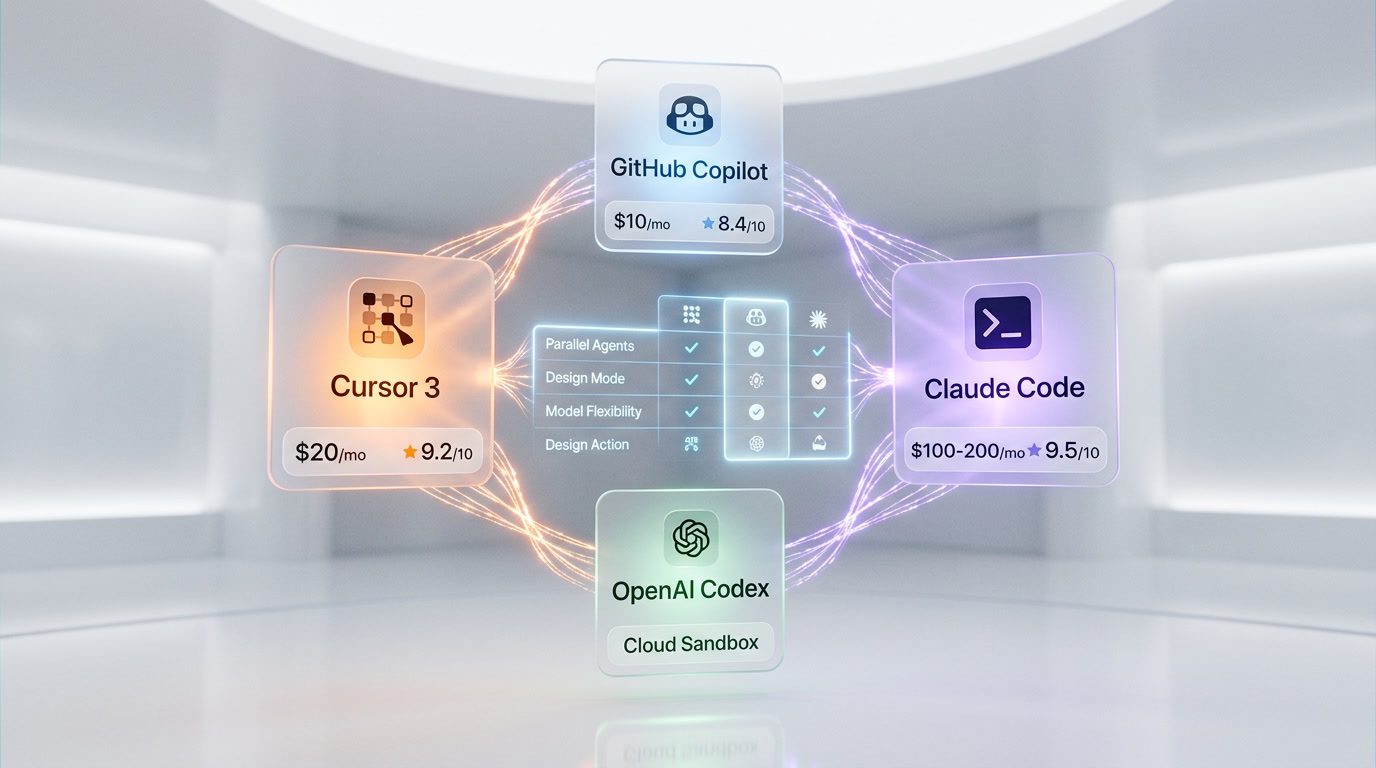
Cursor Pro at $20 per month versus GitHub Copilot at $10 per month versus Claude Code Max at $100-200/month. The pricing did not increase with Cursor 3 — existing subscribers got the upgrade for free. The credit-based billing model introduced in mid-2025 stays: Auto mode is unlimited, while manually selecting premium models like Claude Sonnet or GPT-4o draws from your monthly credit pool.
BugBot Code Review Pricing
| BugBot Plan | Price | Details |
|---|---|---|
| Pro | $40 per user/month | Up to 200 PR reviews/month, custom rules |
| Teams | $40 per user/month | All PRs reviewed, analytics, advanced rules |
| Enterprise | Custom | Org-wide trial, advanced analytics, priority support |
BugBot, Cursor's automated code reviewer, graduated from reviewer to fixer in late February 2026. When it finds a problem, it now spins up a cloud agent, tests a fix, and proposes the fix directly on your PR. Over 35% of BugBot Autofix suggestions are currently being merged into base PRs.

The Agents Window: Cursor 3's Core Feature
The Agents Window replaces Composer as the primary workspace. Activate it with Cmd+Shift+P → Agents Window. Each agent gets its own tab, viewable side-by-side or in a grid layout. You can run agents locally or in the cloud simultaneously, and switch back to the classic IDE view at any time.
Here is what makes this meaningful in practice:
- Parallel execution — Run 3, 5, or 10 agents on different tasks at the same time. One agent refactors your auth module while another builds a new API endpoint while a third writes tests.
- Multi-workspace — Agents work across different repositories simultaneously from a unified sidebar.
- Multi-source launch — Start agents from the desktop app, mobile, web, Slack, GitHub, or Linear. All appear in one interface.
- Local-to-cloud handoff — Drag a local session to the cloud so it continues running when you close your laptop. Pull a cloud session back to local for testing and iteration.
- Cloud verification — Cloud agents automatically generate screenshots and demo videos of their work so you can verify without running the code locally.
Cursor's own engineering reflects this philosophy: 35% of their internal pull requests are now generated by autonomous agents running on cloud VMs, with agents returning merge-ready code accompanied by video demonstrations.
Design Mode: Visual UI Editing
Design Mode is the feature that frontend developers have been waiting for. Activate it with Cmd+Shift+D. Instead of describing UI changes in text, you annotate browser elements directly:
- Shift + drag to select an area on the page
- Cmd + L to add an element to the chat context
- Option + click to add an element to your input
Click a button, type "make this bigger and change the color to blue," and the agent implements the modification. For UI-heavy work, this eliminates the constant back-and-forth of describing visual elements in prose. We tested it on a React dashboard component and the precision of element selection was significantly better than describing the same changes in natural language.
New Commands and Tools
/worktree — Isolated Experimentation
The new /worktree command creates isolated Git worktrees for agent changes. This is critical for safe experimentation: the agent works in a separate branch without touching your main working tree. If the result is good, merge it. If not, discard the worktree with zero risk to your actual code.
/best-of-n — Model Comparison
Run the same prompt across multiple models in parallel worktrees and compare the outcomes side-by-side. Want to see how Claude Sonnet, GPT-4o, and Gemini Pro handle the same refactoring task? /best-of-n gives you direct head-to-head results. This is a feature we have wanted for months — model quality varies significantly by task type, and having empirical comparison built into the IDE is a genuine productivity win.
Await Tool
Agents can now wait for shell commands, subagents, or specific outputs using the new Await tool. This enables more complex multi-step workflows where one agent's output feeds another agent's input, without manual intervention.
Composer 2 (Local Model)
Cursor shipped Composer 2, their in-house coding model, which they claim matches "GPT-5.4 on coding benchmarks at one-tenth inference cost." However, TechCrunch revealed it was built on Moonshot AI's open-source Kimi 2.5, and the lack of upfront disclosure damaged some community trust. Regardless of the controversy, the model runs with high usage limits locally, enabling rapid iteration without draining your credit pool.
Market Context: The Agent IDE War
Cursor 3 does not exist in a vacuum. The AI coding market is estimated at $15-20 billion in 2026, and three tools dominate developer conversations: Cursor, Claude Code, and OpenAI Codex. Each takes a fundamentally different approach.
| Feature | Cursor 3 | Claude Code | GitHub Copilot | OpenAI Codex |
|---|---|---|---|---|
| Interface | Desktop IDE (agent-first) | Terminal-native CLI | IDE extension | Cloud-based autonomous |
| Agent Model | Visual orchestration | Agentic terminal | Copilot Workspace | Cloud sandbox |
| Parallel Agents | Yes (local + cloud) | Background tasks | Limited | Yes (cloud) |
| Price (Individual) | $20 per month | $100-200/month (Max) | $10 per month | Included with ChatGPT Pro |
| Model Flexibility | Multi-model (Claude, GPT, Gemini) | Claude only | GPT + Claude | OpenAI models only |
| Design Mode | Yes | No | No | No |
| Local Model | Composer 2 | No | No | No |
The key insight: 70% of engineers now use between two and four AI coding tools simultaneously, and 15% use five or more. These tools are not mutually exclusive. We run Claude Code in the terminal for complex refactoring and architecture work, and Cursor for daily feature development. Cursor 3's parallel agent model is the most visually intuitive of the bunch, while Claude Code remains the most powerful for deep, single-task reasoning.
Enterprise and Teams Features
Cursor 3 ships several enterprise-specific improvements:
- Directory group names in audit logs — Better readability for compliance teams
- Admin-restricted cloud agent secrets — Team-level control over who can manage cloud agent secrets
- Disable "Made with Cursor" attribution — Enterprise admins can turn off code attribution organization-wide
- Third-party plugin imports default to off — Enterprise accounts require explicit admin approval for external plugins
- SAML/OIDC SSO — Available on Teams and Enterprise plans
- SCIM seat management — Enterprise-only automated user provisioning
Enterprise contracts account for 60% of Cursor's revenue, and these features clearly reflect the priorities of their highest-paying customers.
Performance and Quality-of-Life Improvements
- Large-file diff rendering — Optimized for speed and memory efficiency
- Enhanced agent monitoring — Better visibility into long-running jobs
- Explorer subagent caching — Faster startup times for code exploration
- Browser tool improvements — Reduced surface area but more reliable DOM interaction
- Past chat search — Transcripts now appear in at-mention search results
- Plans in shared chats — Team members see the agent's plan alongside transcripts
- Full-width tab bar — Maximized layouts now use all available horizontal space
- Early Access consolidated to Nightly — Single release track for beta features
The Cost Question: Is Credit-Based Billing Fair?
The elephant in the room. One early tester from Every.to's Vibe Check review reported spending approximately $2,000 in two days of normal use when selecting premium models manually. Another noted that $200 per month on the Ultra plan gets substantial credits, but heavy agent users can still blow through them.
The workaround: Auto mode is unlimited and Cursor selects the model for you. In our experience, Auto mode is surprisingly good at picking the right model for the task. But developers who want explicit control over model selection — always Claude Sonnet for reasoning, always GPT-4o for code gen — will pay more through the credit system.
This is the fundamental tension in Cursor's pricing: the tool wants you to trust its model selection, but power users want control. At $20 per month for Pro, Cursor remains one of the most affordable AI coding tools if you stay in Auto mode. Step outside Auto, and costs scale with your model preferences.
How to Activate Cursor 3
Version 3 updates automatically through the desktop app. To activate the new agent interface:
- Update Cursor to the latest version
- Open the command palette:
Cmd+Shift+P(Mac) orCtrl+Shift+P(Windows/Linux) - Type "Agents Window" and select it
- The new interface opens alongside or replacing the traditional editor
- Switch back anytime — both views coexist
Design Mode is available within the Agents Window via Cmd+Shift+D.

Our Take After 48 Hours
We have been running Cursor 3 since launch day. The Agents Window is genuinely transformative for multi-task workflows — spinning up three agents on different features while reviewing a fourth's PR output is a workflow that did not exist before. Design Mode saved us real time on a React component library update. The /best-of-n command settled a month-long internal debate about which model handles TypeScript refactoring best (Claude Sonnet won by a clear margin).
The concerns are real too. The credit system punishes experimentation with premium models. The Composer 2 provenance controversy was avoidable. And the classic IDE view, while still accessible, clearly received less attention in this release — the message is clear that the Agents Window is the future.
For developers already in the Cursor ecosystem, the upgrade is a no-brainer — it is free and additive. For developers considering switching from Claude Code or Copilot, the value proposition depends on whether you want visual agent orchestration (Cursor's strength) or terminal-native deep reasoning (Claude Code's strength). Most serious developers in 2026 will use both.
Frequently Asked Questions
What is Cursor 3 and when was it released?
Cursor 3 is a major rebuild of the Cursor AI coding IDE, released on April 2, 2026. It replaces the traditional code editor layout with an agent-first interface called the Agents Window, designed for orchestrating multiple AI agents in parallel. The internal codename was "Glass."
How much does Cursor 3 cost?
Cursor 3 pricing starts with a free Hobby plan with limited features. Pro costs $20 per month with a $20 credit pool, Pro+ costs $60 per month with 3x credits, and Ultra costs $200 per month with 20x credits. Teams is $40 per user/month. Existing subscribers received the upgrade at no additional cost.
What is the Agents Window in Cursor 3?
The Agents Window is Cursor 3's primary workspace that replaces Composer. It displays multiple AI agents running in parallel, each in its own tab. Agents can run locally or in the cloud, and you can launch them from desktop, mobile, web, Slack, GitHub, or Linear. Activate it with Cmd+Shift+P and selecting "Agents Window."
What is Design Mode in Cursor 3?
Design Mode (Cmd+Shift+D) lets you annotate browser elements visually instead of describing UI changes in text. You click elements, add instructions, and the AI agent implements the modifications. It is specifically useful for frontend and UI development work.
How does Cursor 3 compare to Claude Code?
Cursor 3 is a visual IDE with agent orchestration, while Claude Code is a terminal-native coding assistant. Cursor 3 excels at parallel visual workflows and multi-model flexibility ($20 per month). Claude Code excels at deep single-task reasoning but costs $100-200/month for Max. Most developers use both tools — 70% of engineers use 2-4 AI coding tools simultaneously in 2026.
Can I still use the classic IDE view in Cursor 3?
Yes. Cursor 3 lets you switch between the new Agents Window and the traditional IDE view at any time. Both can run simultaneously. The update is automatic through the desktop app.
What is the /best-of-n command in Cursor 3?
The /best-of-n command runs the same prompt across multiple AI models (Claude, GPT, Gemini) in parallel Git worktrees, then displays the results side-by-side for comparison. This lets you empirically determine which model handles a specific task best.
What is Composer 2 in Cursor 3?
Composer 2 is Cursor's in-house coding model that they claim matches GPT-5.4 on coding benchmarks at one-tenth the inference cost. It runs locally with high usage limits. However, TechCrunch reported it was built on Moonshot AI's open-source Kimi 2.5, and the lack of upfront disclosure created some community controversy.
Is the Cursor credit system expensive?
It depends on usage. Auto mode is unlimited and selects models automatically. Manually choosing premium models (Claude Sonnet, GPT-4o) draws from your monthly credit pool ($20 for Pro, $60 for Pro+, $200 for Ultra). One early tester reported spending $2,000 in two days with manual model selection. Most users staying in Auto mode find the $20 per month Pro plan sufficient.
Frequently Asked Questions
Is Cursor 3 better than Claude Code for AI-assisted development?
Cursor 3 at $20 per month Pro wins on visual orchestration: parallel agents in a desktop IDE, Design Mode, and multi-model flexibility across Claude, GPT-4o, and Gemini. Claude Code Max at $100–200/mo remains superior for deep, single-task reasoning in the terminal. The key insight from the article: 70% of engineers now run both simultaneously rather than choosing one.
Is Cursor 3 worth it compared to GitHub Copilot at $10 per month?
Cursor 3 Pro at $20 per month delivers parallel AI agents, cloud handoff, Design Mode, /worktree isolation, and multi-model support. GitHub Copilot at $10 per month offers limited parallel agent capabilities and no Design Mode or local-to-cloud session handoff. For developers running multiple concurrent AI tasks or doing frontend UI work, the extra $10 per month gap favors Cursor 3.
Who should use Cursor 3?
Cursor 3 is best suited for: (1) frontend developers who benefit from Design Mode's visual element selection instead of describing UI changes in prose; (2) engineering teams needing parallel agent execution across multiple repositories; (3) existing Cursor Pro subscribers who got the Cursor 3 upgrade free at $20 per month; (4) enterprises requiring SSO, RBAC, and centralized billing at $40 per user/month on the Teams plan.
What are Cursor 3's limitations?
Cursor 3's main limitations: (1) Composer 2 model transparency — TechCrunch revealed it was built on Moonshot AI's open-source Kimi 2.5 without upfront disclosure, damaging community trust; (2) manually selecting premium models like Claude Sonnet or GPT-4o draws from a finite monthly credit pool; (3) BugBot automated code review costs an additional $40 per user/month on top of your existing Pro or Teams plan.
Does Cursor 3 integrate with GitHub, Slack, and Linear?
Yes. Cursor 3 agents can be launched from the desktop app, mobile, web, Slack, GitHub, and Linear, with all sessions consolidated in the unified Agents Window. BugBot integrates directly with GitHub pull requests: when it finds a bug, it spins up a cloud agent, tests a fix, and proposes the patch on the PR. Over 35% of BugBot Autofix suggestions are currently being merged.
Is Cursor 3 better than OpenAI Codex for parallel agent workflows?
Cursor 3 runs parallel agents in a visual desktop IDE across local, cloud, SSH, and Git worktree environments with multi-model support (Claude, GPT-4o, Gemini). OpenAI Codex operates as a cloud-only autonomous sandbox restricted to OpenAI models, included with ChatGPT Pro subscriptions. Cursor 3 wins on local development flexibility and visual orchestration; Codex wins for users already deep in the OpenAI ecosystem.
How much does Cursor 3 cost in 2026?
Cursor 3 pricing: Hobby (free, limited agents), Pro ($20 per month — frontier models, cloud agents, $20 credit pool), Pro+ ($60 per month — 3x usage on all models), Ultra ($200 per month — 20x usage, priority access), Teams ($40 per user/mo — SSO, RBAC, shared chats), Enterprise (custom — SCIM, audit logs, invoice billing). BugBot automated code review is a separate add-on at $40 per user/month.
What is the Cursor 3 Agents Window and how does it replace Composer?
The Agents Window (activated via Cmd+Shift+P) is Cursor 3's core feature, replacing Composer as the primary workspace. It runs multiple AI agents simultaneously in separate tabs (side-by-side or grid layout) across local, cloud, SSH, and worktree environments. Local sessions can be dragged to cloud to continue running after closing your laptop. Cloud agents auto-generate screenshots and demo videos so you can verify their work without running the code locally.