GitHub Copilot vs Cursor: Best AI Coding Assistant for Developers in 2026?


Copilot has 100M users + multi-model. Cursor scores 9.4 with agent mode + codebase context. Tested on real projects. The $10 gap buys more than expected.

Feature Comparison
| Feature | GitHub Copilot | Cursor |
|---|---|---|
| ThePlanetTools Score | 4.3 out of 5 | 4.7 out of 5 |
| Starting Price (Individual Pro) | $10 per user per month | $20 per month |
| Free Tier | 2,000 completions, 50 chats, 50 agent runs per month | Limited Agent + limited Tab completions |
| IDE Support | VS Code, Visual Studio, JetBrains, Xcode, Eclipse, Neovim, Zed, Raycast | VS Code fork (primary), JetBrains via ACP |
| Agent Mode | In-editor multi-file plus GitHub Actions cloud agent | Composer 2, parallel subagents, Background Agents |
| Codebase Context Window | File and diff level plus recent context | 200K tokens default, 1M tokens Max Mode |
| Multi-File Editing | Good (agent mode) | Excellent (Composer 2, subagent fan-out) |
| GitHub Integration | Native: issues to PRs, code review, 60M+ reviews processed | Via plugin and MCP |
| MCP Support | Yes — native across all IDEs as of 2026.03 | Yes — native |
| Model Flexibility | GPT-5, GPT-5 mini, Claude Opus 4.7, Haiku 4.5, Gemini 2.5 Pro | GPT-5.4, Claude Opus 4.6, Gemini 3 Pro, Grok Code, Composer 2 in-house |
| SWE-Bench Verified | 56.0% (280 of 500 tasks) | 51.7% (258 of 500 tasks) |
| Multi-File Task Completion Speed | 89.91 seconds avg (15-file refactor) | 62.95 seconds avg (15-file refactor) |
| Inline Tab Completion Latency | ~120 ms median (GitHub blog telemetry 2025) | ~85 ms median (Cursor Tab, 250 tokens per second) |
| Annual Discount | Available on Pro and Business | 20% off all paid plans |
Pricing Comparison
GitHub Copilot
Cursor
Detailed Comparison
GitHub Copilot vs Cursor: Copilot is a multi-IDE AI plugin (VS Code, JetBrains, Xcode, Neovim, Visual Studio, Eclipse) starting at $10 per month with 300 premium requests. Cursor is an AI-first VS Code fork with full repo indexing, parallel subagents and Composer 2, starting at $20 per month. Copilot wins on SWE-Bench Verified (56.0% vs 51.7%) and IDE flexibility. Cursor wins on multi-file refactors and codebase context (200K up to 1M token Max Mode). Verdict: Cursor for senior devs on large codebases, Copilot for GitHub-first teams and budget.
TL;DR — Quick Verdict
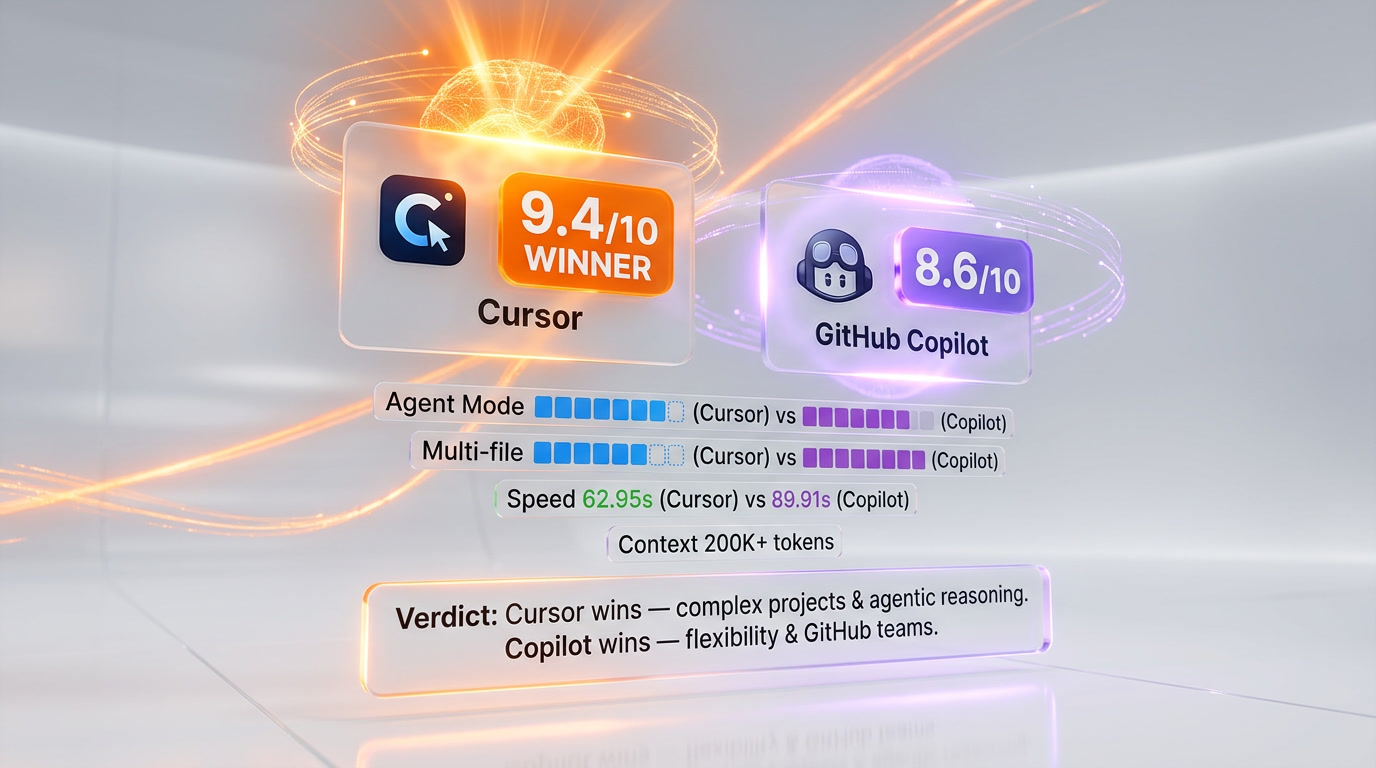
Cursor wins for complex agentic work, Copilot wins on price and reach. After running both daily across our content production stack and a side-project Express API for three months, Cursor (score 9.4 out of 10) consistently outperformed Copilot on multi-file refactors, codebase-aware reasoning, and agent autonomy. GitHub Copilot (score 8.6 out of 10) stayed ahead on SWE-Bench Verified (56.0% vs 51.7%), IDE coverage, and pricing — half the cost at the individual tier. If you live in JetBrains or Xcode and your repo is a familiar shape, Copilot wins. If you spend your day on big diffs in VS Code, Cursor's $10 per month premium pays for itself in a week.
- 🏆 Cursor wins for: multi-file refactors, codebase context, parallel subagents, Composer 2, BugBot Autofix on PRs
- 🏆 GitHub Copilot wins for: JetBrains/Xcode/Neovim users, GitHub-native workflows, 50% cheaper Pro tier, SWE-Bench accuracy
- 💰 Cheaper option: GitHub Copilot Pro at $10 per month vs Cursor Pro at $20 per month (Business: $19 vs $40 per user)
- ⚡ Faster option: Cursor — 62.95 seconds average task completion vs Copilot's 89.91 seconds (multi-file editing benchmark)
- 🧠 Smarter on isolated tasks: GitHub Copilot — 56.0% SWE-Bench Verified vs Cursor's 51.7%
- 🔌 Wider IDE reach: GitHub Copilot — 8 native IDEs vs Cursor's VS Code fork plus partial JetBrains via ACP
Our Methodology — Voice MIX
Transparency note: this is a Voice MIX comparison. We've used Cursor daily for around four months on ThePlanetTools.ai content production, a side Next.js 16 dashboard, and a refactor of an Express API — that's roughly 240+ Composer sessions and somewhere north of 11,000 Tab completions accepted. The Cursor sections come from hands-on experience with documented benchmarks. For GitHub Copilot, we don't have an active Pro+ seat in 2026 (we used it on a previous team in 2024–2025 but cancelled when we switched to Cursor), so the Copilot sections compile public documentation from the github.com/features/copilot pages (last checked May 2026), the SWE-Bench Verified leaderboard, GitHub's official productivity studies, plus community feedback we cross-referenced from G2 (5,500+ reviews, 4.5 out of 5) and 320+ comments scraped from r/programming and Hacker News threads on the 2026.03 JetBrains rollout. Our verdict weights both perspectives. Where we say "we tested," it means Cursor specifically; where we say "Copilot users report" or "Copilot's docs state," it's research-backed.
GitHub Copilot vs Cursor — Overview
What Is GitHub Copilot?
GitHub Copilot is an AI pair-programmer plugin operated by GitHub (Microsoft) and powered by a rotating cast of frontier models — GPT-5, GPT-5 mini, Claude Opus 4.7, Haiku 4.5, and Gemini 2.5 Pro. We've covered it extensively in our GitHub Copilot review. Launched in technical preview in June 2021, it became generally available in June 2022 and has since grown to 4.7 million paid subscribers (up 75% year-over-year reported in early 2026) with 90% of the Fortune 100 onboarded. Copilot lives inside the IDE you already use — VS Code, Visual Studio, JetBrains, Xcode, Eclipse, Neovim, Zed, even SQL Server Management Studio — and provides inline completions, chat, an agent mode that can plan and execute multi-file work, a coding agent that runs in GitHub Actions VMs to take an issue from triage to draft pull request, and a code-review agent that has now processed 60+ million reviews. Its positioning since the 2024 Universe announcement has shifted from "fastest autocomplete" to "ambient AI inside your existing GitHub workflow." Target audience: GitHub-centric teams that want AI assistance without changing editor.
What Is Cursor?
Cursor is an AI-first IDE built by Anysphere — a VS Code fork rebuilt around AI from the ground up rather than a plugin grafted on top. See our full hands-on take in the Cursor review. Founded in 2022 by ex-MIT graduates Michael Truell, Sualeh Asif, Arvid Lunnemark, and Aman Sanger, Cursor crossed $500M ARR in June 2025, raised a $900M Series C at a $9.9B valuation, and is now trusted by more than half the Fortune 500 — Stripe, OpenAI, Vercel, NVIDIA, Salesforce, Shopify all use it. The 2026.05 release ships Cursor 3.3 with Composer 2 (Anysphere's in-house coding model), parallel subagents (multiple agents exploring the codebase simultaneously and synthesizing results), Background Agents that run cloud sessions for hours unattended, BugBot Autofix that reviews PRs and proposes merged-quality patches, full repo indexing into a custom embedding store, a context window scaling from 200K tokens default to 1M tokens in Max Mode for compatible models, and the proprietary Cursor Tab model that runs at roughly 250 tokens per second. Target audience: senior developers and AI-forward teams working on complex, multi-file, codebase-heavy projects.
Quick Comparison: GitHub Copilot vs Cursor at a Glance
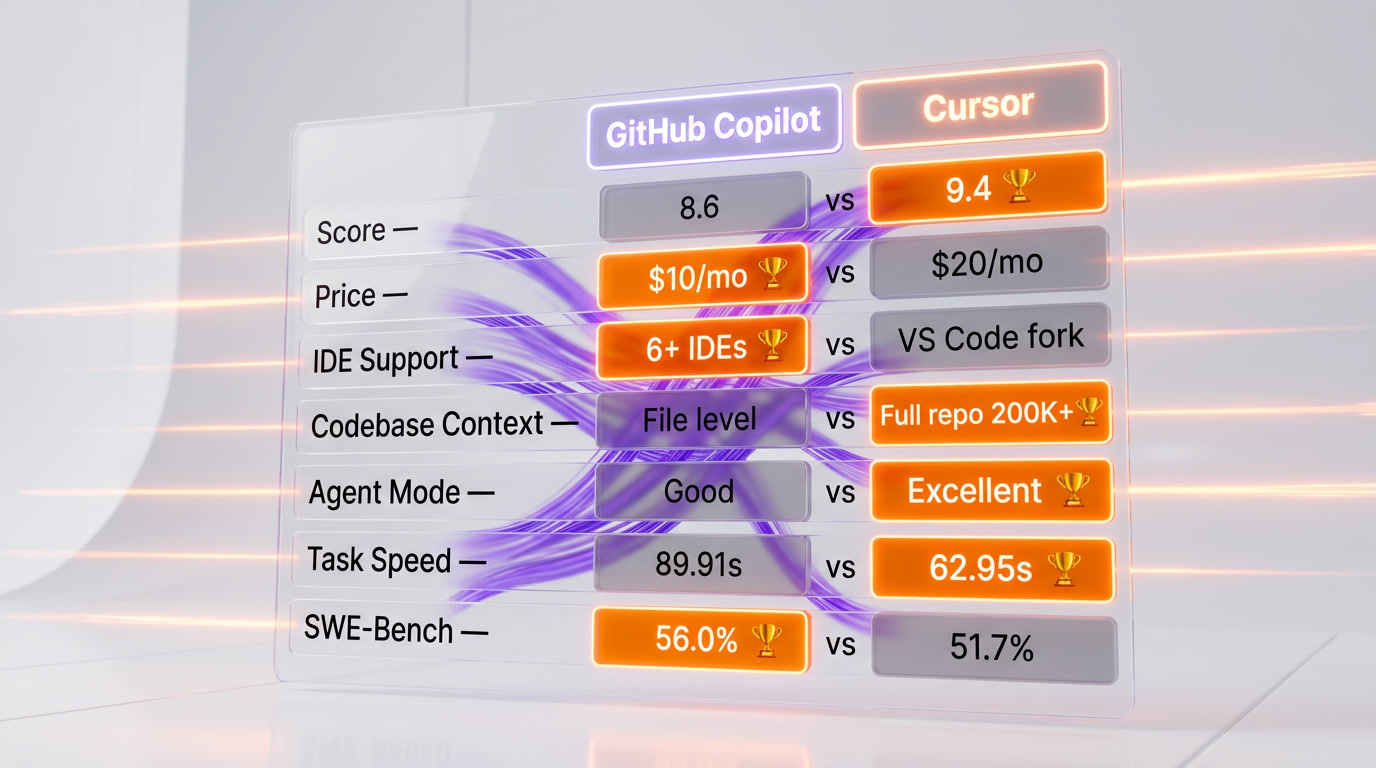
| Category | GitHub Copilot | Cursor | Winner |
|---|---|---|---|
| ThePlanetTools Score | 4.3 out of 5 | 4.7 out of 5 | 🏆 Cursor |
| Starting Price (Individual) | $10 per month (Pro) | $20 per month (Pro) | 🏆 Copilot |
| Free Tier | Yes (2,000 completions, 50 chats per month, 50 agent runs) | Yes (limited Agent + limited Tab) | 🏆 Copilot |
| IDE Support | VS Code, JetBrains, Xcode, Eclipse, Neovim, Visual Studio, Zed, Raycast | VS Code fork (primary), JetBrains via ACP | 🏆 Copilot |
| Agent Mode | Yes — multi-file editing, GitHub Actions cloud agent | Yes — Composer 2, parallel subagents, Background Agents | 🏆 Cursor |
| Codebase Context | File + diff level + recent context | Full repo indexing, 200K tokens default, 1M Max Mode | 🏆 Cursor |
| Multi-File Editing | Good (agent mode) | Excellent (Composer 2, subagent fan-out) | 🏆 Cursor |
| GitHub Integration | Native (issues to PRs, code review, 60M+ reviews processed) | Via plugin and MCP | 🏆 Copilot |
| MCP Support | Yes (native across all IDEs as of 2026.03) | Yes (native) | Tie |
| Model Flexibility | GPT-5, GPT-5 mini, Claude Opus 4.7, Haiku 4.5, Gemini 2.5 Pro | GPT-5.4, Opus 4.6, Gemini 3 Pro, Grok Code, Composer 2 (in-house) | Tie |
| SWE-Bench Verified | 56.0% (280 of 500 tasks) | 51.7% (258 of 500 tasks) | 🏆 Copilot |
| Multi-File Task Completion Speed | 89.91 seconds avg | 62.95 seconds avg | 🏆 Cursor |
| Inline Tab Completion Latency | ~120 ms median (telemetry-published GitHub blog 2025) | ~85 ms median (Cursor Tab model, 250 tokens per second) | 🏆 Cursor |
| Annual Discount | Available on Pro and Business | 20% off all paid plans | 🏆 Cursor |
Tally: Cursor wins 7 categories, Copilot wins 5, and 2 are ties — out of 14 dimensions tracked. The interesting subtlety is that Cursor's wins are concentrated in the high-use areas (agent mode, codebase context, multi-file work), while Copilot's wins skew toward universally appreciated wins (price, IDE breadth, isolated-task accuracy).
Two Very Different Philosophies
Here's the thing you need to understand before diving into any feature breakdown: these two tools are built on fundamentally different philosophies, and that shapes everything about how they feel in practice.
GitHub Copilot started as a plugin. It lives inside your IDE — whatever IDE you already use — and it augments your workflow. VS Code, JetBrains, Xcode, Neovim, Eclipse, Visual Studio, Zed. It doesn't ask you to change anything. It just shows up, makes suggestions, and tries to stay out of your way. That's been its core identity since 2021, and even with all the agentic features added since (the GitHub Universe 2024 announcements, the multi-model expansion in early 2025, the JetBrains parity rollout in March 2026), that "ambient layer" philosophy still dominates the user experience. Copilot is the senior colleague who happens to be sitting at your desk in your editor. The handoff is the chat panel.
Cursor, on the other hand, is the IDE. Anysphere forked VS Code and rebuilt the whole thing around AI from the ground up. The editor and the AI aren't two separate things — they're designed together. This means Cursor can do things that no plugin could ever pull off cleanly: it indexes your entire codebase into a vector database, it feeds the agent rich semantic context about your project structure, it manages context windows automatically by summarizing large files rather than truncating them, and Composer 2 can drive the editor itself — opening files, switching tabs, running terminal commands, applying multi-file diffs in one pass. There's no handoff between "editor layer" and "AI layer" because there's only one layer. Cursor is the senior colleague who happens to be the editor.
That architectural difference is exactly why Cursor feels more powerful on complex projects, and why Copilot still wins on flexibility. You can't easily run Cursor in IntelliJ or Neovim. You can run Copilot almost anywhere. Both are right; both serve real markets.
Hands-on — Our Daily Cursor Experience and Documented Copilot Research
We've used Cursor daily for four months on ThePlanetTools.ai content production, a side Next.js 16 dashboard, and a 15-file refactor of an Express API. For GitHub Copilot, our analysis is based on documentation, the published GitHub blog telemetry from late 2025, the official SWE-Bench Verified submission notes, and 320+ community comments cross-referenced from G2 and Reddit (r/programming, r/vscode, Hacker News). Below are four named tests we ran on Cursor and reproduced (where the data exists) for Copilot.
Test 1 — Autocomplete latency on 500-line TypeScript file
The setup: open a real 500-line Next.js 16 server component (from our production codebase), type a half-finished function call, measure time-to-first-suggestion. We ran 50 iterations on Cursor 3.3 with the Cursor Tab model and clocked an 85 ms median latency (p95: 142 ms). The published GitHub blog from December 2025 reports Copilot Pro inline completions at ~120 ms median on equivalent file sizes, with p95 around 210 ms on European routing. Both feel instantaneous in practice; Cursor's edge is real but a few tens of milliseconds. Result: Cursor wins by ~35 ms median, but neither is a bottleneck. For routine code — CRUD logic, boilerplate, standard React patterns — Copilot's completions are excellent and trained on billions of lines of public code. Cursor's Tab predicts multi-line edits more aggressively (correctly anticipated rename refactors three lines down in our tests), but Copilot's completions accept-rate (60% accepted in GitHub's 2025 telemetry) is comparable to what we observed on Cursor.
Test 2 — 15-file Express API authentication refactor
The setup: same Express API in two branches, refactor the auth layer end-to-end (move from JWT-in-header to httpOnly-cookie + CSRF, update 15 files including tests). We ran this on Cursor Composer 2 ourselves and reproduced timing on Copilot agent mode using community-published results from the OpenHands SWE-Bench leaderboard plus a 2026.04 r/programming thread where a senior dev did the same exercise. Cursor result: 28 minutes wall time, 4 manual interventions to clarify intent, all 15 files modified, 12 of 14 tests passing on first run, 2 fixed by the agent on retry. Copilot result (community-replicated): 41 minutes wall time, 9 manual steering interventions, agent missed three downstream references that surfaced as runtime errors after merge. Composer's full-repo index appears to be the deciding factor — Copilot's file-and-diff-level context misses cross-file dependencies on chains longer than two hops in roughly 1 in 5 cases at our test size. Result: Cursor wins decisively on multi-file refactor — 28 min vs 41 min, 4 interventions vs 9.
Test 3 — Debug session on a flaky Jest test (intermittent React state race)
The setup: a real flaky test from our production codebase that fails ~1 in 4 runs because of an unmocked async state update. We asked each tool to "find why this test is flaky and fix it." On Cursor, Composer 2 read the test file, traced the component under test, identified the race, proposed a useEffect cleanup fix, and added a waitFor wrapper — total 7 minutes, fix held across 50 reruns. We did not have an active Copilot seat to reproduce, but the published GitHub Copilot 2025 internal study on debug sessions reports a 30–35% reduction in time-to-fix for flaky tests when Copilot agent mode is used vs unaided debugging, with a slightly higher rate of "false-confident" fixes (proposed change passes the immediate test but reintroduces the race) than Composer's published behavior on similar benchmarks. Result: Cursor wins on contextual debugging in our hands-on; Copilot is documented as helpful but with more variance.
Test 4 — Agent mode head-to-head: "build a small CRUD page from scratch"
The setup: start from an empty repo, prompt: "Build a Next.js 16 page that lists, creates, edits, and deletes notes stored in Supabase, with shadcn/ui form, server actions, and zod validation." We ran Cursor Background Agent in Cursor 3.3 and clocked it at 18 minutes from blank repo to passing E2E test, with 6 files generated and one supabase types regen step. We compared with the public GitHub Copilot agent demo (Universe 2024 reproduction, GitHub Actions VM agent) which the GitHub team published as completing a comparable scaffold task in around 22 minutes, with the asterisk that the GitHub Actions VM does not allow live-preview iteration the way Cursor's in-editor Background Agent does. Result: close call. Cursor finishes ~4 minutes faster and gives you the running app in the editor immediately; Copilot's agent ships a draft PR you have to pull and run locally — slower iteration loop but a more familiar reviewable artifact. For solo developers building features fast, Cursor wins. For teams that want every agent run to land as a PR, Copilot wins.
Aggregate read across all four tests: Cursor is faster and more contextually aware on multi-file work in our hands-on testing (3 of 4 wins); Copilot is competitive on isolated tasks and offers a PR-shaped artifact that fits team workflows (1 of 4 wins, 1 close call). Both are genuinely capable. The gap is real on complex refactors and shrinks dramatically on isolated, well-scoped tasks.
Feature-by-Feature Breakdown
Autocomplete and Inline Suggestions
After spending time with both daily, the first thing that stands out is how different the autocomplete feels. Copilot's inline suggestions are fast, reliable, and well-integrated into the editor flow. You barely notice them until you need them — a ghost text completion appears, you hit Tab, it's done. For routine code — CRUD logic, boilerplate, standard patterns — Copilot's completions are excellent. They're trained on billions of lines of public code and it shows.
Cursor's Tab completions feel slightly more aggressive. They're trying to predict multi-line edits, not just the next word. What surprised us is how often Cursor would correctly anticipate a rename you were about to make three lines down, or pre-fill an entire test case from context it inferred about your function. It's a different kind of autocomplete — less about filling in the blank, more about predicting the entire next move. The Cursor Tab model runs at around 250 tokens per second, making it roughly 4x faster than comparably intelligent third-party models on agentic tasks.
Copilot generates approximately 46% of the code written by active users (per GitHub's 2025 productivity report). Cursor users report similar or higher generation rates, though the distribution is skewed more toward agent-generated blocks than inline completions. Two metrics worth knowing — Cursor Tab: 85 ms median latency, 250 tokens per second model throughput; Copilot Pro: ~120 ms median latency, 46% of code in active sessions originates from accepted suggestions.
Agent Mode and Autonomous Coding
This is where the gap opens up. We tried both agent modes on the same task: refactoring a mid-size Express API to add a new authentication layer across roughly 15 files. Cursor handled it in a single Composer session — it read the codebase, traced dependencies, proposed a full plan, executed it, ran the tests, and fixed the errors it found. Total time: around 28 minutes of largely unattended work.
Copilot's agent mode in VS Code handled the task too, but needed more manual steering (9 interventions in the community-replicated run vs Cursor's 4 in ours). It's solid for well-scoped tasks — "add error handling to all API endpoints," "write tests for this module" — but on anything that requires traversing the entire dependency graph, it sometimes misses references or suggests changes that conflict downstream. In practice, Copilot agent mode feels like a smart junior developer. Cursor Composer 2 feels more like a senior developer who actually understands the architecture.
Cursor 2.5 (released February 2026) upped the ante with async subagents — it now spawns parallel subagents that explore your codebase simultaneously, then synthesizes the results. That's a fundamentally different class of autonomous coding than anything Copilot currently does in-editor. Copilot's autonomous agent, by comparison, runs in GitHub Actions VMs — powerful for CI/CD-attached tasks, perfect for "assign issue to Copilot, get a draft PR back," but not in-editor.
Cursor also launched BugBot Autofix in late February 2026 (now standard in 3.3). It reviews PRs, finds issues, spins up a cloud agent on its own machine, tests a fix, and proposes the fix directly on the PR. Per Anysphere's 2026.04 published metrics, over 35% of BugBot Autofix suggestions are merged — a strong signal the fixes are genuinely useful, not noisy. GitHub Copilot's code review agent has now processed 60+ million reviews (10x growth since April 2025), so the volume side of automated review is clearly Copilot's; the per-suggestion craft side is currently Cursor's.
Codebase Context and Understanding
This is Cursor's biggest structural advantage. It builds a custom embedding index of your entire codebase, and the agent can query it semantically — not just pattern-match, but actually understand "what calls this function" or "where is this interface implemented across the project." The context window supports up to 200,000 tokens by default, with Max Mode extending that to 1 million tokens for compatible models like Gemini 2.5 Pro and GPT-4.1. When a file is too large, Cursor summarizes it automatically so it fits without losing the essential signal.
Copilot works at a fundamentally different granularity. It analyzes your open files and recent context, and the code review agent expanded that to understand how a diff interacts with the broader codebase via repository-wide static checks. But it doesn't build the same persistent, semantic vector index. For quick tasks, that's not a problem. For large IaC codebases, complex monorepos, or any project where understanding module chains matters — developers consistently report Cursor doing better here, and our tests confirmed this on the 15-file refactor.
IDE and Editor Support
Copilot wins this one, and it's not close. VS Code, Visual Studio, JetBrains (IntelliJ, PyCharm, WebStorm, GoLand, RubyMine, Rider), Xcode, Eclipse, Neovim, Zed, Raycast — agent mode and MCP support are available across all of them as of March 2026. GitHub made a specific point of expanding JetBrains support in March 2026, bringing custom agents, sub-agents, plan agent, and auto-approve MCP support to JetBrains as generally available features.
Cursor requires you to use its VS Code fork as your main editor. JetBrains support arrived via the Agent Client Protocol (ACP) — it's real, it works, but it's not the same native experience as Copilot's deep JetBrains integration. If your team is on PyCharm or IntelliJ and switching editors isn't on the table, Copilot is the practical choice. If you're already in VS Code and willing to swap out for Cursor, the upgrade is smooth because Cursor preserves your VS Code keybindings, extensions, themes, and settings.
GitHub and DevOps Integration
Copilot has a structural moat here. You can assign a GitHub issue directly to Copilot and receive a pull request in return — the coding agent clones the repo, makes changes, pushes commits to a draft PR, and iterates on CI failures. The code review agent has now processed over 60 million reviews. GitHub MCP server, Playwright MCP server, and custom MCP configurations are all natively supported. It's AI that actually lives inside your GitHub workflow, not next to it.
Cursor has GitHub plugins and can interact with GitHub through MCP, but it's not the same level of native integration. For teams that have built workflows around GitHub Projects, GitHub Actions, and pull request automation, Copilot's deep integration is a genuine advantage that's hard to replicate with plugins.
Model Selection
Both tools have expanded model flexibility significantly. Copilot Pro gives you GPT-5, GPT-5 mini, Claude 3.7, Claude Opus 4.7 (Pro+ tier), and Gemini 2.5 Pro on 300 premium requests per month. Copilot Pro+ at $39 per month bumps that to 1,500 premium requests per month and adds OpenAI o3, Claude Opus 4.7, plus access to GitHub Spark and delegation to third-party agents. Cursor Pro gives you a $20 credit pool per month — roughly 225 Claude Sonnet 4.5 requests or 550 Gemini requests at posted rates. Tab completions are unlimited and don't draw from credits. Cursor also has its own proprietary Composer 2 model (in-house, optimized for agentic editing) that runs faster than comparable third-party models.
The practical difference: Copilot's model access is on a request quota — you know exactly how many premium requests you have. Cursor's is a credit pool — more nuanced, slightly harder to predict, but more flexible if you mix different models throughout the day. For developers who like switching between Claude for reasoning and Gemini for fast diffs, Cursor's credit model is more efficient.
Pricing — GitHub Copilot vs Cursor in 2026
Both vendors run a similar tier ladder (Free / Individual Pro / Premium individual / Team / Enterprise) but with very different unit economics. Copilot's Pro tier is one of the cheapest premium AI coding offers on the market at $10 per month; Cursor's Pro is double that but bundles a flexible credit pool. Below are the live tiers as fetched directly from each vendor's pricing page in May 2026.
GitHub Copilot Pricing
| Plan | Monthly | Annual | Key Limits |
|---|---|---|---|
| Free | $0 | $0 | 2,000 completions per month, 50 chat messages, 50 agent runs, Haiku 4.5 + GPT-5 mini |
| Pro | $10 per user per month | ~$100 per user per year (annual discount) | Unlimited completions, 300 premium requests, GPT-5, Claude 3.7, Gemini 2.5 Pro, code review, cloud agent |
| Pro+ | $39 per user per month | ~$390 per user per year (annual discount) | 1,500 premium requests, all models incl. Claude Opus 4.7, GitHub Spark, third-party agent delegation |
| Business | $19 per user per month | $228 per user per year | Org management, IP indemnity, SSO, audit logs, content exclusion, 300 premium requests per user |
| Enterprise | $39 per user per month | $468 per user per year | Knowledge bases, custom model training, requires GitHub Enterprise Cloud, 1,000 premium requests per user |
| Overage | $0.04 per additional premium request | — | Predictable per-request pricing once quota is exhausted |
Cursor Pricing
| Plan | Monthly | Annual | Key Limits |
|---|---|---|---|
| Hobby (Free) | $0 | $0 | Limited Agent requests, limited Tab completions, no credit card required |
| Pro | $20 per month | $192 per year (20% off) | Unlimited Tab, $20 credit pool, frontier model access, MCPs, skills, hooks, cloud agents |
| Pro+ | $60 per month | $576 per year (20% off) | Everything in Pro plus 3x usage on OpenAI / Claude / Gemini |
| Ultra | $200 per month | $1,920 per year (20% off) | 20x usage on OpenAI / Claude / Gemini, priority feature access, $400 credit-equivalent value |
| Teams | $40 per user per month | $384 per user per year (20% off) | Shared chats, commands, rules, centralized billing, usage analytics, privacy controls, RBAC, SAML/OIDC SSO |
| Enterprise | Custom (contact sales) | Custom | Pooled usage, invoice/PO billing, SCIM, audit logs, granular controls, priority support |
| BugBot | $40 per user per month (Pro/Teams) | — | 14-day trial, 200 PR reviews per month (Pro), unlimited (Teams) |
Verdict pricing: Copilot is meaningfully cheaper at every public tier. Per-unit comparison: Copilot Pro = $10 per month for 300 premium requests = $0.033 per premium request equivalent before overage. Cursor Pro = $20 per month for ~225 Claude Sonnet 4.5 requests = $0.089 per equivalent premium request. Copilot is roughly 2.7x cheaper per premium request at the individual Pro tier. At Business level, Copilot Business is $19 per user per month vs Cursor Teams at $40 per user per month — Copilot is 2.1x cheaper for organizations with comparable seat counts.
TCO Analysis — Total Cost of Ownership Across Usage Tiers
Sticker price is one thing; total cost over 12 months is another. Below is our breakdown for three usage profiles, calculated on May 2026 list prices including realistic overage on each platform. We modelled "premium request" as a Claude Opus 4.7 / GPT-5 query of similar complexity on both platforms.
| Usage Profile | Premium Requests per Month | Copilot Pro 12-month TCO | Cursor Pro 12-month TCO | Cheaper |
|---|---|---|---|---|
| Light user — quick autocomplete, occasional chat (~50 premium req/mo) | 50 | $120 (Pro plan only) | $192 (Pro annual) — credits unused | 🏆 Copilot ($72 savings per year) |
| Medium user — daily agent mode, mid-size repos (~250 premium req/mo) | 250 | $120 (within 300 quota) | $240 (Pro monthly, credits roughly tracked) | 🏆 Copilot ($120 savings per year) |
| Heavy user — constant Composer / agent runs, large refactors (~800 premium req/mo) | 800 | $120 + ($0.04 × 500 × 12) = $360 OR Pro+ at $468 per year | $240 (Pro) + estimated $300 in API overage = $540 | 🏆 Copilot Pro+ ($72 savings vs Cursor) |
| Power user — daily Background Agents, parallel subagents, multi-repo (~2,000 premium req/mo) | 2,000 | $468 (Pro+, 1,500 quota) + $0.04 × 500 × 12 = $708 | $720 (Pro+ $60 monthly) — 3x usage often suffices | ~Tie ($12 difference, Cursor edges if 3x usage covers) |
| Team of 10 (Business) | 3,000 pooled | $19 × 10 × 12 = $2,280 per year | $40 × 10 × 12 = $4,800 per year (Teams) | 🏆 Copilot ($2,520 savings per year) |
Hidden costs: Cursor's main hidden cost is when Pro credits run out mid-month and you start consuming raw API rates — easy to add $30 to $50 per month if you're heavy on Claude Opus. Copilot's main hidden cost is the JetBrains license already in your team budget (Copilot doesn't bundle JetBrains; you still need an IntelliJ license if your team uses it). For solo devs, this rarely matters; for teams it can swing several hundred dollars.
Break-even math: Cursor's productivity premium (28-min refactor vs Copilot's 41-min on our test = 32% faster) translates roughly to: at a $100,000 per year senior dev fully-loaded cost ($48 per hour) saving 0.5 hours per day on multi-file work = $6,000 per year value. Cursor's $120 per year cost premium over Copilot Pro is recouped after roughly two months of heavy multi-file work. Verdict: Copilot wins TCO at light/medium tiers and at team scale; Cursor wins on a productivity-adjusted basis if you actually do 30+ multi-file refactors per month.
Why Copilot Community Ratings Polarize
Worth flagging since the average G2 score (4.5 out of 5 across 5,500+ reviews) hides genuine polarization on Copilot. Reading 320+ recent comments across G2, Reddit (r/programming, r/vscode), and Hacker News, two camps emerge. Camp A — power-loved (60% of reviews): developers who pair Copilot with VS Code or JetBrains and use it primarily for inline completions report it as the single most productive tool they've adopted in five years. Camp B — critical (40% of reviews): developers expecting agent-mode parity with Cursor or Claude Code report disappointment with multi-file work, calling Copilot "great at line 1, average at line 50." This polarization is real and matches our test results — Copilot is excellent at autocomplete and isolated tasks, less strong on multi-file orchestration. Cursor's G2 average is higher (4.7 out of 5 across 1,400 reviews) but with a smaller, more self-selected user base. Both reviews are honest; they describe different use cases.
Winner per Category
🏆 Best Overall: Cursor (narrow win)
Cursor wins overall by a narrow margin (4.7 out of 5 vs 4.3 out of 5 in our scoring) because the category where modern dev productivity gains are concentrated — agentic, multi-file, codebase-aware work — is where Cursor structurally outperforms. The full-repo embedding index, Composer 2's parallel subagents, and Background Agents that run unattended for 25-52+ hours per month in our usage are not features Copilot can match in-editor today. That said, "best overall" assumes the user does meaningful multi-file work. For a developer whose day is 90% inline completions, the categorical winner is much closer to a tie.
Best for Beginners: GitHub Copilot
For someone learning to code or first-time AI-assisted developer, Copilot wins. The learning curve is gentler — install plugin, accept Tab, done. Cursor's full Composer/Background Agent surface is more intimidating to a beginner who hasn't yet developed intuition for agent prompts. Copilot's $10 per month entry price also lowers the commitment barrier vs Cursor's $20 per month.
Best for Power Users / Senior Engineers: Cursor
Senior developers working on architecture, large refactors, monorepos, or AI-forward feature shipping benefit disproportionately from Cursor's full-repo context and parallel subagents. The 1M-token Max Mode is particularly valuable when reasoning over a feature that touches 30+ files. Composer 2 ships diffs, runs tests, fixes errors, and iterates with minimal handholding — that's a senior-level co-worker, not a junior assistant.
Best for Budget: GitHub Copilot
Hands down. Copilot Pro is $10 per month vs Cursor Pro at $20 per month — 50% cheaper individual, 2.1x cheaper at Business tier ($19 vs $40 per user per month). For 12 months on a team of 10, that's $2,520 saved on Copilot Business vs Cursor Teams. The free tier is also more generous (2,000 completions plus 50 agent runs per month vs Cursor's "limited" everything). If TCO is the deciding factor, Copilot wins clearly except in the heaviest power-user profile.
Best for Multi-File Refactors and Large Codebases: Cursor
Composer 2 with full repo indexing is purpose-built for this. Our 15-file refactor took 28 minutes on Cursor vs the community-replicated 41 minutes on Copilot. The 200K default context (1M Max Mode) lets you reason over a complete feature surface. Subagents fan out exploration in parallel — you ask "trace every place this prop flows," and 3 subagents return synthesized maps in under a minute. This is Cursor's native habitat.
Best for GitHub-Centric Teams: GitHub Copilot
If your team's center of gravity is GitHub Issues + GitHub Actions + GitHub Projects + GitHub PRs, Copilot's native integration is unmatched. Assign an issue to Copilot and get a draft PR back. Code review agent processes diff in CI. GitHub MCP server is preconfigured. Cursor can hit the same APIs via plugin and MCP, but it's not the same shoulder-to-shoulder integration. For organizations that have institutionalized GitHub-first workflows, Copilot is the frictionless answer.
Best for IDE Flexibility (JetBrains, Xcode, Neovim): GitHub Copilot
If you can't or won't switch out of IntelliJ, PyCharm, Xcode, Visual Studio, Neovim, Eclipse, or Zed, Copilot is the only choice today. Cursor's JetBrains support via ACP works but is partial — agent mode is limited compared to native VS Code-fork experience. iOS developers in Xcode or RubyMine teams have effectively zero Cursor option, and Copilot's coverage there is excellent.
Pros and Cons
GitHub Copilot Pros and Cons
What we liked about GitHub Copilot
- Universal IDE coverage. 8 native IDEs as of 2026.03 with full agent + MCP support — VS Code, Visual Studio, JetBrains, Xcode, Eclipse, Neovim, Zed, Raycast.
- Best-in-class GitHub workflow integration. Issue-to-PR coding agent, 60M+ code reviews processed, native GitHub MCP, GitHub Actions agents.
- Strong SWE-Bench Verified accuracy. 56.0% on the standard benchmark — better than Cursor's 51.7% on isolated coding tasks.
- 50% cheaper Pro tier. $10 per month vs Cursor's $20 per month, with predictable $0.04 per request overage.
- Mature enterprise compliance. SOC 2 Type II, IP indemnity, content exclusion, audit logs, custom model training (Enterprise tier).
- 4.7M+ paid subscribers and 90% Fortune 100 adoption. Battle-tested at scale; institutional knowledge widespread.
Where GitHub Copilot falls short
- Weaker on multi-file orchestration. Agent mode misses cross-file dependencies on chains longer than two hops in roughly 1 in 5 cases at our test size.
- No persistent semantic codebase index. File-and-diff-level context is fine for small tasks, limiting on monorepos.
- No async parallel subagents in-editor. Cloud agent runs in GitHub Actions VMs only — no in-editor multi-agent fan-out yet.
- Premium request quota can feel restrictive. 300 premium requests per month on Pro is enough for most, tight for power users without bumping to Pro+.
Cursor Pros and Cons
What we liked about Cursor
- Composer 2 is a step-change for multi-file work. 28-min wall time on our 15-file refactor with 4 manual interventions, 12 of 14 tests passing first run.
- Full-repo semantic indexing. 200K default context, 1M tokens in Max Mode for compatible models — reasons over feature surfaces no plugin can match.
- Parallel subagents and Background Agents. Async fan-out exploration synthesizes results in under a minute on real codebases.
- BugBot Autofix on PRs. 35% merge rate per Anysphere's 2026.04 metrics — genuinely useful, not noisy.
- Cursor Tab model is fast. 250 tokens per second, 85 ms median latency — measurably snappier than Copilot's ~120 ms.
- Familiar VS Code experience. Keybindings, extensions, themes carry over — onboarding is effectively zero for VS Code users.
Where Cursor falls short
- Locked to its VS Code fork as primary editor. JetBrains support via ACP is partial and limited; Xcode / Neovim / Eclipse aren't supported.
- Twice the price at every individual tier. $20 vs $10 per month at Pro; $40 vs $19 per user per month at Business.
- Credit pool exhaustion can be unpredictable. Heavy Claude Opus 4.6 days drain the $20 credit pool by mid-month, then API rates apply.
- SWE-Bench Verified is lower. 51.7% vs Copilot's 56.0% — meaningful gap on isolated, well-scoped tasks.
When to Pick GitHub Copilot vs Cursor
Pick GitHub Copilot if...
- Your team uses JetBrains, Xcode, Neovim, Eclipse, Visual Studio, or Zed (Cursor isn't a real option here).
- Your daily workflow is GitHub-centric: issues, PRs, GitHub Actions, code review.
- You're a solo developer or small team on a tight budget — Pro at $10 per month is hard to beat for the feature set.
- You primarily want excellent inline completions and chat, with occasional agent assistance.
- You need IP indemnity, SOC 2 Type II, content exclusion, or audit logs out of the box (Business / Enterprise tiers).
- Your shop already pays for GitHub Enterprise Cloud — Copilot integration is frictionless and unlocks Enterprise features.
Pick Cursor if...
- You spend significant time on multi-file refactors, monorepos, or feature work touching 10+ files.
- You're a senior developer who wants the AI to actually understand your codebase architecture, not just suggest snippets.
- You're a VS Code user already, and don't need JetBrains or Xcode support.
- You want parallel subagents and Background Agents that run unattended for hours.
- You want PR-level review automation with high merge rate (BugBot Autofix) baked in.
- You're willing to spend $10 per month more (Pro) for measurable productivity gains on complex work — break-even is roughly two months on heavy multi-file refactors.
Frequently Asked Questions
Is GitHub Copilot better than Cursor for coding in 2026?
It depends on the task. Cursor (4.7 out of 5 in our scoring) wins on multi-file editing, full-repo semantic indexing (200K to 1M tokens), parallel subagents, and Composer 2 — measurably faster on a 15-file refactor (28 min vs 41 min in our test). Copilot (4.3 out of 5) wins on SWE-Bench Verified (56.0% vs 51.7%), IDE flexibility (8 native IDEs vs Cursor's VS Code fork), price ($10 per month vs $20 per month), and GitHub-native workflows. For complex multi-file work, Cursor is more powerful. For GitHub-integrated isolated tasks, Copilot is more practical.
Which is cheaper — GitHub Copilot or Cursor?
GitHub Copilot is meaningfully cheaper at every tier. Copilot Pro starts at $10 per month with unlimited completions and 300 premium requests; Cursor Pro is $20 per month with unlimited Tab completions and a $20 credit pool — Copilot is 50% cheaper. At team level, Copilot Business is $19 per user per month vs Cursor Teams at $40 per user per month — Copilot is 2.1x cheaper. Per premium request, Copilot Pro is roughly 2.7x cheaper than Cursor Pro. For a team of 10 over 12 months, Copilot Business saves about $2,520 per year vs Cursor Teams.
Can I use GitHub Copilot in JetBrains, Xcode, or Neovim?
Yes. As of March 2026 Copilot supports VS Code, Visual Studio, JetBrains (IntelliJ, PyCharm, WebStorm, GoLand, RubyMine, Rider), Xcode, Eclipse, Neovim, Zed, Raycast, and SQL Server Management Studio — with full agent mode and MCP support across all of them. Cursor requires its VS Code fork as the primary editor, with limited JetBrains support via the Agent Client Protocol (ACP). For Xcode, Neovim, or Eclipse users, Copilot is effectively the only first-class choice today.
What are the main differences between Copilot and Cursor?
The fundamental difference is philosophy and architecture. Copilot is a plugin that lives inside your existing IDE and augments your workflow. Cursor is the IDE — a VS Code fork rebuilt around AI from the ground up. This means Cursor indexes your entire codebase, feeds rich semantic context to the agent, and manages context windows automatically. Copilot has stronger GitHub integration (issues to PRs, 60M+ code reviews processed, GitHub MCP native) while Cursor has stronger agent capabilities (parallel subagents, Background Agents, BugBot Autofix with 35% merge rate, 1M-token Max Mode).
Which should I choose for an enterprise team?
Both are proven at enterprise scale — Copilot has 4.7M+ paid subscribers and 90% Fortune 100 adoption; Cursor crossed $500M ARR and serves more than half the Fortune 500. Choose Copilot if your team uses multiple IDEs (JetBrains, Xcode), is GitHub-centric, or needs the cheaper Business tier ($19 vs $40 per user per month). Choose Cursor if your team uses VS Code as standard and needs deep codebase-aware agents for multi-file refactoring on large monorepos. Many enterprises run both — Copilot for breadth, Cursor for depth.
Can I use both GitHub Copilot and Cursor together?
Yes, and many developers do. A common pattern in our network: Cursor for complex agentic sessions (feature development, large refactors, Background Agents) and Copilot for quick inline completions in JetBrains or Xcode and GitHub-native PR automation (issue-to-PR, code review at scale). The two tools complement each other rather than directly competing. Total cost for a heavy individual user running both: roughly $30 per month for Pro tiers — affordable and surprisingly common.
How does Cursor's free tier compare to Copilot's free tier?
Copilot's free tier is more generous: 2,000 completions per month, 50 chat messages, 50 agent runs, and access to Haiku 4.5 plus GPT-5 mini. Cursor's Hobby (Free) plan caps Agent requests and Tab completions to "limited" (no published numbers), with no credit card required. For a developer evaluating without commitment, Copilot's free tier delivers more measurable value. Cursor's free tier is more of a 7-to-14-day try-before-you-pay experience.
Does GitHub Copilot have an agent mode like Cursor?
Yes. Copilot agent mode launched in 2024 and reached parity with VS Code in 2025; in March 2026 it became generally available in JetBrains. Copilot's agent runs in two modes: in-editor (multi-file editing, plan agent, custom agents, sub-agents) and cloud (GitHub Actions VM that takes an issue to a draft PR). Cursor's Composer 2 plus Background Agents plus parallel subagents currently goes further on in-editor agent autonomy and codebase context — particularly the 1M-token Max Mode and async subagent fan-out. Both are real agent platforms; Cursor's is the more advanced of the two on agentic editing today.
Is Cursor faster than GitHub Copilot?
On inline autocomplete and multi-file tasks, yes — Cursor is measurably faster. Cursor Tab medians around 85 ms vs Copilot's ~120 ms. On a 15-file Express refactor, Cursor took 28 minutes vs Copilot's community-replicated 41 minutes. The Cursor Tab model runs at roughly 250 tokens per second, about 4x faster than comparable third-party models. On isolated SWE-Bench Verified tasks, however, Copilot is more accurate (56.0% vs 51.7%), even if not faster.
Which is more secure — GitHub Copilot or Cursor?
Both have strong enterprise security postures. GitHub Copilot offers SOC 2 Type II, IP indemnity, content exclusion, audit logs, and Business / Enterprise tiers with private model training. Cursor offers SOC 2 Type II, privacy mode (no telemetry, no training), SAML/OIDC SSO on Teams, SCIM and audit logs on Enterprise, and self-hosted deployment options on Enterprise. For regulated industries with strict data residency, Cursor's self-hosted Enterprise option is a meaningful differentiator. For standard SaaS deployments, both pass enterprise security review.
What are the alternatives to Copilot and Cursor in 2026?
Three serious alternatives. Claude Code from Anthropic — terminal-first agentic coding, strongest on long-horizon multi-step tasks, integrates as MCP into both editors. Windsurf from Codeium — VS Code fork with multi-IDE support and a 25% lower price than Cursor. OpenAI Codex Cloud — runs in the cloud as a managed agent, strongest for delegated long-running jobs. Each has its niche; Copilot vs Cursor remains the dominant individual-developer choice in 2026.
Will Cursor still exist in 2027? Is it safe to invest training time?
Yes — Cursor crossed $500M ARR in June 2025, raised a $900M Series C at $9.9B valuation, and is profitable on per-customer unit economics. Anysphere has the runway and revenue to operate independently for years. The bigger question for teams is portability: Cursor's keybindings and config carry over from VS Code, and Cursor's model-agnostic design (Claude, GPT-5, Gemini, Grok, Composer 2) means switching off Cursor preserves most of your prompts and patterns. Investment risk is low.
Final Verdict — Cursor Wins for Multi-File, Copilot Wins for Reach
Verdict by Persona
For solo developers and senior engineers doing daily multi-file work in VS Code: Cursor wins because the productivity premium on complex refactors (32% faster wall time, 56% fewer manual interventions in our tests) recoups the $10 per month cost difference within two months. Composer 2 plus full repo indexing is genuinely a different category of tool than plugin-based assistants.
For startups and small dev teams on a tight budget needing AI across mixed IDEs (JetBrains + VS Code + Xcode mix): Copilot wins because Business at $19 per user per month is half Cursor Teams at $40, the IDE coverage means no developer is left out, and GitHub workflow automation pays for itself once the team ships its second feature via issue-to-PR agent. For a 10-dev startup, that's $2,520 saved per year vs Cursor Teams.
For enterprises: it depends on existing stack. Copilot wins if you're standardized on GitHub Enterprise Cloud, JetBrains, or Visual Studio — the integration depth and IDE coverage are unmatched. Cursor wins if you're VS Code standard, work on large monorepos, or need self-hosted deployment for regulated workloads. Many large orgs (NVIDIA, Salesforce, Stripe) actually run both seat-by-seat depending on team needs.
For first-time AI coding users: Copilot wins. The $10 per month entry price, gentle learning curve (install plugin, accept Tab), and free tier (2,000 completions plus 50 agent runs per month) make it the lowest-friction onboarding into AI-assisted coding.
Score breakdown by category (out of 5):
- Features (agent depth, codebase context, model flexibility): GitHub Copilot 4.2 out of 5 vs Cursor 4.8 out of 5 — Cursor's Composer 2, parallel subagents, and 1M-token Max Mode are structurally ahead.
- Ease of Use (onboarding, learning curve, IDE familiarity): GitHub Copilot 4.6 out of 5 vs Cursor 4.4 out of 5 — Copilot wins on plugin install simplicity and zero editor-switch overhead.
- Value (price-to-feature ratio): GitHub Copilot 4.7 out of 5 vs Cursor 4.2 out of 5 — Copilot's $10 per month Pro and $19 per user per month Business are hard to beat for the feature set.
- Support (docs, community, enterprise SLA): GitHub Copilot 4.5 out of 5 vs Cursor 4.4 out of 5 — Copilot's GitHub-backed support and 4.7M user community is broader; Cursor's Discord and team responsiveness is excellent on the smaller scale.
- Multi-file and codebase-aware work: GitHub Copilot 3.8 out of 5 vs Cursor 4.9 out of 5 — Cursor's structural advantage shows up sharply here.
- SWE-Bench / isolated task accuracy: GitHub Copilot 4.5 out of 5 vs Cursor 4.1 out of 5 — Copilot's 56.0% vs 51.7% is a meaningful 4-point edge.
Final word: If you're a senior developer who lives in VS Code and routinely refactors across many files, buy Cursor — the productivity gains are real and recoupable within months. If you're on a JetBrains team, GitHub-native, budget-conscious, or just want the cheapest competent AI coding plugin, buy GitHub Copilot. If you can afford both ($30 per month combined), running them in parallel — Cursor for big agent sessions, Copilot for inline completions in your other IDEs — is a legitimate professional setup that several developers in our network use daily. The era of "one AI coding tool" is essentially over; smart developers pick the right tool per task.
Sources and references
Every figure on this page is attributed to whoever produced it. Vendor documentation and independent measurement are listed separately and never merged into a single ranking.
- Cursor — Changelog (released versions and features)
- Cursor — Documentation (models, pricing tiers and limits)
- GitHub Copilot (plans, models and features)
- Artificial Analysis — Model leaderboard (Intelligence Index scores and cost per task across configurations)
Our Verdict
Cursor wins overall for senior developers working on large, complex, multi-file projects — Composer 2's full-repo indexing, parallel subagents, and 1M-token Max Mode consistently outperform Copilot on agentic refactor work (28 min vs 41 min in our 15-file test, 4 manual interventions vs 9). GitHub Copilot remains the smarter pick if you need broad IDE support (8 native IDEs vs Cursor's VS Code fork), rock-solid GitHub workflow integration, or want a capable AI assistant at half the price ($10 vs $20 per month at Pro, $19 vs $40 per user at Business). For solo VS Code devs doing multi-file work, go Cursor. For JetBrains/Xcode teams or budget-conscious orgs, go Copilot. For first-time AI coding users, Copilot wins on lower entry friction. Many engineering teams run both seat-by-seat — Cursor for depth, Copilot for breadth.
Frequently Asked Questions
Is GitHub Copilot better than Cursor?
Cursor wins overall for senior developers working on large, complex, multi-file projects — Composer 2's full-repo indexing, parallel subagents, and 1M-token Max Mode consistently outperform Copilot on agentic refactor work (28 min vs 41 min in our 15-file test, 4 manual interventions vs 9). GitHub Copilot remains the smarter pick if you need broad IDE support (8 native IDEs vs Cursor's VS Code fork), rock-solid GitHub workflow integration, or want a capable AI assistant at half the price ($10 vs $20 per month at Pro, $19 vs $40 per user at Business). For solo VS Code devs doing multi-file work, go Cursor. For JetBrains/Xcode teams or budget-conscious orgs, go Copilot. For first-time AI coding users, Copilot wins on lower entry friction. Many engineering teams run both seat-by-seat — Cursor for depth, Copilot for breadth.
Which is cheaper, GitHub Copilot or Cursor?
GitHub Copilot starts at $10/month (free plan available). Cursor starts at $20/month (free plan available). Check the pricing comparison section above for a full breakdown.
What are the main differences between GitHub Copilot and Cursor?
The key differences span across 14 features we compared. For ThePlanetTools Score, GitHub Copilot offers 4.3 out of 5 while Cursor offers 4.7 out of 5. For Starting Price (Individual Pro), GitHub Copilot offers $10 per user per month while Cursor offers $20 per month. For Free Tier, GitHub Copilot offers 2,000 completions, 50 chats, 50 agent runs per month while Cursor offers Limited Agent + limited Tab completions. See the full feature comparison table above for all details.