Claude Code vs Cursor: We Use Both Every Day — The Honest Winner in 2026


We use Claude Code and Cursor every day to ship ThePlanetTools.ai. 1M context, 5.5x token efficiency, Design Mode, Cmd+K — the honest 2026 winner.

Feature Comparison
| Feature | Claude Code | Cursor |
|---|---|---|
| Tool nature | Terminal-first autonomous CLI agent (with desktop app and IDE extensions) | AI-augmented IDE — VS Code fork with native AI features |
| Entry pricing (Pro) | $20 per month (annual: $17 per month, $200 billed up front) | $20 per month |
| Top tier pricing | Max 20 — $200 per month (~20x Pro usage); Max 5 — $100 per month | Ultra — $200 per month (20x usage); Pro+ — $60 per month (3x usage) |
| Team pricing | Premium ~$100 per seat per month | Teams — $40 per user per month |
| Context window (advertised) | 200K standard, 1M beta with Opus 4.6 | 200K advertised |
| Context window (effective) | ~76% recall on MRCR v2 at 1M tokens (Opus 4.6) — long context that actually works | ~70K to 120K usable in practice after internal truncation and summarization |
| SWE-bench Verified | ~80.8% with Opus 4.6 — state-of-the-art among agentic coding tools | Top-3 region depending on selected model (Claude or GPT) |
| Token efficiency | ~5.5x fewer tokens per task in independent testing | Baseline (uses 5.5x more tokens for identical tasks) |
| Blind-test win rate (production engineering tasks) | Wins ~67% of head-to-head blind tests | Wins ~33% of head-to-head blind tests |
| Visual editing (Design Mode, Cmd+K, tab completions) | No native visual editing — terminal agent by design | Design Mode (click DOM element, describe change), Cmd+K inline edits, best-in-class tab completions |
| Model flexibility | Anthropic-only (Opus 4.6 and Sonnet 4.6) | Claude, GPT, and Gemini selectable inside the same IDE |
| MCP ecosystem | Reference MCP client — 97M+ installs, deepest server library, wiring works first try | MCP supported via Cursor Marketplace; one release behind on some servers |
| Memory system | CLAUDE.md at user, project, and perpetual levels — auto-loaded every session | .cursorrules and Rules system — static guardrails, do not compound across sessions |
| Sub-agent / multi-agent orchestration | Claude Agent SDK with first-class sub-agents (coordinator and worker pattern) | Background Agents and Agents Window — flatter model, no first-class sub-agent SDK |
| Autonomous execution stability (30+ minute runs) | Stable past 30 minutes; trusted for hour-long autonomous sessions on production code | Background Agents narrowing the gap but less stable past 30 minutes |
| Learning curve | Higher — terminal comfort, slash commands, hooks, and CLAUDE.md to learn | Lowest in the category — VS Code muscle memory transfers directly |
Pricing Comparison
Claude Code
Cursor
Detailed Comparison
We use Claude Code and Cursor every single day to ship ThePlanetTools.ai. Claude Code is our terminal driver, Cursor is our IDE for visual editing — and after months of running both side by side, here is the honest 2026 winner. Claude Code wins overall for autonomous work, complex refactors and production code quality — 80.8% on SWE-bench Verified with Opus 4.6, a real 1M-token context (76% on MRCR v2 at that length) and roughly 5.5x fewer tokens per task than Cursor in independent tests. Cursor wins everything visual: Design Mode, inline edits, tab completions, and the muscle memory of a VS Code fork. Both are $20 per month at entry. If you can only run one, pick based on how you like to work: Claude Code if you trust an agent to drive, Cursor if you want to stay in the editor. If you can run both, run both — the overlap is small and the winner is "use each tool for what it is actually best at."
The quick verdict: winner by category
Before the full breakdown, here is the scorecard we ended our daily-use test with. This is how we actually split work between Claude Code and Cursor in 2026, not a marketing table.
- Overall winner for autonomous agent work: Claude Code. It is the only agent we trust to run for an hour on a production Next.js codebase and come back with code we can ship.
- Overall winner for visual editing and IDE feel: Cursor. Design Mode, inline Cmd+K, tab completions, the VS Code extension ecosystem — nothing in the CLI world touches it.
- Complex engineering, refactors, architecture: Claude Code. Opus 4.6 reasoning plus a true 1M-token context is the difference on multi-file work.
- Frontend iteration and UI polish: Cursor. Pointing at a button beats describing one, every time.
- Context window in practice: Claude Code. Opus 4.6 scores 76% on MRCR v2 at 1M tokens. Cursor advertises 200K but community testing routinely reports 70K-120K usable context after internal truncation.
- Token efficiency and cost per task: Claude Code. Independent testing found Claude Code uses roughly 5.5x fewer tokens than Cursor for identical tasks — a real margin on metered plans.
- Model flexibility: Cursor. Switch between Claude, GPT, and Gemini inside the same IDE. Claude Code is Anthropic-only.
- MCP ecosystem: Claude Code. 97M+ installs, the deepest server library and the smoothest wiring experience. Cursor supports MCP, but Claude Code was the reference client.
- Memory and project context: Claude Code.
CLAUDE.mdat user, project and perpetual levels is unmatched. Cursor has.cursorrulesbut it does not compound the same way. - Multi-agent orchestration and sub-agents: Claude Code. The Claude Agent SDK and sub-agent pattern power real production pipelines. Cursor has Background Agents — good, but less composable.
- Autonomous execution (30+ minute runs): Claude Code. More stable, fewer sideways sessions.
- Learning curve: Cursor. If you know VS Code, you already know Cursor. Claude Code expects you to be comfortable in a terminal.
- Pricing for light use: Tie. Both are $20 per month entry.
- Pricing for heavy use: Claude Code. At $200 per month on Max 20, agent orchestration plus MCP plus memory beats Cursor Ultra at the same price for the work we do.
Now the breakdown — what you get for $20, what the benchmarks say, and what we actually do with each tool every single day.
Pricing: $20 vs $20 — but what you actually get
On the sticker, pricing is identical. Claude Code Pro is $20 per month. Cursor Pro is $20 per month. That tells you nothing useful. The honest answer to "which is better value at $20" depends entirely on how you like to work, and what you actually hit first: token limits, feature gates or friction.
- Claude Code Pro — $20 per month. Claude Opus 4.6 and Sonnet 4.6, rolling message limits, full CLI, MCP, memory, sub-agents, background agents, slash commands,
.claude/commands/, worktrees, agent SDK. On a heavy engineering day on Pro, you will hit the message cap by mid-afternoon. That is why Max plans exist — we run on Max 20. - Claude Code Max 5 — $100 per month. Roughly 5x the Pro usage. This is the sweet spot for a solo builder shipping daily. We lived here for most of 2025.
- Claude Code Max 20 — $200 per month. Roughly 20x Pro usage. This is where we sit now. At this tier we stop thinking about limits and start thinking about the work.
- Cursor Pro — $20 per month. Unlimited tab completions, full Agent mode, Background Agents, Composer, Design Mode, Cmd+K inline edits, all frontier models, MCP marketplace, plugin support. Pro feels smoother than Claude Code Pro because Cursor absorbs the model cost inside a single flat credit pool.
- Cursor Pro+ — $60 per month. Roughly 3x usage on all models. A useful middle tier Claude Code does not match.
- Cursor Ultra — $200 per month. 20x usage, priority features, first access to new model releases. Genuinely unlimited for almost all real workflows.
- Cursor Teams — $40 per user/month. The cheapest team tier in the category, and easier to roll out across a team than Claude Code Premium at $100 per seat.
Our read after months of daily use: at the $20 entry tier, Cursor feels like a better pure dollar value if you are doing visual, IDE-driven work. Unlimited tab completions and Cmd+K alone are worth the twenty. At the same tier for autonomous agentic coding, Claude Code Pro goes further on pure token efficiency — the 5.5x gap on identical tasks is not a rounding error. At the $200 tier, Claude Code Max 20 is the stronger setup for complex engineering because agent orchestration, MCP and memory compound on top of raw inference. Cursor Ultra is the stronger setup if your daily driver is a visual IDE and you want to stay there.
Benchmarks head-to-head: SWE-bench, context, token efficiency
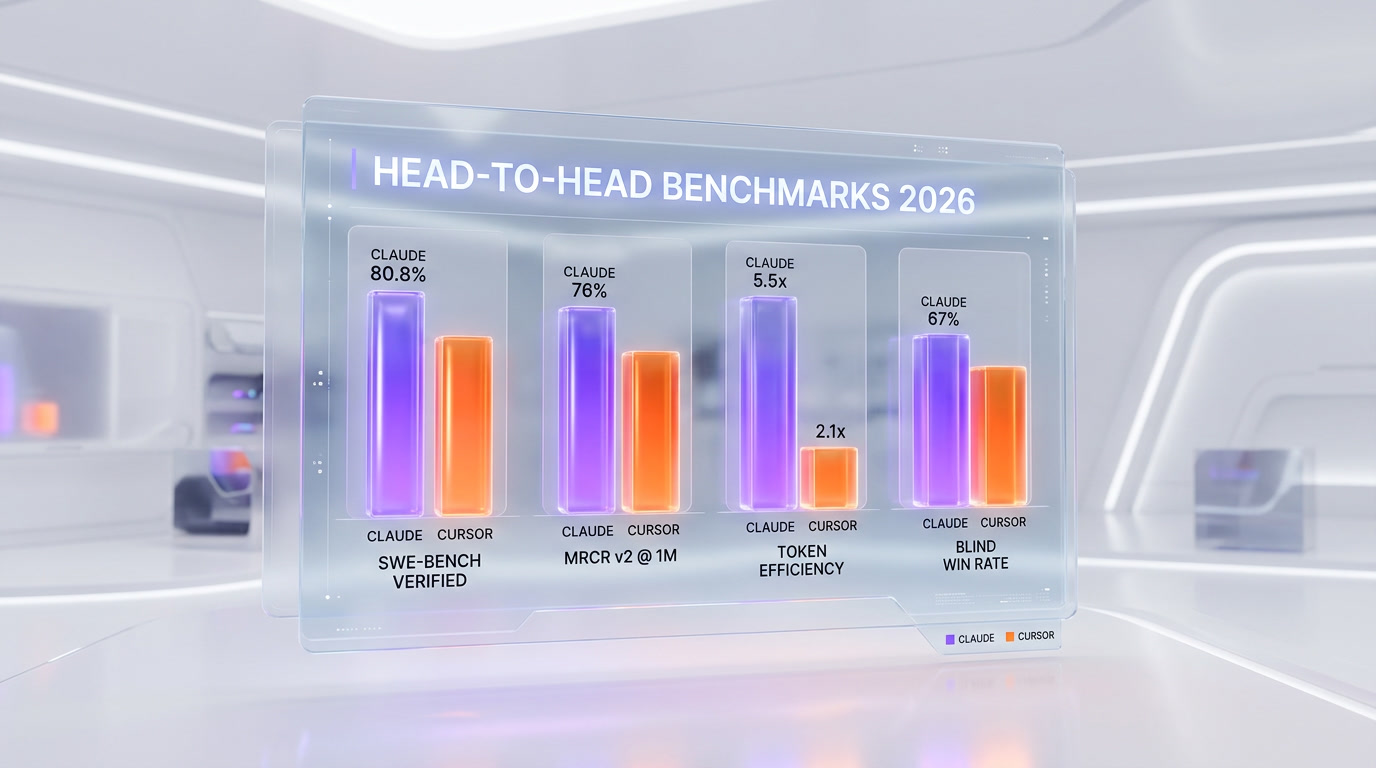
Benchmarks are not the whole story. But the ones below are consistent across multiple independent tests and they match what we see in daily use.
- SWE-bench Verified. Claude Code with Opus 4.6 scores roughly 80.8%. Cursor's score depends on which model you pick inside it, and its top configuration lands in the top-3 region when paired with Claude or GPT. For apples-to-apples "what does each tool hit at its best," Claude Code is ahead.
- Token efficiency. Independent testing has found Claude Code uses approximately 5.5x fewer tokens than Cursor for identical tasks. In one representative benchmark, Claude Code (Opus) completed a task in roughly 33K tokens with zero errors. On metered billing, a task that costs $1.00 in Cursor credits costs approximately $0.18 in Claude Code tokens. That compounds fast on heavy days.
- Context window (advertised vs real). Claude Code delivers the full 200K token context reliably and has a 1M-token mode with Opus 4.6 that scores 76% on the MRCR v2 benchmark at that length — that is a rare benchmark because most models fall off a cliff past 200K. Cursor advertises 200K context windows, but multiple community threads report 70K-120K usable context after Cursor's internal truncation and summarization. The gap at the long end is larger than the sticker would suggest.
- Blind-test win rate. In blind, head-to-head tests on production engineering tasks, Claude Code wins roughly 67% of the time against Cursor on the same inputs. Not a landslide, but consistent across samples.
- Multi-file reasoning. On the same 720K-token codebase dump of a Next.js 16 project (we tried this on both), Claude Code traced 14 files accurately with correct line numbers and caught a type issue Cursor missed. Cursor's answer was correct on the files it got to — it just stopped earlier because of context truncation.
The honest reading: Claude Code is better on autonomous, long-context, high-complexity tasks by a real margin. Cursor is competitive on the tasks that fit inside a standard IDE loop — inline edits, single-file changes, and tight iteration with the human in the loop. Anybody telling you one "destroys" the other is selling you something.
Agent architecture: CLI vs IDE — two philosophies

The core difference is not a feature list. It is a philosophy. Claude Code is "AI drives, you supervise." Cursor is "you drive, AI assists." Once you internalize that sentence, every feature comparison below starts to make sense.
- Claude Code is a terminal-first autonomous agent. You give it a job, it plans, it reads files, it edits, it runs shell commands, it checks its own work, it loops, it reports. You are there to approve, redirect and review. The default mental model is "hire a junior engineer and give them a ticket."
- Cursor is an AI-augmented IDE. You open a file, you type, the AI completes, you accept. You select a range, press Cmd+K, describe the change, it rewrites inline. You stay in the driver's seat at all times — the AI is a very fast, very smart autocomplete on top of VS Code's editing experience. The default mental model is "pair programmer."
- Agent mode in Cursor bridges the two. Cursor's Agent (Composer) and Background Agents can run autonomously for longer stretches — Background Agents in particular let you hand off a task to the cloud and come back to a diff. This narrows the gap with Claude Code, and it is one of the best improvements Cursor shipped in 2025-2026. It is still not as stable as Claude Code on 30+ minute runs, but the distance is smaller every month.
- Sub-agent system. Claude Code has the Claude Agent SDK and a first-class sub-agent concept. You can spin up specialized agents with their own system prompts, tools, and contexts, and route work between them. Our SEO content pipeline uses seven specialized sub-agents coordinated by a parent coordinator. Cursor does not have a matching user-facing sub-agent SDK — Background Agents are the closest primitive and they work on a flatter model.
- Editing primitives. Cursor edits in-place in the editor, with diffs, tab completions and Cmd+K. Claude Code edits via file reads and writes through tool calls, with verification steps in between. For small, surgical UI tweaks, Cursor is faster. For coordinated, multi-file, "reason about the blast radius" changes, Claude Code is more reliable.
- Human-in-the-loop ceremony. Cursor requires the human to stay in the loop on every single edit by default (that is the point). Claude Code has a configurable auto-approval and hook system so you can decide how much you want to babysit versus supervise. Both approaches are valid; they just serve different jobs.
Context window: 1M vs 200K (and the truth about both)
This is where the numbers and the reality start to diverge. The sticker says Claude Code has a 1M-token context with Opus 4.6 and Cursor has 200K. That is roughly five times more on paper. In practice the gap is usually even larger, for two reasons.
First, Claude Code's 1M mode actually works. Opus 4.6 scores 76% on the MRCR v2 benchmark at 1M tokens — most models fall off a cliff past 200K on long-context recall, so this is one of the few genuine million-token workflows in production. When we hand Claude Code a 720K-token Next.js codebase dump, it answers questions about it accurately. That is not something we can do elsewhere yet.
Second, Cursor's 200K is harder to hit in practice than it looks. Multiple community threads and independent tests report that the usable context inside Cursor after its internal summarization and truncation is closer to 70K-120K tokens. This is not a bug — Cursor makes smart decisions about what to keep in context to keep latency down and costs predictable — but it means the "200K" on the box and the "200K" you actually get on a complex refactor are not always the same number. If you have ever watched Cursor forget a file it read two messages ago, you have seen this.
Practical takeaway: if you are doing tight, localized edits, context does not matter. Both tools are fine. If you are doing whole-codebase reasoning — trace a bug from the Supabase query layer through the renderer, rename a domain concept across 40 files, audit types globally — Claude Code's long-context advantage is decisive. It is the biggest single reason we use Claude Code for refactors.
Multi-agent and worktrees: parallel coding on the same repo
Running multiple agents in parallel on one repo is the new frontier in 2026, and both tools have a story here. They are just very different stories.
Claude Code has supported git worktrees for parallel sub-agent execution for a while, and the feature is tightly integrated with the sub-agent SDK. In Claude Code, you can describe a job, have a coordinator spawn three specialized sub-agents in three worktrees, collect their results, and reconcile them in one pass. Our SEO pipeline does exactly this — a coordinator plus seven worker sub-agents, each with its own system prompt and tool set. The orchestration is composable and you write it once.
Cursor added Background Agents that can run in the cloud while you keep working locally, and the Agents Window in recent releases gives you a view of multiple agents running across local machines, cloud environments, worktrees and SSH sessions. This is real parallelism. What it is not, yet, is first-class orchestration — you still think of it as "N independent sessions on one repo," not "one orchestrator with N workers."
For a solo developer shipping fast, the difference is not huge. For a team building automation like our content pipeline, Claude Code's sub-agent model is materially more powerful. The flip side: Cursor's Background Agents are easier to set up and have a lower floor. If you just want to "kick off three agents on three tickets and look at the diffs later," Cursor does that with zero ceremony.
MCP ecosystem: Claude Code's biggest moat

The Model Context Protocol (MCP) is the open standard Anthropic released in 2024 for connecting AI agents to external tools — databases, APIs, knowledge bases, design tools. By April 2026, MCP has passed 97 million installs across clients and servers. Every serious developer tool that wants to be agent-addressable ships an MCP server. We wire Claude Code into Ahrefs, Supabase, Context7 documentation, Crypto.com, internal tools — and it mostly just works.
Cursor speaks MCP as well, and the Cursor Marketplace has a growing catalog of MCP servers that install with a few clicks. This has narrowed the ecosystem gap a lot since 2024. For most people most of the time, MCP in Cursor is good enough and the install experience is arguably nicer than editing JSON config files.
Where Claude Code still wins: the ecosystem weight is lopsided because most serious MCP servers are built and tested against Claude Code first. In practice, when we plug a new MCP server into Claude Code, it usually works on the first try because it was probably built and tested against Claude Code. In Cursor, MCP works, but the community of server-builders is more centered on Claude Code, and the server versions you get in Cursor's marketplace are sometimes one release behind. The gap will narrow. In April 2026, it has not fully narrowed yet.
Memory system: CLAUDE.md vs .cursorrules
Memory is where Claude Code feels genuinely ahead by a wide margin. The CLAUDE.md convention is deceptively simple — a markdown file at the project root and at the user's home — but it turns into something powerful once you layer a perpetual-memory pattern on top. A perpetual-memory setup can layer .claude/memory/ folders — primer, decisions, learnings — with a small update-memory script that appends annotated decisions and learnings across sessions. Claude Code reads this memory at the start of every session, so yesterday's architectural decision is today's starting point, automatically.
Cursor has .cursorrules at the project level and a Rules system that lets you add multiple rule files. It is a real feature and it is better than nothing. But it does not compound the same way CLAUDE.md does in practice. Cursor Rules tend to be static guardrails — "always use TypeScript strict," "prefer Server Components" — whereas CLAUDE.md plus a memory folder captures the living history of the project. After 60 days of daily use of both, Cursor Rules feel like a style guide and CLAUDE.md feels like an engineering journal. They solve different problems, and the journal is the one that matters more for long projects.
This is the feature we most miss when we are inside Cursor: every session feels a little bit like starting over.
Real-world workflow: how we actually use both every day
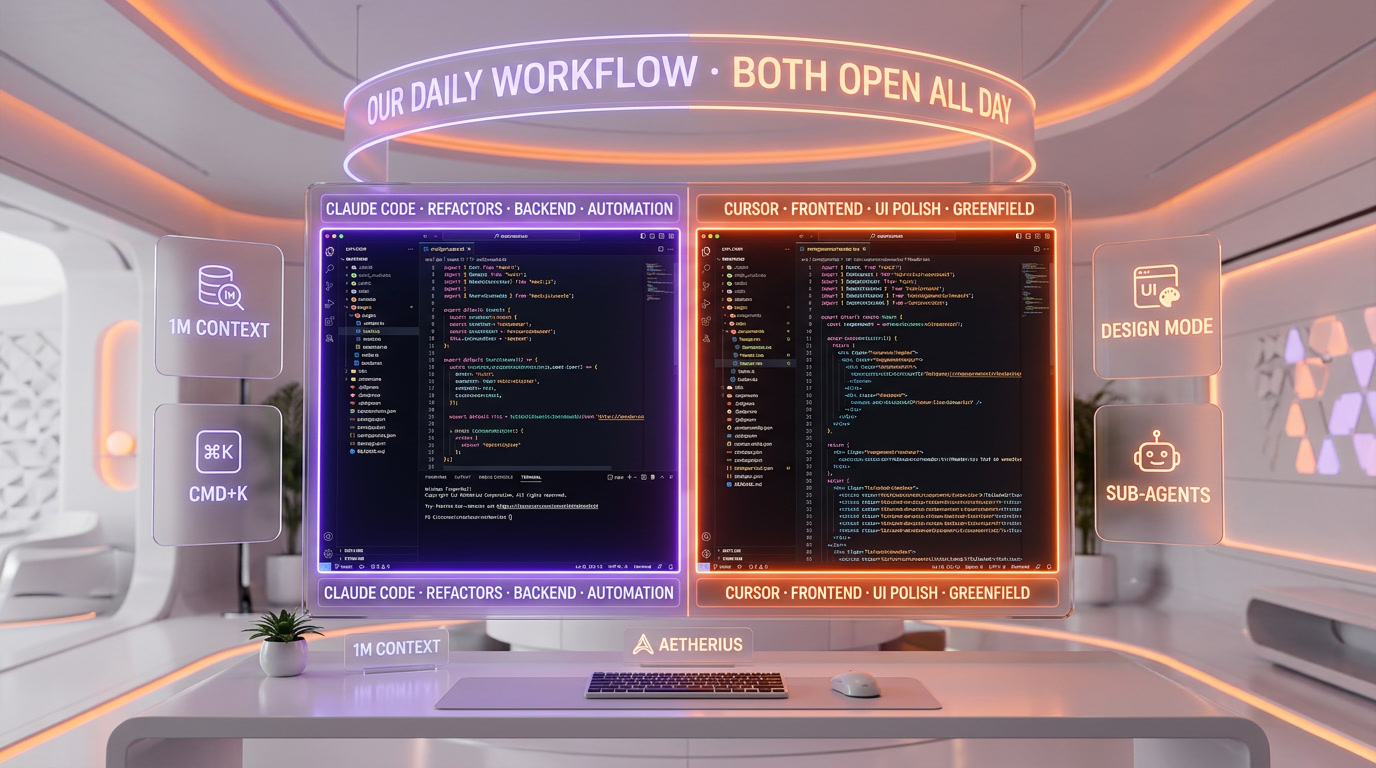
Benchmarks and features are one thing. The real test is what we open first in the morning. Here is the honest split, after months of running both on the ThePlanetTools.ai codebase — a Next.js 16 App Router project with Supabase, Tailwind CSS v4, MCP integrations, and a content pipeline that publishes to production daily.
- Feature work that touches backend and types. Claude Code, always. New API route, new Supabase query, new content type wired through the admin dashboard and public renderer — we give Claude Code the brief, it reads the relevant files, it plans, it edits across the tree, it verifies, and it reports. We review the diff at the end. This is where its architectural judgement shines.
- Frontend polish and UI iteration. Cursor, always. Button is 2 pixels off, spacing is wrong, hover state needs a gradient — open the file in Cursor, Cmd+K, describe the change, accept, move on. Design Mode takes this even further: click the element, describe what you want, Cursor writes the code change for the exact DOM node you pointed at. This is a workflow Claude Code can only approximate from a terminal.
- Complex refactors across many files. Claude Code, always. The 1M-token context plus Opus 4.6's reasoning plus the sub-agent SDK win this category decisively. We have Claude Code do multi-file renames, API migrations, type system upgrades — work where the blast radius has to be understood up front.
- Writing new React components from scratch. Either, but usually Cursor first. Tab completions plus inline edits make greenfield component writing very fast, and the visual feedback loop in Cursor is hard to beat. If the component is also wiring new data flow, we switch to Claude Code mid-way.
- Hard, non-obvious bugs. Claude Code. A memoization issue that broke Server Components, a race condition in our revalidation webhook, a TOC anchor ID algorithm drift between renderer and extractor — all solved by Claude Code after initial Cursor attempts stalled. Opus 4.6 reasoning is still the difference-maker on "why is this subtly wrong" problems.
- DevOps, shell, CI/CD, Vercel debugging. Claude Code. Terminal-native wins terminal work.
- Code review and diff reading. Cursor, for the keyboard-friendly diff viewer. Claude Code, for "tell me what this PR is really doing." We use both.
- Content pipeline orchestration and automation. Claude Code only. Our pipeline depends on the Claude Agent SDK and sub-agents. Porting to Cursor would mean rebuilding the orchestration layer, and that by itself says something about architectural lock-in.
- Learning a new library or framework quickly. Cursor. Tab completions on a library you have never used are a cheat code for learning curves.
- Ultra-long autonomous runs (leave the agent working while you get coffee). Claude Code. More stable past the 30-minute mark, less likely to go sideways.
This split is not rigid — we cross-use both tools all day — but the pattern above is the default every morning. Both tabs are open, and the work tells us which one to use.
Visual editing experience: where Cursor wins
There are workflows Claude Code can technically do — it can absolutely edit React components from a terminal — and workflows Claude Code will never feel good at. Visual editing is the second kind.
Cursor's Design Mode is the cleanest example. You are in the browser looking at your live page, you click on a DOM element, you describe the change in plain English, and Cursor applies the code edit to the right file and the right line. There is no "describe where the button is" step. The AI knows, because you pointed at it. That is a qualitative improvement over anything a terminal agent can do.
Tab completions are the second example. When you are writing a new component and you have typed three lines, Cursor's next-token predictions are often uncannily accurate — "I was going to type exactly that" — and you just press Tab. Over an hour of new-code writing, the time saved is real and it is specific to the IDE model. Claude Code does not have a tab-completion primitive because it is not what a terminal agent is.
Cmd+K for inline edits is the third. Select a function, press Cmd+K, say "make this handle errors and return a typed result," Cursor rewrites it in place. This is the feature we use most in Cursor, by a wide margin. It is the single most natural "AI-assisted editing" interaction in the category.
If you spend most of your day in a visual editor and you like it that way, Cursor is the right primary tool. That is not a concession — it is a design choice. Claude Code trades the visual loop for something else, and the trade is worth it only if the "something else" is what you want.
Autonomous execution: where Claude Code wins
The flip side is the category Cursor cannot quite reach yet. When we give Claude Code a job and walk away, it comes back with usable work roughly six times out of ten on our Max 20 tier, minor-edits-required roughly three times out of ten, and "needs rework" only one time out of ten. Cursor Background Agents have closed a lot of this gap since launch, but they are still not as stable past the 30-minute mark, and they do not have the memory system that makes Claude Code's autonomous runs compound over a week of daily work.
The specific features that make Claude Code win this category: CLAUDE.md memory that loads automatically at session start, sub-agent SDK for coordinator-worker orchestration, a large message budget on Max 20, and Opus 4.6's better judgement on when to stop and ask for clarification versus plow ahead. Put those together and you get "hire a junior engineer for $200 per month." Cursor is closer to "hire an extremely fast pair programmer who never gets tired." Both are valuable. They are not interchangeable.
Learning curve: where Cursor wins (for most developers)
If you know VS Code, you already know Cursor. Install it, open your project, start typing. Tab completions and Cmd+K are discoverable in the first five minutes. Agent mode is a panel away. Background Agents are a keyboard shortcut away. There is almost no learning curve for a developer coming from VS Code — because it literally is VS Code, forked and augmented.
Claude Code asks more of you. You have to be comfortable on a command line. You have to understand the idea of slash commands, hooks, and project configuration in markdown. You have to learn the CLAUDE.md convention to get full value. You have to be willing to trust the agent with auto-approved tool calls to get the most out of autonomous runs, and that takes a week or two of calibration. None of this is hard, but it is real, and it is the reason most developers start with Cursor and add Claude Code later — not the other way around.
Our honest advice: if you have never used an AI coding tool before, start with Cursor. You will be productive in an hour. If you already know VS Code, start with Cursor. If you are a terminal native or you want to build automation on top of the agent, start with Claude Code. If you are building serious software and shipping every day, you will probably end up with both open at the same time within a month, the way we did.
Who should use which? Our recommendations
- Frontend developer (React, Next.js, Vue): Cursor first. Design Mode, tab completions and Cmd+K are the most effective combination for UI work in 2026. Add Claude Code later for refactors.
- Backend / infrastructure engineer: Claude Code first. Terminal-native agent with 1M-token context, MCP,
/loop, and memory is the right tool for API routes, migrations, CI/CD and server work. - Full-stack solo developer: Both. $40 per month buys you the best of each, and they do not fight each other. Use Cursor for the client, Claude Code for the server and refactors.
- Startup founder (MVP builder): Cursor first. Lower learning curve, faster zero-to-screen, good enough for most early work.
- Student or budget-conscious developer: Cursor Pro at $20 if you can afford it, Claude Code Pro at $20 if you prefer terminal workflows and lean heavily on agents. If you are going full free, try OpenAI Codex (bundled with ChatGPT Plus) as a third option.
- DevOps / SRE: Claude Code. Shell work, infra, automation — this is its home.
- AI / ML engineer: Claude Code. Long context matters on research codebases, and Opus 4.6 reasoning is strongest on the hard stuff.
- Enterprise team (10+ developers): Cursor Teams at $40 per user. Easier rollout, lower friction, mature SSO. Layer Claude Code on top for the engineers who want it.
- Agency / client work: Both. Cursor for delivery speed on client projects, Claude Code for complex backend work and automation you reuse across clients.
- Building production automation or content pipelines: Claude Code. The sub-agent SDK and CLAUDE.md memory are what make pipelines like ours possible.
Final verdict: Claude Code wins 2026 overall, but the right answer is "use both"

If you force us into a single winner, it is Claude Code. It is the tool we trust most with production work, the tool that handles the hardest problems on our codebase, the tool we built ThePlanetTools.ai with, the tool our content pipeline depends on. The benchmarks back it up — 80.8% SWE-bench Verified, 76% MRCR v2 at 1M tokens, 5.5x token efficiency, 67% blind-test win rate on production engineering tasks. The ecosystem backs it up — 97M+ MCP installs and the best memory system in the category. The daily experience backs it up — Claude Code is the only agent we trust to run autonomously for 30+ minutes on our Next.js codebase and come back with shippable work.
But the real answer for a working developer in 2026 is not to pick one. It is to run both, every day, and let the work decide which tool opens when. We use Cursor for everything visual — frontend polish, UI iteration, greenfield component writing, learning new libraries — and Claude Code for everything autonomous — refactors, backend work, hard bugs, DevOps, pipeline automation. The overlap is small. The combined cost at entry tiers is $40 a month. The productivity gain from having the right tool for each job is larger than anything you will get by picking a single winner.
Cursor is a genuinely great IDE with real Agent mode features, Design Mode, Background Agents, model flexibility, and the lowest learning curve in the category. It is the best way to get an AI-assisted IDE experience in 2026, and it is not a consolation prize. Claude Code is a different tool solving a related problem from the opposite direction, and the two sit next to each other on our desktop all day because the problem is bigger than any one tool.
One final honest note: we built ThePlanetTools.ai with Claude Code, we use Claude Code daily in our own development work, and we rely on CLAUDE.md throughout our projects. That biases us. We tried to strip the bias out by running Cursor on the same codebase every day and measuring where each tool actually wins. The split you see above is what we found. The reason we are locked in to Claude Code is that it is better at the work we do. The reason we also keep Cursor open is that it is better at the work it does. That is the whole review.
If you want more context, read our full Claude Code tool review and Cursor tool review, and our comparison of Claude Code to OpenAI Codex if you are also evaluating the pure-CLI alternatives.
Frequently asked questions
Which is better in 2026, Claude Code or Cursor?
We use both every day. Claude Code wins overall for autonomous agentic work, complex refactors and production code quality — 80.8% on SWE-bench Verified with Opus 4.6, a real 1M-token context and roughly 5.5x fewer tokens per task than Cursor in independent tests. Cursor wins on visual editing, Design Mode, inline Cmd+K edits, tab completions and the lowest learning curve in the category. If you can only run one, pick Claude Code if you like agents to drive and Cursor if you like staying in the editor. If you can run both at $40 per month combined, run both — the overlap is small and the win is real.
Is Claude Code's context window really bigger than Cursor's?
Yes, and the gap is larger than the sticker suggests. Claude Code delivers the full 200K token context reliably and has a 1M-token beta on Opus 4.6 that scores 76% on the MRCR v2 long-context benchmark — one of the few genuine million-token production workflows. Cursor advertises 200K context windows, but multiple independent and community tests report 70K-120K usable context after Cursor's internal truncation and summarization. For whole-codebase reasoning, multi-file refactors or long traces, Claude Code is the stronger tool by a real margin.
How do Claude Code and Cursor compare on SWE-bench and token efficiency?
Claude Code with Opus 4.6 scores roughly 80.8% on SWE-bench Verified. Cursor's score depends on which model you pick inside it and its top configuration lands in the top-3 region when paired with Claude or GPT. On token efficiency, independent testing found Claude Code uses approximately 5.5x fewer tokens than Cursor for identical tasks — a task that consumes $1.00 in Cursor credits costs roughly $0.18 in Claude Code tokens. That efficiency compounds on metered plans and is one of the main reasons we reach for Claude Code on long sessions.
How much does each tool cost in 2026?
Claude Code has three tiers: Pro at $20 per month, Max 5 at $100 per month (roughly 5x Pro usage) and Max 20 at $200 per month (roughly 20x Pro usage). Cursor has Pro at $20 per month, Pro+ at $60 per month (3x usage), Ultra at $200 per month (20x usage), and Teams at $40 per user/month. At the $20 entry tier, Cursor feels smoother for IDE-driven work and Claude Code goes further on token efficiency for agent-driven work. At the $200 tier, Claude Code Max 20 wins for complex engineering and automation because agent orchestration, MCP and memory compound on top of raw inference.
Can I use Claude Code and Cursor together?
Yes, and that is exactly what we do every day. Claude Code is a CLI agent that lives in your terminal. Cursor is a VS Code-based IDE. They do not conflict — you can even run Claude Code inside Cursor's integrated terminal if you want a single window. Our daily split: Cursor for frontend polish, UI iteration and greenfield components; Claude Code for refactors, backend work, hard bugs, DevOps and pipeline automation. The combined entry cost is $40 per month and the productivity gain from having the right tool for each job is larger than picking a single winner.
Does Claude Code have better memory than Cursor?
Yes, clearly. Claude Code ships a first-class memory convention called CLAUDE.md at three levels: global user memory at ~/.claude/CLAUDE.md, per-project memory at ./CLAUDE.md, and optional perpetual memory folders like .claude/memory/ with decisions, learnings and primers. Claude Code loads this memory automatically at session start. Cursor has .cursorrules and a Rules system that works more like a static style guide. Over months of daily use, CLAUDE.md plus a memory folder feels like an engineering journal that compounds, while Cursor Rules feel like a coding standard. The journal wins on long projects.
Which tool is better for frontend development?
Cursor, by a clear margin. Design Mode lets you click on a UI element in the browser and describe the change, and Cursor applies the code edit to the exact file and line. Cmd+K inline edits rewrite selected code in place. Tab completions are the best in the category on a new component. These are features a terminal agent like Claude Code cannot match by design. For backend and refactor work the answer flips to Claude Code, but for frontend polish and UI iteration Cursor is our daily driver.
Which tool is better for backend and refactoring?
Claude Code, by a clear margin. A real 1M-token context window with Opus 4.6, CLAUDE.md memory, the sub-agent SDK and stable 30+ minute autonomous runs make it the right tool for multi-file refactors, API migrations, type system work and hard bugs where the blast radius has to be understood up front. We use it every day for exactly that kind of work on a production Next.js codebase. Cursor's Background Agents have narrowed the gap but the 1M context and memory system are still Claude Code's territory.
Should I switch from Cursor to Claude Code in 2026?
Not exactly — the better move is to add Claude Code to your stack rather than switch. Keep Cursor as your visual IDE for frontend, UI and greenfield component work. Add Claude Code as your autonomous agent for refactors, backend work, hard bugs, DevOps and automation. At $20 per month each, the combined cost is $40 per month and the overlap is small enough to be worth it. If budget forces a single tool, pick based on how you like to work: Cursor if you want to stay in the editor, Claude Code if you want agents to drive. Most serious shipping developers we know end up with both within a month.
Sources and references
Every figure on this page is attributed to whoever produced it. Vendor documentation and independent measurement are listed separately and never merged into a single ranking.
- Cursor — Changelog (released versions and features)
- Cursor — Documentation (models, pricing tiers and limits)
- Anthropic — Claude Code (product capabilities and access)
- Artificial Analysis — Model leaderboard (Intelligence Index scores and cost per task across configurations)
Our Verdict
We use Claude Code and Cursor every single day to ship ThePlanetTools.ai. Claude Code wins overall on autonomous work, 1M-token context and code quality. Cursor wins everything visual — Design Mode, Cmd+K, tab completions. Both are $20/month. The real answer: run both, let the work decide which one opens.
Choose Claude Code
Anthropic's agentic CLI coding tool — not a chatbot, a real AI engineer that lives in your terminal, reads your entire codebase, and ships production code.
Try Claude Code →Frequently Asked Questions
Is Claude Code better than Cursor?
We use Claude Code and Cursor every single day to ship ThePlanetTools.ai. Claude Code wins overall on autonomous work, 1M-token context and code quality. Cursor wins everything visual — Design Mode, Cmd+K, tab completions. Both are $20/month. The real answer: run both, let the work decide which one opens.
Which is cheaper, Claude Code or Cursor?
Claude Code starts at $20/month (free plan available). Cursor starts at $20/month (free plan available). Check the pricing comparison section above for a full breakdown.
What are the main differences between Claude Code and Cursor?
The key differences span across 16 features we compared. For Tool nature, Claude Code offers Terminal-first autonomous CLI agent (with desktop app and IDE extensions) while Cursor offers AI-augmented IDE — VS Code fork with native AI features. For Entry pricing (Pro), Claude Code offers $20 per month (annual: $17 per month, $200 billed up front) while Cursor offers $20 per month. For Top tier pricing, Claude Code offers Max 20 — $200 per month (~20x Pro usage); Max 5 — $100 per month while Cursor offers Ultra — $200 per month (20x usage); Pro+ — $60 per month (3x usage). See the full feature comparison table above for all details.