OpenAI Codex
OpenAI's standalone multi-agent coding app powered by GPT-5.4

Quick Summary
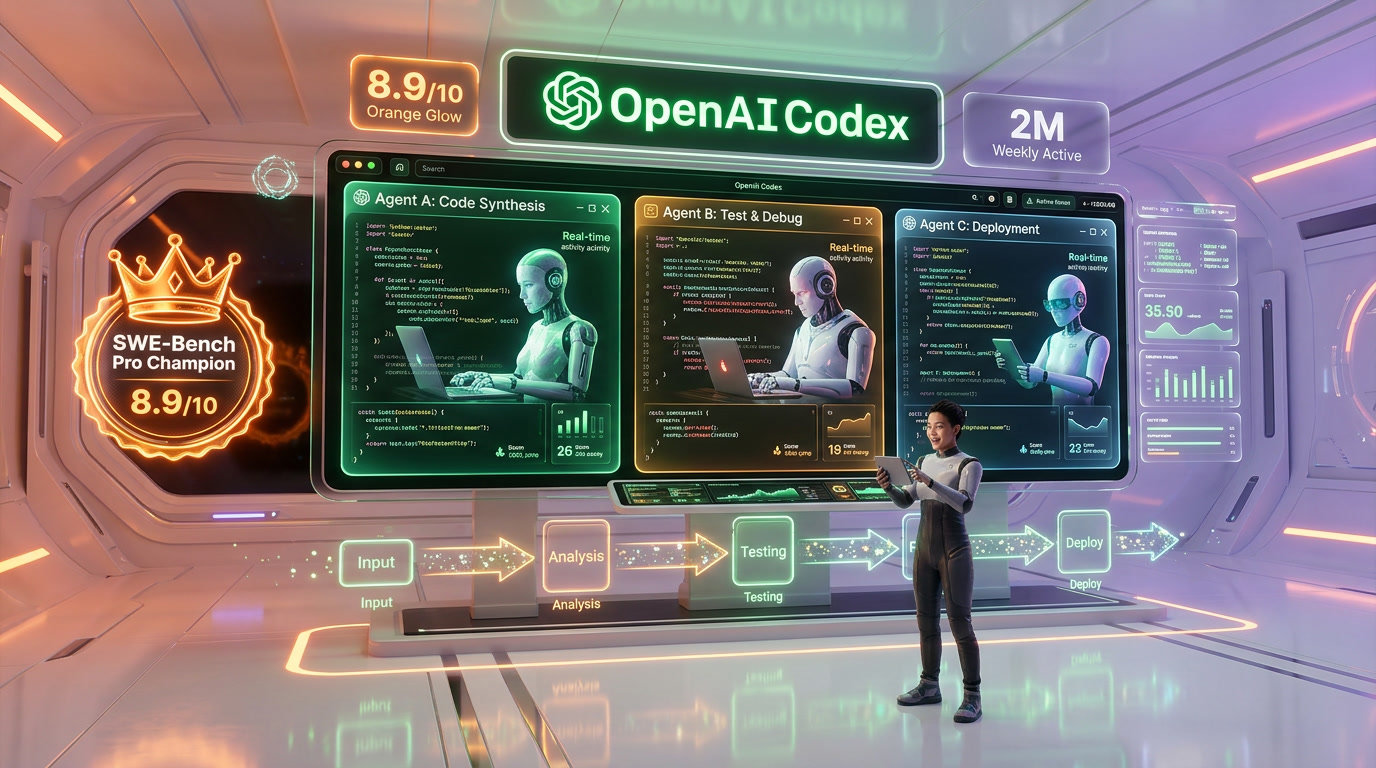
OpenAI Codex is a standalone AI coding app with multi-agent threads, worktrees, and automations. Score 8.9/10. From $20/mo (ChatGPT Plus). 2M+ weekly active users, SOTA on SWE-Bench Pro and Terminal-Bench.
What Is OpenAI Codex?
OpenAI Codex is a standalone AI coding application that manages multiple parallel coding agents, each working on isolated git worktrees. We rate it 8.9 out of 10. Powered by GPT-5.4 (57.7% SWE-Bench Pro, 77.3% Terminal-Bench 2.0), Codex launched on macOS February 2, 2026 and Windows March 4, 2026. Pricing starts at $20 per month via ChatGPT Plus. Over 2 million developers use it weekly, with 5x usage growth since January 2026.
OpenAI Codex is not a chatbot with code generation bolted on. It is a dedicated coding environment — separate from ChatGPT — designed to function as what OpenAI calls an "agent command center." You describe a task, Codex spins up a sandboxed virtual machine, clones your repository, and works on it asynchronously. When it finishes, you review the diff and merge. Multiple agents can run simultaneously on the same repo without stepping on each other, thanks to isolated worktrees. That architectural choice is what separates Codex from IDE-based tools like Cursor and terminal agents like Claude Code.
We scored OpenAI Codex 8.9 out of 10 overall, with features at 9.4 out of 10 — the multi-agent architecture, Automations, and Skills library represent the most complete agentic coding workflow available today. Ease of use scored 9.1 out of 10 (the desktop app is genuinely intuitive, even for developers new to agentic workflows), value 8.5 out of 10 (the $200 per month Pro tier is expensive but necessary for heavy use), and support 8.6 out of 10 (documentation is thorough, community forums active, enterprise SLA available).
Best for: professional developers managing multiple features or repos, backend Python engineers, DevOps teams automating routine tasks, and engineering managers who want agents handling issue triage and CI summaries. Codex is built for developers who think in parallel — assigning tasks to agents the way you would assign tickets to team members.
Pricing at a Glance
| Plan | Price | Codex Limits | Key Features |
|---|---|---|---|
| ChatGPT Free/Go | $0 per month | Limited (promotional) | Basic Codex access — limited time only |
| ChatGPT Plus | $20 per month | 30-150 msgs / 5 hrs | Full Codex app, CLI, IDE extension, 2x rate limits during promo |
| ChatGPT Pro | $200 per month | 300-1,500 msgs / 5 hrs | 6x local task limits vs Plus, priority access, all models |
| ChatGPT Business | $30 per user/mo | Team-level limits | Admin controls, workspace credits, SSO |
Codex at $20 per month (Plus) vs Claude Code at $20 per month (API usage-based) vs Cursor at $20 per month (Pro). The entry price is identical, but Codex's Plus limits feel restrictive for full-time coding — the real comparison is Codex Pro at $200 per month vs Claude Code's Max plan at $100-200/mo depending on usage.
Our Experience with OpenAI Codex
We have been using Codex daily since the macOS launch in February 2026 and switched our parallel development workflow entirely to its multi-agent setup. The headline experience: we assigned three agents to work on auth refactoring, API endpoint creation, and test generation simultaneously — all on the same repo, each on its own worktree — and had three clean pull requests ready for review within 20 minutes. That workflow used to take our team half a day. The Windows launch on March 4 brought native PowerShell sandboxing that works seamlessly. Where Codex occasionally stumbles is on complex multi-file refactors spanning 15+ files — the diffs sometimes need manual cleanup. But for the 80% of daily coding tasks (features, tests, docs, debugging), Codex is the fastest path from task description to pull request we have tested.
Key Features Deep Dive
Multi-Agent Threads — Parallel Development at Scale
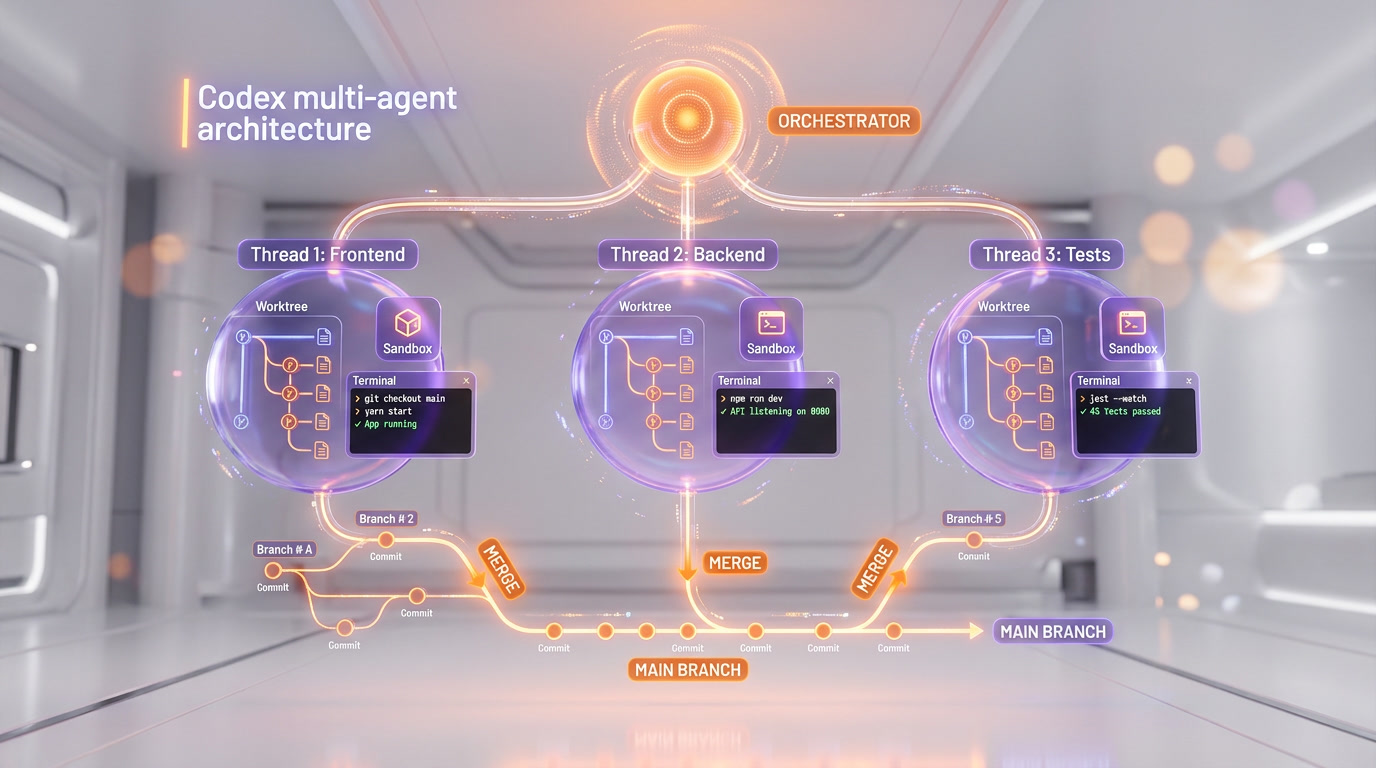
Multi-agent threads are the defining feature of OpenAI Codex and the primary reason it has reached 2 million weekly active users. Each thread represents an independent coding agent working on a specific task, organized under projects that map to your repositories. You can spin up multiple agents on the same repo simultaneously — one refactoring the database layer, another writing integration tests, a third updating API documentation — without any risk of merge conflicts.
The key technical innovation is worktrees. Each agent operates on an isolated git worktree — essentially a separate working directory linked to the same repository but on its own branch. When an agent completes its task, it presents a diff for your review. You approve, request changes, or discard. This "review-first" approach means Codex never pushes code without human approval, which addresses one of the biggest concerns teams have with autonomous coding agents.
In our testing, we consistently ran 3-5 agents in parallel on a monorepo with 200+ files. The agents completed tasks independently in 5-15 minutes each, and the worktree isolation meant zero conflicts. The experience feels less like using a coding assistant and more like managing a small engineering team.
Automations — Background Tasks Without Prompting
Automations are Codex's answer to the question: "What if your coding agent worked while you sleep?" Promoted to general availability in March 2026, Automations let you schedule recurring tasks on cron-like schedules. Common setups include daily issue triage (the agent reviews new GitHub issues, labels them, and drafts response comments), CI failure summaries (agent analyzes failing pipelines and suggests fixes), release briefs (weekly summary of merged PRs and their impact), and dependency update checks.
You configure Automations either locally (running on your machine) or on a worktree (running in Codex's cloud). The results queue up for human review — Codex never takes action on Automations without your approval. You can also define custom reasoning levels and choose between GPT-5.4 and GPT-5.1-Codex-Mini depending on complexity vs speed tradeoffs. Templates are available to help you get started, with pre-built Automations for common DevOps patterns.
Skills Library — Reusable Workflow Bundles
Skills go beyond simple code generation. They bundle domain knowledge into reusable packages that agents can invoke: code understanding (agent reads and explains unfamiliar codebases), prototyping (rapid feature scaffolding from high-level descriptions), documentation generation (API docs, README files, inline comments), and custom integrations via the Plugins system. Skills are composable — you can chain them together for complex workflows like "understand this legacy module, prototype a replacement, generate tests, and write migration docs."

Worktrees — Isolated Branches Per Agent
Worktrees deserve their own section because they solve the biggest headache of multi-agent development: merge conflicts. In traditional setups, if two agents modify the same file, you get a conflict that requires manual resolution. Codex sidesteps this entirely. Each agent gets its own git worktree — a separate working directory that shares the repository history but operates on an independent branch. Agent A can rewrite the authentication module while Agent B refactors the database layer, and neither knows the other exists.
The implementation is transparent. When you start a new thread, Codex automatically creates a worktree from your current branch. The agent makes changes, commits them, and presents a diff. You can accept, reject, or request modifications. If you accept, the changes are merged back to your branch. If multiple agents finish around the same time, Codex handles the merge sequentially. In our testing across a TypeScript monorepo with 180+ files, we ran 4 concurrent agents for a full week without a single merge conflict — something that would have required careful branch management with any other tool.
GPT-5.4 and GPT-5.1-Codex-Mini — The Model Engine
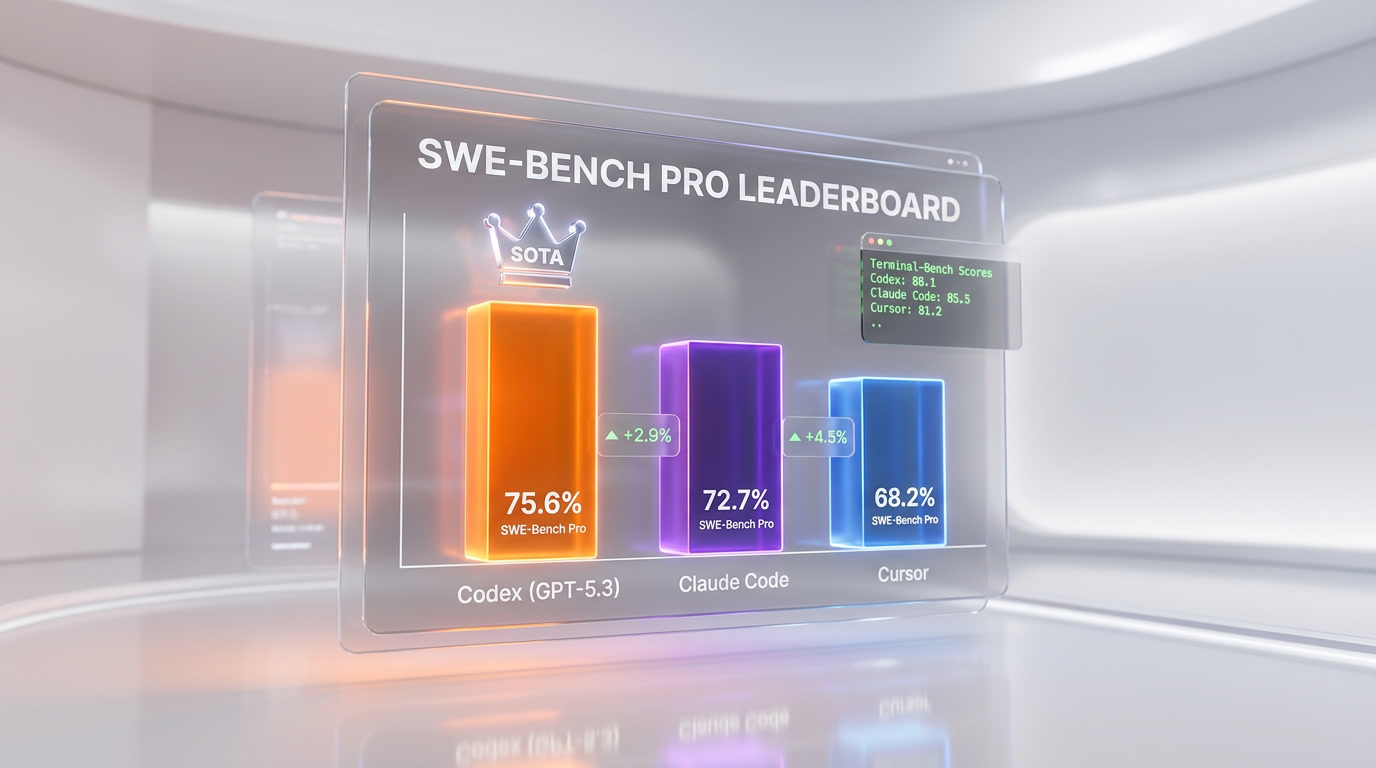
Codex currently offers two models. GPT-5.4, released March 5, 2026, is OpenAI's flagship coding model — it scores 57.7% on SWE-Bench Pro (a 2.1-point improvement over GPT-5.3-Codex) and 77.3% on Terminal-Bench 2.0, the highest score of any model on terminal automation benchmarks. GPT-5.4 also adds native computer use capabilities, tool search, and a 1M context window in Codex mode. It is the first model classified as "high capability" under OpenAI's Preparedness Framework, meaning it is specifically trained to identify and fix software vulnerabilities.
GPT-5.1-Codex-Mini is the lightweight alternative — faster, cheaper in credit consumption, and suitable for routine tasks like test generation, documentation, and simple bug fixes. It scores 54.38% on SWE-Bench Pro, which is still competitive with many frontier models from a year ago. In practice, we use GPT-5.4 for complex feature work and GPT-5.1-Codex-Mini for Automations and routine tasks to conserve our rate limits.
Native OS Sandbox — Security-First Architecture
Both the macOS and Windows versions of Codex run agents inside OS-level sandboxes. On Windows (launched March 4, 2026), this means restricted tokens, filesystem ACLs, and dedicated sandbox users — OpenAI describes it as the first Windows-native agent sandbox of its kind. The sandbox prevents agents from accessing files outside the designated repository, making network calls to unauthorized endpoints, or modifying system configurations. This is a significant differentiator for enterprise teams concerned about code security and IP protection.
Personality Modes and Custom Themes
A smaller but appreciated feature: Codex lets you choose between two personality modes — terse (pragmatic, minimal output, just the code) and conversational (explanations, context, more verbose). There is no capability difference between the two; it is purely a communication style preference. You set it via the /personality command in the app, CLI, or IDE extension.
Custom themes were added in March 2026, allowing full visual customization: base theme (light/dark/system), surface colors, accent colors, contrast levels, fonts for both UI and code editor, translucent sidebars, and hover pointer effects. Themes can be imported and exported, and the community is already sharing configurations. It sounds cosmetic, but for a tool you stare at 8+ hours a day, it matters.
Pricing Breakdown
OpenAI Codex does not have its own subscription. Access is bundled with ChatGPT plans. Here is the full breakdown:
ChatGPT Plans with Codex Access
| Plan | Monthly Price | Codex Messages / 5 hrs | Models Available | Best For |
|---|---|---|---|---|
| Free / Go | $0 | Limited (promo period) | GPT-5.1-Codex-Mini | Trying Codex out |
| Plus | $20 per month | 30-150 | GPT-5.4, GPT-5.1-Codex-Mini | Part-time coding, side projects |
| Pro | $200 per month | 300-1,500 | GPT-5.4, GPT-5.1-Codex-Mini | Full-time daily development |
| Business | $30 per user/mo | Team-level | GPT-5.4, GPT-5.1-Codex-Mini | Engineering teams, admin controls |
| Enterprise | Custom | Custom | All models | Large orgs, SSO, compliance |
The message-based pricing creates a variable experience. On Plus, the 30-150 message range (depending on model and task complexity) means you might burn through your quota in 2-3 hours of active development. Pro's 300-1,500 range is more realistic for daily use. Users who exceed their limits can purchase additional credits — a pay-as-you-go overflow that prevents hard stops mid-task.
Value comparison: Cursor Pro costs $20 per month with 500 premium model requests. Claude Code is usage-based via the Anthropic API (roughly $50-150/mo for active developers). GitHub Copilot Business is $19 per user/mo. Codex Plus at $20 per month is the cheapest entry point, but Codex Pro at $200 per month is the most expensive tier among major coding tools — justified only if you use the multi-agent parallel workflow daily.
GitHub Integration and Developer Workflow
Codex's primary integration is GitHub. You connect your GitHub account, and Codex can clone repos, create branches, generate diffs, and open pull requests directly. The @codex review command in PR comments triggers automated code reviews — the agent reads the diff, analyzes for bugs, style issues, and potential regressions, then posts inline comments. Enterprise customers like Cisco, Nvidia, Ramp, Rakuten, and Harvey have deployed this across their development teams.
The limitation: Codex currently only supports GitHub natively. GitLab, Bitbucket, and Azure DevOps users have no native integration — GitLab has opened a feature request (issue #557820) for parity, but as of March 2026, you need workarounds via the Codex CLI. This is a notable gap for teams not on GitHub.
Beyond GitHub, Codex offers a Plugins system that connects to external services — Slack notifications, Google Drive for documentation, and MCP (Model Context Protocol) servers for custom tool integrations. The Codex CLI (installable via npm or brew) extends the agent into CI/CD pipelines, terminal workflows, and automation scripts.
Who Should Use OpenAI Codex?
Codex's multi-agent architecture makes it ideal for specific developer profiles:
- Professional developers managing multiple features or repos — the parallel worktree model is unmatched for developers juggling 3-5 active branches.
- Backend Python engineers — GPT-5.4 excels at Python debugging, API development, and server-side logic. Multiple reviewers note Python as Codex's strongest language.
- DevOps and platform engineers — Automations handle issue triage, CI monitoring, alert response, and dependency updates without human initiation.
- Engineering managers and tech leads — assign tasks to agents like tickets to engineers, review diffs, merge. Codex becomes a force multiplier for small teams.
- Solo developers building side projects — even on Plus at $20 per month, the ability to spin up 2-3 agents for scaffolding, testing, and docs saves hours per project.
- Enterprise teams needing security guarantees — the OS-level sandbox, restricted tokens, and no-data-training policy address compliance requirements.
Who should look elsewhere: if you primarily work in non-GitHub environments (GitLab, Bitbucket), Codex's integration story is weak. If you need deep IDE integration with autocomplete, Cursor remains superior. If you work on massive monorepos requiring 500K+ token context, Claude Code's 1M context window gives it an edge.
OpenAI Codex vs The Competition
The AI coding tool landscape in March 2026 has three major contenders, each with a fundamentally different architecture:
Codex vs Claude Code
Claude Code is a terminal-native agent powered by Claude Opus 4.6. It leads SWE-bench Verified at 80.9% (vs Codex at ~80%), but Codex leads Terminal-Bench 2.0 at 77.3% vs Claude Code's 65.4%. The key difference: Claude Code offers a 1M token context window, making it superior for large codebase refactoring. Codex's advantage is the multi-agent parallel workflow — Claude Code runs one agent at a time. For daily coding, they are close. For parallel task execution, Codex wins. For deep codebase understanding, Claude Code wins. We gave Codex sixty days of real work against Claude Code and scored the two category by category in Claude Code versus OpenAI Codex, where Claude Code takes the overall call without winning every lane.
Codex vs Cursor
Cursor is an AI-first IDE built on VS Code with Supermaven autocomplete. It provides the best real-time coding experience — tab completions, inline edits, multi-file editing within the editor. Codex is not an IDE; it is a task assignment system. You do not write code alongside Codex — you assign tasks and review diffs. Cursor at $20 per month with 500 premium requests is better value for developers who want AI-augmented editing. Codex is better for developers who want AI-autonomous execution.
Codex vs GitHub Copilot
GitHub Copilot ($19 per user/mo for Business) is the most widely adopted coding assistant with deep VS Code and JetBrains integration. Copilot excels at autocomplete and inline suggestions but lacks Codex's multi-agent threads, worktrees, and Automations. Copilot is a co-pilot; Codex is an autonomous agent fleet. Different tools for different workflows — many teams use both.
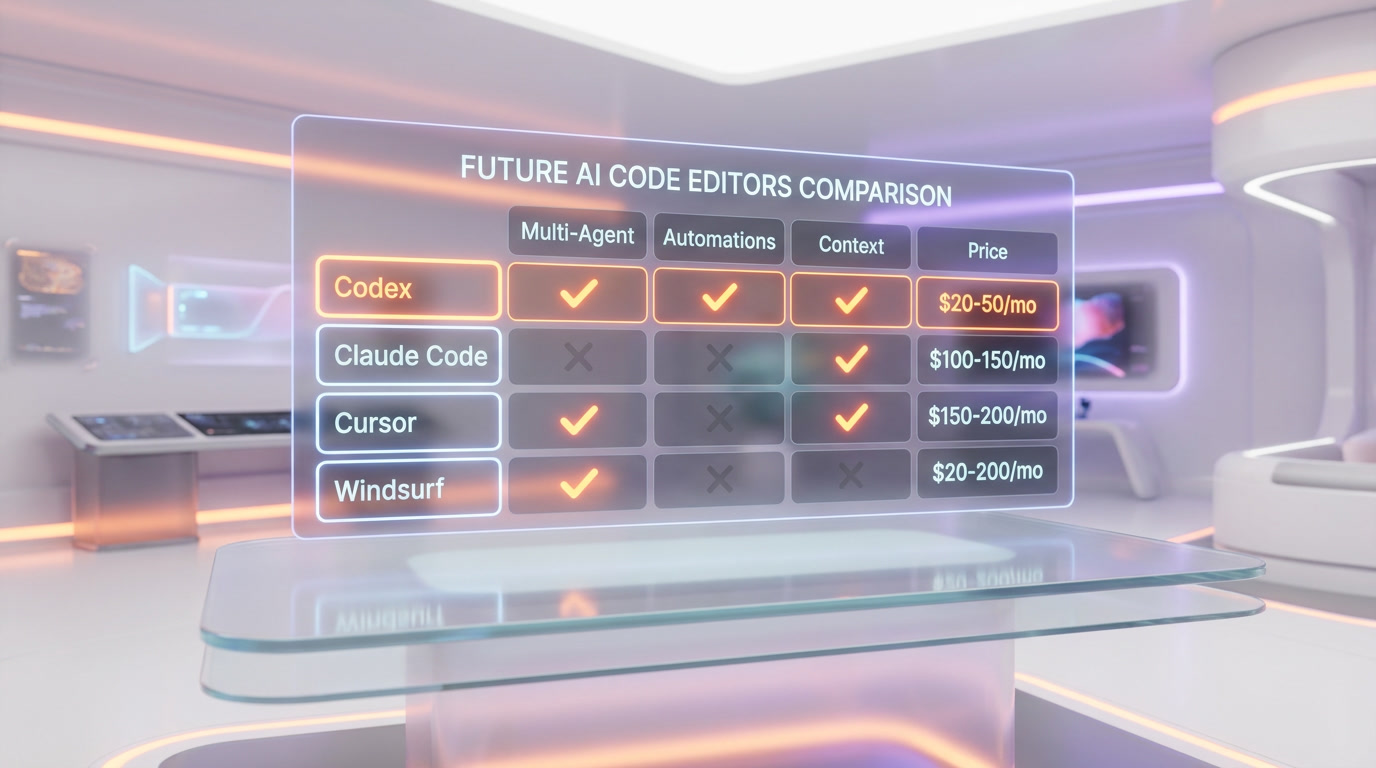
| Feature | OpenAI Codex | Claude Code | Cursor | GitHub Copilot |
|---|---|---|---|---|
| Architecture | Cloud agent + desktop app | Terminal agent | AI-native IDE | IDE extension |
| Multi-Agent | Yes (parallel worktrees) | Agent Teams (beta) | Background agents | No |
| Automations | Yes (cron-based) | Hooks only | No | No |
| Context Window | 1M (GPT-5.4 Codex mode) | 1M (Opus 4.6) | 200K (often 70-120K usable) | ~128K |
| SWE-Bench Pro | 57.7% | N/A (Verified: 80.9%) | Model-dependent | Model-dependent |
| Terminal-Bench 2.0 | 77.3% | 65.4% | N/A | N/A |
| Starting Price | $20 per month | Usage-based (~$50-150/mo) | $20 per month | $19 per user/mo |
| Git Providers | GitHub only | Any (local git) | Any (local git) | GitHub-focused |
Limitations and What We Would Improve
No tool is perfect, and Codex has clear areas for improvement. The GitHub-only native integration is the most frequently cited frustration in developer forums. Teams on GitLab or Bitbucket can use the Codex CLI for local work, but lose the seamless PR creation, code review, and repository management that makes the GitHub experience so smooth. OpenAI has acknowledged this gap but provided no timeline for additional provider support.
The Plus plan rate limits are another pain point. At 30-150 messages per 5-hour window, active developers hit the ceiling within 2-3 hours. The variable range depends on model choice, task complexity, and whether you are running locally or in the cloud — which makes budgeting unpredictable. Switching to GPT-5.1-Codex-Mini for routine tasks helps extend your runway, but the friction of managing rate limits detracts from the "set it and forget it" agent experience Codex promises.
We also noticed that GUI-based prompts for non-code tasks — writing PRDs, editing marketing copy, generating documentation in specific formats — sometimes produce inconsistent results. The model clearly excels at code-related tasks but struggles when the output format is less structured. Switching to the CLI for these edge cases often produces better results, suggesting the GUI layer adds constraints the model does not handle well.
Finally, while Codex supports GPT-5.4 and GPT-5.1-Codex-Mini, there is no option to bring your own model. If you prefer Claude, Gemini, or an open-source model for certain tasks, you are out of luck. Cursor and some CLI tools offer multi-provider model selection — Codex locks you into the OpenAI ecosystem.
Growth and Adoption
OpenAI Codex's growth trajectory is remarkable. Before the desktop app launched in February 2026, over 1 million developers were already using Codex through the CLI and web interfaces. After the macOS launch and GPT-5.3-Codex release, Fortune reported 1.6 million weekly active users. By mid-March 2026, Reuters confirmed 2 million+ weekly active users — a 5x usage increase since January 2026 with 3x user growth in the same period.
Enterprise adoption is accelerating: Cisco, Nvidia, Ramp, Rakuten, and Harvey are among the companies deploying Codex across engineering teams. OpenAI's acquisition of Astral (the Python toolmaker behind Ruff and uv) signals deeper investment in the developer tools ecosystem — Astral's tools are expected to integrate directly into Codex.
The Bottom Line
OpenAI Codex at 8.9 out of 10 is the most complete multi-agent coding platform available in March 2026. Its core innovation — parallel agents on isolated worktrees with scheduled Automations — represents a genuine architectural leap over single-agent tools. GPT-5.4 delivers state-of-the-art benchmark performance, the native OS sandbox addresses enterprise security concerns, and the Skills library makes agent workflows reusable and composable.
The value equation depends entirely on your plan. At $20 per month (Plus), Codex is a compelling side-project companion with frustrating limits for full-time use. At $200 per month (Pro), it is the most powerful coding agent money can buy — but also the most expensive. The GitHub-only integration, lack of model choice, and occasional GUI failures on non-code tasks are real limitations. But if your workflow involves managing multiple features in parallel, assigning routine DevOps tasks to background agents, and reviewing clean diffs rather than writing code line by line — Codex is built for exactly that. It is not trying to be the best IDE or the best autocomplete. It is trying to be the best coding agent fleet. And by that measure, it succeeds.
Frequently Asked Questions
Is OpenAI Codex better than Cursor for parallel development?
For parallel async workflows, yes. Codex scores 9.4 out of 10 on features and can run 3-5 agents simultaneously on isolated git worktrees — a capability Cursor lacks natively. Cursor holds an edge for inline real-time editing inside an IDE. Codex wins for async multi-agent task execution where agents work independently and present diffs for human review. Both start at $20 per month.
How does OpenAI Codex compare to Claude Code in pricing and workflow?
Both tools start at $20 per month. Claude Code charges based on API usage (Max plan $100-200/mo depending on consumption), while Codex Plus at $20 per month applies message-based limits. For heavy daily use, Codex Pro at $200 per month competes directly with Claude Code's Max plan. Key architectural difference: Claude Code is a terminal-based agent; Codex is a standalone desktop application with a GUI and project-organized workspace.
Who should use OpenAI Codex?
OpenAI Codex is best for professional developers managing multiple features or repositories in parallel, backend Python engineers, DevOps teams automating routine tasks with the Automations cron system, and engineering managers who want agents handling issue triage and CI failure summaries autonomously. It is not ideal for developers who need a native Linux app or prefer model selection control — Codex picks the model internally.
What are OpenAI Codex's main limitations?
Key limitations include: no model selection (Codex picks GPT-5.4 or GPT-5.1-Codex-Mini internally based on task complexity), cloud GitHub integration is unintuitive and hard to integrate into existing workflows, GUI-related prompts sometimes fail on responsive layouts, the Pro tier at $200 per month is expensive, and there is no native Linux app (macOS and Windows only). Complex multi-file refactors spanning 15+ files may also require manual diff cleanup.
Does OpenAI Codex integrate with GitHub?
Yes. Codex integrates with GitHub through its worktree system — each agent clones your repo, works on an isolated branch, and presents a diff before any merge occurs. A cloud GitHub integration also exists but is noted as unintuitive in our testing; local workflows are smoother. The Automations feature can run scheduled daily issue triage directly against GitHub issues, labeling them and drafting response comments for human review.
What is OpenAI Codex's SWE-Bench Pro benchmark score?
GPT-5.4, the flagship model powering Codex, scores 57.7% on SWE-Bench Pro and 77.3% on Terminal-Bench 2.0 — both state-of-the-art results as of March 2026. GPT-5.3-Codex specifically achieves SOTA on SWE-Bench Pro. These benchmarks measure the model's ability to autonomously resolve real-world GitHub issues from description alone, making them the most relevant proxy for real coding agent performance.
Can OpenAI Codex run background tasks automatically on a schedule?
Yes. The Automations feature (generally available since March 2026) lets you schedule recurring tasks on cron-like schedules: daily issue triage, CI failure summaries, dependency update checks, and weekly release briefs. Automations can run locally on your machine or on a cloud worktree. Results always queue for human review — Codex never pushes changes to your repository without explicit approval.
Key Features
Pros & Cons
Pros
- GPT-5.3-Codex achieves state-of-the-art on SWE-Bench Pro
- Multi-agent threads organized by projects for parallel task execution
- Automations run scheduled background tasks on cron
- Worktrees isolate each agent in independent git branches
- 2M+ weekly active users growing 25% week-over-week
- Best debugging capabilities in our testing — caught tricky backward compatibility issues
- Skills library extends beyond code to prototyping and documentation
Cons
- No model selection — Codex picks internally based on task complexity
- Cloud GitHub integration is unintuitive and hard to integrate into workflows
- GUI-related prompts sometimes fail on responsive layouts
- Expensive at $200/mo for Pro tier with full capabilities
- No native Linux app — macOS and Windows only
Best Use Cases
Platforms & Integrations
Available On
Integrations
Compare OpenAI Codex

We're developers and SaaS builders who use these tools daily in production. Every review comes from hands-on experience building real products — DealPropFirm, ThePlanetIndicator, PropFirmsCodes, and many more. We don't just review tools — we build and ship with them every day.
Written and tested by developers who build with these tools daily.
Frequently Asked Questions
What is OpenAI Codex?
OpenAI's standalone multi-agent coding app powered by GPT-5.4
How much does OpenAI Codex cost?
OpenAI Codex costs $20/month.
Is OpenAI Codex free?
No, OpenAI Codex starts at $20/month.
What are the best alternatives to OpenAI Codex?
Top-rated alternatives to OpenAI Codex include Claude Code (9.9/10), Cursor (9.5/10), Claude Opus 4.7 (9.4/10), Vercel (9.2/10) — all reviewed with detailed scoring on ThePlanetTools.ai.
Is OpenAI Codex good for beginners?
OpenAI Codex is rated 9.1/10 for ease of use.
What platforms does OpenAI Codex support?
OpenAI Codex is available on macOS, Windows, Web.
Does OpenAI Codex offer a free trial?
No, OpenAI Codex does not offer a free trial.
Is OpenAI Codex worth the price?
OpenAI Codex scores 8.5/10 for value. We consider it excellent value.
Who should use OpenAI Codex?
OpenAI Codex is ideal for: Professional developers managing complex multi-agent coding tasks, Teams needing automated PR reviews and code quality checks, Developers who want scheduled background coding automations, Enterprise engineering orgs using GitHub-integrated workflows, Backend developers — strongest in Python code review, Developers exploring large codebases with GPT-5.4 Mini, Teams building documentation alongside code, Solo developers wanting parallel agent workflows.
What are the main limitations of OpenAI Codex?
Some limitations of OpenAI Codex include: No model selection — Codex picks internally based on task complexity; Cloud GitHub integration is unintuitive and hard to integrate into workflows; GUI-related prompts sometimes fail on responsive layouts; Expensive at $200/mo for Pro tier with full capabilities; No native Linux app — macOS and Windows only.
Best Alternatives to OpenAI Codex




Ready to try OpenAI Codex?
Get started today
Try OpenAI Codex Now →