Claude Code
Anthropic's agentic CLI coding tool — not a chatbot, a real AI engineer that lives in your terminal, reads your entire codebase, and ships production code.

Quick Summary
Claude Code is Anthropic's agentic command-line coding tool powered by Claude Opus 4.6 with 1M token context. Score: 9.9/10. Terminal-first, reads entire repos, runs multi-agent workflows, supports MCP (97M+ installs). From $20/mo Max 5 or $100/mo Max 20. The tool we used to build this entire site.

What Is Claude Code?
Claude Code is Anthropic's agentic command-line interface for software development, powered by Claude Opus 4.6 with a 1-million-token context window. Score: 9.9 out of 10. It operates directly in your terminal, reads your entire codebase, executes shell commands, writes and edits files, manages git workflows, and orchestrates multi-agent teams. Pricing starts at $20 per month (Max 5) or $100 per month (Max 20) with unlimited usage on Max 20. Unlike IDE-based tools like Cursor ($20 per month, 9.4 out of 10) or GitHub Copilot ($10 per month, 8.6 out of 10), Claude Code is a full autonomous agent — not an autocomplete engine.
Quick Facts — Claude Code at a Glance
| Spec | Details |
|---|---|
| Developer | Anthropic |
| Model | Claude Opus 4.6 (default), Sonnet 4.6, Haiku 4.5 |
| Context Window | 1,000,000 tokens (1M) |
| Our Score | 9.9 out of 10 |
| Pricing | Free (limited) / Max 5 $20 per month / Max 20 $100 per month / Max 20+ $200 per month |
| Best For | Full-stack developers, teams building production apps, multi-project workflows |
| Platforms | macOS, Linux, Windows (WSL), VS Code, JetBrains |
| SWE-Bench | 72.7% (Opus 4) — #1 among all agents |
| Terminal-Bench | #1 overall (April 2026) |
| MCP Installs | 97M+ Model Context Protocol server installs |
| Release | February 2025 (research preview), GA May 2025 |
Our Experience — We Built Everything With It
We've been using Claude Code daily since its research preview launch in February 2025. It is not an exaggeration to say it is the backbone of everything we build. This entire site — ThePlanetTools.ai — was built using Claude Code. Our content work, our CMS, our SEO work, our image generation workflows, our multi-agent content factory — all of it runs through Claude Code. After thousands of hours with it, across dozens of projects in Next.js, TypeScript, Supabase, and Tailwind, we can say with confidence: Claude Code is the most capable agentic coding tool available today. It doesn't autocomplete lines. It builds features. It debugs production issues. It refactors entire modules. It writes this content. It is our most productive team member.

Claude Code Pricing — Every Plan Explained
Claude Code's pricing operates through Anthropic's Max subscription tiers. Here's the complete breakdown as of April 2026:
| Plan | Price | Claude Code Access | Usage Limit | Best For |
|---|---|---|---|---|
| Free | $0 per month | Limited | Very limited daily tokens | Trying it out |
| Pro | $20 per month | Full | Standard usage caps | Individual developers |
| Max 5 | $100 per month | Full + Priority | 5x Pro usage | Power users, freelancers |
| Max 20 | $200 per month | Full + Priority | 20x Pro usage | Teams, production workflows |
| API (Opus 4) | $15/$75 per MTok | Full (programmatic) | Pay-per-token | Custom integrations, CI/CD |
| API (Sonnet 4) | $3/$15 per MTok | Full (programmatic) | Pay-per-token | High-volume, cost-sensitive |
| Team | $30 per user/mo | Full + Admin | Higher caps | Engineering teams |
| Enterprise | Custom | Full + SSO + Audit | Custom | Large organizations |
We run on Max 20 ($200 per month). At our usage level — 8+ hours of daily agentic coding across multiple projects — it pays for itself within the first hour of each day. The ROI is absurd. For context, a single junior developer costs $4,000-8,000/month. Claude Code on Max 20 does the work of at least one junior dev for $200 per month. That's a 20-40x cost multiplier.
API Pricing vs Max Plans
If you use Claude Code heavily through the API (via the Agent SDK or direct CLI with API keys), costs can scale quickly. Opus 4 at $15 input / $75 output per million tokens means a single complex coding session (50K input + 20K output tokens) costs roughly $2.25. On Max 20, that same session is included in your flat $200 per month. For daily power users, Max plans are dramatically cheaper than API billing.
Competitor Comparison — Claude Code vs the Field
The AI coding tools market in 2026 is crowded. Here's how Claude Code stacks up against every major competitor we've tested:
| Tool | Our Score | Price (from) | Type | Context | Agent Mode | Multi-Agent | MCP |
|---|---|---|---|---|---|---|---|
| Claude Code | 9.9 out of 10 | $20 per month | CLI Agent | 1M tokens | Native | Yes (SDK) | 97M+ installs |
| Cursor | 9.4 out of 10 | $20 per month | IDE (VS Code fork) | ~200K | Background Agents | Limited | No |
| GitHub Copilot | 8.6 out of 10 | $10 per month | IDE Extension | ~128K | Agent mode (new) | No | No |
| Windsurf | 8.5 out of 10 | $15 per month | IDE (VS Code fork) | ~200K | Cascade Agent | No | No |
| Devin | 8.3 out of 10 | $20 per month | Cloud Agent | Variable | Fully autonomous | No | No |
| Google Antigravity | 7.8 out of 10 | Free | CLI Agent | 1M (Gemini) | Native | Limited | No |
| Augment Code | 8.8 out of 10 | $20 per month | IDE Extension | Large | Agent mode | No | No |
Why Claude Code Wins
Three differentiators set Claude Code apart from every competitor:
- 1M token context window — Claude Code can hold your entire codebase in context. Cursor maxes out around 200K. Copilot around 128K. This isn't a marginal difference — it's the difference between an agent that understands your whole project and one that guesses from fragments.
- Native agentic architecture — Claude Code was built as an agent from day one. It doesn't bolt agent capabilities onto an autocomplete engine. It reads files, writes files, runs commands, manages git, calls APIs, and orchestrates sub-agents. Cursor added Background Agents later. Copilot added agent mode even later. Claude Code was born this way.
- Model Context Protocol (MCP) — With 97M+ server installs, MCP is becoming the USB-C of AI tool connectivity. Claude Code can connect to databases, APIs, browsers, design tools, and any custom server through MCP. No other coding tool has this ecosystem.
OpenAI's Codex is the rival that competes on a different architecture: several coding agents running in parallel on isolated git worktrees, rather than one agent holding the whole repository in context. We put the two side by side in Claude Code versus OpenAI Codex.

Features Deep Dive — Everything Claude Code Can Do
Claude Code is not a single feature — it's an ecosystem. Here's a comprehensive breakdown of every major capability, organized by category.
Core Agent Capabilities
Terminal-First Architecture
Claude Code runs in your terminal. No browser tab. No Electron app. No VS Code fork. Just claude in your shell. This isn't a limitation — it's a design choice. The terminal is the most powerful interface a developer has. It's where you run builds, manage git, SSH into servers, and orchestrate infrastructure. Claude Code lives where the work happens.
Full Codebase Awareness
When you start Claude Code in a repository, it indexes the project structure and can read any file on demand. With the 1M token context window, it can hold thousands of files in working memory simultaneously. It understands imports, type definitions, database schemas, API routes, and cross-file dependencies. Ask it "what happens when a user clicks the submit button?" and it will trace the flow from the React component through the API route to the database query.
File Reading, Writing, and Editing
Claude Code has native tools for reading files (Read), writing new files (Write), and making surgical edits to existing files (Edit). The Edit tool performs exact string replacements — no regex guessing, no "approximate" patches. It finds the exact text and replaces it. This is dramatically more reliable than diff-based approaches used by other tools.
Shell Command Execution
Claude Code can run any shell command via the Bash tool. Install packages. Run tests. Start dev servers. Execute database migrations. Deploy to production. Curl APIs. Run linters. The shell is the agent's hands — and Claude Code has full use of them.
Git Integration
Claude Code understands git natively. It can stage files, create commits with proper conventional commit messages, create branches, handle merge conflicts, create pull requests (via gh CLI), and even review PRs. It follows a safety protocol — never force-pushing, never amending unless asked, never skipping hooks. We use it for 100% of our git workflow.
Advanced Agent Features
Agent SDK — Build Multi-Agent Systems
The @anthropic-ai/claude-agent-sdk is the official SDK for building multi-agent systems with Claude Code. It lets you spawn Claude Code instances programmatically, assign them specialized roles, and coordinate their work. Our content pipeline uses this: a Coordinator agent delegates to Writer, SEO, Image, and QC sub-agents, each working in parallel on different aspects of a content piece. The SDK supports streaming, tool injection, conversation management, and cost tracking.
Multi-Agent Teams
Claude Code can spawn sub-agents for parallel work. Need to refactor 5 files simultaneously? Spawn 5 agents. Need to research a topic while writing code? One agent researches, another codes. The Coordinator and Swarm patterns discovered in the source code reveal even more sophisticated orchestration: a lead agent that decomposes tasks and delegates to N workers, with automatic result aggregation.
Worktrees — Parallel Git Branches
Claude Code supports git worktrees natively. This means you can have multiple agents working on different branches of the same repository simultaneously, without conflicts. Agent A works on the feature branch in one worktree, Agent B fixes a bug in another worktree, and they never interfere with each other. This is a massive productivity multiplier for teams.
Adaptive Thinking and Extended Thinking
Claude Code uses adaptive reasoning — it dynamically adjusts how much "thinking" it does based on task complexity. Simple file reads get instant responses. Complex architectural decisions trigger extended thinking with visible chain-of-thought. You can also force extended thinking with the think command for problems that need deep reasoning.
Context Compaction
When conversations get long (and they do — we regularly hit 200K+ tokens in a session), Claude Code automatically compacts the context. It summarizes earlier parts of the conversation while preserving critical details, allowing sessions to continue far beyond what the raw context window would allow. In practice, this means you can work with Claude Code for hours on a complex task without starting over.
Model Context Protocol (MCP)
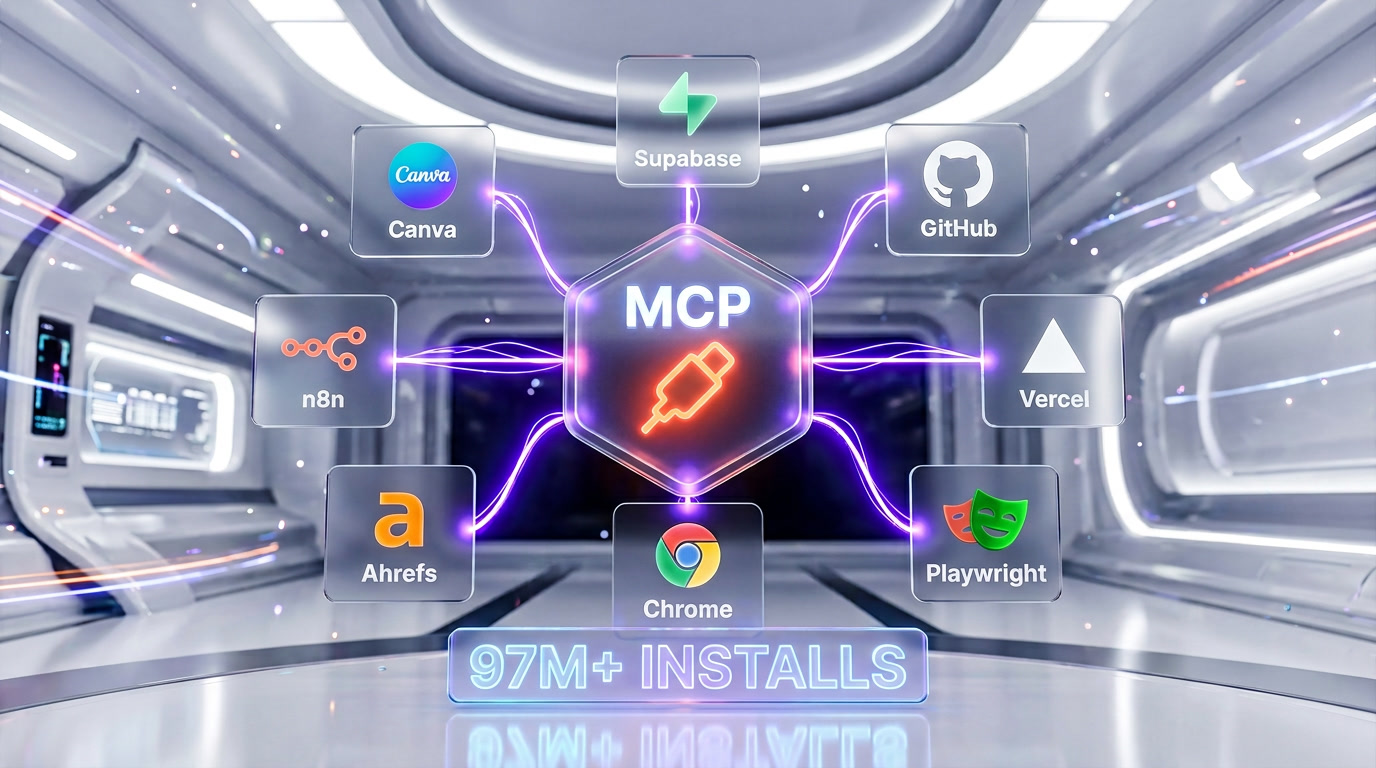
MCP is arguably the most important innovation in Claude Code's ecosystem. With 97M+ server installs as of early 2026, it's becoming the standard protocol for connecting AI agents to external tools and data sources.
What MCP Enables
Through MCP servers, Claude Code can:
- Connect to databases — Supabase, PostgreSQL, MongoDB, MySQL. Execute queries, run migrations, inspect schemas. We use the Supabase MCP server to manage our entire content database directly from Claude Code.
- Control browsers — Playwright and Chrome DevTools MCP servers let Claude Code navigate websites, take screenshots, fill forms, run Lighthouse audits, and scrape data.
- Manage GitHub — Create repos, issues, PRs, review code, manage branches — all through the GitHub MCP server.
- Deploy applications — Vercel MCP server for deployment, build logs, runtime logs, and project management.
- Access documentation — Context7 MCP server fetches live documentation for any library, ensuring Claude Code always has up-to-date API references.
- Manage workflows — n8n MCP server for automation workflows, credential management, and workflow execution.
- Design — Canva MCP server for creating, editing, and exporting designs programmatically.
- Analytics — Ahrefs MCP server for SEO data, keyword research, backlink analysis, and site audits.
We currently run 8+ MCP servers simultaneously in our daily workflow: Supabase, GitHub, Vercel, Playwright, Chrome DevTools, Context7, n8n, and Ahrefs. The ability to connect Claude Code to literally any tool through a standardized protocol is a game-changer that no competitor can match.
Memory System — CLAUDE.md and Persistent Knowledge
Project Memory (CLAUDE.md)
Every project can have a CLAUDE.md file at the root that Claude Code reads at the start of every session. This file contains project conventions, architecture decisions, coding standards, known issues, and anything else the agent needs to know. It's like an onboarding document for an AI team member. We maintain detailed CLAUDE.md files for every project — they contain our stack, conventions, decisions, sprint state, and deployment checklist.
User Memory (~/.claude/CLAUDE.md)
Global preferences that apply across all projects. Our global CLAUDE.md contains our identity, default stack (Next.js + Supabase + Tailwind + TypeScript), coding conventions, and a skills index that tells Claude Code which specialized skill files to read for different tasks.
Auto-Memory (MEMORY.md)
Claude Code can automatically persist learnings, decisions, and context across sessions through memory files. When we discover a pattern that works (or doesn't), it gets annotated with <!-- LEARN: --> or <!-- DECISION: --> and persisted. The next session picks up where the last one left off.
Hooks and Skills System
Hooks
Hooks let you attach automated behaviors to Claude Code events. Before a commit? Run the linter. After file creation? Update the index. Before a session starts? Pull the latest from git. Hooks are configured in settings.json and executed by the Claude Code harness — they run reliably even if the AI agent doesn't explicitly remember to trigger them.
Skills
Skills are reusable knowledge modules stored as markdown files. When Claude Code detects a relevant context (e.g., "JSON-LD", "affiliate tracking", "sitemap"), it reads the corresponding skill file for specialized instructions. We have 12 custom skills covering SEO metadata, JSON-LD schemas, E-E-A-T signals, affiliate tracking, internal linking, Supabase queries, and more. Skills turn Claude Code from a general-purpose agent into a domain expert.
IDE Extensions
VS Code Integration
Claude Code integrates natively with VS Code through the official extension. You get an inline chat panel, the ability to reference files with @-mentions, and seamless switching between the terminal agent and the IDE. The extension shares context with the CLI — start a conversation in the terminal, continue it in VS Code.
JetBrains Integration
JetBrains IDEs (IntelliJ IDEA, PyCharm, WebStorm, GoLand, etc.) are supported through the official Claude Code plugin. This brings the full agentic experience to the JetBrains ecosystem — something Windsurf and Devin don't offer.
Permissions and Security
Claude Code has a granular permission system that controls what the agent can do:
- File access — Read, write, and edit permissions can be scoped to specific directories
- Command execution — Shell commands require approval by default (you can allowlist safe commands)
- MCP tool access — Each MCP server's tools can be individually permitted or denied
- Git operations — Destructive operations (force push, reset hard) are blocked unless explicitly approved
- Network access — Web fetch and search can be controlled
This isn't just security theater. When you have an AI agent that can run arbitrary shell commands, permissions matter. Claude Code defaults to safe — you escalate permissions deliberately, not accidentally.
What We Discovered in the Source Code
On March 31, 2026, Claude Code's entire source code was leaked through a 59.8MB npm source map. Our team analyzed all 512,000 lines of TypeScript across 1,900 files. Here's what we found — and what it reveals about where Claude Code is heading.
512K Lines, 330+ Environment Variables
The leaked codebase contains 330+ environment variables and 32 compile-time feature flags. This isn't a prototype — it's a massive, enterprise-grade system with extensive configuration surface. Variables control everything from model routing and rate limiting to experimental features and internal debugging.
KAIROS and AutoDream — The AI That Never Sleeps
The most fascinating discovery: KAIROS is a daemon mode that keeps Claude Code running 24/7 with heartbeat ticks and proactive actions. At night, AutoDream consolidates memory like REM sleep — reorganizing learnings, pruning irrelevant context, and strengthening important patterns. An AI that literally dreams about your code to be better tomorrow.
Coordinator, Swarm, and ULTRAPLAN
The source reveals three distinct multi-agent orchestration patterns:
- Coordinator Mode — A lead agent decomposes complex tasks and delegates to N worker agents, each with a specific sub-task
- Agent Teams / Swarm — Multiple Claude Code instances work as CLI teammates, communicating through shared context
- ULTRAPLAN — A 30-minute cloud planning session that creates detailed execution plans for complex projects
Buddy / Tamagotchi System
Hidden behind a feature flag: a full Tamagotchi system called Buddy. 18 species across 5 rarity tiers, RPG stats (empathy, wit, tenacity, curiosity, optimism), shiny variants, ASCII sprites, and AI-generated personality descriptions. It's a companion that evolves as you code — part mascot, part engagement mechanism, part genuine surprise from a company known for serious AI safety research.
Anti-Distillation and Security
The source contains ANTI_DISTILLATION_CC — a system that injects fake tool definitions into prompts to pollute competing models' training data. Plus cryptographic signatures to protect chain-of-thought reasoning from extraction. Whatever you think about the ethics, it reveals how seriously Anthropic takes competitive moats.
The Roadmap — Voice, Chrome, Desktop, Mobile
Feature flags reveal everything coming in 2026: voice input supporting 20 languages, a Chrome DevTools extension, an enhanced desktop app with system tray integration, mobile remote control, and a plugin marketplace. Claude Code is evolving far beyond a terminal tool. Read our full analysis of the voice and UI roadmap.
Benchmarks — The Numbers Don't Lie
SWE-Bench Verified
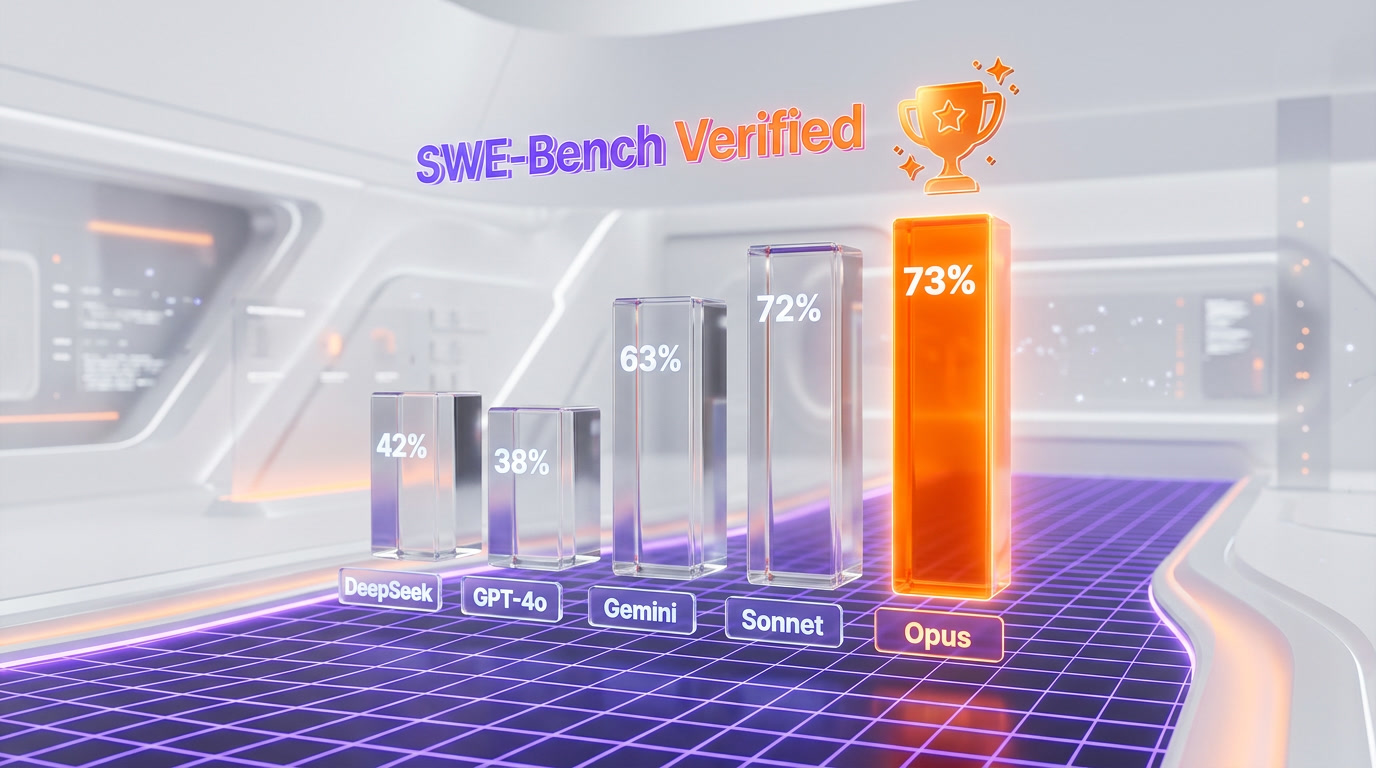
SWE-Bench is the gold standard for evaluating AI coding agents on real-world software engineering tasks. Claude Opus 4.6, the model powering Claude Code, scores 72.7% — the highest score achieved by any model or agent system. For comparison:
| Model / Agent | SWE-Bench Verified Score |
|---|---|
| Claude Opus 4.6 (Claude Code) | 72.7% |
| Claude Sonnet 4.6 | 72.4% |
| GPT-4o (OpenAI) | ~38% |
| Gemini 2.5 Pro | ~63% |
| DeepSeek V3 | ~42% |
The gap between Claude models and the competition is significant. Opus 4 doesn't just lead — it leads by a wide margin on the tasks that matter most: understanding large codebases, reasoning about cross-file dependencies, and generating correct patches for real bugs in real repositories.
Terminal-Bench
Terminal-Bench evaluates AI agents specifically on terminal-based development tasks — the exact use case Claude Code is designed for. As of April 2026, Claude Code holds the #1 position overall. It outperforms every competitor on tasks involving shell navigation, file manipulation, git workflows, and multi-step development processes.
Developer Satisfaction
In the 2025 Stack Overflow Developer Survey, Claude was ranked the "Most Loved" AI coding tool with a 46% satisfaction rate — ahead of ChatGPT, Copilot, and every other tool. Developers who use Claude Code don't just tolerate it; they actively prefer it over alternatives they've tried.
Real-World Use Cases — How We Use Claude Code Daily
Full-Stack Web Development
Our primary use case. We build Next.js applications with TypeScript, Tailwind CSS, and Supabase. Claude Code handles everything: creating new pages and API routes, implementing complex React components, writing Supabase queries, debugging build errors, and managing deployments through Vercel. A typical day involves 50-100 Claude Code interactions, each one a mini-task that would take 5-30 minutes manually.
Content Pipeline Automation
Our content generation pipeline is 100% Claude Code-powered. A coordinator agent orchestrates specialized sub-agents: a Content Writer that researches and drafts 3,000-10,000 word articles, an SEO Specialist that generates metadata and JSON-LD schemas, an Image Prompt Specialist that creates AI image descriptions, and a QC agent that validates everything before database insertion. This pipeline has produced 40+ tools reviews, 30+ articles, 9 comparisons, and 6 guides — all pushed directly to our Supabase database.
SEO and GEO Optimization
Claude Code generates our meta titles, meta descriptions, JSON-LD structured data (6-12 schemas per page), FAQ sections, answer capsules, and internal linking structures. It understands GEO (Generative Engine Optimization) principles natively — fact-dense answer capsules, speakable markup, definition-first paragraphs, and competitor-inclusive FAQs. Our Google Search Console data shows position 1 rankings on targeted queries.
Multi-Project Management
We manage 5+ active projects simultaneously. Claude Code's memory system (CLAUDE.md per project + global config) means switching between projects is seamless. Start Claude Code in a different directory and it immediately loads that project's context, conventions, and current sprint state. No re-explaining, no context loss.
Database Management
Through the Supabase MCP server, Claude Code manages our entire database: creating tables, writing queries, inserting content, running migrations, and debugging query performance. We haven't opened the Supabase dashboard in weeks — Claude Code handles everything from the terminal.
Code Review and Refactoring
Claude Code reviews PRs by reading the diff, understanding the context, and providing actionable feedback. It catches bugs, suggests performance improvements, identifies security issues, and ensures coding standards compliance. For refactoring, it can analyze an entire module, propose a restructuring plan, and execute it across all affected files — something that would take a human developer hours.

How to Get Started with Claude Code
Step 1: Install
Claude Code is installed via npm:
npm install -g @anthropic-ai/claude-codeRequires Node.js 18+ on macOS, Linux, or Windows (WSL).
Step 2: Authenticate
Run claude in your terminal. On first launch, it opens a browser window for Anthropic account authentication. Sign in with your Claude Pro, Max, or Team account. API key authentication is also supported for programmatic use.
Step 3: Start Coding
Navigate to your project directory and run claude. It indexes your project and you can immediately start giving it tasks:
"Add a user authentication system with Supabase""Fix the TypeScript errors in the checkout flow""Refactor the API routes to use middleware""Create a comprehensive test suite for the payment module"
Step 4: Configure Memory
Create a CLAUDE.md file in your project root with your conventions, stack, and preferences. Claude Code reads this at every session start. This single file is the highest-ROI configuration you can do — it turns a general-purpose agent into your project's domain expert.
Step 5: Add MCP Servers
Configure MCP servers in your .claude/settings.json to connect Claude Code to your databases, deployment platforms, and tools. Each server adds new capabilities without any code changes to Claude Code itself.
Limitations — What Claude Code Can't Do (Yet)
No tool is perfect. After thousands of hours of daily use, here are the real limitations we've encountered:
Cost at Scale
$200 per month for Max 20 is a significant investment for individual developers. While the ROI is clear for professionals who use it 8+ hours daily, casual users may find the Pro plan ($20 per month) limiting and the jump to Max steep. API costs can spiral quickly on complex multi-agent workflows.
Learning Curve
Claude Code is not a "install and go" autocomplete tool. Getting the most out of it requires understanding prompt engineering, configuring CLAUDE.md files, setting up MCP servers, and learning the permission system. The terminal-first approach alienates developers who live exclusively in their IDE. Expect 1-2 weeks to reach productivity.
Terminal-Only (Mostly)
While VS Code and JetBrains extensions exist, the primary experience is terminal-based. For developers who want a visual diff interface, inline code suggestions, and mouse-driven interactions, Cursor or Windsurf may feel more natural. Claude Code is for developers who think in commands, not clicks. We use both every day, and we settled the argument in Claude Code versus Cursor.
Verbosity
Claude Code can be verbose in its responses, especially with extended thinking enabled. Complex tasks sometimes generate lengthy explanations when you just want the code. The /compact mode helps, but it's not always enough. This is improving with each update.
No Offline Mode
All processing happens in the cloud. No internet, no Claude Code. For developers working in air-gapped environments or with intermittent connectivity, this is a dealbreaker. Local models via Ollama can be configured as a fallback, but the experience isn't comparable.
Context Window Limits in Practice
While the 1M token context window is industry-leading, very large monorepos can still exceed it. Claude Code's compaction helps, but there are sessions where you hit the wall and need to start fresh. This affects maybe 5% of our sessions — but when it happens, it's frustrating.
Who Should Use Claude Code?
Perfect For
- Full-stack developers building production applications with modern stacks (React, Next.js, Node, Python, Rust)
- Solo founders and indie hackers who need to move fast without a team — Claude Code is your 10x multiplier
- DevOps and infrastructure engineers who live in the terminal and need an agent that speaks their language
- Content teams building SEO-optimized websites with automated pipelines
- Teams adopting agentic workflows with the Agent SDK for custom automation
Not Ideal For
- Beginners who need visual guidance — Cursor or GitHub Copilot offer gentler onramps
- Teams on tight budgets — $200 per month per developer adds up; Copilot at $10 per month is 20x cheaper
- IDE-centric developers who never open a terminal — the core experience won't resonate
- Offline-first environments — no internet means no Claude Code
Claude Code Tips and Tricks — From 1,000+ Hours of Use
After using Claude Code daily for over a year, here are the patterns that maximize productivity:
Write a Killer CLAUDE.md
The single most impactful thing you can do. Include: your stack, file naming conventions, coding standards, common patterns, known issues, and deployment checklist. The more specific, the better. Our CLAUDE.md files are 100+ lines and save us hours of re-explaining context.
Use Skills for Repetitive Tasks
If you do the same type of work repeatedly (SEO metadata, API routes, database queries), create a skill file. Claude Code reads it when the context matches and applies specialized knowledge consistently. Our 12 skills have eliminated entire categories of mistakes.
Leverage MCP Servers Aggressively
Every external tool you connect via MCP is a capability multiplier. Database queries, deployments, documentation lookups, browser testing — the more you connect, the more autonomous Claude Code becomes.
Use Worktrees for Parallel Work
When you need multiple features developed simultaneously, use git worktrees. Each Claude Code instance works in its own worktree with its own branch. No merge conflicts. No context switching. Pure parallel development.
Trust the Agent, Verify the Output
Claude Code is remarkably reliable, but it's not infallible. Review generated code, especially for security-sensitive operations. Run tests. Check the diff before committing. The best workflow is trust-but-verify: let Claude Code do 95% of the work, then spend your time on the critical 5%.
Frequently Asked Questions
Is Claude Code worth $200 per month?
If you're a professional developer using it 4+ hours daily, absolutely. The math is simple: $200 per month is $10 per workday. If Claude Code saves you 1 hour per day (it saves us 3-5), and your time is worth $50+/hour, that's a 5-25x return. We consider our Max 20 subscription the single best investment in our development stack. For lighter usage, the Pro plan ($20 per month) or Max 5 ($100 per month) may be sufficient.
Is Claude Code better than Cursor?
They solve different problems. Cursor (9.4 out of 10) is the best AI-powered IDE — it excels at visual code editing, inline suggestions, and a polished GUI experience. Claude Code (9.9 out of 10) is the best agentic coding tool — it excels at autonomous task execution, multi-file operations, MCP integrations, and terminal workflows. If you want an AI-enhanced editor, use Cursor. If you want an AI teammate that ships features end-to-end, use Claude Code. We use both — Cursor for visual editing, Claude Code for everything else.
Can Claude Code replace a junior developer?
In many scenarios, yes. Claude Code can write features from specifications, debug issues, write tests, create documentation, manage databases, and handle deployments. It works faster than most junior developers, doesn't need sleep, and costs $200 per month instead of $4,000-8,000. The key limitation: it needs clear direction. A senior developer guiding Claude Code is more productive than a senior developer managing a junior developer. But it cannot replace the human judgment, creativity, and stakeholder communication that even junior developers provide.
How does Claude Code compare to GitHub Copilot?
GitHub Copilot (8.6 out of 10, $10 per month) is an autocomplete tool that suggests code as you type. Claude Code (9.9 out of 10, from $20 per month) is an autonomous agent that builds features, manages files, runs commands, and coordinates sub-agents. They're not in the same category. Copilot is a typing assistant. Claude Code is an AI engineer. Copilot costs less because it does less. If you just need faster typing, Copilot is fine. If you want an agent that can build, test, and deploy entire features, Claude Code is in a different league.
Does Claude Code work with Python / Rust / Go / Java?
Yes to all. Claude Code is language-agnostic — it works with any language you can run in a terminal. It excels with TypeScript/JavaScript (our primary use), Python, Rust, Go, Java, C/C++, Ruby, and PHP. Support quality depends on the underlying model's training data, so mainstream languages get the best experience. We've used it successfully with TypeScript, Python, SQL, Bash, Markdown, HTML/CSS, and Rust.
Is Claude Code safe for proprietary code?
Claude Code sends your code to Anthropic's servers for processing. On Max and Team plans, your data is not used for model training (Anthropic's data policy confirms this). Enterprise plans offer additional guarantees including SSO, audit logs, and data residency options. For highly sensitive codebases, evaluate Anthropic's data handling policy. In practice, thousands of companies including major enterprises use Claude Code with proprietary code.
Can I use Claude Code in CI/CD pipelines?
Yes. Claude Code supports non-interactive mode via the --print flag and can be authenticated with API keys. This enables automated workflows: code review on PRs, automated test generation, documentation updates, and deployment scripts. The Agent SDK makes it straightforward to integrate Claude Code into GitHub Actions, GitLab CI, or any CI/CD system.
What's the difference between Claude Code and Claude.ai?
Claude.ai is a web-based chat interface for general conversations with Claude. Claude Code is a terminal-based agentic tool specifically designed for software development. Claude Code can read/write files, run shell commands, manage git, use MCP servers, and operate autonomously. Claude.ai cannot do any of those things — it's a conversation partner, not a development agent. Both use the same underlying Claude models.
How does Model Context Protocol (MCP) work?
MCP is an open protocol (created by Anthropic, now adopted industry-wide) that lets AI agents connect to external tools through standardized servers. Each MCP server exposes a set of tools (functions) that Claude Code can call. For example, the Supabase MCP server exposes tools like execute_sql, list_tables, and apply_migration. You configure servers in .claude/settings.json, and Claude Code can use their tools during any session. 97M+ MCP server installations prove the ecosystem is thriving.
Will Claude Code get a GUI?
Based on the leaked roadmap, yes. Feature flags reveal an enhanced desktop app with system tray integration, a Chrome extension, and mobile remote control. Voice input supporting 20 languages is also in development. The terminal will remain the core interface, but visual companions are coming in 2026.
Our Verdict — 9.9 out of 10
Claude Code is the most powerful agentic coding tool available in April 2026. It's not the cheapest (GitHub Copilot at $10 per month costs 20x less on paper). It's not the most visually polished (Cursor wins that battle). It's not the easiest to learn (Windsurf has a gentler onramp). But in raw capability — the ability to understand your entire codebase, execute complex multi-step tasks, coordinate teams of sub-agents, connect to any tool through MCP, and maintain persistent memory across sessions — nothing else comes close.
We didn't give it 9.9 out of 10 because we're biased (though we freely admit we love this tool). We gave it 9.9 out of 10 because after testing every major competitor — Cursor, Copilot, Windsurf, Devin, Google Antigravity, Augment Code — Claude Code is the one we reach for first, every single day. It's the tool that built this website. It's the tool that writes our content. It's the tool that manages our database. It's the tool that deploys our code. The 0.2 points we docked are for the learning curve, the cost barrier, and the lack of offline mode.
If you write code professionally and want the most capable AI partner available today, Claude Code is it. Start with the Pro plan at $20 per month, configure your CLAUDE.md, connect a few MCP servers, and prepare to rethink what "productivity" means.

Key Features
Pros & Cons
Pros
- 1M token context window — holds your entire codebase, 5-8x larger than Cursor or Copilot
- Native agentic architecture — reads files, writes code, runs commands, manages git, all autonomously
- Model Context Protocol (MCP) with 97M+ installs — connects to databases, browsers, APIs, deployment tools
- Multi-agent orchestration via Agent SDK — spawn teams of specialized sub-agents for parallel work
- Persistent memory system (CLAUDE.md) — remembers your project conventions, stack, and decisions across sessions
- SWE-Bench #1 at 72.7% — highest score of any AI coding model or agent system
- Git-native workflow — commits, branches, PRs, merge conflict resolution, code review built in
- IDE extensions for VS Code and JetBrains — not locked into a single editor
- Hooks and Skills system — automate behaviors and inject domain expertise for repetitive tasks
- Worktree support for parallel branch development — multiple agents, zero conflicts
Cons
- $200/month for Max 20 is steep for individual developers — significantly more expensive than Cursor ($20/mo) or Copilot ($10/mo)
- Terminal-first interface has a 1-2 week learning curve for IDE-centric developers
- No offline mode — all processing requires cloud connectivity to Anthropic servers
- Can be verbose in responses, especially with extended thinking — /compact mode helps but doesn't fully solve it
- API costs can spiral on complex multi-agent workflows without Max plan cost caps
- Context compaction on very long sessions occasionally loses important earlier context
Best Use Cases
Platforms & Integrations
Available On
Integrations
Compare Claude Code

We're developers and SaaS builders who use these tools daily in production. Every review comes from hands-on experience building real products — DealPropFirm, ThePlanetIndicator, PropFirmsCodes, and many more. We don't just review tools — we build and ship with them every day.
Written and tested by developers who build with these tools daily.
Frequently Asked Questions
What is Claude Code?
Anthropic's agentic CLI coding tool — not a chatbot, a real AI engineer that lives in your terminal, reads your entire codebase, and ships production code.
How much does Claude Code cost?
Claude Code has a free tier. Premium plans start at $20/month.
Is Claude Code free?
Yes, Claude Code offers a free plan. Paid plans start at $20/month.
What are the best alternatives to Claude Code?
Top-rated alternatives to Claude Code include Cursor (9.5/10), Claude Opus 4.7 (9.4/10), Vercel (9.2/10), LangGraph (9.1/10) — all reviewed with detailed scoring on ThePlanetTools.ai.
Is Claude Code good for beginners?
Claude Code is rated 10/10 for ease of use.
What platforms does Claude Code support?
Claude Code is available on macOS, Linux, Windows (WSL), VS Code, JetBrains IDEs.
Does Claude Code offer a free trial?
Yes, Claude Code offers a free trial.
Is Claude Code worth the price?
Claude Code scores 10/10 for value. We consider it excellent value.
Who should use Claude Code?
Claude Code is ideal for: Full-stack web development with modern frameworks (Next.js, React, Node, Python, Rust), Content pipeline automation — AI-powered content generation, SEO optimization, database management, SEO and GEO optimization — metadata, JSON-LD, answer capsules, internal linking, Multi-project management with persistent per-project memory, Database management through MCP — queries, migrations, schema design, Code review and automated PR analysis, CI/CD pipeline integration — automated testing, deployment, documentation, DevOps and infrastructure automation from the terminal, Solo founder / indie hacker productivity multiplier, Enterprise development with SSO, audit logs, and team management.
What are the main limitations of Claude Code?
Some limitations of Claude Code include: $200/month for Max 20 is steep for individual developers — significantly more expensive than Cursor ($20/mo) or Copilot ($10/mo); Terminal-first interface has a 1-2 week learning curve for IDE-centric developers; No offline mode — all processing requires cloud connectivity to Anthropic servers; Can be verbose in responses, especially with extended thinking — /compact mode helps but doesn't fully solve it; API costs can spiral on complex multi-agent workflows without Max plan cost caps; Context compaction on very long sessions occasionally loses important earlier context.
Best Alternatives to Claude Code




Ready to try Claude Code?
Start with the free plan
Try Claude Code Free →