Devin
The autonomous AI software engineer by Cognition

Quick Summary
Devin is an autonomous AI software engineer by Cognition AI that plans, codes, tests, and debugs tasks end-to-end without human intervention. Scored 8.3/10 overall. From $20/mo (96% price drop from $500), with ACU-based billing at $2.25 per task unit.

What is Devin?
Devin is the world's first autonomous AI software engineer, built by Cognition AI. Unlike AI coding assistants that autocomplete lines or suggest snippets inside your editor, Devin operates as an independent software engineer that can take a task description, plan an approach, write code, debug errors, run tests, and deliver completed work — all without human intervention during the process.
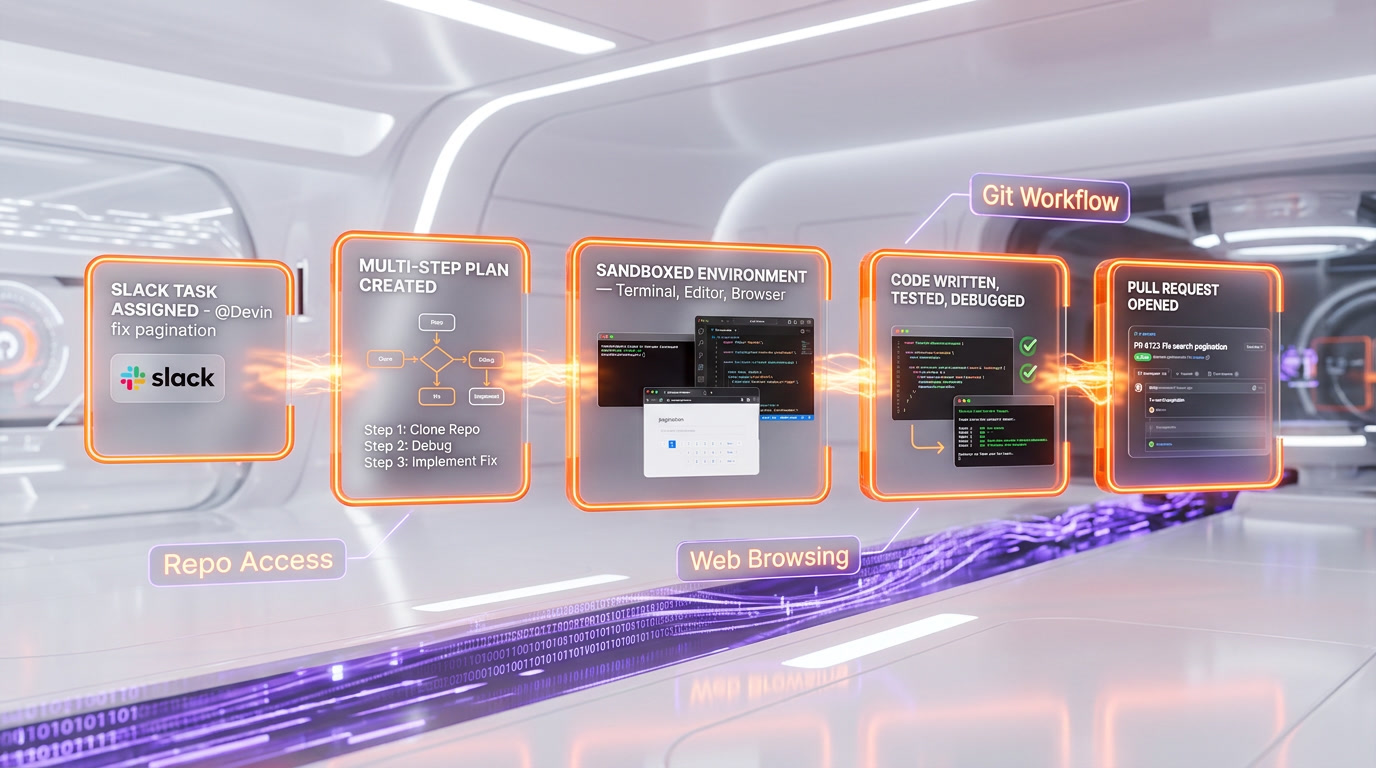
Think of Devin not as a tool inside your IDE, but as a virtual team member. You assign Devin a task the same way you'd assign it to a junior or mid-level developer: through a Slack message, a ticket description, or a direct prompt. Devin then works in its own sandboxed environment — complete with a code editor, terminal, and web browser — executing the task autonomously and reporting back when it's done.
Cognition AI made waves in the industry when it first demonstrated Devin, and the company has continued to push boundaries. In a significant strategic move, Cognition acquired Windsurf (formerly Codeium) for approximately $250 million, consolidating two major AI coding platforms under one roof. This acquisition signals Cognition's ambition to dominate both the autonomous AI engineer space (Devin) and the AI-assisted coding space (Windsurf).
Perhaps the most dramatic change came with Devin 2.0, which slashed the entry price from $500 per month to just $20 per month — a 96% price reduction. This move transformed Devin from an enterprise-only tool into something accessible to individual developers, freelancers, and small teams.
Key Features in 2026
Fully Autonomous Task Execution
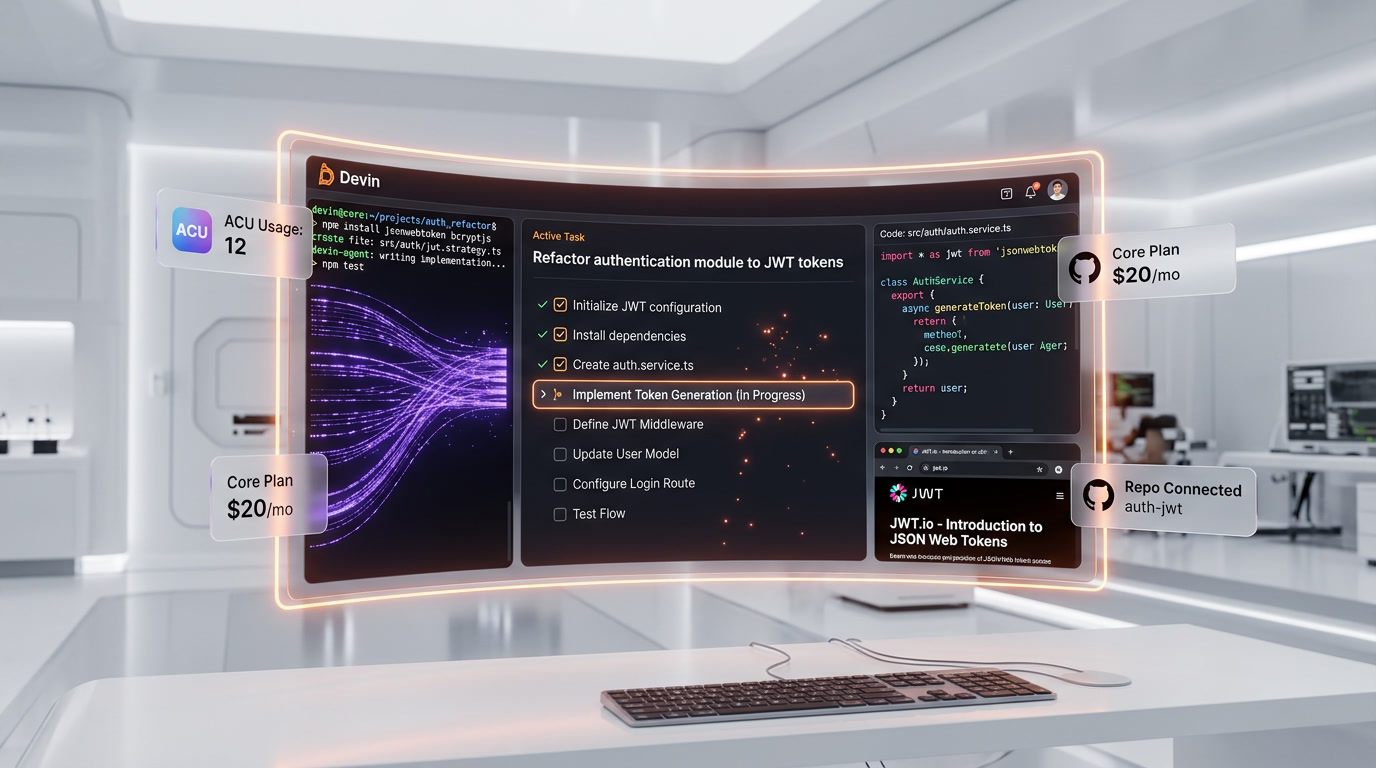
Devin's defining capability is autonomy. When you give Devin a task — "Refactor the authentication module to use JWT tokens" or "Add a dark mode toggle to the settings page" — it doesn't just generate code snippets. It creates a plan, writes the implementation, tests it, debugs any issues it encounters, and delivers the completed work. During this process, Devin operates in a sandboxed environment with access to a full development stack: file system, terminal, code editor, and web browser.
Sandboxed Development Environment
Devin works inside its own isolated environment that mirrors a real developer's setup. It has access to your repository, can run commands in the terminal, install packages, execute tests, and even browse the web to look up documentation or troubleshoot errors. This sandboxed approach means Devin's work doesn't interfere with your local development environment until you choose to merge its changes.
Slack Integration for Task Assignment
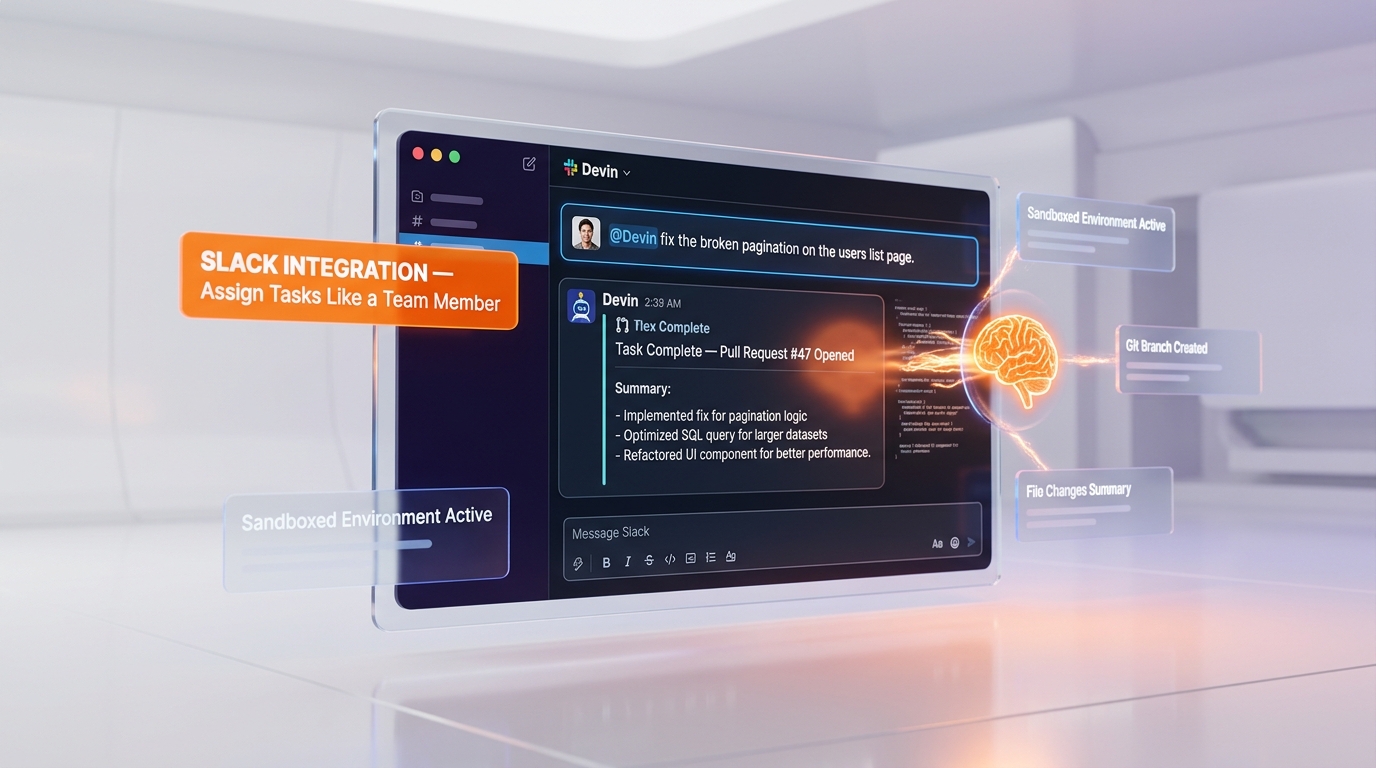
One of Devin's most practical features is its Slack integration. You can assign tasks to Devin directly in Slack, just as you would message a human team member. You write something like "@Devin fix the broken pagination on the users list page" and Devin picks up the task, works on it, and reports back in the same Slack thread with a summary of what it did, the changes it made, and a link to the pull request. This integration makes Devin feel like a natural part of your development team's workflow.
Repository Access and Git Workflow
Devin connects to your Git repositories and follows standard development workflows. It creates branches, makes commits with descriptive messages, and opens pull requests for your review. This means Devin's work goes through the same review and approval process as any human developer's contributions, maintaining your team's quality standards.
Web Browsing for Research
Unlike most AI coding tools that are limited to their training data, Devin can browse the web in real time. If it encounters an unfamiliar API, a new library version, or a framework-specific pattern, it can look up the latest documentation. This capability significantly reduces the "hallucination" problem that plagues other AI coding tools when dealing with recently updated technologies.
Multi-Step Planning and Reasoning
Devin doesn't just write code reactively. It creates a step-by-step plan visible in the interface before beginning implementation, breaking complex tasks into manageable sub-tasks. You review the plan and provide feedback before Devin starts executing, giving you oversight without requiring you to micromanage the implementation.
Learning and Adaptation
Devin can learn your codebase's patterns, conventions, and architectural decisions over time. The more it works with your repository, the better it becomes at producing code that matches your team's style and adheres to your project's established patterns.
Pricing Breakdown
| Plan | Price | ACUs Included | Key Features |
|---|---|---|---|
| Core | $20 per month | Pay-as-you-go ($2.25 per ACU) | Full Devin access, repo connection, sandboxed environment, Slack integration |
| Team | $500 per month | 250 ACUs included | Everything in Core, team management, priority support, advanced analytics |
| Enterprise | Custom pricing | Custom ACU allocation | SSO/SAML, dedicated support, SLAs, custom integrations, on-premise options |
What is an ACU? ACU stands for "Agent Compute Unit," Devin's unit of work measurement. Each task Devin performs consumes a certain number of ACUs depending on the complexity and compute time required. On the Core plan, you pay $2.25 per ACU on a pay-as-you-go basis. The Team plan includes 250 ACUs, which effectively reduces the per-ACU cost for teams with consistent usage.
The dramatic price drop from $500 per month to $20 per month for the Core plan (with Devin 2.0) was one of the most significant pricing moves in the AI developer tools space. Previously, only well-funded teams could afford Devin. Now, an individual freelancer can access the same autonomous AI engineer for the cost of a few coffees, paying only for the compute they actually use.
Pros and Cons
Pros
- True autonomy. Devin is one of the only AI coding tools that can take a task from start to finish without constant human guidance. You assign it work and come back to a completed pull request.
- Dramatically reduced price with Devin 2.0. The 96% price cut from $500 to $20 per month makes autonomous AI engineering accessible to individuals and small teams for the first time.
- Slack-native workflow. Assigning tasks via Slack removes friction and integrates AI engineering into how teams already communicate.
- Sandboxed safety. Devin works in its own environment and submits PRs for review, so it can't accidentally break your production code.
- Web browsing capability. Real-time access to documentation and resources means Devin can work with the latest versions of libraries and frameworks.
- Windsurf acquisition synergy. Cognition's acquisition of Windsurf for ~$250M suggests a long-term commitment to building a comprehensive AI development platform.
- Standard Git workflow. Devin's work goes through your existing PR review process, maintaining quality gates.
Cons
- ACU costs can add up. While the base subscription is cheap, complex tasks consume multiple ACUs at $2.25 each. A heavy week of delegated tasks could result in a significant bill.
- Not ideal for real-time pair programming. Devin is designed for asynchronous task completion, not real-time inline code suggestions. If you want autocomplete-style assistance, tools like Cursor or GitHub Copilot are better suited.
- Quality varies with task complexity. Devin handles well-defined, medium-complexity tasks reliably. Highly ambiguous or architecturally complex tasks may require more iteration or human intervention.
- Requires clear task descriptions. Like any team member, Devin performs best when given clear, specific instructions. Vague task descriptions lead to suboptimal results.
- Review overhead for critical code. While Devin's code quality is generally solid, autonomously generated code for critical systems still requires careful human review.
Who Should Use Devin?
Development teams with large backlogs will find Devin transformative. Those dozens of "nice to have" tickets that never make it into a sprint — bug fixes, refactors, documentation updates, small feature additions — can be delegated to Devin, freeing human developers to focus on complex, creative work.
Solo developers and freelancers can effectively multiply their output. Instead of spending hours on repetitive tasks like writing boilerplate code, creating test suites, or implementing standard features, they can delegate these to Devin and focus on the unique aspects of their projects.
Startup CTOs who need to move fast can use Devin as an always-available team member that works nights and weekends. When you're trying to ship features faster than your small team can handle, Devin can pick up the overflow.
Open source maintainers dealing with a constant stream of issues, dependency updates, and contribution management can delegate routine maintenance tasks to Devin.
Who Should NOT Use Devin?
Developers who want real-time coding assistance in their editor should use Cursor, GitHub Copilot, or Windsurf instead. Devin is not an autocomplete tool — it's an autonomous agent that works asynchronously on delegated tasks.
Teams working on highly sensitive or classified codebases may have concerns about sending code to external AI services. While Devin's sandboxed environment provides security, organizations with strict data sovereignty requirements should evaluate the Enterprise plan's on-premise options.
Projects that require deep domain expertise in niche areas — specialized scientific computing, custom hardware drivers, legacy system integrations — may find that Devin lacks the specialized knowledge that a domain expert developer would bring.
Developers on extremely tight budgets who can't afford any per-usage costs beyond the base subscription should be cautious, as ACU consumption on active projects can exceed expectations.
Devin vs Competitors
Devin vs Cursor
Cursor is an AI-powered code editor (a fork of VS Code) that provides real-time coding assistance — autocomplete, inline edits, chat-based code generation — while you work. Devin is an autonomous agent that works independently. The key difference is the interaction model: Cursor assists you while you code; Devin works while you don't. Many developers use both — Cursor for hands-on coding sessions and Devin for delegated tasks. They are complementary rather than competitive for most workflows.
Devin vs GitHub Copilot
GitHub Copilot is an AI pair programmer integrated into your IDE that provides inline code suggestions and chat assistance. Like Cursor, it's a real-time assistant rather than an autonomous agent. Copilot is excellent for line-by-line coding productivity, while Devin is designed for task-level delegation. Copilot is also more broadly available across IDEs and programming languages, while Devin's strength is handling complete, multi-file tasks independently.
Devin vs Human Freelancers
This is perhaps the most interesting comparison. A human freelancer on a platform like Upwork or Toptal might charge $50–$200 per hour. Devin's Core plan at $20 per month plus ACU costs can handle many of the same tasks — bug fixes, feature implementations, refactors — at a fraction of the cost. However, human freelancers bring judgment, creativity, communication skills, and the ability to handle ambiguity that Devin cannot match. The practical answer for most teams is to use Devin for well-defined, routine tasks and human developers for complex, judgment-heavy work.
Devin vs Manus
Manus sits closer to Devin than either IDE assistant above: another autonomous agent you hand a whole task to, rather than a tool you code alongside. Devin versus Manus is where we separate the two.
What's New in 2026
The biggest story of 2026 for Cognition AI is arguably the Windsurf acquisition. By acquiring Windsurf (formerly Codeium) for approximately $250 million, Cognition now controls both a leading autonomous AI engineer (Devin) and a popular AI-assisted IDE (Windsurf). This positions Cognition as a potential one-stop shop for AI-powered software development — from real-time coding assistance to fully autonomous task completion.
Devin 2.0 brought the landmark price reduction from $500 per month to $20 per month, fundamentally changing who can afford autonomous AI engineering. This wasn't just a pricing move — Devin 2.0 also brought improved task completion rates, better code quality, and more reliable multi-step reasoning.
The introduction of the ACU-based billing model allows users to pay proportionally to the work Devin actually performs, replacing the previous flat-rate model that was prohibitively expensive for light users. At $2.25 per ACU, developers can delegate small tasks for just a few dollars each.

FAQ
What is Devin AI?
Devin is an autonomous AI software engineer built by Cognition AI. Unlike coding assistants that help you write code in real time, Devin works independently — you assign it a task, and it plans, codes, tests, and debugs autonomously in a sandboxed environment, delivering completed work as a pull request.
How much does Devin cost in 2026?
Devin's Core plan costs $20 per month with pay-as-you-go pricing of $2.25 per ACU (Agent Compute Unit). The Team plan is $500 per month and includes 250 ACUs. Enterprise pricing is custom. This represents a 96% price reduction from the original $500 per month flat rate.
What is an ACU in Devin?
ACU stands for Agent Compute Unit. It's Devin's unit of work measurement. Each task consumes a variable number of ACUs depending on its complexity and the compute time required. Simple tasks like bug fixes may use a fraction of an ACU, while complex feature implementations may use several.
Can Devin replace a human developer?
For well-defined, routine tasks — bug fixes, refactors, boilerplate code, test writing, small feature additions — Devin can perform at a level comparable to a junior or mid-level developer. For complex architectural decisions, ambiguous requirements, or tasks requiring deep domain expertise, human developers remain essential. Most teams use Devin to augment their developers, not replace them.
How does Devin's Slack integration work?
You install the Devin Slack app in your workspace. Then you can mention @Devin in any channel and describe a task. Devin picks up the task, works on it in its sandboxed environment, and reports back in the same Slack thread with a summary of changes and a link to the pull request. It's designed to feel like assigning work to a team member.
Did Cognition AI really acquire Windsurf?
Yes. Cognition AI acquired Windsurf (formerly known as Codeium) for approximately $250 million. This acquisition combines Devin's autonomous AI engineering capabilities with Windsurf's AI-assisted IDE, creating a comprehensive AI development platform under one company.
Is Devin safe to use with my codebase?
Devin operates in a sandboxed environment and submits changes as pull requests, so it cannot directly modify your production code without your approval. Your code is processed by Cognition's systems to generate results. For organizations with strict security requirements, the Enterprise plan offers additional security controls and potential on-premise deployment options.
What programming languages does Devin support?
Devin supports most mainstream programming languages and frameworks. It works with Python, JavaScript, TypeScript, Go, Rust, Java, C++, Ruby, and many others. Since Devin operates in a full development environment with terminal access, it can work with any language or tool that can be installed and run in a Linux environment.
How does Devin compare to using Cursor or GitHub Copilot?
They serve different purposes. Cursor and GitHub Copilot are real-time coding assistants that help you write code faster while you're actively working in your editor. Devin is an autonomous agent that works independently on delegated tasks. Many developers use Cursor or Copilot for their hands-on coding sessions and Devin for tasks they want to delegate entirely. The tools are complementary rather than competing.
Key Features
Pros & Cons
Pros
- Fully autonomous task completion
- Sandboxed environment with repo access
- Slack integration for task assignment
- 96% price drop to $20/mo
- Handles debugging and deployment
- Cognition acquired Windsurf
Cons
- Autonomous mode can make mistakes
- Requires clear task descriptions
- Not suitable for all project types
- Limited to web/software tasks
- Team plan expensive at $500/mo
Best Use Cases
Platforms & Integrations
Available On
Compare Devin

We're developers and SaaS builders who use these tools daily in production. Every review comes from hands-on experience building real products — DealPropFirm, ThePlanetIndicator, PropFirmsCodes, and many more. We don't just review tools — we build and ship with them every day.
Written and tested by developers who build with these tools daily.
Frequently Asked Questions
What is Devin?
The autonomous AI software engineer by Cognition
How much does Devin cost?
Devin costs $20/month.
Is Devin free?
No, Devin starts at $20/month.
What are the best alternatives to Devin?
Top-rated alternatives to Devin include Claude Code (9.9/10), Cursor (9.5/10), Claude Opus 4.7 (9.4/10), Vercel (9.2/10) — all reviewed with detailed scoring on ThePlanetTools.ai.
Is Devin good for beginners?
Devin is rated 7.5/10 for ease of use.
What platforms does Devin support?
Devin is available on web.
Does Devin offer a free trial?
No, Devin does not offer a free trial.
Is Devin worth the price?
Devin scores 9/10 for value. We consider it excellent value.
Who should use Devin?
Devin is ideal for: Prototype development, Bug bounty hunting, Code migration, Repetitive engineering tasks, Internal tool building.
What are the main limitations of Devin?
Some limitations of Devin include: Autonomous mode can make mistakes; Requires clear task descriptions; Not suitable for all project types; Limited to web/software tasks; Team plan expensive at $500/mo.
Best Alternatives to Devin




Ready to try Devin?
Get started today
Try Devin Now →