Luma Ray 3 vs Veo 3.1: HDR Studio Video vs Native-Audio Frontier (2026)


Luma Ray 3 ships native 16-bit HDR EXR; Veo 3.1 ships native audio and 148s clips. We tested Veo, researched Luma. Split verdict — pick by finishing.
Feature Comparison
| Feature | Luma Ray 3 | Veo 3.1 |
|---|---|---|
| Text-to-Video Video Arena rank (attributed) | ~1,211 Elo (#2 at launch) | ~1,226 Elo (#2 current) |
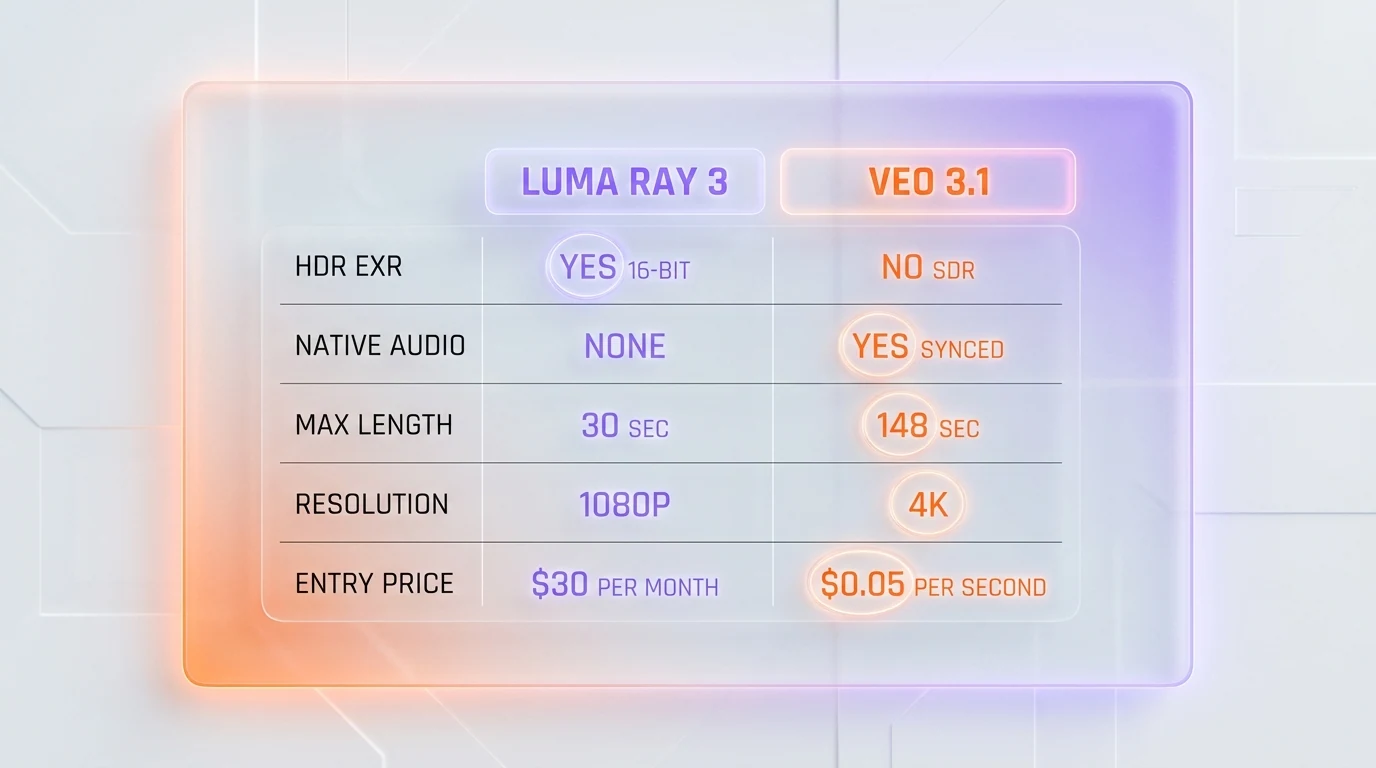
| Native HDR pipeline (EXR export) | Yes (ACES2065-1, 10/12/16-bit OpenEXR) | No (8-bit SDR output) |
| Native synced audio | No (silent video) | Yes (dialogue, SFX, ambient, music in one pass) |
| Reasoning-driven generation | Yes (chain-of-thought, self-judging) | Yes (scene understanding) |
| Video-to-video conversion | Best-in-class (third-party reviews) | Yes (standard) |
| Maximum single-generation length | 10 seconds (text-to-video) | 8 seconds |
| Maximum extended length | ~30 seconds (extend); 20 seconds (Modify) | ~148 seconds (20 extend steps) |
| Maximum resolution | 1080p native, 4K via upscale (HDR/EXR at 540p and 720p) | 4K native ($0.60 per second Standard) |
| First and last frame editing | Yes (keyframe control) | Yes (interpolation) |
| Character reference consistency | Image reference lock across generations | Reference images (up to 3) |
| Draft / fast preview mode | Draft Mode (5x faster, 5x cheaper) | Veo 3.1 Fast variant ($0.10 per second) |
| Pricing model | Monthly subscription, credit-based | Pay-per-second, no subscription |
| Cheapest entry tier | Plus at $30 per month (credit pool) | Lite at $0.05 per second of 720p |
| Free tier | No — paid tier only | No — paid tier only |
| API access | Yes (Luma API, plus Adobe Firefly partner) | Yes (Gemini API native) |
Pricing Comparison
Luma Ray 3
Veo 3.1
Detailed Comparison
Luma Ray 3 vs Veo 3.1: Luma Ray 3 is Luma AI's third-generation reasoning-driven video model inside Dream Machine, the first mainstream model with a native 16-bit HDR pipeline and ACES2065-1 OpenEXR export, priced as a subscription from $30 per month with no native audio. Veo 3.1 is Google DeepMind's pay-per-second frontier model exposed through the Gemini API, with native synchronized audio (dialogue, sound effects, ambient, music) and clip extension up to roughly 148 seconds, billed from $0.05 to $0.60 per second. We tested Veo 3.1 directly through Google AI Studio and the Gemini API, and we researched Luma Ray 3 from Luma AI's official documentation, the Dream Machine pricing page, third-party benchmarks and community reviews, attributed throughout. Verdict: split. Pick Luma Ray 3 for HDR-mastered finishing, OpenEXR color-grading pipelines and best-in-class video-to-video. Pick Veo 3.1 for native synced audio in one pass, longer extended sequences and pure pay-per-second flexibility.
Quick Verdict
Split verdict. Two frontier video models built around two different finishing philosophies. Luma Ray 3 from Luma AI is the studio-grade HDR specialist — a native 16-bit HDR pipeline with ACES2065-1 EXR export that pipes straight into DaVinci Resolve and Nuke, a reasoning-driven generation layer, and a flat monthly subscription from $30. Veo 3.1 from Google DeepMind is the native-audio frontier model with synced dialogue, sound effects and ambient in a single generation pass, clip extension up to about 148 seconds, and pure pay-per-second billing from $0.05 to $0.60 per second. Both sit in the top tier of the 2026 video model landscape.
- Luma Ray 3 wins for: HDR-mastered output for streaming and theatrical finishing, OpenEXR post-production pipelines, best-in-class video-to-video stylization, and teams who already budget on a flat monthly subscription
- Veo 3.1 wins for: native synced audio in one pass, dialogue-heavy shorts, longer extended sequences (up to roughly 148 seconds), and API-first product workflows on the Gemini stack
- Cheaper option for occasional use: Veo 3.1 Lite at $0.05 per second of 720p — a 5-second clip costs $0.25, no subscription required
- Cheaper option for predictable monthly budgeting: Luma Ray 3 Plus at $30 per month, a flat fee with no per-second metering
- Best HDR and color depth: Luma Ray 3 (native 16-bit HDR with ACES2065-1 OpenEXR export — no other frontier model ships this in June 2026)
- Best native audio: Veo 3.1 (synced dialogue, sound effects, ambient and music in a single pass — Luma Ray 3 generates silent video)
- Best video-to-video: Luma Ray 3 (cited best-in-class for stylized regeneration across multiple third-party reviews)
- Best benchmark ranking: Veo 3.1 (ranked #2 Text-to-Video on the Artificial Analysis Video Arena at roughly 1,226 Elo, just ahead of Luma Ray 3 at roughly 1,211)
Our Methodology for This Comparison
This comparison mixes hands-on testing with attributed research, and we want to be transparent about which is which. We tested Veo 3.1 directly through Google AI Studio and the Gemini API across April, May and June 2026, running text-to-video, image-to-video, first and last frame interpolation, audio generation and clip extension on the same prompt sets we use for every frontier video review. We have not had production hands-on access to Luma Ray 3, so our Luma findings are researched, not tested: we compiled Luma AI's official Ray3 product page (lumalabs.ai/ray, last checked June 2026), the Dream Machine pricing page (lumalabs.ai/pricing), the Luma video models field guide, Luma's launch announcements covering reasoning capabilities and the Ray3.14 update, third-party reviews on G2, Trustpilot and Product Hunt, public benchmark blogs and the CineD and Adobe Firefly partner documentation. Pricing tables for both models were captured by direct fetch on the vendor pricing pages on June 2026 — lumalabs.ai/pricing for Luma Ray 3 and ai.google.dev/gemini-api/docs/pricing for Veo 3.1. Benchmark figures are attributed to the Artificial Analysis Video Arena and labeled as such. Where we describe Luma Ray 3 output quality, we are describing public sample reels and third-party reviewer findings, not our own generations. We will revisit this comparison with full hands-on Luma testing once we complete a Plus or Pro subscription cycle.
Luma Ray 3 vs Veo 3.1 — Overview
What Is Luma Ray 3?
Luma Ray 3 is the third-generation video model from Luma AI, the San Francisco lab founded in 2021 by Amit Jain and Alex Yu (both formerly of Apple) that launched Dream Machine in June 2024. Released in March 2026, Ray 3 introduced a reasoning-driven generation architecture: the model generates intermediate visual concepts, judges them against the prompt's intent, and refines before producing the final output — a chain-of-thought loop closer to a director's iterative refinement than a single-pass prompt-to-video model. The headline feature is the native HDR pipeline. Ray 3 generates HDR in ACES2065-1 across 10-bit, 12-bit and 16-bit formats and exports to OpenEXR, the post-production industry standard, so studios can pipe output directly into DaVinci Resolve, Nuke and After Effects color-grading workflows. The Ray3.14 update added native 1080p generation, 4x faster inference and 3x lower cost than Ray3.0. On June 9, 2026, Luma released Ray3.2 — the build now serving the Ray 3 line through Luma's own API, and the first API availability for the Ray 3 lineage — so the analysis and pricing in this comparison apply to that current build. Ray 3 also ships best-in-class video-to-video, first and last frame editing with keyframe control, character reference consistency and a Draft Mode at 5x faster and 5x cheaper for rapid iteration. It generates silent video — there is no native audio. More details on Luma Ray 3 in our full review.
What Is Veo 3.1?
Veo 3.1 is Google DeepMind's text-to-video and image-to-video model, exposed publicly through the Gemini API (model IDs veo-3.1-generate-preview, veo-3.1-fast-generate-preview, veo-3.1-lite-generate-preview) and Google AI Studio. Three variants ship side by side: Standard for highest fidelity, Fast for cheaper near-equivalent quality, and Lite for the cheapest 720p and 1080p tier. Veo was the first frontier video model to natively generate synchronized audio — dialogue with lip-sync, sound effects, ambient noise and music — alongside the visual track, with audio toggleable per request. A single generation produces 4, 6 or 8 seconds, and the extend-video endpoint chains up to 7 seconds per step across as many as 20 steps, enabling roughly 148 seconds (about two and a half minutes) of total output from one starting clip. Pricing is usage-based, billed per second of generated video, with no monthly subscription and no free tier. Veo 3.1 supports text-to-video, image-to-video, first and last frame interpolation, reference-based generation and video extension. More details on Veo 3.1 in our full review.
Features Comparison
We compared the two on the dimensions that matter when you are choosing one for production work: raw quality and benchmark ranking, HDR and color depth, native audio, video-to-video, length, resolution, character control and pricing model. Numbers come from our hands-on Veo 3.1 testing, attributed Artificial Analysis Video Arena rankings, vendor documentation (resolution, HDR, audio, duration limits) and third-party reviews of Luma Ray 3 output.
| Feature | Luma Ray 3 | Veo 3.1 | Winner |
|---|---|---|---|
| Vendor | Luma AI (US) | Google DeepMind (US) | — |
| Text-to-Video Video Arena rank (attributed) | ~1,211 Elo (#2 at launch) | ~1,226 Elo (#2 current) | Veo 3.1 |
| Native HDR pipeline (EXR export) | Yes (ACES2065-1, 10/12/16-bit OpenEXR) | No (8-bit SDR output) | Luma Ray 3 |
| Native synced audio | No (silent video) | Yes (dialogue, SFX, ambient, music in one pass) | Veo 3.1 |
| Reasoning-driven generation | Yes (chain-of-thought, self-judging) | Yes (scene understanding) | Tie |
| Video-to-video conversion | Best-in-class (third-party reviews) | Yes (standard) | Luma Ray 3 |
| Maximum single-generation length | 10 seconds (text-to-video) | 8 seconds | Luma Ray 3 |
| Maximum extended length | ~30 seconds (extend); 20 seconds (Modify) | ~148 seconds (20 extend steps) | Veo 3.1 |
| Maximum resolution | 1080p native, 4K via upscale (HDR/EXR at 540p and 720p) | 4K native ($0.60 per second Standard) | Veo 3.1 |
| First and last frame editing | Yes (keyframe control) | Yes (interpolation) | Tie |
| Character reference consistency | Image reference lock across generations | Reference images (up to 3) | Tie |
| Draft / fast preview mode | Draft Mode (5x faster, 5x cheaper) | Veo 3.1 Fast variant ($0.10 per second) | Tie |
| Agentic automation | Luma Agents (chained workflows) | Gemini SDK orchestration | Tie |
| Pricing model | Monthly subscription, credit-based | Pay-per-second, no subscription | Tie (use case) |
| Cheapest entry tier | Plus at $30 per month (credit pool) | Lite at $0.05 per second of 720p | Veo 3.1 (occasional) |
| Free tier | No — paid tier only | No — paid tier only | Tie |
| API access | Yes (Luma API, plus Adobe Firefly partner) | Yes (Gemini API native) | Tie |
Luma Ray 3 wins on 3 features (native HDR pipeline, video-to-video, single-generation length). Veo 3.1 wins on 4 features (Video Arena rank, native audio, extended length, maximum resolution). Eight ties (reasoning, first and last frame editing, character consistency, draft mode, agentic automation, pricing model trade-off, free tier, API access). Net: the two are remarkably balanced, and the right choice is finishing-driven. If your output is destined for an HDR color-grade in a DaVinci Resolve or Nuke pipeline, Luma Ray 3's ACES2065-1 OpenEXR export is something Veo 3.1 simply does not ship. If your output needs dialogue, sound design or scenes longer than 30 seconds, Veo 3.1's native audio and 148-second extension are things Luma Ray 3 does not ship.
Pricing — Luma Ray 3 vs Veo 3.1 in 2026
The two tools sit on opposite ends of the pricing spectrum. Luma Ray 3 runs on a classic monthly subscription with credit budgets that refresh each cycle, delivered through Dream Machine. Veo 3.1 is pure pay-per-second usage billing through the Gemini API — no seats, no monthly minimum. Neither has a free tier. Both pricing tables below were captured by direct fetch on the vendor pricing pages in June 2026.
Luma Ray 3 Pricing
| Plan | Monthly Price | Annual Price | Includes |
|---|---|---|---|
| Plus | $30 per month | $300 per year | Luma and third-party image and video models, edit access for guests, commercial use |
| Pro | $90 per month | $900 per year | Everything in Plus, 4x usage with Luma Agents |
| Ultra | $300 per month | $3,000 per year | Everything in Pro, 15x usage with Luma Agents |
| Team / Enterprise | Contact sales | Custom | Multi-seat, SSO, usage analytics, dedicated support |
Pricing is credit-based per generation. Luma does not publish exact monthly credit allocations per tier on the pricing page — users discover their allocation through usage. Per-generation costs are documented separately: a Ray3.14 HDR generation runs significantly more credits than a standard 720p output, so HDR mastering at volume is economically tight on the Plus tier. There is no free tier of Ray 3 specifically. The Pro tier at $90 per month, with its 4x Plus usage allocation and Luma Agents, is the price-quality sweet spot for studio workflows.
Veo 3.1 Pricing
| Variant | Model ID | 720p | 1080p | 4K | Audio |
|---|---|---|---|---|---|
| Veo 3.1 Standard | veo-3.1-generate-preview | $0.40 per second | $0.40 per second | $0.60 per second | Synced audio included |
| Veo 3.1 Fast | veo-3.1-fast-generate-preview | $0.10 per second | $0.12 per second | $0.30 per second | Synced audio included |
| Veo 3.1 Lite | veo-3.1-lite-generate-preview | $0.05 per second | $0.08 per second | Not supported | Synced audio included |
No free tier on Veo 3.1 — paid Gemini API tier only. You are charged only if the video is successfully generated; Google waives charges on audio processing failures. The three-variant structure lets you tune the cost-quality trade-off per generation, which most subscription-only models cannot do.
Verdict pricing: Veo 3.1 Lite at $0.05 per second of 720p is the cheapest way into frontier video generation — a 5-second clip is $0.25 with synced audio included, cheaper than any month of a Luma subscription if your usage is occasional. Luma Ray 3 Plus at $30 per month is the better value for predictable monthly budgeting and for HDR finishing work where per-second metering would be hard to forecast. Per-unit comparison: a 5-second 1080p Veo 3.1 Standard clip costs $2.00 ($0.40 per second times 5), and a 5-second 4K clip costs $3.00 ($0.60 per second times 5). On Luma, the same 5-second 1080p HDR generation draws from your monthly credit pool rather than billing per second, so heavy HDR users hit the credit ceiling on Plus and need Pro at $90 per month. For occasional non-HDR work Veo 3.1 is dramatically cheaper; for daily HDR-mastered finishing the flat Luma subscription is easier to budget and avoids surprise per-second bills.
Hands-on Veo 3.1, Researched Luma Ray 3
We tested Veo 3.1 directly across our standard frontier video prompt sets. We have not had hands-on access to Luma Ray 3, so the Luma findings below are researched from official documentation, public sample reels and third-party reviews, attributed accordingly. Here is the comparative picture.
Veo 3.1 hands-on findings
The genuine paradigm shift on Veo 3.1 remains native synced audio. On our two-shot character dialogue test, Veo 3.1 generated a person speaking with their voice, lip-synced, in one pass — sound effects, ambient room tone and dialogue all baked into the visual track at generation time. No other tier-1 model we have tested ships this end-to-end in a single pass, and it removes an entire post-production step for one-shot dialogue work. The audio is toggleable per request, so you can disable it when you want a silent plate. The second standout is reach: a single generation caps at 8 seconds, but the extend-video endpoint chained up to 7 seconds per step across as many as 20 steps in our testing, producing roughly 148 seconds of total output from one starting clip — useful for longer narrative sequences that Luma's roughly 30-second extension ceiling cannot match. The three variants let us tune cost against quality on the fly: Lite at $0.05 per second of 720p for drafts, Standard at $0.40 per second for finals, 4K at $0.60 per second when the shot needed it. Where Veo 3.1 hurts is finishing fidelity for color work — output is 8-bit SDR, so there is no HDR path and no OpenEXR export. For a documentary-grade HDR grade in DaVinci Resolve, Veo 3.1 forces an SDR-to-HDR upconversion step that historically degrades AI-generated video. Per-second cost also compounds fast at scale: a 30-second 4K Standard scene at $0.60 per second is $18 for a single shot.
Luma Ray 3 researched findings (attributed)
Luma Ray 3's structural advantage, per Luma AI's documentation and multiple third-party reviews, is the native HDR pipeline. Ray 3 generates HDR in ACES2065-1 across 10-, 12- and 16-bit formats and exports to OpenEXR, which means studios can pipe output directly into DaVinci Resolve, Nuke and After Effects color-grading workflows without the SDR-to-HDR upconversion that competing models force. CineD and the Adobe Firefly partner documentation both confirm the ACES2065-1 HDR support; the practical caveat in Luma's own field guide is that HDR and EXR downloads are available at 540p and 720p only, so HDR finishing is not yet a 1080p or 4K workflow. Community reception on Product Hunt and Reddit r/aivideo, as compiled in our full Luma Ray 3 review, clusters around three points: HDR output described as "actually usable for real production," the Draft Mode workflow as the practical productivity win, and best-in-class video-to-video conversion that reviewers rate above Sora 2 and Runway Gen-4 for stylized regeneration of existing footage. The reasoning-driven architecture — the model generating intermediate concepts and judging them before final output — appears in reviews as tighter prompt adherence on compositional directives like low-angle and dutch-angle shots. The consistent limitations reported across third-party reviews: no native audio (Ray 3 generates silent video, requiring external TTS or music production), HDR credit cost that is high relative to standard 720p output, and opaque credit allocation per subscription tier. On the Artificial Analysis Video Arena, Luma Ray 3 launched at roughly 1,211 Elo and #2 in Text-to-Video, trailing Google's Veo, and #7 in Image-to-Video — a strong ranking that sits just behind Veo 3.1's roughly 1,226 Elo.
Winner per Category
Best Overall: Tie — Both Top-Tier
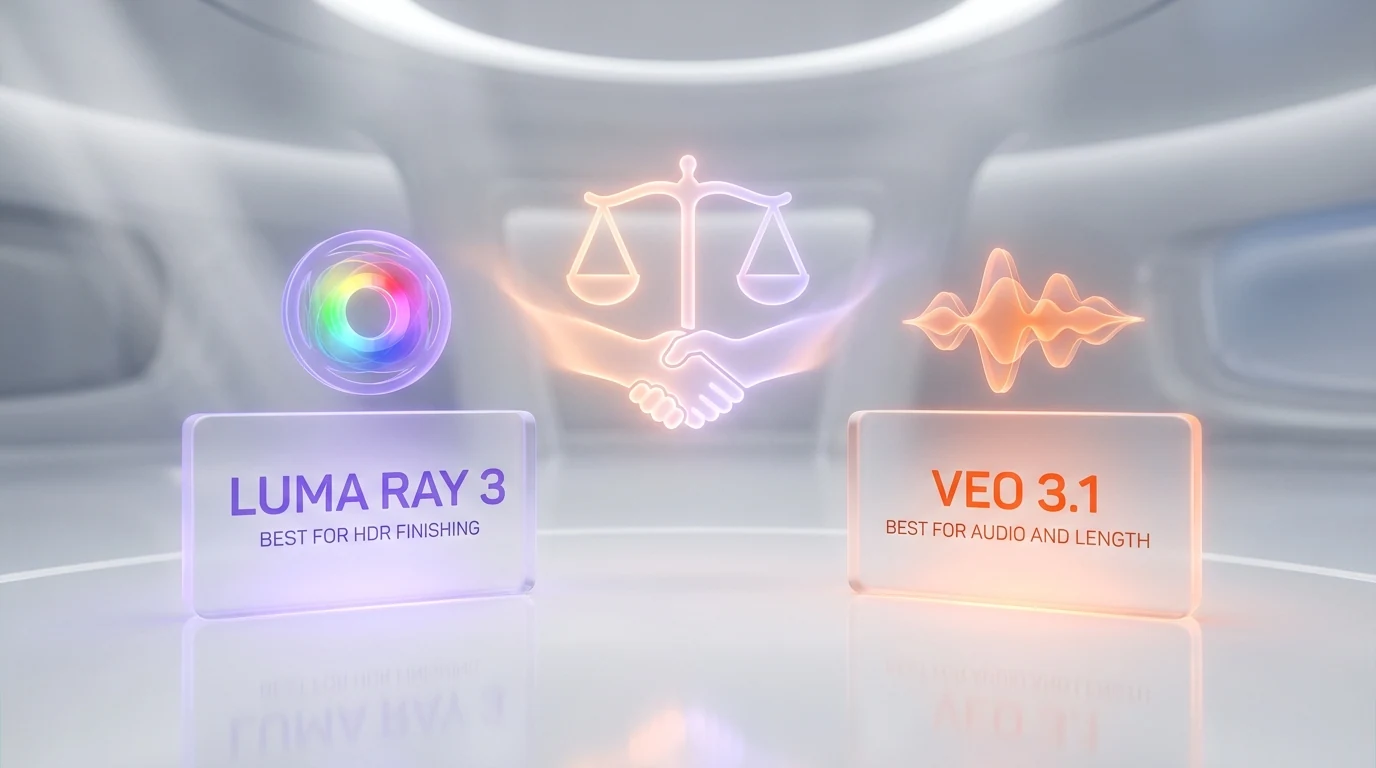
Both models sit in the top tier of 2026 frontier video, separated by roughly 15 Elo points on the Artificial Analysis Video Arena (Veo 3.1 at about 1,226, Luma Ray 3 at about 1,211). The choice is genuinely finishing-driven, not quality-driven. Luma Ray 3 owns the HDR color pipeline and video-to-video. Veo 3.1 owns native audio, length and 4K. We cannot crown a global winner without picking a use case first.
Best for HDR-Mastered Finishing: Luma Ray 3
Luma Ray 3, because the native 16-bit HDR pipeline with ACES2065-1 OpenEXR export is the only one of its kind in the mainstream frontier tier in 2026. If your output is destined for an HDR color-grade in DaVinci Resolve or Nuke — streaming masters, theatrical placements, premium brand films — Ray 3 integrates into the post-production pipeline cleanly, while Veo 3.1's 8-bit SDR output forces a quality-degrading upconversion. The caveat: HDR and EXR downloads are 540p and 720p only, so this is a color-finishing advantage, not a high-resolution one.
Best for Native Audio and Dialogue: Veo 3.1
Veo 3.1, by default — it is not close. Veo 3.1 generates synced dialogue, sound effects, ambient noise and music in a single generation pass, with lip-sync tied to the audio. Luma Ray 3 generates silent video and requires an external TTS, music or DAW step for any finished audio. If your output is dialogue-heavy shorts, talking-head explainers or anything where sound design is part of the brief, Veo 3.1 removes an entire post-production stage that Luma cannot touch.
Best for Video-to-Video Stylization: Luma Ray 3
Luma Ray 3, because multiple third-party reviews cite its video-to-video conversion as best-in-class — superior to Sora 2 and Runway Gen-4 for regenerating existing footage with a new style, lighting or look. If your workflow is stylizing raw plates, applying consistent grading across an entire scene, or rapid style exploration on assets you already have, Ray 3 is the researched pick. Veo 3.1 supports video-to-video but it is not the model's headline strength.
Best for Longer Sequences: Veo 3.1
Veo 3.1, because the extend-video endpoint chains up to 7 seconds per step across as many as 20 steps, reaching roughly 148 seconds of total output from one starting clip. Luma Ray 3 caps at 10 seconds for a single text-to-video generation, 20 seconds with Modify and roughly 30 seconds with extensions. For anything approaching a minute or more of continuous output, Veo 3.1 is the only one of the two that gets there.
Best for Budget / Occasional Generation: Veo 3.1 Lite
Veo 3.1 Lite at $0.05 per second of 720p, because if you generate a handful of short clips per month, the $30 Luma Plus subscription is overkill. Pay-per-second wins for low volume — a 5-second Lite clip is $0.25 with synced audio included, and there is no monthly commitment.
Best for Predictable Monthly Budgeting: Luma Ray 3 Plus
Luma Ray 3 Plus at $30 per month, because once you are producing daily and especially doing HDR finishing work, the flat monthly fee is far easier to forecast than per-second metering. Veo 3.1's pay-per-second model can produce surprise bills on heavy 4K days; Luma's subscription gives you a fixed line item. For HDR mastering at volume, step up to Pro at $90 per month for the 4x credit allocation.
Best for API-First Workflows: Veo 3.1
Veo 3.1, because the Gemini API is mature, well-documented and integrates cleanly with the rest of Google's AI stack — Gemini for prompts, Imagen for stills, Veo 3.1 for video, all callable from the same SDK with the same auth and the same rate-limit pool. Luma offers a developer API and an Adobe Firefly partner integration, but the Gemini stack is the deeper developer ecosystem for teams already on Google Cloud.
Best for 4K Output: Veo 3.1
Veo 3.1, because it generates native 4K at $0.60 per second on the Standard variant. Luma Ray 3 generates native 1080p with 4K via upscaling, and its HDR pipeline is limited to 540p and 720p. If raw resolution is the priority and you do not need an HDR color-grade, Veo 3.1 ships true 4K where Luma upscales.
Pros and Cons
Luma Ray 3 Pros and Cons
What looks strong about Luma Ray 3
- Native 16-bit HDR with OpenEXR export. ACES2065-1 across 10-, 12- and 16-bit formats — the first mainstream frontier model to ship genuinely studio-grade color output that pipes into DaVinci Resolve, Nuke and After Effects.
- Best-in-class video-to-video. Multiple third-party reviews rate Ray 3 above Sora 2 and Runway Gen-4 for stylized regeneration of existing footage.
- Reasoning-driven generation. Chain-of-thought self-judging architecture reportedly produces tighter prompt adherence on compositional directives with lower regeneration cycles.
- Draft Mode at 5x faster, 5x cheaper. A practical productivity workflow for stakeholder review cycles before committing full-credit generation.
- Flat monthly subscription. $30 per month on Plus is easy to budget and avoids the surprise per-second bills that pay-per-second metering can produce.
- First and last frame editing plus keyframe control. Genuine narrative direction capability with image-reference character consistency across separate generations.
Where Luma Ray 3 falls short
- No native audio. Ray 3 generates silent video. Dialogue, sound effects and music require an external TTS, music or DAW step — a full post-production stage that Veo 3.1 handles in one pass.
- HDR limited to 540p and 720p. The HDR and EXR download path tops out at 720p, so HDR finishing is a color-depth advantage, not a high-resolution one.
- Shorter maximum length. 10 seconds per single generation, 20 seconds with Modify, roughly 30 seconds with extensions — well short of Veo 3.1's roughly 148-second reach.
- Opaque credit allocation. Luma does not publish exact monthly credit numbers per tier, and HDR generation costs are high relative to standard output, making volume HDR work economically tight on Plus.
- No native 4K. 1080p native with 4K via upscaling, where Veo 3.1 generates true 4K.
Veo 3.1 Pros and Cons
What we liked about Veo 3.1
- Native synced audio in one pass. First and still among the best in the frontier tier — dialogue with lip-sync, sound effects, ambient and music all generated alongside the video. Removes an entire post-production step for one-shot dialogue work.
- Longest extended output. The extend-video endpoint reaches roughly 148 seconds across 20 chained steps — far past anything Luma Ray 3 ships.
- Native 4K. True 3840 by 2160 on the Standard variant at $0.60 per second, no upscaling step.
- Pay-per-second flexibility. No subscription, no minimums. Veo 3.1 Lite at $0.05 per second of 720p is unbeatable for low-volume occasional generation.
- Three variants for cost tuning. Standard, Fast and Lite let you pick the cost-quality trade-off per generation, which most subscription-only models cannot do.
- Mature Gemini API integration. Same SDK, same auth, same rate-limit pool as the rest of the Gemini stack. Drops cleanly into existing Google AI Studio or Vertex AI workflows.
Where Veo 3.1 falls short
- No HDR pipeline. 8-bit SDR output only — no ACES2065-1, no OpenEXR. HDR finishing requires an SDR-to-HDR upconversion that degrades quality, where Luma Ray 3 ships native HDR.
- Per-second cost compounds fast. A 30-second 4K Standard scene at $0.60 per second is $18 for a single shot. At production scale, per-second metering can outpace a flat Luma subscription.
- No free tier. Paid Gemini API tier only — you cannot try Veo 3.1 without a billing setup.
- 8-second single-generation cap. Longer scenes require chained extensions, which can introduce visible quality drift across many hops.
- Video-to-video is not the headline strength. Veo 3.1 supports it, but third-party reviews put Luma Ray 3 ahead for stylized regeneration of existing footage.
When to Pick Luma Ray 3 vs Veo 3.1
Pick Luma Ray 3 if...
- Your output is HDR-mastered video destined for an OpenEXR color-grade in DaVinci Resolve, Nuke or After Effects
- You produce streaming masters, theatrical placements or premium brand films where color depth matters more than raw resolution or native audio
- Your workflow is video-to-video stylization — regenerating existing footage with a new style, lighting or look
- You want predictable flat monthly billing rather than per-second metering
- You value the Draft Mode iteration workflow and the reasoning-driven prompt adherence on compositional directives
- You can handle audio separately with external TTS, music or DAW tools
Pick Veo 3.1 if...
- Your output needs native synced audio — dialogue, sound effects, ambient or music baked into the visual track in one pass
- You are producing dialogue-heavy shorts, talking-head explainers or anything where sound design is part of the brief
- You need sequences longer than 30 seconds — Veo 3.1 extends to roughly 148 seconds where Luma caps near 30
- You need native 4K resolution without an upscaling step
- You are a developer building API-driven workflows on top of Google's Gemini stack
- Your usage is occasional or unpredictable and pay-per-second beats a $30 subscription
Related Models Worth Considering
The 2026 frontier video tier includes more than just these two. We have compared Runway Gen-4.5 vs Veo 3.1 and Veo 3.1 vs Kling 3 Omni in dedicated showdowns, which are the obvious next reads if Veo 3.1 is on your shortlist. Runway Gen-4.5 is the creative-suite alternative with Director Mode and Act-One actor capture — an editor-first Western workflow. Veo 3.1 Fast at $0.10 per second is the cheaper near-equivalent if you like Veo's audio but want lower per-second cost, and Veo 3.1 Lite at $0.05 per second is the budget entry. For the full context on each model in this comparison, see our Luma Ray 3 review and Veo 3.1 review.
Frequently Asked Questions
Is Luma Ray 3 better than Veo 3.1 in 2026?
Neither is globally better — it is a split, and the two are separated by only about 15 Elo points on the Artificial Analysis Video Arena (Veo 3.1 at roughly 1,226, Luma Ray 3 at roughly 1,211). Luma Ray 3 wins on native 16-bit HDR with OpenEXR export and on video-to-video stylization. Veo 3.1 wins on native synced audio, longer extended sequences (up to roughly 148 seconds) and native 4K. Pick by finishing requirement, not by leaderboard — Luma Ray 3 for HDR color-grading pipelines, Veo 3.1 for audio and length.
How much does Luma Ray 3 cost compared to Veo 3.1?
Luma Ray 3 is a monthly subscription through Dream Machine — Plus at $30 per month ($300 per year), Pro at $90 per month ($900 per year) and Ultra at $300 per month ($3,000 per year), all credit-based with no free tier. Veo 3.1 is pay-per-second through the Gemini API — Lite at $0.05 per second of 720p, Fast at $0.10 per second, and Standard at $0.40 per second of 720p or 1080p ($0.60 per second at 4K), all with synced audio and no free tier. For occasional use Veo 3.1 Lite is far cheaper; for predictable monthly budgeting Luma Plus is easier to forecast.
Does Luma Ray 3 generate audio? Does Veo 3.1?
Veo 3.1 generates native synced audio — dialogue with lip-sync, sound effects, ambient noise and music — in a single generation pass, toggleable per request. Luma Ray 3 generates silent video with no native audio, so dialogue and sound design require an external step with TTS, music or DAW tools. If sound is part of your brief, Veo 3.1 is the clear pick; Luma Ray 3 adds a full post-production audio stage that Veo 3.1 avoids.
Which has a better HDR pipeline: Luma Ray 3 or Veo 3.1?
Luma Ray 3, by a wide margin. Ray 3 generates native HDR in ACES2065-1 across 10-, 12- and 16-bit formats and exports to OpenEXR, the post-production industry standard, so output pipes directly into DaVinci Resolve and Nuke color-grading workflows. Veo 3.1 outputs 8-bit SDR with no HDR path and no EXR export, forcing an SDR-to-HDR upconversion that degrades quality. The caveat on Luma: HDR and EXR downloads are available at 540p and 720p only, so it is a color-depth advantage rather than a high-resolution one.
Which produces longer videos: Luma Ray 3 or Veo 3.1?
Veo 3.1, by a large margin. A single Veo 3.1 generation produces 4, 6 or 8 seconds, and the extend-video endpoint chains up to 7 seconds per step across as many as 20 steps, reaching roughly 148 seconds — about two and a half minutes — of total output from one starting clip. Luma Ray 3 caps at 10 seconds for a single text-to-video generation, 20 seconds with Modify and roughly 30 seconds with extensions. For sequences approaching a minute or more, Veo 3.1 is the only one of the two that gets there.
Which produces higher resolution: Luma Ray 3 or Veo 3.1?
Veo 3.1 generates native 4K (3840 by 2160) on the Standard variant at $0.60 per second. Luma Ray 3 generates native 1080p with 4K via upscaling, and its HDR and EXR path is limited to 540p and 720p. If raw resolution is the priority and you do not need an HDR color-grade, Veo 3.1 ships true 4K where Luma upscales. If color depth matters more than pixel count, Luma's native HDR at 720p can be the better finishing source despite the lower resolution.
Which has better video-to-video conversion?
Luma Ray 3, per multiple third-party reviews that rate its video-to-video as best-in-class — above Sora 2 and Runway Gen-4 for regenerating existing footage with a new style, lighting or look. If your workflow is stylizing raw plates or applying consistent grading across an entire scene, Ray 3 is the researched pick. Veo 3.1 supports video-to-video but it is not the model's headline strength; Veo's standout is native audio and length, not stylized regeneration.
Did you test both Luma Ray 3 and Veo 3.1 hands-on?
We tested Veo 3.1 hands-on through Google AI Studio and the Gemini API across April, May and June 2026 — text-to-video, image-to-video, audio generation, first and last frame interpolation and clip extension. We have not had production hands-on access to Luma Ray 3, so the Luma findings in this comparison are researched and attributed: Luma AI's official documentation, public sample reels, the Dream Machine pricing page, the CineD and Adobe Firefly partner docs, third-party reviews on G2, Trustpilot and Product Hunt, and the Artificial Analysis Video Arena benchmark. We will revisit with full Luma hands-on testing once we complete a Plus or Pro subscription cycle.
Can I use both Luma Ray 3 and Veo 3.1 together?
Yes, and for high-end production it is a sensible split. A common pattern: generate dialogue and audio-driven shots on Veo 3.1 (native synced audio in one pass, longer sequences, native 4K), then run HDR finishing and video-to-video stylization passes on Luma Ray 3 (ACES2065-1 OpenEXR export into a DaVinci Resolve grade). The two are complementary — Veo 3.1 for audio, length and 4K capture, Luma Ray 3 for HDR color depth and stylized regeneration of the footage you already have.
Is Luma Ray 3 or Veo 3.1 better for developers and API workflows?
Veo 3.1, in most cases. The Gemini API is mature and well-documented, and it shares the same SDK, auth and rate-limit pool as the rest of Google's AI stack — Gemini for prompts, Imagen for stills, Veo 3.1 for video. Luma offers a developer API and an Adobe Firefly partner integration, which is fine, but the Gemini stack is the deeper ecosystem for teams already building on Google Cloud or Vertex AI. If your pipeline is already Google-centric, Veo 3.1 drops in cleanly.
What is reasoning-driven generation in Luma Ray 3?
Reasoning-driven generation is Luma AI's term for Ray 3's architecture: the model generates intermediate visual concepts, evaluates them against the prompt's intent in a chain-of-thought loop, and refines before producing the final output. This is closer to a director's iterative refinement than the single-pass prompt-to-video approach of older models, and third-party reviews report it as tighter prompt adherence on compositional directives — low-angle shots, dutch angles, specific lighting moods — with fewer regeneration cycles. Veo 3.1 also has strong scene understanding, but Luma frames its reasoning layer as a distinct self-judging step.
Are there alternatives to Luma Ray 3 and Veo 3.1?
Yes — the 2026 frontier video tier also includes Sora 2 (OpenAI), Runway Gen-4.5 (RunwayML), Kling 3 Omni (Kuaishou) and Seedance 2 (ByteDance). Runway Gen-4.5 is the creative-suite alternative with Director Mode and Act-One actor capture, closer to an editor-first Western workflow. Kling 3 Omni is the directable multi-shot storyboard model with native multilingual audio. Veo 3.1 Fast at $0.10 per second and Veo 3.1 Lite at $0.05 per second are cheaper variants if you want Veo's audio at lower per-second cost. For HDR finishing specifically, Luma Ray 3 remains the only mainstream frontier model shipping native ACES2065-1 OpenEXR export in 2026.
Final Verdict: Split — Luma Ray 3 for HDR Finishing, Veo 3.1 for Audio and Length
This is a genuine split, not a hedge. Luma Ray 3 wins on the native 16-bit HDR pipeline with ACES2065-1 OpenEXR export, best-in-class video-to-video stylization, a longer single-generation clip (10 seconds versus 8), the reasoning-driven generation layer and predictable flat monthly billing. Veo 3.1 wins on native synced audio in one pass, far longer extended sequences (roughly 148 seconds versus roughly 30), native 4K, pay-per-second flexibility and a slightly higher Artificial Analysis Video Arena ranking (about 1,226 Elo versus about 1,211). If your output is HDR-mastered video destined for an OpenEXR color-grade, go with Luma Ray 3 — no other mainstream frontier model ships native ACES2065-1 export in 2026, and that is a real finishing advantage for streaming and theatrical work. If your output needs native audio, dialogue, sound design or sequences longer than 30 seconds, go with Veo 3.1 — the one-pass synced audio and 148-second extension are capabilities Luma Ray 3 simply does not have. If you produce at scale across both needs, run both: capture audio-driven and longer shots on Veo 3.1, then finish HDR and video-to-video passes on Luma Ray 3.
Score breakdown by category:
- Output quality / benchmark: Veo 3.1 9.0 out of 10 (about 1,226 Elo, #2 Text-to-Video) vs Luma Ray 3 8.7 out of 10 (about 1,211 Elo) — Veo 3.1 edges the leaderboard by a narrow margin.
- HDR and color depth: Luma Ray 3 9.5 out of 10 (native ACES2065-1 16-bit, OpenEXR) vs Veo 3.1 5.0 out of 10 (8-bit SDR, upconversion only) — Luma Ray 3 wins decisively.
- Native audio: Veo 3.1 9.5 out of 10 (synced dialogue, SFX, ambient, music in one pass) vs Luma Ray 3 0 out of 10 (silent video) — Veo 3.1 wins outright.
- Video-to-video: Luma Ray 3 9.3 out of 10 (best-in-class per third-party reviews) vs Veo 3.1 7.5 out of 10 (supported, not headline) — Luma Ray 3 wins.
- Length and reach: Veo 3.1 9.4 out of 10 (about 148 seconds extended) vs Luma Ray 3 6.5 out of 10 (about 30 seconds extended) — Veo 3.1 wins.
- Pricing flexibility: Veo 3.1 8.5 out of 10 (three variants, pay-per-second) vs Luma Ray 3 8.0 out of 10 (flat monthly, predictable) — Veo 3.1 edges this on flexibility, Luma on predictability.
Final word. If you have to pick one and your output is HDR-mastered finishing for streaming or theatrical distribution, pick Luma Ray 3 — the native ACES2065-1 OpenEXR pipeline is a genuine studio-grade capability that no other mainstream frontier model ships in 2026, and the best-in-class video-to-video is a real workflow advantage. If you have to pick one and your output needs dialogue, sound design or sequences longer than 30 seconds, pick Veo 3.1 — the one-pass native audio and the roughly 148-second extension are capabilities Luma cannot match, and the pay-per-second model is unbeatable for occasional use. If your production is serious enough that running two tools is no obstacle, use them together — they are complementary, and the highest-quality 2026 AI video pipelines increasingly capture on Veo 3.1 and finish on Luma Ray 3. Last compared June 2026.
Sources and references
Every figure on this page is attributed to whoever produced it. Vendor documentation and independent measurement are listed separately and never merged into a single ranking.
- Google DeepMind — Veo (model capabilities and availability)
- Luma AI — Dream Machine (model capabilities and access)
- Artificial Analysis — Model leaderboard (Intelligence Index scores and cost per task across configurations)
Our Verdict
Split verdict, not a hedge. Luma Ray 3 wins on the native 16-bit HDR pipeline with ACES2065-1 OpenEXR export, best-in-class video-to-video stylization, a longer single-generation clip (10 seconds versus 8), reasoning-driven generation and predictable flat monthly billing. Veo 3.1 wins on native synced audio in one pass, far longer extended sequences (roughly 148 seconds versus roughly 30), native 4K, pay-per-second flexibility and a slightly higher Artificial Analysis Video Arena ranking (about 1,226 Elo versus about 1,211). Pick Luma Ray 3 for HDR-mastered finishing destined for an OpenEXR color-grade in DaVinci Resolve or Nuke. Pick Veo 3.1 for native audio, dialogue, sound design or sequences longer than 30 seconds. High-end 2026 pipelines increasingly capture audio-driven and longer shots on Veo 3.1, then finish HDR and video-to-video passes on Luma Ray 3.
Choose Luma Ray 3
Luma Labs' third-generation AI video model with native 16-bit HDR pipeline, OpenEXR export, reasoning-driven generation, and best-in-class video-to-video.
Try Luma Ray 3 →Choose Veo 3.1
Google DeepMind's flagship AI video model — the only one with native audio lip-sync in a single pass
Try Veo 3.1 →Frequently Asked Questions
Is Luma Ray 3 better than Veo 3.1?
Split verdict, not a hedge. Luma Ray 3 wins on the native 16-bit HDR pipeline with ACES2065-1 OpenEXR export, best-in-class video-to-video stylization, a longer single-generation clip (10 seconds versus 8), reasoning-driven generation and predictable flat monthly billing. Veo 3.1 wins on native synced audio in one pass, far longer extended sequences (roughly 148 seconds versus roughly 30), native 4K, pay-per-second flexibility and a slightly higher Artificial Analysis Video Arena ranking (about 1,226 Elo versus about 1,211). Pick Luma Ray 3 for HDR-mastered finishing destined for an OpenEXR color-grade in DaVinci Resolve or Nuke. Pick Veo 3.1 for native audio, dialogue, sound design or sequences longer than 30 seconds. High-end 2026 pipelines increasingly capture audio-driven and longer shots on Veo 3.1, then finish HDR and video-to-video passes on Luma Ray 3.
Which is cheaper, Luma Ray 3 or Veo 3.1?
Luma Ray 3 starts at $30/month. Veo 3.1 starts at $0.4/second. Check the pricing comparison section above for a full breakdown.
What are the main differences between Luma Ray 3 and Veo 3.1?
The key differences span across 15 features we compared. For Text-to-Video Video Arena rank (attributed), Luma Ray 3 offers ~1,211 Elo (#2 at launch) while Veo 3.1 offers ~1,226 Elo (#2 current). For Native HDR pipeline (EXR export), Luma Ray 3 offers Yes (ACES2065-1, 10/12/16-bit OpenEXR) while Veo 3.1 offers No (8-bit SDR output). For Native synced audio, Luma Ray 3 offers No (silent video) while Veo 3.1 offers Yes (dialogue, SFX, ambient, music in one pass). See the full feature comparison table above for all details.