You can cut a large-language-model API bill by 80 to 95 percent without changing what your app does. In this guide we'll show you the exact seven-step process we use to shrink LLM costs: measure where the money goes, right-size the model, turn on prompt caching, trim tokens, batch non-urgent work, route requests by difficulty, and monitor continuously. Our worked example takes a real support workload from $8,250 down to $580 per month.
Quick Summary
AI API costs are almost always higher than they need to be. Most teams pick a flagship model on day one, wire it into everything, and never revisit the decision. The bill grows quietly with traffic until someone in finance asks why the "AI line item" tripled.
The good news: LLM spend is one of the most controllable costs in a modern stack. Pricing is transparent and per-token, so every optimization has a number attached to it. By the end of this guide you'll be able to look at any workload and know, within a few minutes, where its money is going and which lever will save the most.
Here is what we'll cover, in order of impact:
- Step 1 — Measure. Split your spend into input, output, and cached tokens so you know what you are actually optimizing.
- Step 2 — Right-size the model. Move tasks that don't need a flagship down a tier. Usually the single biggest win.
- Step 3 — Prompt caching. Reuse a long, static system prompt for about 90 percent less on the cached portion.
- Step 4 — Reduce tokens. Shorten prompts, cap output length, and stop sending context the model never reads.
- Step 5 — Batching. Run non-urgent work asynchronously for roughly 50 percent off.
- Step 6 — Model routing. Send easy requests to a cheap model and only the hard ones to the flagship.
- Step 7 — Monitor. Track cost per task and alert on drift so savings don't quietly erode.
Difficulty: Intermediate. Time to read: about 18 minutes. Time to implement: a focused afternoon for the first three steps, which is where most of the savings live.
What You Need Before You Start
This is a hands-on guide. To follow along and apply the steps to your own workload, you'll want the following in place:
- An LLM API account with usage data. Any major provider works. You need access to your usage or billing dashboard, and ideally the per-request token counts that come back in the API response.
- Comfort reading a pricing page. You should be able to find your provider's per-million-token input price, output price, and cached-token price. These three numbers drive every calculation in this guide.
- Basic Python (or the language of your stack). Our code samples are in Python using a generic client, but every idea maps directly to Node, Go, or a raw HTTP call. Nothing here is provider-locked.
- The ability to change your own prompts and model selection. If model choice is buried in a vendor product you can't configure, some steps won't apply, but Steps 1, 4, and 7 still will.
One convention before we start: throughout this guide, prices are quoted per million tokens, split into an input rate and an output rate. When you see a model described as "$1 in, $5 out," that means one dollar per million input tokens and five dollars per million output tokens. We verified every price used in the worked example against vendor pricing pages in 2026; treat them as illustrative and confirm current rates before you budget.
First, How LLM API Billing Actually Works
Before you can cut a bill, you have to understand how it is built. Almost every LLM API charges by the token, and it charges differently for three kinds of tokens.
Input tokens are everything you send: the system prompt, the conversation history, retrieved documents, and the user's message. Output tokens are everything the model generates back. Cached tokens are input tokens the provider has already processed once and stored, so it can skip most of the work on the next call.
Two facts about this pricing surprise almost everyone the first time they see the numbers:
Output usually costs several times more than input. On a typical frontier model, output tokens are priced five to six times higher than input tokens. That means a chatty model that writes long answers can cost more than a model that reads a long document and replies briefly, even if the second one sees far more total tokens.
Cached input is dramatically cheaper. When a provider supports prompt caching, reading a cached token typically costs about one-tenth of a fresh input token, which is roughly a 90 percent discount on that portion. There is usually a small surcharge the first time you write something into the cache, but at steady volume the read savings dwarf it.
Keep these three token types in your head. Every step below is really just moving tokens from an expensive bucket to a cheaper one, or removing them entirely.
Step 1: Measure Where Your Money Actually Goes
You cannot optimize what you haven't measured, and guessing is where teams waste the most effort. We'll show you how to build a real picture of your spend before touching a single prompt.
Start with a concrete workload. Throughout this guide we'll follow one running example: a customer-support service that summarizes incoming tickets. It handles 500,000 requests per month. Each request sends about 1,500 input tokens (a 1,000-token static system prompt full of guidelines and examples, plus roughly 500 tokens of ticket text) and generates about 300 output tokens of summary.
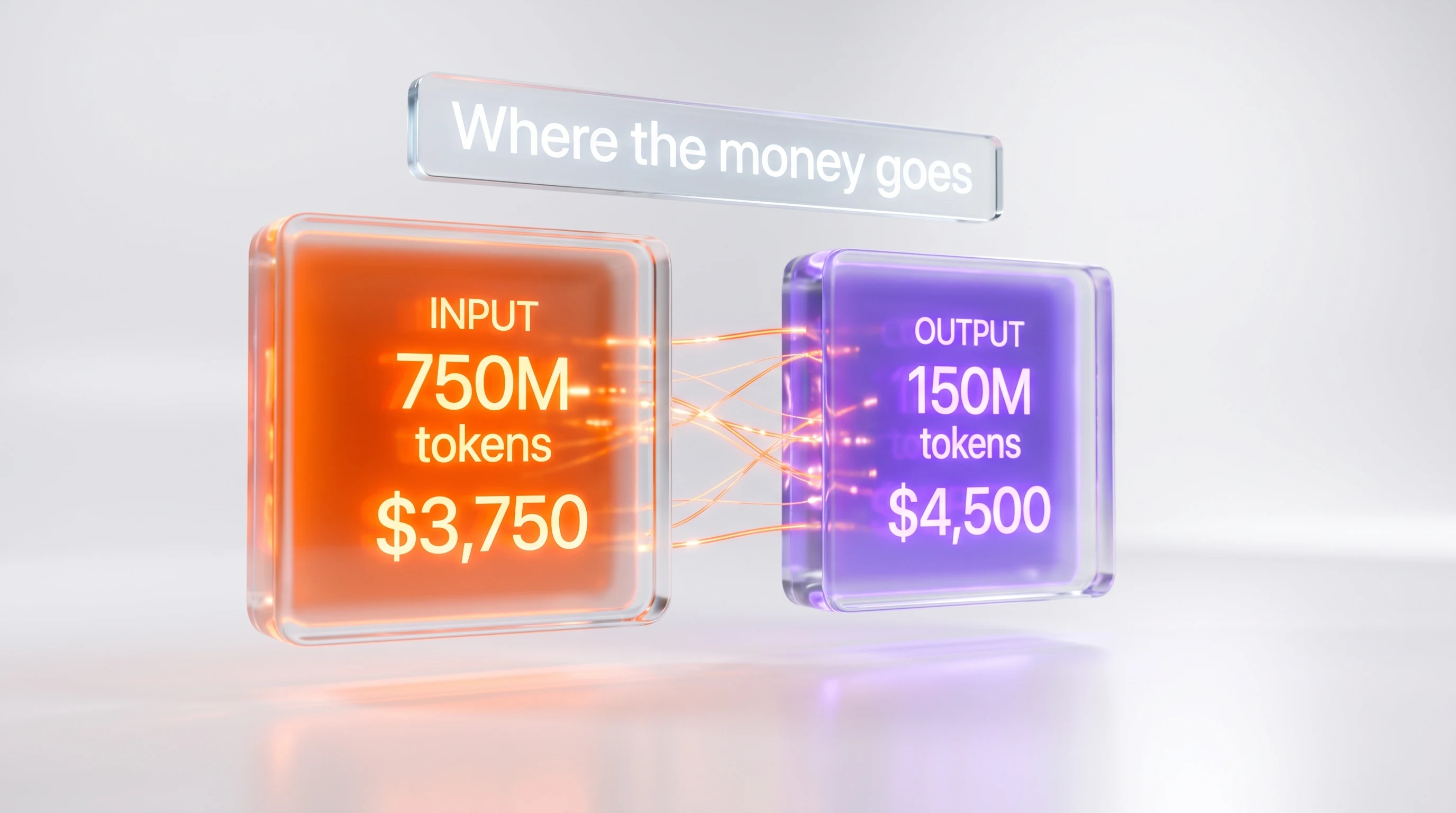
Multiply that out and the monthly volume is 750 million input tokens (500,000 times 1,500) and 150 million output tokens (500,000 times 300). The team launched on a flagship model priced at $5 per million input tokens and $30 per million output tokens.
Now the bill breaks down like this:
- Input: 750 million tokens at $5 per million is $3,750.
- Output: 150 million tokens at $30 per million is $4,500.
- Total: $8,250 per month.
Read that again, because it contains the single most important lesson in cost work. There are five times more input tokens than output tokens, yet output is the bigger line item: $4,500 versus $3,750, about 55 percent of the bill. That happens because each output token costs six times as much as each input token on this model. If you had optimized purely on token count you'd have attacked the wrong half of the bill.
To get these numbers for your own workload, read the token usage that comes back on every API response and log it. Here is a minimal cost calculator you can drop into any request path:
PRICES = {
    # per MILLION tokens: (input_rate, output_rate, cached_input_rate)
    "flagship": (5.00, 30.00, 0.50),
    "light":    (1.00,  5.00, 0.10),
}

def request_cost(model, input_tokens, output_tokens, cached_input_tokens=0):
    in_rate, out_rate, cache_rate = PRICES[model]
    fresh_input = input_tokens - cached_input_tokens
    cost = (
        fresh_input        / 1_000_000 * in_rate +
        cached_input_tokens / 1_000_000 * cache_rate +
        output_tokens      / 1_000_000 * out_rate
    )
    return cost

# One support request on the flagship, no caching yet:
print(request_cost("flagship", input_tokens=1500, output_tokens=300))
# 0.0165  -> times 500,000 requests = $8,250 per month
Log the cost of every call with a tag for the feature that made it. Within a day you'll have a ranked list of which features and which token type are draining the budget. That ranked list, not intuition, decides where you spend your optimization time.
Step 2: Right-Size the Model

This is almost always the biggest single win, and it's the one teams resist most. The instinct is that a smarter model is safer. But summarizing a support ticket is not a frontier reasoning problem. It's a routine task that a much cheaper model handles just as well, and we'll show you how to prove that before you commit.
Providers now ship a ladder of models. There's a flagship for hard reasoning, a mid-tier workhorse, and a light model built for high-volume, well-defined tasks. The price gaps are large. In our example the flagship is $5 in and $30 out; a light model in the same family might be $1 in and $5 out.
Move the summarization workload to that light model and rerun the math with the same volume:
- Input: 750 million tokens at $1 per million is $750.
- Output: 150 million tokens at $5 per million is $750.
- Total: $1,500 per month.
That's a drop from $8,250 to $1,500 — about 82 percent off the bill — from a one-line change to which model string you pass. No prompt rewrite, no architecture change.
The catch is that you must confirm quality didn't fall off. Never downgrade on faith. Build a small evaluation set of 50 to 100 real inputs with known-good outputs, run both models, and compare. We'll show you the shape of that test:
import statistics

def score(candidate, reference):
    # Replace with your real metric: exact match, ROUGE, an LLM-as-judge call, etc.
    return 1.0 if candidate.strip() == reference.strip() else 0.0

def evaluate(model, eval_set, run_model):
    scores = [score(run_model(model, item["input"]), item["reference"])
              for item in eval_set]
    return statistics.mean(scores)

flagship_quality = evaluate("flagship", eval_set, run_model)
light_quality    = evaluate("light",    eval_set, run_model)

# Ship the cheaper model only if quality holds within your tolerance:
if light_quality >= flagship_quality - 0.02:
    print("Light model is good enough. Switch and save.")
else:
    print("Keep the flagship for this task, or try the mid tier.")
If the light model just misses on a subset of hard inputs, don't give up the savings — that subset is exactly what Step 6 (routing) is for. For now, the rule is simple: run the cheapest model that passes your evaluation. If you want to see how two tiers of the same family actually compare on capability and price, our side-by-side of a mid-tier workhorse against a flagship walks through the trade-off in detail.
Step 3: Turn On Prompt Caching

Look at our support prompt again. Of the 1,500 input tokens, 1,000 are a static system prompt — guidelines, tone rules, and few-shot examples — that is identical on every single request. Only the last 500 tokens (the ticket text) change. You are paying full price to send those same 1,000 tokens 500,000 times a month. Prompt caching fixes exactly that, and we'll show you how to wire it up.
When you mark a stable prefix as cacheable, the provider processes it once and stores it. Subsequent requests that reuse the prefix read it from cache at roughly one-tenth the input price — about a 90 percent discount on those tokens. There's usually a small one-time surcharge to write the cache, but with steady traffic the entry stays warm and that overhead is immaterial next to the read savings.
Here's the important nuance that keeps your arithmetic honest: caching discounts only the cached tokens, not the whole bill. Let's do the real math on the light-model workload from Step 2, where input was $750 and output was $750.
- Cached portion: 1,000 of the 1,500 input tokens per request are static. That's 500 million tokens a month, now billed at the cached rate of $0.10 per million: $50.
- Fresh portion: the other 500 tokens per request stay at the normal input rate. That's 250 million tokens at $1 per million: $250.
- New input total: $50 plus $250 is $300, down from $750.
So the input bill falls from $750 to $300 — a 60 percent cut on input — even though each cached token is 90 percent cheaper. The blended discount is smaller than 90 percent because a third of your input still pays full price. Output is untouched at $750, so the new monthly total is $1,050, down from $1,500. Cumulatively you're now 87 percent below the original $8,250.
Wiring it up is a one-line change on most providers: you attach a cache marker to the end of the stable block. Conceptually:
response = client.messages.create(
    model="light",
    max_tokens=300,
    system=[
        {
            "type": "text",
            "text": STATIC_GUIDELINES_AND_EXAMPLES,   # the same 1,000 tokens every call
            "cache_control": {"type": "ephemeral"},     # mark this prefix cacheable
        }
    ],
    messages=[{"role": "user", "content": ticket_text}],  # the ~500 tokens that change
)

usage = response.usage
# Inspect these to confirm caching is working:
#   usage.cache_creation_input_tokens  -> written to cache (small, occasional)
#   usage.cache_read_input_tokens      -> read from cache (should dominate)
#   usage.input_tokens                 -> fresh, full-price input
The single most common caching mistake is putting a value that changes — a timestamp, a user name, a session ID — inside the cached prefix. One changing token near the front invalidates the whole cache and quietly sends you back to full price. Keep everything dynamic after the cache marker, and watch the cache-read token count to confirm it's actually hitting.
Step 4: Cut the Tokens You Don't Need
Every token is billable, so the cheapest token is the one you never send. This step is unglamorous but compounding: it stacks on top of everything you've already done, and we'll show you the three places waste hides.
Trim the prompt. Prompts written during prototyping are almost always bloated — repeated instructions, redundant examples, polite filler the model doesn't need. Tightening the dynamic part of our support prompt from 500 tokens to 350 is realistic just by removing boilerplate and duplicated context.
Cap the output with max_tokens. Output is the expensive side, so an unbounded response length is a standing risk. Our summaries only need to be short, but without a limit the model sometimes rambles to 300 tokens. Setting max_tokens to 200 and asking for a tighter summary brings the typical response down accordingly. Capping output is the highest-leverage token cut you can make, because you're trimming the most expensive bucket.
Stop sending context the model never reads. If you're stuffing entire documents or long histories into the prompt "just in case," retrieve only the relevant chunks instead. Less context is often more accurate, not just cheaper, because the model isn't distracted.
Let's price the two concrete changes on top of the cached workload from Step 3, keeping the cached portion at $50:
- Fresh input: 350 tokens per request is 175 million a month at $1 per million: $175 (down from $250).
- Output: 200 tokens per request is 100 million a month at $5 per million: $500 (down from $750).
- New total: $50 plus $175 plus $500 is $725 per month.
Trimming input by 30 percent and output by a third took the bill from $1,050 to $725 — now 91 percent below where we started. A tidy way to enforce this in code is to make brevity explicit and bounded:
response = client.messages.create(
    model="light",
    max_tokens=200,                      # hard ceiling on the expensive side
    system=[{"type": "text", "text": STATIC_GUIDELINES_AND_EXAMPLES,
             "cache_control": {"type": "ephemeral"}}],
    messages=[{
        "role": "user",
        "content": f"Summarize this ticket in 2 sentences. Ticket:\n{ticket_text}",
    }],
)
If you run agentic or coding workloads where context tends to balloon, the same "send less" discipline applies at the tool level. Our guide on managing context and memory in Claude Code goes deep on keeping working context lean.
Step 5: Batch Everything That Isn't Urgent
Not every request needs an answer in the next 300 milliseconds. Overnight report generation, bulk classification, back-catalog processing, evaluation runs — none of it is latency-sensitive. Most providers offer a Batch API that trades speed for a large discount, and we'll show you how to tell which of your traffic qualifies.
The deal is straightforward: submit a batch of requests, get results back within a turnaround window (commonly up to 24 hours, often much faster), and pay about 50 percent less than the synchronous price. The discount typically stacks with prompt caching, so you don't lose the gains from Step 3.
In our support example, suppose 40 percent of the daily volume is a nightly sweep of low-priority tickets that nobody is waiting on in real time. That portion can move to the batch queue. Working from the $725 monthly total in Step 4:
- Batchable 40 percent: that slice is worth $290 of the $725. At 50 percent off, it becomes $145.
- Real-time 60 percent: the other $435 is unchanged.
- New total: $145 plus $435 is $580 per month.
That's another $145 saved, bringing us to $580 — 93 percent below the original $8,250. The batch request format is usually one JSON object per line, each with its own ID so you can match results back up:
{"custom_id": "ticket-88012", "method": "POST", "url": "/v1/messages", "body": {"model": "light", "max_tokens": 200, "messages": [{"role": "user", "content": "Summarize this ticket in 2 sentences. Ticket: ..."}]}}
{"custom_id": "ticket-88013", "method": "POST", "url": "/v1/messages", "body": {"model": "light", "max_tokens": 200, "messages": [{"role": "user", "content": "Summarize this ticket in 2 sentences. Ticket: ..."}]}}
The rule of thumb: if a human isn't actively waiting on the result, it belongs in a batch. The only thing you're spending is patience, and the return is half the price.
Step 6: Route Requests by Difficulty

Right-sizing in Step 2 picks one model for a whole task. Routing goes finer: it picks a model per request, based on how hard that specific request is. This is the lever for mixed workloads where most inputs are easy but a stubborn few genuinely need a flagship. We'll show you the pattern with its own example, kept separate from the running total so we don't double-count savings.
Consider a different workload: 100,000 requests a month, each about 1,500 input tokens and 300 output tokens. Ten percent are complex and need the flagship's reasoning; the other 90 percent are routine. The naive approach — run everything on the mid-tier model so the hard ones are covered — at $2 in and $10 out looks like this:
- Input: 150 million tokens at $2 per million is $300.
- Output: 30 million tokens at $10 per million is $300.
- Total: $600 per month.
Now route instead. Send the 90 percent of easy requests to the light model ($1 in, $5 out) and only the 10 percent of hard ones to the mid-tier:
- Light model, 90,000 requests: 135 million input at $1 is $135, plus 27 million output at $5 is $135. Subtotal $270.
- Mid-tier, 10,000 requests: 15 million input at $2 is $30, plus 3 million output at $10 is $30. Subtotal $60.
- Total: $270 plus $60 is $330 per month.
Routing took this workload from $600 to $330 — 45 percent cheaper — while the hard requests still get the model they need. The routing decision itself should be cheap: a keyword rule, a length threshold, or a very small classifier model. Keep it simple enough that the classification cost stays negligible against the savings.
def choose_model(request_text):
    # Cheap, deterministic signals first — no extra API call needed.
    tokens = len(request_text.split())
    hard_markers = ("prove", "debug", "step by step", "explain why", "edge case")
    looks_hard = tokens > 800 or any(m in request_text.lower() for m in hard_markers)
    return "mid" if looks_hard else "light"

model = choose_model(user_input)
response = client.messages.create(model=model, max_tokens=200, messages=[...])
Start with rules you can read and audit. Only reach for a learned router once you have data showing where the simple rules misclassify. Open-weight models make especially good "cheap tier" targets here; if you're weighing options, our comparison of two popular low-cost open models lays out the price and capability differences.
Step 7: Monitor Cost Per Task, Continuously
Every optimization so far can silently erode. A prompt grows during a feature update, a cache key starts changing, traffic shifts toward the flagship, someone removes a max_tokens cap "temporarily." Without monitoring you won't notice until the invoice arrives. We'll show you the one metric that catches all of it.
That metric is cost per task — not total spend, which moves with traffic, but the average cost of a single unit of work. Total spend going up can be healthy growth. Cost per task going up means an optimization broke. Track it per feature, chart it over time, and alert when it drifts past a threshold.
import logging

# Rolling baseline you established after Steps 1-6, in dollars per request:
BASELINE_COST_PER_TASK = 0.00116   # $580 / 500,000 requests
ALERT_THRESHOLD = 1.25             # alert if a feature drifts 25% above baseline

def record(feature, cost):
    log_metric(feature, cost)                     # send to your metrics backend
    avg = rolling_average(feature, window="1h")
    if avg > BASELINE_COST_PER_TASK * ALERT_THRESHOLD:
        logging.warning(
            f"Cost per task for {feature} is {avg:.5f}, "
            f"above baseline {BASELINE_COST_PER_TASK:.5f}. Investigate."
        )
Set a monthly calendar reminder to re-run Step 1 from scratch. Model prices fall often, new lighter models ship constantly, and a workload you right-sized six months ago may now have an even cheaper home. Cost control is not a one-time project; it's a habit. The teams that keep their AI bills low are simply the ones that look at cost per task every week.
Putting It All Together

Here is the full journey for our support-summarization workload, one line per step. Every number is the same one we derived in the sections above:
| Step | What changed | Monthly cost | Cut vs. baseline |
|---|---|---|---|
| Baseline | Flagship model, no optimization | $8,250 | — |
| 2. Right-size | Move to a light model | $1,500 | 82% |
| 3. Prompt caching | Cache the static system prompt | $1,050 | 87% |
| 4. Reduce tokens | Trim input, cap output | $725 | 91% |
| 5. Batching | Batch 40% of non-urgent volume | $580 | 93% |
From $8,250 to $580 per month — a 93 percent reduction — with no change to what the product does for its users. Notice the order of impact. Right-sizing alone did most of the work, dropping the bill 82 percent. Everything after that is compounding: caching, token trimming, and batching each took a slice off an already-smaller number. (Routing, from Step 6, applies to a different mixed workload and isn't included in this table so we don't overstate the total.)
You will not always reach 93 percent. Some workloads genuinely need the flagship, some have no static prefix to cache, and some are entirely real-time. But nearly every workload has at least two of these levers available, and two levers is usually enough to cut a bill in half. Start with measurement, apply right-sizing, and let the rest compound.
Common Mistakes and How to Troubleshoot Them
These are the errors we see most often when teams first work through this process, and how to fix each one.
Optimizing before measuring. The classic mistake is spending a week shrinking prompts when 80 percent of the bill was output tokens the whole time. Always do Step 1 first. If your spend is output-heavy, prompt trimming barely moves the needle — cap output and right-size instead.
Downgrading the model without an evaluation set. Switching to a cheaper model on vibes leads to quiet quality regressions that surface as user complaints weeks later. Build the 50-to-100-item eval from Step 2 before you switch, and rerun it whenever you change models or prompts.
Breaking your own cache. If your cache-read token count is near zero after enabling caching, something dynamic is sitting inside the cached prefix. Common culprits: a current timestamp, a per-user greeting, a request ID, or a randomly ordered list of examples. Move everything variable after the cache marker and confirm the read count jumps.
Forgetting to set max_tokens. An unbounded output length is a budget with no ceiling. Even if the model usually stops early, a single prompt injection or an unusual input can produce a very long, very expensive response. Always set a limit that fits the task.
Batching latency-sensitive work. The batch discount is only free if nobody is waiting. Don't route a user-facing chat response through a 24-hour queue to save 50 percent — you'll trade a few dollars for a broken experience. Reserve batching for genuinely asynchronous jobs.
Setting it and forgetting it. The most expensive mistake is treating cost work as a one-time cleanup. Prices change, prompts drift, and traffic patterns shift. Without the Step 7 monitor, you'll redo this whole exercise in six months from a worse starting point.
Frequently Asked Questions
What is the fastest way to cut my AI API costs?
Right-size the model. Moving a routine task from a flagship model to a lighter model in the same family is usually a one-line change that cuts the bill by 70 to 85 percent. In our worked example it dropped a $8,250 monthly bill to $1,500, an 82 percent reduction, before any other optimization. Always validate quality with a small evaluation set first.
Why is output more expensive than input on most LLM APIs?
Generating tokens is more computationally demanding than reading them, so providers price output higher — commonly five to six times the input rate. On a model priced at $5 per million input tokens and $30 per million output tokens, output costs six times as much per token. This is why capping response length with max_tokens is often the highest-leverage single change you can make.
How much does prompt caching actually save?
Cached input tokens typically cost about one-tenth of fresh input tokens, roughly a 90 percent discount on the cached portion. But it only discounts the tokens that are actually cached. If two-thirds of your prompt is a static system prompt, caching cuts your input bill by about 60 percent overall, not 90 percent. There's a small one-time surcharge to write the cache, which is negligible at steady volume.
Does prompt caching work with the Batch API?
On most providers, yes — the caching discount and the batch discount stack. That means a non-urgent request with a large static prefix can benefit from both the roughly 90 percent cached-token discount and the roughly 50 percent batch discount at the same time. Check your provider's documentation, since the exact stacking rules vary.
What is model routing and when should I use it?
Model routing chooses a model per request based on how hard that request is, sending easy inputs to a cheap model and hard ones to a flagship. Use it for mixed workloads where most requests are simple but a minority need more capability. In our example, routing 90 percent of traffic to a light model and 10 percent to a mid-tier model cut that workload's cost 45 percent, from $600 to $330 per month.
How do I choose between a cheaper closed model and an open-weight model?
Open-weight models like DeepSeek V4, Kimi K2.7 Code, and GLM-5.2 often post the lowest per-token prices and are strong choices for high-volume, well-defined tasks. Closed models sometimes justify a premium on the hardest reasoning. The honest answer is to test both against your own evaluation set; price only matters if quality holds. Our head-to-head comparisons of these models break down the trade-offs.
Will using a cheaper model hurt quality?
Sometimes, which is why you never switch on faith. Build an evaluation set of 50 to 100 real inputs with known-good answers, run both models, and compare scores. For routine tasks like classification, extraction, and summarization, lighter models usually match flagship quality. For open-ended reasoning or code generation, the gap can be real — and that's exactly the case where routing lets you keep the cheap model for the easy 90 percent.
How do I estimate my monthly API cost before I build?
Multiply your expected requests per month by the input and output tokens per request to get monthly token volumes, then multiply each by the provider's per-million-token rate. For 500,000 requests at 1,500 input and 300 output tokens on a $5-in, $30-out model, that's 750 million input tokens ($3,750) plus 150 million output tokens ($4,500), or $8,250 per month. The calculator in Step 1 automates this.
Is it worth caching if my prompts change every time?
Only the stable prefix benefits. If truly nothing repeats across requests, caching won't help and you should focus on right-sizing, token reduction, and batching instead. But most applications have more static content than they realize — system prompts, tool definitions, style guides, and few-shot examples are all cacheable. Audit your prompt for anything identical across calls before concluding caching won't help.
What single metric should I watch to keep costs under control?
Cost per task — the average cost of one unit of work, tracked per feature. Total spend rises with healthy growth and tells you little, but a rising cost per task means an optimization has broken: a prompt grew, a cache stopped hitting, or traffic drifted to a pricier model. Alert when cost per task climbs past about 25 percent over your post-optimization baseline.
Do these tactics apply to agentic and coding workloads too?
Yes, and the stakes are higher because agents make many chained calls. The same levers apply: right-size the model for each step, cache tool definitions and system prompts, cap output, and route simple sub-tasks to cheaper models. The main addition is context discipline — agents tend to accumulate history, so keeping working context lean is its own major saving. Our Claude Code memory guide covers that in depth.
How often should I revisit my cost setup?
Monthly is a good cadence. Model prices fall regularly, new lighter models ship constantly, and a workload you right-sized six months ago may now have an even cheaper home. Set a recurring reminder to re-run the Step 1 measurement and check whether a newer or cheaper model now passes your evaluation. Cost control is a habit, not a one-time project.
Next Steps
You now have a repeatable process: measure, right-size, cache, trim, batch, route, and monitor. Start today with just Step 1 — instrument one workload and log its cost per task. The ranked breakdown you get back will tell you which lever to pull first, and the first two steps alone typically cut a bill in half.
To go deeper, these resources pair naturally with this guide:
- Compare the price and capability of a mid-tier workhorse against a flagship in Claude Sonnet 5 vs Claude Opus 4.8 to sharpen your right-sizing decisions.
- Weigh a closed frontier model against the cheapest open option in Claude Sonnet 5 vs DeepSeek V4, or see two low-cost open models head to head in Kimi K2.7 Code vs DeepSeek V4.
- See how output pricing shapes a flagship decision in Claude Opus 4.8 vs GPT-5.5.
- Browse individual light-tier models for high-volume tasks: Claude Haiku 4.5, Gemini 3 Flash, DeepSeek V4, Kimi K2.7 Code, and Mistral Large 3.
- Understand the market forces pushing prices down in Google's Gemini 3.1 Flash-Lite and the LLM pricing war, and see how per-token billing is reshaping tooling budgets in GitHub Copilot's new token billing and the token economics driving Microsoft's tooling choices.
- Cut token waste in agentic workflows with our guide to Claude Code memory and context optimization.
Written by Anthony Martinez, founder of ThePlanetTools.ai. We run these exact tactics on our own production AI workloads. Last updated: July 2026. Pricing figures were verified against vendor pricing pages in 2026 and are illustrative — confirm current rates before budgeting. See our about page for how we test and how we make money.