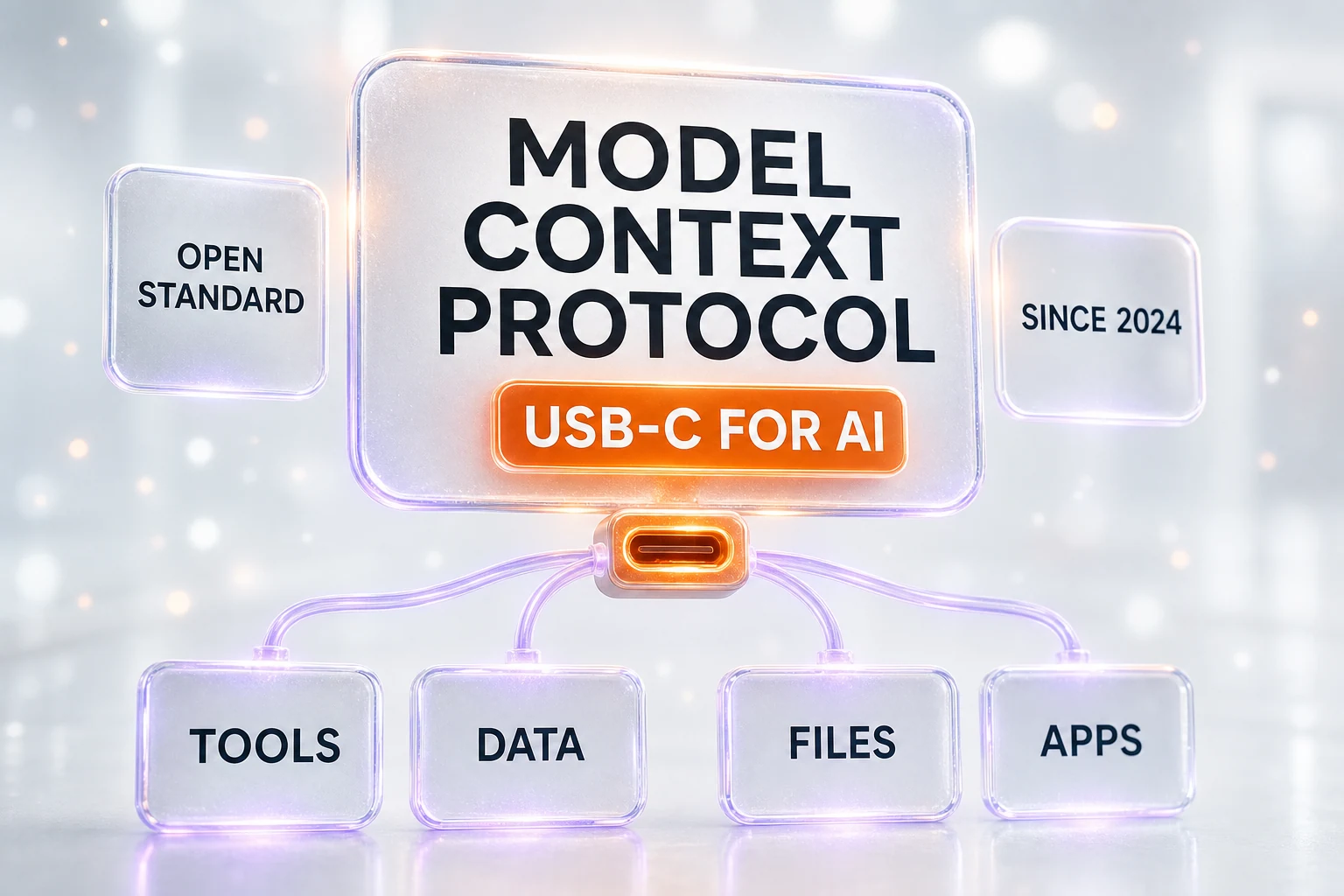
MCP (Model Context Protocol) is an open standard that lets any AI model connect to external tools and data through one universal interface — think of it as a USB-C port for AI. Anthropic created and open-sourced MCP in November 2024, and it has since been adopted by OpenAI and Google. Instead of building a custom integration for every app, a developer exposes data and actions through an MCP server, and any MCP-capable model can plug in and use them.
What Is MCP (Model Context Protocol)?
The Model Context Protocol, almost always shortened to MCP, is an open standard that gives AI models a single, consistent way to reach outside their own training. Rather than being limited to what it memorized, a model connected through MCP can read a file, query a database, check a calendar, or call a service — and do it through the same interface every time.
Anthropic introduced MCP on November 25, 2024, and open-sourced it the same day. That choice matters: an open standard is one anybody can implement, extend, or criticize without asking permission. It is the difference between a public port design and a proprietary cable that only one company sells. Because MCP is open, it spread quickly — the same protocol now works whether the model behind the screen is Claude, a GPT model in ChatGPT, or Gemini.
If you only remember one sentence, remember this one: MCP is a USB-C port for AI. It is the canonical way to describe the protocol, and even OpenAI uses that exact phrase in its own developer documentation. The rest of this guide unpacks what that means, why it was needed, and how the pieces fit together — in plain English, with no code required.
MCP at a Glance
| Question | Answer |
|---|---|
| What is it? | An open standard for connecting AI models to tools and data |
| Who created it? | Anthropic |
| When? | Announced and open-sourced November 25, 2024 |
| The one-line analogy | A USB-C port for AI |
| Who supports it? | Anthropic, OpenAI, and Google, plus a fast-growing community |
| Cost | Free and open source; you only pay for the services a server connects to |
| Core parts | Host, client, and server, talking over JSON-RPC |
The USB-C Analogy: One Port for Every Tool
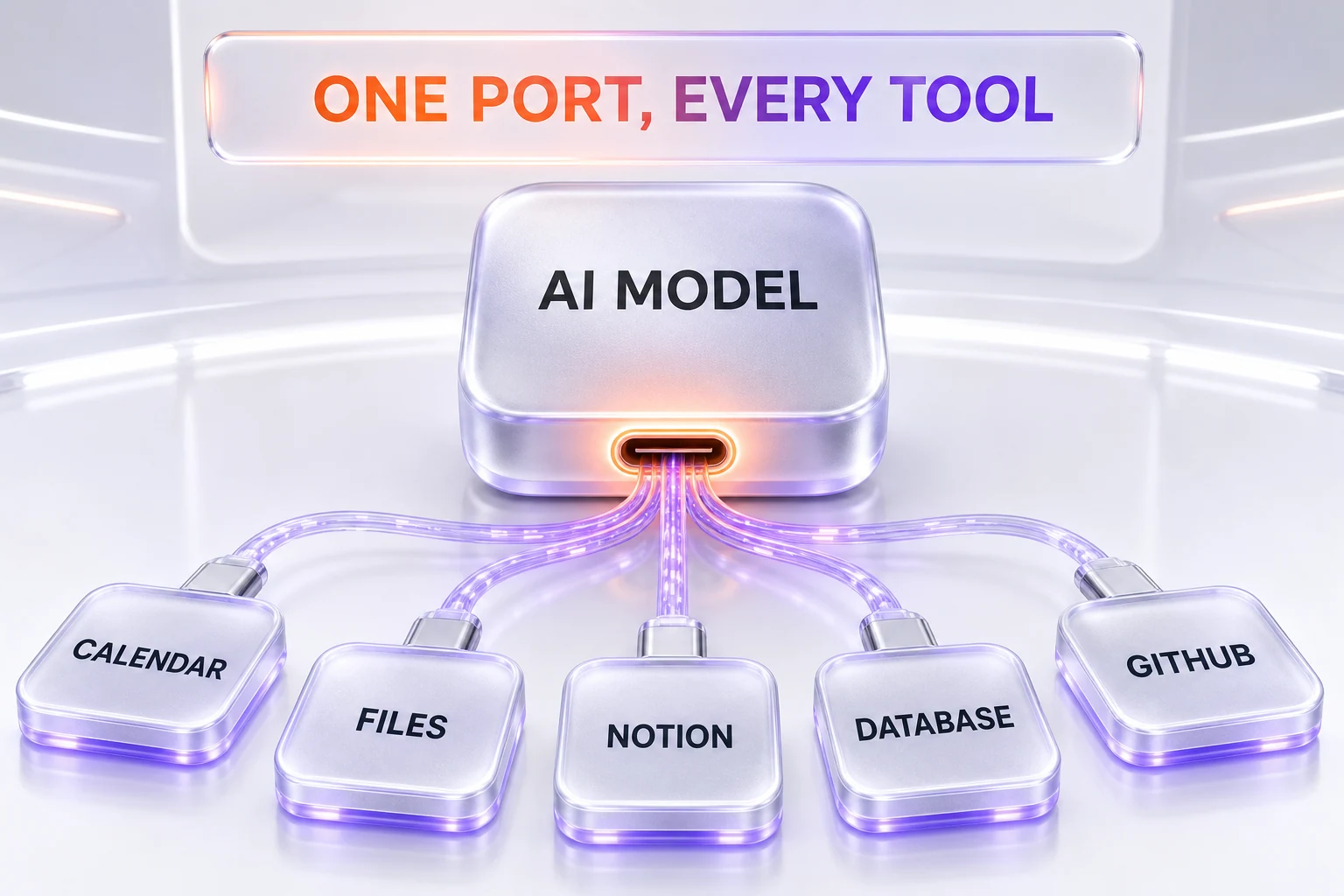
Think back to the years before USB-C. A phone needed one cable, a camera needed another, a laptop charger was a third, and none of them fit each other. Every new device meant a new adapter in the drawer. USB-C fixed that by agreeing on a single connector shape: now one port charges your laptop, drives a monitor, and moves files, because everyone builds to the same standard.
AI had the same drawer full of mismatched cables. Every time you wanted a model to use a tool — your files, your issue tracker, your customer database — someone had to hand-build a connector between that specific model and that specific tool. MCP is the agreed-upon port shape. Build your tool as an MCP server once, and any MCP-capable model can plug into it. Give a model an MCP client once, and it can reach any MCP server.
This is why the analogy is so sticky, and why we lead with it. USB-C did not make new devices; it made connecting them boring, predictable, and universal. MCP is doing the same thing for the connection between AI and the real world — and boring, in infrastructure, is exactly the point.
The Problem MCP Solves: The N by M Integration Nightmare
To see why a standard was needed, count the connections. Suppose you have a handful of AI applications — call it N — and a handful of data sources and tools — call it M. Connecting them the old way means building a custom integration for nearly every pairing. That is roughly N times M separate pieces of glue code, each one written, tested, and maintained by hand. Add one new tool and you owe an integration to every app. Add one new app and you owe an integration to every tool.
As Anthropic put it when announcing MCP, "every new data source requires its own custom implementation," which makes the whole system fragile and expensive to grow. The math is brutal: the work grows by multiplication, so a modest number of apps and tools can generate a genuinely large maintenance burden that never stops expanding.
MCP turns that multiplication into addition. Each tool is built once as a server. Each application speaks MCP once as a client. Now adding a tool is a single new server that every app can already reach, and adding an app is a single new client that can already reach every server. The tangle of one-off integrations collapses into a clean set of standard connections — the same shift the industry is making across the wider agentic web.
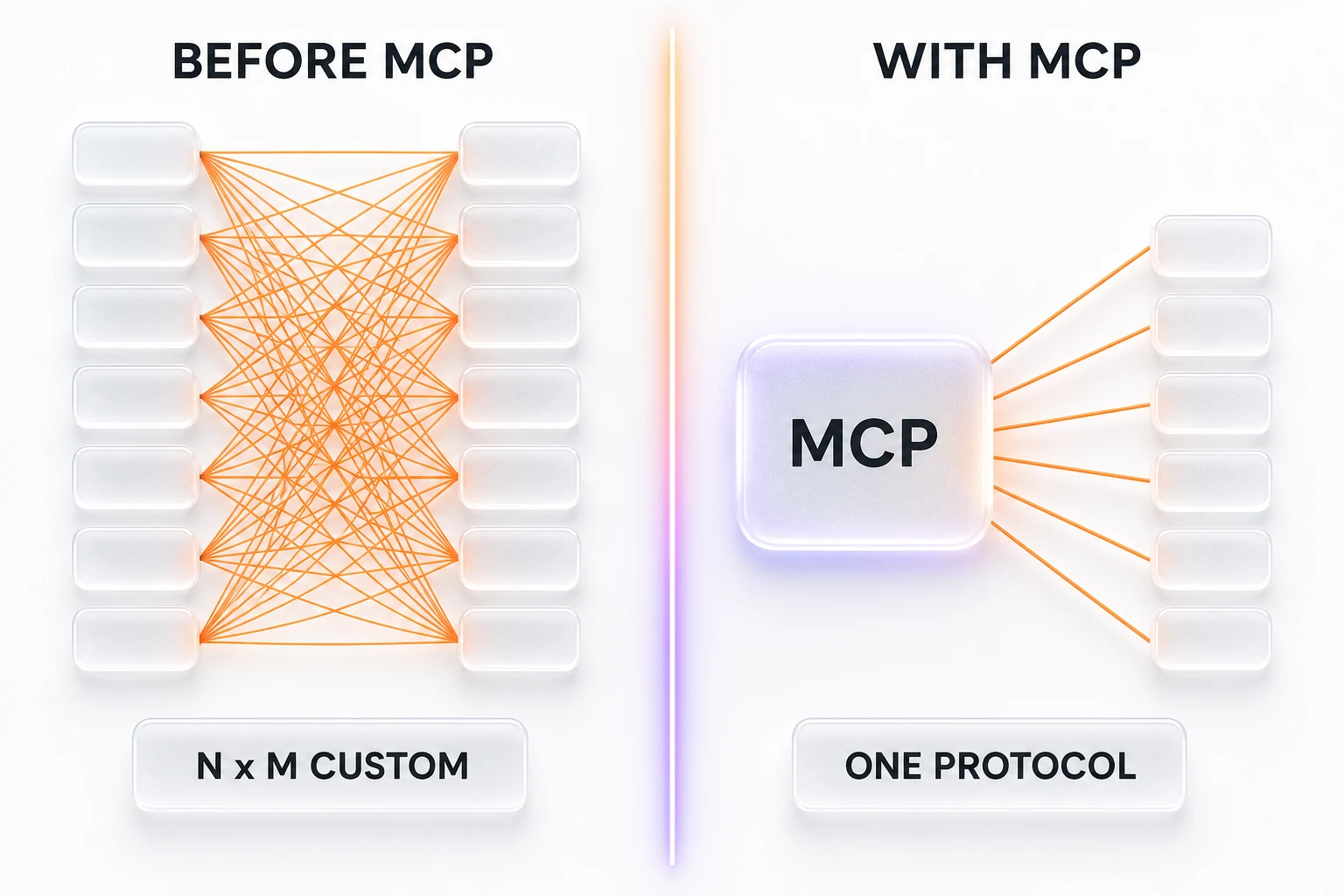
How MCP Works: Host, Client, and Server
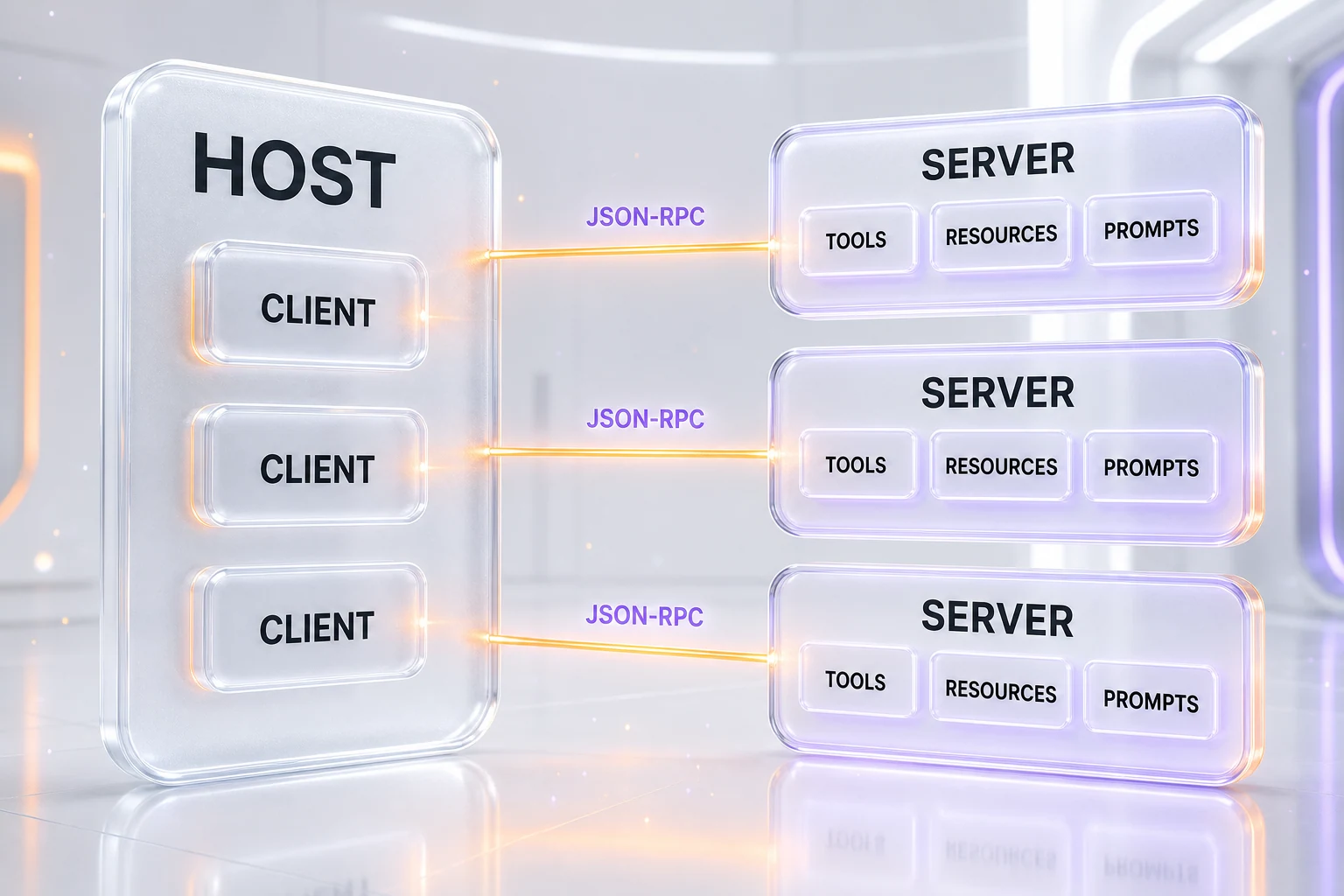
MCP uses a simple client-server design with three roles. You do not need to write code to understand them, and once they click, everything else about MCP makes sense.
The Host
The host is the AI application you actually interact with. Claude Code is a host. So is Claude Desktop, and so is an editor like VS Code or Cursor when it has MCP turned on. The host coordinates everything: it holds the model, manages connections, and decides — with your permission — which tools the model is allowed to use.
The Client
Inside the host lives the client. A client is the small component that maintains one dedicated connection to one server. If the host connects to three servers, it spins up three clients, one per server. You rarely think about clients directly; they are the plumbing the host manages on your behalf, keeping each connection separate and orderly.
The Server
The server is where the useful stuff lives. An MCP server is a standalone program that exposes a specific capability — a filesystem server that can read and write files, a database server that can run queries, a GitHub server that can open pull requests. Servers can run locally on your own machine or remotely on a company’s platform, and the model connects to them the same way either way.
What Servers Expose: Tools, Resources, and Prompts
An MCP server can offer three kinds of things. Tools are actions the model can take, such as running a query or sending a message. Resources are data the model can read, such as a file’s contents or a database record. Prompts are reusable templates that help structure a task. When a host connects, it asks the server what it offers, gets back a list, and hands that menu to the model — so the model always knows exactly which actions are available before it tries anything.
The Wire: JSON-RPC
Underneath, MCP messages travel as JSON-RPC, a plain, well-understood format for one program to call another and get a reply. Local servers usually talk over standard input and output on the same machine; remote servers talk over HTTP. You do not need to care about the wire format to use MCP, but it is worth knowing that MCP did not invent an exotic protocol — it standardized how AI applications describe and call tools, and leaned on boring, proven plumbing for the rest.
What MCP Unlocks If You Are Not a Developer
Here is where MCP stops being abstract. On its own, a chatbot can only tell you what it would do. Connect it through MCP and it can actually do it, because now it can reach the tools and data that live in your world.
With a filesystem server connected, a model can open the folder of documents on your computer, read them, and edit them. With a calendar server, it can see your week and schedule around it. With a Notion server, it can pull the exact page you are referencing instead of paraphrasing from memory. With a database server, it can answer a question by querying the live data rather than guessing. The pattern is always the same: MCP is what lets the assistant plug into your tools instead of standing outside them.
This is also the moment a model shifts from being a talker to being a doer — the core idea behind the difference between an agentic model and a chatbot. The model decides which tool to call and when, MCP provides the standard way to call it, and the whole approach is a big part of the broader rise of AI agents. Real products already ship this way: Robinhood, for instance, opened agentic trading over MCP so an AI agent can act on a brokerage account through the standard.
MCP vs API: What Is the Difference?
People often ask whether MCP replaces APIs. It does not — it usually sits on top of them. An API is a fixed interface a developer wires up in advance for one specific integration; it does exactly what it was built to do and nothing more. MCP is a standard wrapper that describes tools and data in a uniform way so that a model can discover them and decide, at run time, which one to use.
The clean way to hold it in your head: with a plain API, a human decides in advance which call happens and writes the code to make it. With MCP, the MCP server still calls the underlying API behind the scenes, but the model chooses which action to take based on the task in front of it. MCP does not compete with your APIs; it gives models a consistent front door to them, and lets the model — not a hard-coded script — decide when to knock.
The MCP Ecosystem: Popular Servers and Categories
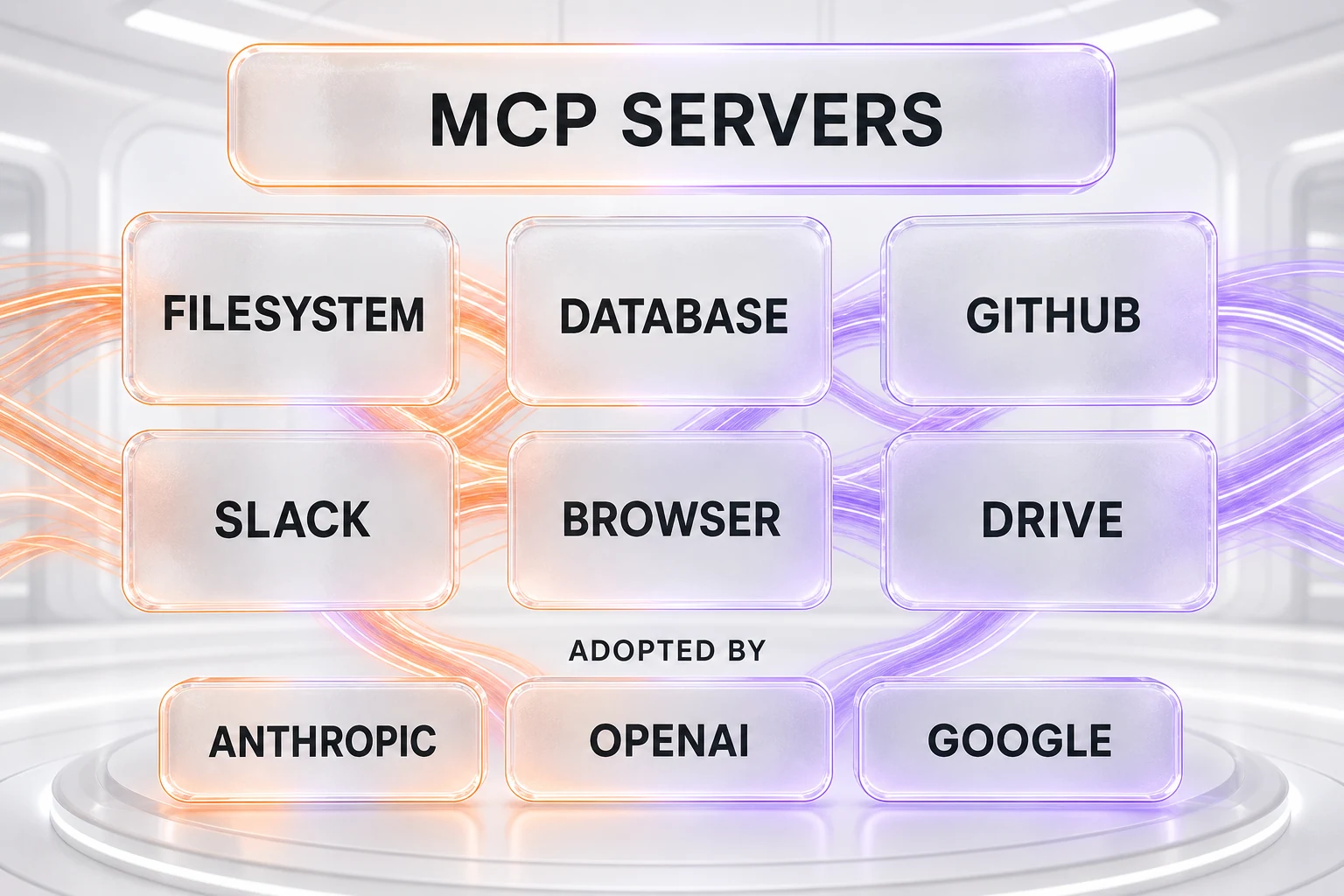
Because MCP is open, anyone can publish a server, and thousands now exist. They tend to fall into three broad categories. Developer tooling covers filesystem access, Git and GitHub, databases such as Postgres, and browser automation. Productivity and knowledge covers apps like Google Drive, Slack, and Notion. Business systems covers payments, CRMs, and monitoring, with vendor-built servers from companies such as Stripe and Sentry.
The reference servers Anthropic published — filesystem, database, GitHub, and a handful of others — set the pattern, and the community filled in the rest. The infrastructure underneath is consolidating too: when Anthropic acquired Stainless, it picked up the SDK tooling that helps generate the very servers and clients that OpenAI, Google, and Cloudflare rely on. For most people the takeaway is simpler: whatever tool you already use, there is a good chance an MCP server for it already exists, or soon will.
Who Uses MCP? Adoption Across the Industry
MCP started as an Anthropic project, but it did not stay one — and that is the whole story of why it matters. OpenAI added MCP support to its Agents SDK, which can connect to hosted, HTTP, and local MCP servers. Google added MCP support to the Gemini API, letting its models connect to remote MCP servers. When the three largest model providers all speak the same protocol, it stops being a vendor feature and becomes shared infrastructure.
On the tooling side, MCP is now a standard checkbox. Coding hosts like Claude Code, Cursor, Windsurf, OpenAI Codex, GitHub Copilot, and Gemini Code Assist support connecting MCP servers, which is part of why choosing between them increasingly comes down to workflow rather than raw capability — see our takes on Claude Code vs Cursor and Claude Code vs OpenAI Codex. In our own stack we wire models such as Claude Sonnet 5 to MCP servers daily, and if you want to try it yourself, our Claude Code for beginners guide and the hooks and skills cookbook are the fastest way in.
Security and Limits: What MCP Does Not Solve
MCP is powerful precisely because it lets a model take real actions on real systems — which is exactly why it deserves honest caution. Standardizing the connection does not standardize away the risk, and two issues matter most.
The first is prompt injection. If a model reads content from a data source, malicious text hidden in that content can try to hijack the model into doing something you did not ask for. Because MCP feeds external data straight to the model, an untrusted server or document is an attack surface. The second is over-broad permissions. A server handed more access than a task needs is a liability; a "read a file" job should not come with the ability to delete the whole directory.
The practical guidance is the same advice you would give for installing any software: run servers you trust, scope each one’s permissions as tightly as the task allows, and keep a human approval step in front of anything sensitive or destructive. MCP gives you a clean, standard way to connect a model to the world. It does not decide, on your behalf, what that model should be trusted to touch — that judgment stays with you.
The Bottom Line
MCP is not a product you buy or a model you run; it is the quiet standard that makes AI assistants genuinely useful. It answers a single, boring, enormously valuable question — how does a model connect to the tools and data outside itself — and it answers it once, for everyone, with an open specification anyone can build on. That is why the USB-C comparison keeps coming back: the win is not excitement, it is universality.
The signal to watch is adoption, and it is already decisive. Anthropic created MCP, open-sourced it, and within months OpenAI and Google were speaking the same protocol. When the biggest labs, the most popular coding tools, and a sprawling community of servers all agree on one port shape, the debate is effectively over. If you are trying to understand where AI is heading, MCP is one of the few pieces of plumbing worth learning by name — because almost everything an AI agent does in the real world now flows through it.
Frequently Asked Questions
What is MCP (Model Context Protocol)?
MCP, the Model Context Protocol, is an open standard that lets an AI model connect to external tools and data through one universal interface instead of a separate custom integration for each one. A developer exposes data or actions through an MCP server, and any MCP-capable application — such as Claude Code, Cursor, or ChatGPT — can plug in and use them. The common shorthand is that MCP is a USB-C port for AI.
Who created MCP and when?
Anthropic created MCP and announced it on November 25, 2024, releasing it as an open, open-sourced standard rather than a proprietary product. Because it is an open specification, other companies were free to adopt it, and within months OpenAI and Google added MCP support to their own developer platforms.
Why is MCP compared to a USB-C port?
Before USB-C, every device needed its own cable and adapter. USB-C replaced that mess with one connector that works everywhere. MCP does the same for AI: instead of writing a bespoke integration for every model-to-tool pairing, you build one MCP server and any MCP-capable model can connect to it. OpenAI uses this exact analogy in its own documentation, calling MCP "a USB-C port for AI applications."
What problem does MCP solve?
It solves the N by M integration problem. If you have several AI applications and several data sources, connecting them the old way means building a custom integration for nearly every pairing — an amount of work that grows roughly as N times M. MCP collapses that: each tool is built once as a server, each app speaks MCP once as a client, and the number of integrations grows by addition instead of multiplication.
What are MCP hosts, clients, and servers?
The host is the AI application you interact with, such as Claude Code, Claude Desktop, or VS Code. Inside the host, the client is the component that maintains one dedicated connection to each server. The server is a separate program that exposes tools, data, or prompts — for example a filesystem server, a database server, or a GitHub server. One host can run many clients, each talking to its own server.
Do OpenAI and Google support MCP?
Yes. OpenAI added MCP support to its Agents SDK, which can connect to hosted, HTTP, and local MCP servers. Google added MCP support to the Gemini API, letting models connect to remote MCP servers. That broad adoption across Anthropic, OpenAI, and Google is why MCP is now treated as an industry standard rather than one vendor’s format.
What is the difference between MCP and an API?
An API is a fixed interface a developer wires up in advance for a specific integration. MCP is a standard wrapper around tools and data that a model can discover and decide to use on its own at run time. In practice MCP usually sits on top of existing APIs: the MCP server calls the underlying API, and MCP’s job is to describe those actions in a uniform way so the model can choose which one to call.
What can MCP do for someone who is not a developer?
It lets an AI assistant actually use your tools instead of only talking about them. With the right MCP servers connected, a model can read your calendar, open and edit files on your computer, pull a page from Notion, or query a database — then act on what it finds. You still grant permission, but the model can reach real data and take real actions rather than guessing from memory.
What are some popular MCP servers?
Common reference servers cover filesystem access, databases such as Postgres, GitHub, Slack, Google Drive, and browser automation, plus vendor servers from companies like Sentry and Stripe. Server categories generally fall into three buckets: developer tooling, productivity and knowledge apps, and business systems such as payments and CRMs. New servers appear constantly because anyone can publish one.
Is MCP secure, and what are the risks?
MCP standardizes connections but does not remove risk. The main concerns are prompt injection, where malicious text in a data source tricks the model into unwanted actions, and over-broad permissions, where a server is granted more access than a task needs. Safe use means running trusted servers, scoping permissions tightly, and keeping a human approval step for sensitive actions. Treat any MCP server like software you install, because it is.
Is MCP open source and free to use?
Yes. Anthropic open-sourced the protocol, the specification, and reference server implementations, so the standard itself is free to build on with no license fee. You can inspect the spec, write your own client or server, and run everything locally. Costs, if any, come from the underlying services an MCP server connects to — not from MCP.
Do I need MCP to use AI agents?
No, but it makes agents far more useful. An agent can work with built-in tools alone, yet MCP is what lets it reach the specific tools and data you care about without custom engineering for each one. As agents move from answering questions to completing tasks, MCP is becoming the standard way they connect to the outside world.